



Search  for anything...

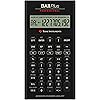
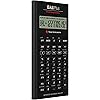
Texas Instruments BA II Plus Professional Financial Calculator

  • Based on 5,325 reviews
Condition: New
Checking for the best price...
$51.87 Why this price?
4th of July Sale · 42% off was $89.99

Buy Now, Pay Later


As low as $8.65 / mo
  • – 6-month term
  • – No impact on credit to apply
  • – Instant approval decision
  • – Secure and straightforward checkout

Ready to go? Add this product to your cart and select a plan during checkout.

Payment plans are offered through our trusted finance partners Klarna, Affirm, Afterpay, Apple Pay, and PayTomorrow. No-credit-needed leasing options through Acima may also be available at checkout.

Learn more about financing & leasing here.

Free shipping on this product

FREE 30-day refund/replacement

To qualify for a full refund, items must be returned in their original, unused condition. If an item is returned in a used, damaged, or materially different state, you may be granted a partial refund.

To initiate a return, please visit our Returns Center.

View our full returns policy here.


Availability: Only 10 left in stock, order soon!
Fulfilled by Amazon

Arrives Tuesday, Jul 7
Order within 2 hours and 45 minutes
Available payment plans shown during checkout

Protection Plan Protect Your Purchase
Checking for protection plans...

Features

  • Solves time-value-of-money calculations such as annuities, mortgages, leases, savings, and more
  • Performs cash-flow analysis for up to 32 uneven cash flows with up to 4-digit frequencies
  • Calculates various financial functions: Net Future Value Net present Value Modified Internal Rate of Return Internal Rate of Return Modified Duration Payback Discounted Payback
  • The Texas Instruments BAII Plus Professional features an Automatic Power Down (APD) function for extended battery life
  • Prompted display guides you through financial calculations showing current variable and label. Ten-digit display

Description

An advanced calculator for business and finance professionals. The BA II Plus Professional calculator features all the great features of its predecessor while packing in even more time-saving functions to make short work of complex equations. It's an ideal choice for entry level and advanced finance, accounting, economics, investment, statistics, and other business classes. It's also a great choice to bring to the Chartered Financial Analyst (CFA) exam. Along with the standard capabilities of time-value-of-money, accrued interest, amortization, cost- sell-margin, and depreciation calculations, users can calculate more advanced business and finance related issues. It will handle net future value (NFV), modified internal rate of return (MIRR), modified duration, payback, discount payback, and more. Its rugged metal exterior, firm-touch keypad and anti-slip rubber feet make it ideal for anyone in accounting, economics, investing, statistics, and related businesses.

Brand: Texas Instruments


Color: Black


Calculator Type: Financial


Power Source: Battery Powered


Screen Size: 3


Calculator Type: Financial


Power Source: Battery Powered


Screen Size: 3


Number of Batteries: 1 CR123A batteries required. (included)


Compatible Devices: Calculator


Display Type: LCD


Color: Black


Enclosure Material: Metal


Item Dimensions L x W: 6.14"L x 3.17"W


Brand: Texas Instruments


Model Name: BA II Plus Professional


UPC: 033317192045


Global Trade Identification Number: 45, 07


Manufacturer: Texas Instruments


Mfr Part Number: IIBAPRO/TBL/1L1


Model Number: BA II Plus


Item Part Number: IIBAPRO/TBL/1L1


Warranty Description: 1 year Manufacturer


Unit Count: 1.0 Count


Frequently asked questions

If you place your order now, the estimated arrival date for this product is: Tuesday, Jul 7

Yes, absolutely! You may return this product for a full refund within 30 days of receiving it.

To initiate a return, please visit our Returns Center.

View our full returns policy here.

  • Klarna Financing
  • Affirm Pay in 4
  • Affirm Financing
  • Afterpay Financing
  • PayTomorrow Financing
  • Financing through Apple Pay
Leasing options through Acima may also be available during checkout.

Learn more about financing & leasing here.

Top Amazon Reviews


  • With a few minor changes, the best financial unit ever made
This is my first ever review of any product. I own a lot of calculators. Mostly HPs (12C, 10B, 48GX, 49G+, 50G), a few Casios, Sharps, other specialized types. This is my first TI and it is a real nice piece of work. In a nutshell, this is one spectacular business calculator. It looks good, feature rich (I can't think of anything I would want that it doesn't have), interesting interface. A total winner. I ordered on June 5, 2007. It arrived June 12th. About $35 w/free shipping. I won't compare it with the HP12C. Have had the 12C for a long time. Always loved it. Faster, slower? Po-tAto, Po-tato. With all the good things about this calculator, there are just a few things I'd change or add to it. There are three glaring flaws that I can't believe they forgot. 1) No equivalent to the "EEX" key on the 12C. Or at least a "000" key that allows entry of thousands, millions, ... with one button press. This is a very annoying ommission for me. Keying in 3, 6, or more zeros is a real pain in the arse. This is an absolute must have feature. 2) A calculator with trig functions and no "PI" key? Duh! 3) No slide off hard cover? Very, very bad move. Maybe a two line display would be nice. But I won't lose any sleep over that. The rest for me is just key placement. Moving from upper right to lower left for power and clear? These keys are nearly always near each other. The "CE/C" and back arrow key also on opposite extremes. They should be clustered closer together. The on/off key should also be a shifted key to avoid accidentally keying it when unit's in a pocket, or by a stray key press when working. One should have to take deliberate action to turn the calculator on or off. Matter of fact, you should have to "hold" the shift key and press the on/off key to turn the unit off. The unit should also have the option (in setup) of using "continuous memory" or not. [Meaning when you manually shut the unit off, it comes back on where you left it, rather than clearing] So, I would move the backspace key up one and make the "on/off" shifted above it. Then I would move the "CE/C" key where the backspace key is now. Move the "CLR WORK" key with the "CE/C" key. Then all the clear keys would be together. Now, where should that "PI" key go? How about shifted above the square root key? Then I would move the reciprocal ("1/X") key to the shifted position and make that key either an "EEX" or "000" key. Now there would be an extra key left where the "CE/C" key was in the lower left corner. How about a "TIME" key? This calculator is nice enough that it should know what the time and date are. Yes? Matter of fact, it should be one of those self setting atomic types! Maybe a timer too. Does the equals ("=") key need to be two (2) keys high? No big deal either way. (But no, it doesn't! Move +, -, X, / down one! Hmm. Another extra key. Maybe that could be where the "EEX" could go.) Last request would be in the display options. On most HP scientific calculators, there is something they call "engineering notation". Basically it is "scientific notation" but grouped in multiples of (3). You know, kilo (E3), mega (E6), giga (E9), ... Has no one thought that this is also "money notation" too? Thousands, Million, Billions, ... Like some annual reports list "(in Thousands)"? Once in awhile a body might want to display like that too (Maybe a letter in the "indicators" along the top could be used. The "T" and "M" in "COMPUTE" could indicate thousands and millions? The "B" in "BGN" for billions?) For me, this calculator, with these few changes, would easily be the new "world standard" for business calculators. And the trig functions are a nice touch too. ... show more
Reviewed in the United States on December 6, 2007 by A. Gardner

  • Better than the regular BA 2 plus but still flawed
I own both this and the regular BA 2 plus. They have the same functionality but the build quality on this model is much better in every respect in which they differ. Both models share the same weaknesses, though. Strengths: * Allowed on the CFA exam and in many finance classes. This is the real reason for its use * Has most finance-related functions you would need reasonably handily available * An alternative to the ubiquitous HP 12C * Has both chain and algebraic mode. Chain mode calculates everything up to now immediately, so 2+3*5 = 25. It also has algebraic mode, which would give you 2+3*5=17. Some people like one way and some like another. I'm glad they provided both. Personally I use algebraic mode but you have to get used to it. Weaknesses: * The biggest weakness in both this and the regular BA 2 plus is their decision about key presses. You CANNOT press a key until you have completely released the previous key or it will not register. This leads to big problems if you are typing fast on it. You really have to use the same finger for all keys you press or some of your key presses will not register. You may think this is a small problem because this is how many people use a calculator. However, the BA 2 plus has many important functions that you can only get to by pressing "2nd" and then the key. It would be very desirable to be able to press second with one hand and the key with another. I can't tell you how many errors this has caused for me. I think TI had to implement this on purpose, so I have to blame their engineering and/or design department. The HP does not have this failing. * Screen construction. The plastic over the screen is really, really thin and in contact with the LCD. This means a very gentle touch will turn your LCD black or put crazy designs on it. This is problematic since this calculator only provides a soft case and the screen is not recessed, so the screen WILL get pressure applied at times. No need to make things so delicate, TI. * Friction with the table. The regular BA 2 plus has no friction between it and the table so as you type, your calculator will move around. Awful. This pro model has two small rubber bumps at the top of the calculator but the bumps at the bottom are plastic with no friction. This means the calculator has a tendency to rotate as you use it. I don't know why TI didn't just use rubber at the bottom like they used it at the top. * Interface design. This is not the worst design in the world, but it does seem like the guys at TI could have put more thought into which functions are frequently used in finance. For example, you must press "2nd" in order to use the exponential function. That's a very common function in finance! They made really obscure functions like inverse hyperbolic cosine as easily available as really basic and important stuff. Another example of a poor decision: it takes multiple keystrokes to clear basic items like the values stored in the time-value-of-money spreadsheet or the memory locations. Why make these commonly used key so obscure. What TI really needs to do is video people actually using this calculator on the CFA and in classes and see which keys get used. Make them easy, preferably one keystroke. Bury things that are *never* used in a menu or something. Neutral comments: * Some people say the keys require a lot of pressure to press. This is true but it's also true of the HP and generally, I think, a fine choice. They could have made them more gentle, but these positively click, so you really know when you have pressed them. You won't accidentally press wrong keys. I think it's fine. Anyway all three main financial calculators (HP 12C, BA 2 plus, BA 2 plus pro) have high pressure keys. ... show more
Reviewed in the United States on December 17, 2018 by j3kf88sfjj22

  • Professional, useful product!
Professional, useful product! Last semester, I bought the Texas Instruments BA II Plus Professional Financial Calculator for my finance exam. I can handle both math and various financial problems by using the calculator. The financial Calculator can save much time to make short work of complex equations and easily to learn how to use all its function. It should handle modified internal rate of return, modified duration, net future value and pay back. And it has a nice “firm-touch” keypad. I have used the financial calculator almost one year, and I got the prefect grade in my finance exam by using it. When I use the financial calculator, I needn’t to use the financial formula sheet or spend a long time to think about how to find the each part of formula. Because the brushed metal face has a polished metal inset to highlight the primary financial function buttons. Advantage • The Professional Financial Calculator has a very attractive appearance, it has a solid feel that is consistent with its metal look. And it comes with a black protective case. • It can approved for Chartered Financial Analyst (CFA), and a quickly speed of calculation, for example, a complex Internal Rate of return took two or three seconds. • You can easily to learn how to use the calculator different function, because you can research many videos to teach you to use it on YouTube or most finance textbook gives example using the calculator. And the battery access is very easy. Disadvantage • The product is $21more than BA II Plus Advanced, but it worth for the price, it has a couple of additional functions compared to the BA II Plus Advanced. • The manual is hard to finding in first time using, and we have to use the Down Arrow key to roll through a series of selections to get it. But when you are familiar with the each part of the manual, we can quickly to find all parts that we need. • When someone entering many value and punching away at the calculator quickly, the button feel so resistant that it sometimes missed some of his keystrokes. However, we have a too quickly to enter a number that is always inaccurate or a wrong number. I would recommend the Texas Instruments BA II Plus Professional Financial Calculator to any-one who have work or study in accounting, finance, investing and related business. It has worked wonderfully for me. ... show more
Reviewed in the United States on September 25, 2015 by Sai Ke

  • Strong start, seems like a great calculator.
There has been a lot of bad press on this calculator, so I would like to put in my two cents. I received the calculator quickly, as expected in a prime membership. - The calculator received was the newer version, not the one in the picture. By all accounts this is either very bad or very good. For now I am choosing to take it as a positive. - By feel, it is solidly built, hefty even. By comparison, I have been lugging around the old Casio scientific calculator I used on the PE which weighs in at about half as much and is slightly larger dimensionally. - I did the test of inputting numbers 1-9 as quickly as possible, and had no issues. The firm press buttons do not feel clunky, just solid. Perhaps it is my background with other older technology where hair trigger buttons tend to cause headaches. I like to feel when I have actuated a button or switch. If they stiffen up in the long run, I will post that later. - My only complaints were that I had to change the calculator to algebraic order of operations from the default and that it does not display full input formulas prior to executing the calculation (which are features I have come to love from my trusty old Casio scientific calculator). The algebraic notation is really important for most calculations as it denotes order of operations above and beyond the parentheses. A personal pet peave for me was also that the default decimal is set at 2 places (dollars and cents). Personally, I prefer to do my own rounding instead of trusting a machine to do it for me, especially as you can't tell if it is truncating. This was also changed while I was changing the order of operations (its in the manual). This is of course predicated on my having just gotten the machine for my MBA program and not having really used it heavily yet. Also please not that I am an engineer, not a business undergrad or accountant. As a result, my remarks are based solely on my experience with high end graphing and programmable calculators as well as on the scientific calculators allowed in the engineering certification exams. ... show more
Reviewed in the United States on October 2, 2014 by BenK

  • Quality product Quality product
I like this calculator especially for my career in finance
Reviewed in the United States on June 6, 2026 Reviewed in the United States on June 6, 2026 by Edmund Kayombo

  • Great device
High functioning calculator which is still going strong after 17 years...lots of functionality baked into the device which many people wouldn't know about if they don't read about it.
Reviewed in the United States on March 24, 2026 by Nilay

  • Great Calculator
If You Want To Research Investments, Great For Calculating!
Reviewed in the United States on June 5, 2026 by Greg H

  • Business/financial calculator
My son needed this for some of his higher level college classes and Amazon came through for him and delivered the next day. Texas Instruments has been around for years (since the 70’s) and I think the calculator I used in college is still at my mom’s house. It’s you basic colored calculator that can fit in a pocket or backpack. This one he is using for his business cybersecurity courses. So I am glad that he is able to carry it to and from school easily. TI is known for their long lasting calculators and I have never had an issue with any being inaccurate or giving a wrong answer (unless it was human error putting the numbers in.). It was definitely worth the price and less expensive than a box store. Overall a great buy and hopefully he will be able to use it for many years. ... show more
Reviewed in the United States on March 19, 2026 by Lisa

Can't find a product?

Find it on Amazon first, then paste the link below.
Checking for best price...