Search  for anything...

TECWARE Phantom 87 Key RGB Mechanical Gaming Keyboard | Outemu Blue Switch | 16.8M Color LED Lighting | 18 Pre-Set | Low Latency | N-Key Rollover | Software Customizable Keys | Wired USB Connection

Based on 1,586 reviews
Condition: New
Checking for the best price...
$49.99

Buy Now, Pay Later


As low as $8.33 / mo
  • – 6-month term
  • – No impact on credit to apply
  • – Instant approval decision
  • – Secure and straightforward checkout

Ready to go? Add this product to your cart and select a plan during checkout.

Payment plans are offered through our trusted finance partners Klarna, Affirm, Afterpay, Zip, Apple Pay, and Google Pay. No-credit-needed leasing options through Acima may also be available at checkout.

Learn more about financing & leasing here.

Selected Option

Free shipping on this product

FREE 30-day refund/replacement

To qualify for a full refund, items must be returned in their original, unused condition. If an item is returned in a used, damaged, or materially different state, you may be granted a partial refund.

To initiate a return, please visit our Returns Center.

View our full returns policy here.


Availability: Only 1 left in stock, order soon!
Fulfilled by Amazon

Arrives Sunday, Nov 8
Order within 4 hours and 34 seconds

Available payment plans shown during checkout

Protect Your Purchase

Easy claims online, fast replacements, no fees

Checking for protection plans...

At a glance

Condition
New
Size
Phantom 87
Color
Blue Switch
Model
TWKB-P87ZOBL
Dimensions
14.23"L x 5.26"W x 1.58"H
Weight
2 g
Keyboard Description
Gaming
Warranty
1 year manufacturer

Features 5

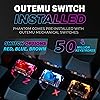
  • SMOOTH RED SWITCH PERFORMANCE: Upgrade your setup with the TECWARE Phantom 87 compact wired TKL mechanical gaming keyboard, engineered with factory pre-lubed Outemu Blue linear switches rated for 50 million keystrokes. These smooth linear keys deliver fast actuation and quiet operation with no tactile bump purpose-built for competitive gamers, professional typists, and anyone seeking a precise and fatigue-free red switch keyboard experience.
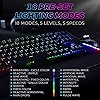
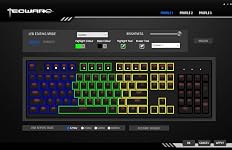
  • DYNAMIC 16.8M RGB BACKLIGHTING: Transform your battlestation with the Phantom RGB gaming keyboard's stunning 16.8 million color LED lighting and 18 pre-set dynamic modes. Customize brightness, speed, direction, and color zones through intuitive software to craft your perfect aesthetic. From subtle ambient glow to vivid reactive animations, this rgb mechanical keyboard delivers unmatched visual immersion for every gaming setup and personal style.
  • FIBERGLASS PCB & DOUBLE-SHOT KEYCAPS: Built for long-term reliability, this wired mechanical keyboard features a dual-layer fiberglass PCB for superior signal stability and extended board lifespan. Double-shot ABS keycaps resist fading and maintain crisp legends even after years of heavy gaming use. Available in Outemu Blue clicky, Outemu Blue linear, and Outemu Brown tactile choose the switch feel that best matches your gaming or typing style.
  • N-KEY ROLLOVER & 1000HZ POLLING RATE: Never miss a critical keystroke with the Phantom 87's full N-Key rollover and ultra-responsive 1000Hz polling rate. Every simultaneous keypress registers instantly and with pinpoint accuracy, giving competitive gamers the split-second edge in fast-paced titles. Paired with stable wired USB connectivity, this wired gaming keyboard delivers consistent, lag-free performance across every session, game, and genre.

Description

Phantom 87 Phantom+ 87 Phantom+ Elite 87 Phantom S 75 At Tecware, we create high-quality, minimalist designed products equipped with essential functions. Gear up with Tecware Premium gear for PC builders and gamers. A premium gasket-mounted mechanical keyboard with a customizable display, interactive knob and next-level personalization. Now available separately for PSU and GPU cables. Add vibrant RGB lighting to the cables already in your setup. Combine the FLEX RGB PSU and GPU cable covers for a cleaner, brighter and more unified ARGB setup. A refined mechanical keyboard experience in 75% and 96% layouts with the flexibility to fit both work and play. Responsive mechanical performance, striking RGB lighting & customization. A Tecware keyboard series trusted by gamers for over a decade From mice and headsets to PC accessories and more, discover the gear you need to complete your setup. In 2012, TECWARE was founded in the Philippines, introducing unique PC cases to the D.I.Y PC builder market locally. In 2016, Global Headquarters was set up in Singapore. Since then, TECWARE has expanded its reach to new markets and evolved its range of products to meet the growing needs of PC builders & gamers today.

Specs 35

Brand TECWARE
Compatible Devices PC
Connectivity Technology USB-A
Keyboard Description Gaming
Recommended Uses For Product Gaming
Special Feature Backlit, Customizable Display Keys
Color Blue Switch
Keyboard backlighting color support RGB

Frequently asked questions

If you place your order now, the estimated arrival date for this product is: Sunday, Nov 8

Yes, absolutely! You may return this product for a full refund within 30 days of receiving it.

To initiate a return, please visit our Returns Center.

View our full returns policy here.

  • Klarna Financing
  • Affirm Pay in 4
  • Affirm Financing
  • Afterpay Financing
  • Zip Pay in 4
  • Financing through Apple Pay
  • Financing through Google Pay
Leasing options through Acima may also be available during checkout.

Learn more about financing & leasing here.

Top Amazon Reviews

TL;DR: Buy this keyboard.
Color: Outemu Red
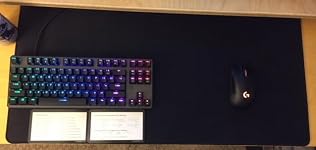
Update Aug 2020: "W" switch died after 2 1/2 years, I suspect "Q, E, R, A, S, D, F" are soon to follow based on the majority of my gaming. This is what I would call normal wear, no complaints here. "W" was the switch with the most strokes on it. Replacing the key was super easy, and they give you extra switched when you purchase the keyboard. Awesome! Total down time < 5 min. Still very satisfied after 2 & 1/2 years. Felt good enough about this keyboard to grab some new key caps & this thing really pops now. Matches my Glorious Model D 😍 Original Review: TL;DR: Buy this keyboard. If you are coming from another low/mid-end mechanical you will be very happy. If you are coming from membrane you will be ecstatic. If you are coming from a higher-end keyboard & don't pro-game this will fit the mold just find, you & your wallet will be happy. Initially I was hesitant to purchase this product with it's lack of reviews, but consider this is a relatively new product (introduced to amazon on Jan 2018) I looked to their other keyboard reviews and was pleasantly satisfied. That being said, if you are uncomfortable with the lack of review I suggest looking at the other products they make and then come back to read the (currently) 3 positive reviews on this keyboard. My review will be two parts, first the product as a stand alone item and second this product against similar items I own. Part 1 Pros: Price: only $40 keyboard I can find with red switches 87 key design: personal preference, but I like a full 16.5” of mouse space to play fps's Lights: it's real pretty, there are 18 different pre-set LED modes with 9 different LED color options. Software: If you want more lighting options download the free software. It's free, super easy to use (easier than the Corsair software IMO) and now my keyboard looks awesome The switches: only red's I can find at this price range. I am not good enough at typing or video games to be an expert of this but the activation point seems to be consistent. They all seem to activate at around 40% of the entire stroke. Peripherals: comes with extra switches, two key pullers, and an easy to follow quick start guide (explains the lighting modes) Build quality: Sturdy, no flex, replaceable switches Cable routing: there are three different channels to route the cable through Aesthetics: aside from the pretty lights, many people enjoy the floating key design. I find it easier to keep clean and looking nice Neutral: The switches (yes, again): While these are nice for $40, if you are coming from Cherry MX or the like you will notice a different. They are not as “snappy” for lack of a better work, but still leaps and bounds over membrane, obviously. Cons: Guided keys: the space bar & shift keys are both on the mushy side. Not a deal breaker, but def noticeable when compared to the other keys that operate with no little metal guide bar. Part 2 Tecware Phantom vs: -Red Dragon 87 key w/blue switches At roughly the same price (Tecware is $3 cheaper) I would recommend the Tecware simply due to the fact you can get it with red switches which I prefer. If you were comparing blues vs blues, it's a toss up that boils down to personal preference. The red dragon has a lot more reviews, but the initial quality of this Tecware product is very impressive. Buy whichever one you think looks cooler. UNLESS, you don't care about RGB. In that case get the Red Dragon because it cheaper without RGB. -Corsaire Strafe Keep in mind this is a $110 product to a $40 one... The Cherry MX switches in the corsaire are nice. If I didn't have the two side by side or had never touched Cherry MX I would have zero complaints about these OUTEM switches. The Corsaire has a few other features I won't really dive into it's not hard to compare specs. The biggest difference I notice is a more consistent key stroke on the Corsaire notable in the guided keys (space & shift). This can make a difference in gaming, but at the level I play it is not worth an extra $70. Bottom line I do not think my Strafe is $70 better than this Phantom. It is without a doubt nicer. -Drevo Gramr I love the size of this little keyboard, but the switches/keys were bad. Noticeably worse than this Phantom. It was about 1.5-2” shorter on the width which is nice, but I have a huge mouse pad and would rather have nicer switches than that extra space. If desk space is at a premium and an extra 1.5-2” is going to make a difference (insert phallic joke here) then go for the tiny Gramr. Otherwise this Phantom is better in every way for a few bucks less. If your wondering why I own(d) all these keyboard... Quick background, my first mechanical keyboard was the Red Dragon 87 key. I loved it, but the blue switches were annoying my wife. Also I felt a linear switch would be a (slight) advantage in fps's. In practice I'm not getting any high K/D with red switches and am no better a CSGO player, which is disappointing. But you can learn from my mistake, nice hardware won't make you suck less. Second keyboard is a friends used Corsair Strife, and I instantly fell in love with the red switches. After hitting my thumb on the 10-key pad a few hundred times I decided to go back to 87-key, but cannot justify spending over $50 on a keyboard when my highest rank is Gold in Overwatch. I tried the Drevo Gramr mostly for work where desk space is at a premium and the minimalist design seemed practical, but couldn't get over the switch quality and the lighting scheme which never worked for me. Now I have this Phantom & love it. ... show more
Reviewed in the United States on April 26, 2018 by M.

A great keyboard for a great price
Color: Outemu Brown
A great keyboard for a great price. One thing to be aware of is that it has a boot time so if you need to get into your bios or efi boot loader, you'll need to use another keyboard.
Reviewed in the United States on June 3, 2018 by Jenny McBride

Great until the space bar started acting up
Color: Outemu Brown
I've had several mechanical keyboards, and for the first six months this keyboard stacked up very well against some that cost in excess of $100. The switches are a little less crisp than official Cherrys but that was more than made up for by the excellent RGB customization, solid build quality, bonuses like the keycap puller and spare switches, and general comfort. However, about six months after purchase the space bar developed an issue where if I pressed it off center, it would tilt that way but not actually actuate the switch, and usually get stuck at that tilt until I pulled it back to level. I fixed this for about two months by flipping the space bar around (as some have suggested doing from the start for comfort reasons), but today it started tilting the other way as well, especially when playing games. I believe the reason for this is due to the stabilization system. Rather than using a metal spring that runs under the space bar to keep it level, this keyboard just uses two of what you might describe as dummy switches to either side of the actual space bar switch. Instead of a spring-loaded switch like every other button on the keyboard, they are just plastic squares with plastic crosses in the middle that slot into key cap stems. Consequently, the space bar has three stems - one for the actual switch and one for each dummy switch. It seems that the dummy switch stems have cracked, so instead of holding the space bar level they allow it to tilt when pressed anywhere off center. The keyboard is still usable, but it's very annoying to have to keep my thumb right in the middle of the space bar, especially while playing video games. ... show more
Reviewed in the United States on June 30, 2019 by Gilros

FIND SOMETHING ELSE
Color: Outemu Brown
OCT 2019 I'm so frustrated that I bought this and have to find a new keyboard already. Now the spacebar doesn't work 2/3 times, and for the enter key to work i have to literally mash it down. Literally can't even game properly, and typing for work is so much more time consuming than it to be. This has been the most disappointing purchase I've made in years. SEPT 2019 A little over two months later (and honestly I'm writing this several weeks late), and I am having keys that sometimes won't input. Actually, within a week or two of use, I first noticed the "L" key was not inputting sometimes. I ignored it and hoped it would wear in with some time. Not long after, the enter key and left shift key are also not inputting correctly. I have to press them abnormally hard for them to input at all. As someone who uses this keyboard to type for work and seriously game, this keyboard has become an instant waste with not even 3 months of use. I'm hugely disappointed because I really loved this keyboard and thought it was perfect, but it causes me to have to double back in my work too often, and I can't depend on it during games. I gave it two stars because maybe that wouldn't be much of an issue for casual users and can be overlooked. ORIGINAL REVIEW JUL. 2019 I bought the TKL brown switch version. I'll also mention that I have paired it with HyperX double shot key caps. -Firstly, for work, I have to type all day long. Something small that I personally appreciate is that the caps lock light and windows lock light are very easily seen with my peripheral vision when I trigger them since they're just above the arrow keys. -It's definitely quieter by far, with a deeper hit sound, and that's with my Red Dragon keyboard having key dampeners on. -Its beautiful and completely customizable. There's pattern modes within lighting modes, and they're all really cool. Something I'd like to add is that while there is no off switch or anything, there's a mode to have all LEDs off. I'm so impressed with this keyboard that I seriously couldn't recommend it enough, especially for the price. Thank you, Tecware. ... show more
Reviewed in the United States on July 11, 2019 by Nick
Checking for best price...