Search  for anything...

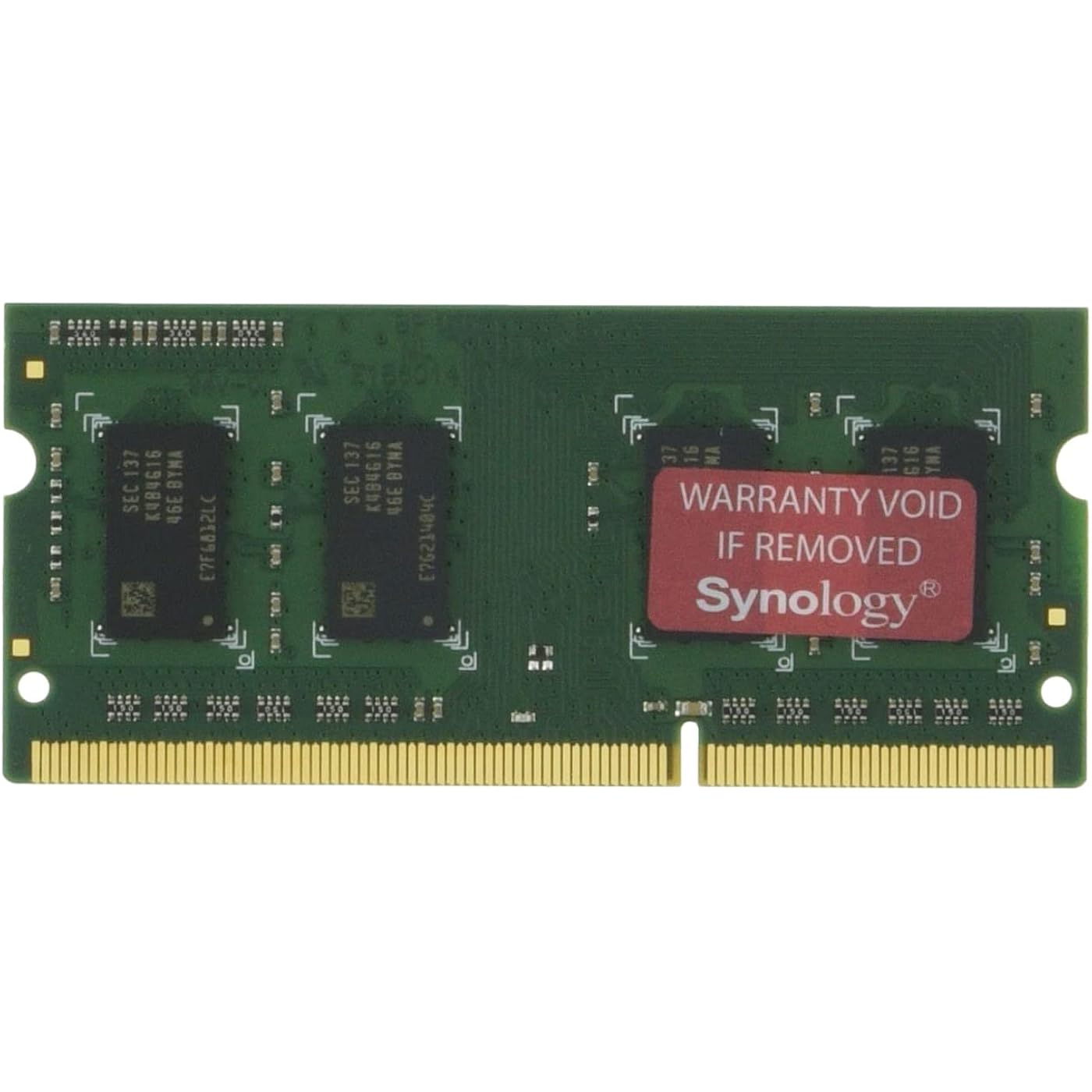
Synology RAM DDR3L-1866 SO-DIMM 4GB (D3NS1866L-4G)

Based on 371 reviews
Condition: New
Checking for the best price...
$64.98
Save $15.93 was $80.91

Buy Now, Pay Later


As low as $10.83 / mo
  • – 6-month term
  • – No impact on credit to apply
  • – Instant approval decision
  • – Secure and straightforward checkout

Ready to go? Add this product to your cart and select a plan during checkout.

Payment plans are offered through our trusted finance partners Klarna, Affirm, Afterpay, Zip, Apple Pay, and Google Pay. No-credit-needed leasing options through Acima may also be available at checkout.

Learn more about financing & leasing here.

Selected Option

Free shipping on this product

FREE 30-day refund/replacement

To qualify for a full refund, items must be returned in their original, unused condition. If an item is returned in a used, damaged, or materially different state, you may be granted a partial refund.

To initiate a return, please visit our Returns Center.

View our full returns policy here.


Availability: Only 3 left in stock, order soon!
Fulfilled by Amazon

Arrives Tuesday, Nov 3
Order within 9 hours and 20 minutes

Available payment plans shown during checkout

Protect Your Purchase

Easy claims online, fast replacements, no fees

Checking for protection plans...

At a glance

Condition
New
Style
DDR3-SODIMM
Model
D3NS1866L-4G
Weight
13.61 g
RAM Memory Technology
DDR3
Memory Speed
1600 MHz
Special Feature
Lightweight
Warranty
3 year
Works with
Server

Features 3

  • DDR3L-1866 SO-DIMM 4GB for Apollo Lake CPU
  • Applied Model: DS218+, DS718+, DS918+, DS418play
  • For expanding your Synology NAS server's memory capacity

Description

Synology RAM DDR3L-1866 SO-DIMM 4GB. Always select authentic Synology memory modules from local distributors for optimum compatibility and reliability. Installation of non-Synology memory modules can lead to system instability or boot failures. Synology will not provide complete product warranty or technical support if non-Synology memory modules are used for memory expansion.

Specs 22

Brand Synology
RAM Memory Technology DDR3
Memory Speed 1600 MHz
Special Feature Lightweight
Additional Features Lightweight
Voltage 1.35 volts
Form Factor SO-DIMM
Data Transfer Rate 12 Gbps

Frequently asked questions

If you place your order now, the estimated arrival date for this product is: Tuesday, Nov 3

Yes, absolutely! You may return this product for a full refund within 30 days of receiving it.

To initiate a return, please visit our Returns Center.

View our full returns policy here.

  • Klarna Financing
  • Affirm Pay in 4
  • Affirm Financing
  • Afterpay Financing
  • Zip Pay in 4
  • Financing through Apple Pay
  • Financing through Google Pay
Leasing options through Acima may also be available during checkout.

Learn more about financing & leasing here.

Top Amazon Reviews


Works like a champ in my DS620slim
Style: DDR3-SODIMM
Last year I actually tried a less expensive non-Synology branded "equivalent" memory card for my DS620slim. It didn't work properly and that old card was removed before the day ended. Recently I thought to give the 4GB upgrade another go. This one is genuine Synology all the way, including the sealed outer Synology packaging. Your mileage may vary, but I am sold on this genuine Synology-branded memory for my DS620slim. (Update June 2023) The DRAM and NAS have been running completely trouble-free for two months. But the reason for appending this review is to relate my experience with the space/performance trade-off. Many mornings I copy a very large non-compressible data file from a PC to a share on the NAS. Prior to any memory upgrade, this transfer typically topped out at about 20MB/sec. Following the memory upgrade (so a 2GB to 6GB transition), the transfer started topping out at about 30MB/sec. I was still running the default "Compression on" setting for the Synology data buffers. I suspected that "Compression on" was just burning needless CPU cycles and possibly slowing down the transfers. At the next opportunity when I needed to restart the Synology anyway (for an unrelated reason), I changed the setting to "Compression off". Guess what - the file transfers now top out at about 38MB/sec. This observation sure exemplifies the benefit of a lot of buffer memory in the Synology DS620slim NAS. ... show more
Reviewed in the United States on May 12, 2023 by CFortC

Excellent Product
Style: DDR3-SODIMM
Purchased this additional RAM for my Synology DS918+ and was extremely easy to install. The RAM itself, came very well package from Synology. Synology only allows the use of their own RAM on their products or you affect/void your warranty. So the purchase was a no brainer, because I did not want to affect my three year warranty that comes with the unit. The performance has been great and no issues noted in my Resources Monitor and System Health is Good. ... show more
Reviewed in the United States on July 29, 2019 by Henry G

How much is your time and data worth?
Style: DDR3-SODIMM
Almost from the get-go, my Synology DS918+ was flaky, often locking up for no apparent reason. It finally got to the point where the storage pool crashed and no volumes were accessible. I opened up a support ticket and they requested I run several memory tests, each of which took a few hours. Finally, after a few anxious days, a support tech was able to SSH into the NAS and rebuild the array, thus saving all my data. The specific reason for the crash - the RAID superblock on all 4 disks was corrupt, most likely caused by the NAS getting locked and having to hard cycle it many times. The culprit? Non-Synology RAM. Trying to save a few bucks, I had purchased two Crucial 8GB SODIMM modules for use in the NAS. The memory tests revealed tons of memory-related issues. After replacing the two non-OEM RAM modules with the single one that came with the unit and rerunning the memory test three times, no errors were found. So, lesson learned. Is this Synology memory expensive? Yes. But, you get what you pay for. My trying to save a few bucks cost me several days of anxiety and several hours running memory tests and sitting in on the SSH session which LUCKILY restored my data. Also, the use of non-Synology RAM modules is NOT supported. The Synology tech was nice enough to help me out despite that. And, you void the NAS warranty if non-Synology RAM causes damage to the NAS motherboard, RAM slots, etc. ... show more
Reviewed in the United States on April 5, 2020 by J. Bonbright

Worked as advertised
Style: DDR3-SODIMM
Memory installed easily; works as advertised. Price is OK, but memory cost should be lower.
Reviewed in the United States on November 2, 2020 by Patrick J. Rogers

Compatible with the Synology DS620slim NAS
Style: DDR3-SODIMM
If you read the reviews for less expensive alternatives to this Synology DDR3L-1866 SO_DIMM 4GB RAM, you will learn that they are not always compatible with a Synology NAS. So, to achieve guaranteed compatibility, you must pay two to three times the price of a less expensive alternative. An irritating, but not fatal, flaw. ... show more
Reviewed in the United States on June 22, 2024 by Photo/Video Gearhead

Works in my Synology DS418 Play
Style: DDR3-SODIMM
Popped right in and keeps the Synology warranty in place. I didn't do any benchmarks to see how much of a performance increase my DS418 Play had after the upgrade. I only know that memory usage went from an average of 73%, down to 23%.
Reviewed in the United States on February 25, 2018 by JP

You gotta really push it in deep
Style: DDR3-SODIMM
Bought this ram for my synology 218+. I did not insert it deep enough and so it was not recognized by the nas. Once I pushed it in a lil further has worked like a charm Nas reports mainly using just the 2gb and not the other 6gb , but I think that is how it the nas is made. Nas is alot more responsive since adding the ram. Its official so expensive but works.. ... show more
Reviewed in the United States on February 24, 2023 by Moe

Works fine
Style: DDR3-SODIMM
Legit product. So far so good since I installed it.
Reviewed in the United States on November 3, 2024 by Chuck Jr. E.
Checking for best price...