Search  for anything...

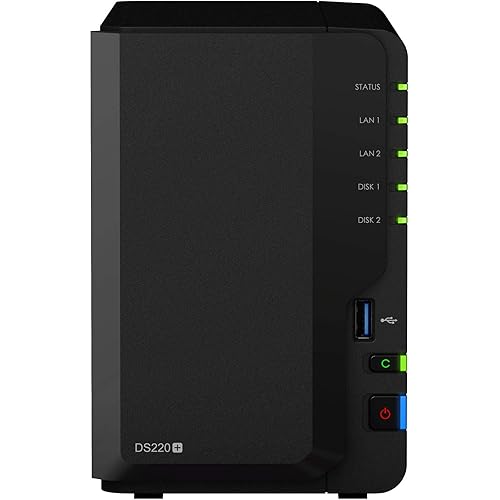
Synology 2 Bay NAS DiskStation DS218 (Diskless)

  • Based on 2,137 reviews
Condition: New
Checking for the best price...
$408.99 Why this price?

Buy Now, Pay Later


As low as / mo
  • – Up to 36-month term if approved
  • – No impact on credit to apply
  • – Instant approval decision
  • – Secure and straightforward checkout

Ready to go? Add this product to your cart and select a plan during checkout.

Payment plans are offered through our trusted finance partners Klarna, Affirm, Afterpay, Apple Pay, and PayTomorrow. No-credit-needed leasing options through Acima may also be available at checkout.

Learn more about financing & leasing here.

Free shipping on this product

This item is eligible for return within 30 days of receipt

To qualify for a full refund, items must be returned in their original, unused condition. If an item is returned in a used, damaged, or materially different state, you may be granted a partial refund.

To initiate a return, please visit our Returns Center.

View our full returns policy here.


Availability: Only 1 left in stock, order soon!
Fulfilled by Sysmel

Arrives Monday, Jun 29
Order within 2 hours and 17 minutes
Available payment plans shown during checkout

Protection Plan Protect Your Purchase
Checking for protection plans...

Features

  • Versatile 2-bay NAS for small offices and home users
  • 64-bit quad-core processor, delivering sequential throughput at over 112 MB/s reading and 112 MB/s writing
  • 2 GB DDR4 memory, 4 times the capacity than its predecessor
  • 4K 10-bit H.265 video transcoding on the fly. Supported client- Windows 7 and 10, Mac OS X 10.11 onwards. Supported browser- Chrome, Firefox, Internet Explorer 10 onwards, Safari 10 onwards; Safari (iOS 10 onwards), Chrome (Android 6.0 onwards)
  • Running on Synology DiskStation Manager (DSM). Maximum Single Volume Size:108 TB

Description

Synology Disk Station DS218 is a high-performance and versatile 2-bay NAS designed for small offices and home users to effectively manage, protect, and share data. Its 64-bit quad-core processor delivers high-speed data transmission and 10-bit 4K H.265 video transcoding to empower shared data storage and multimedia entertainment. Synology DS218 is backed by Synology's 2-year limited warranty. Operating Temperature: 0°C to 40°C (32°F to 104°F).

Brand: Synology


Size: 2-bay; 2GB DDR4


Compatible Devices: Desktop, Laptop


Item Weight: 2.87 Pounds


Mounting Type: Tabletop


Size: 2-bay; 2GB DDR4


Item Weight: 2.87 Pounds


Compatible Devices: Desktop, Laptop


Mounting Type: Tabletop


Is Assembly Required: No


Brand: Synology


Manufacturer: Synology America Corp


UPC: 846504002962


Global Trade Identification Number: 62


Mfr Part Number: DS218


Model Number: DS218


Warranty Description: 2 Years


Item Type Name: Synology DS218 2 Bay NAS Diskstation (Diskless)


Built-In Media: AC power adapter x 1, Accessory pack x 1, DS218 main unit x 1, Quick Installation Guide x 1, RJ-45 LAN cable x 1


Frequently asked questions

If you place your order now, the estimated arrival date for this product is: Monday, Jun 29

Yes, absolutely! You may return this product for a full refund within 30 days of receiving it.

To initiate a return, please visit our Returns Center.

View our full returns policy here.

  • Klarna Financing
  • Affirm Pay in 4
  • Affirm Financing
  • Afterpay Financing
  • PayTomorrow Financing
  • Financing through Apple Pay
Leasing options through Acima may also be available during checkout.

Learn more about financing & leasing here.

Top Amazon Reviews


  • Solid product. Couldn't be happier.
I had tried a few different storage solutions for my Home and family's small business, but no solution I tried seemed to work the way that it was advertised or meet my needs. In all honesty it was because of my choice to try to find a budget solution because $400 for a NAS and then another 4-500, at least, for drives to put in it is a lot of money. I can't begin to describe how happy I am I did it though. This is a solid product. I can't speak to the uses for a media server, because I haven't gotten around to testing those features yet, but for a storage solution I can. This NAS makes back ups, data storage, and file sharing extremely easy and not just because I'm a computer science major. Even for people who may not be the best with computers, set up is super easy and the web interface is simple and very intuitive. Set up on a local network is extremely easy. Set up for remote access for multiple users though, while still much simpler than something like an Ubuntu server, still will probably require a little more than average technical and networking knowledge. Especially if running an antivirus and/or firewall as you will have to make exceptions for the remote IP address. For creating a remote network drive, you will also need either a static IP address or a domain name and a DDNS service. Overall though so far, I couldn't be happier with the product and am glad I decided to spend some extra money and get something that works great, is easy to manage, and meets all my needs. I will try to come back and update once I have the opportunity to text some of the media server features. UPDATE: So I have now had the opportunity to test some of the features using this as a media server. I have put some movies on it and and was able to stream them. My conclusion is I have some good news and some bad news. Lets get the bad news out of the way first. Bad News: If you are a fan of Plex you may be out of luck. Synology seems to have discontinued support for Plex for all model NAS servers aside from those using an intel processor. According to the Plex forums, some of the older DS418 models do have the intel chips but almost all of the new ones have the Realtek quad cores in them. Fear not though, I did find an alternate solution I will share in the good news. One other thing I did find is if there are some other services running while you are trying to stream HD video you may get some stuttering occasionally while there is other uploading or downloading going on in the background. I'm not sure if this is related to the processor or the limited amount of RAM but I plan to add more RAM in the near future I have also recently enabled the ethernet port aggregation and will test to see if that makes any difference as well. **Note: True Port aggregation will only work if you have a router that supports it. They do have a Load balance bonding but it is not the same as port aggregation. Will retest after these modifications and report back again with another update. Good News: The good news I found is, though there is some stuttering it is pretty easy to work around it by pausing some of the back up services you may have running while tyring to streaming video, which, while its not ideal, I don't find to be that big of a deal given the price point compared to other solutions. The port aggregation I enabled recently along with my plan to increase the RAM may even resolve this issue. The other good news is, for those of you who don't have your heart set on Plex, there is an application for the Amazon FireStick called Archos that seems to work very well in my opinion. You can browse all your folders on the server look at pictures, play music, and stream video. So far I have only tested this while streaming on my local network and have not yet tested remote streaming using this application. Once I have had the opportunity I will again report back with another update. ... show more
Reviewed in the United States on January 29, 2018 by darkflame88

  • Very Happy
I've been using the Western Digital MyCloud products for TimeMachine backups on our Macs - The WD products were never particularly stable as a network backup target. When one of the WD's died, I decided to invest in the (admittedly more expensive) Synology DS418, and I'm very happy that I did. Set up was easy, and TimeMachine backups from multiple Macs are working very smoothly (Tips: SHR volume. One shared TM folder. One "user" per Mac with a quota. Do the first backups one at a time!). The only thing to be aware of is that adding/replacing a disk is not fast - adding a third 4TB disk to my config, took the DS418 a couple of days to merge it in, but it did so without difficulty. Overall I'm *very* pleased at how little I have to fiddle around with this server. It just works. UPDATE May 2020: I've had the DS-418 under continuous use for about 2 years now, and I thought I'd add a few additional comments. (1) I initially chose the DS-418 as a device to back-up our family laptops. As mentioned in the original review, it was easy to set-up and works seemlessly with Mac OSX's TimeMachine for all the laptops. Two years of back-ups to the DS-418 have been flawless - the laptops' TimeMachines quietly and automatically back-up each laptop any time they are on our wireless network without the user even noticing. Perfect. (2) I had a drive failure (an older repurposed drive - not unexpected) in a 4 drive configuration and I was thoroughly impressed by how easily the DS-418 recovered. An audible alarm and light alerted me to the failed drive but the DS-418 continued to operate in "degraded mode" allowing me time to order a new drive. Once the new drive arrived, I pulled the old drive, inserted the new one, and started the rebuild. The rebuild ran entirely in the background over the couple days. Net result: ZERO downtime. Easy/complete rebuild. ZERO data loss. I'm EXTREMELY happy with the recovery and data integrity capability of the device! (3) Synology has been excellent about software patches and communication of potential security issues. A couple mouse clicks in the web interface after an email notification is all it takes to manually update it. Alternatively, you can schedule a time one or more days per week to check and automatically apply updates. Again, EXTREMELY happy with this feature! (4) As of this writing, there are 104 (Synology and 3rd party) packages that can be added to the DS-418 to customize the services and capabilities, like audio/video servers, home security camera integration, photo organizers, webserver software, and more. The packages install with a single click. Very easy. I'm running several add-on packages and the DS-418 is still running very smoothly. (5) The resource monitoring tools and storage analysis tools are very good. Easy enough to be helpful for first time users with sufficient data and detail to satisfy more advanced users. ... show more
Reviewed in the United States on August 25, 2018 by J. Kuehn

Can't find a product?

Find it on Amazon first, then paste the link below.
Checking for best price...