Search  for anything...

Synology DS1825+ Enterprise Video Production & Storage - Scale to 360TB, 25GbE Speed & Mission-Critical Reliability (8-Bay Diskless NAS)

  • Based on 0 reviews
Condition: New
Checking for the best price...
$1,249.99 Why this price?
Save $260.00 was $1,509.99

Buy Now, Pay Later


As low as / mo
  • – Up to 36-month term if approved
  • – No impact on credit to apply
  • – Instant approval decision
  • – Secure and straightforward checkout

Ready to go? Add this product to your cart and select a plan during checkout.

Payment plans are offered through our trusted finance partners Klarna, Affirm, Afterpay, Zip, Apple Pay, and Google Pay. No-credit-needed leasing options through Acima may also be available at checkout.

Learn more about financing & leasing here.

Free shipping on this product

FREE 30-day refund/replacement

To qualify for a full refund, items must be returned in their original, unused condition. If an item is returned in a used, damaged, or materially different state, you may be granted a partial refund.

To initiate a return, please visit our Returns Center.

View our full returns policy here.


Availability: Only 10 left in stock, order soon!
Fulfilled by Amazon

Arrives Aug 11 – Aug 15
Order within 21 hours and 33 minutes
Available payment plans shown during checkout

Protection Plan Protect Your Purchase
Checking for protection plans...

Features

  • Multi-User Video Editing - Support 50+ concurrent users editing 4K/8K projects with 2,239 MB/s speeds; run databases, VMs and media services simultaneously
  • Expansive Production Storage - Grow from 160TB to 360TB using expansion units; perfect for growing video archives, post-production workflows and broadcast media
  • Flexible High-Speed Networking - Choose 10GbE or 25GbE network upgrade cards to support demanding creative teams and large file transfers
  • Enterprise Data Protection - High-availability clustering, automated failover and comprehensive backup to prevent any data loss scenario
  • 3-Year Warranty & Enterprise Support - Dedicated technical account management is available for business-critical production environments

Description

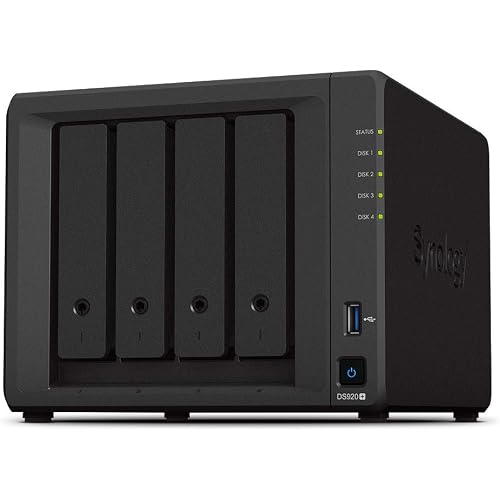
The DS1825+ is a versatile 8-bay storage solution designed to store and protect mission-critical data. Flexible support for faster networking speeds and capacity expansion makes the DS1825+ ideal for businesses needing a scalable and customizable storage solution for their growing data needs. Powered by Synology DiskStation Manager (DSM), this device is a flexible all- in-one solution for data sharing, synchronization, backup, and surveillance.

Brand: Synology


Color: Black


Product Dimensions: 9.57"D x 13.5"W x 6.54"H


Size: 166 mm x 343 mm x 243 mm


Material: Metal, Plastic


Brand: Synology


Manufacturer: Synology


UPC: 846504006021


Mfr Part Number: DS1825+


Model Number: DS1825+


Warranty Description: 3


Item Dimensions D x W x H: 9.57"D x 13.5"W x 6.54"H


Size: 166 mm x 343 mm x 243 mm


Item Weight: 6000 Grams


Compatible Devices: Android, Desktop, Laptop, Server, iPhone


Mounting Type: Tabletop


Color: Black


Enclosure Material: Metal, Plastic


Is Assembly Required: Yes


Frequently asked questions

If you place your order now, the estimated arrival date for this product is: Aug 11 – Aug 15

Yes, absolutely! You may return this product for a full refund within 30 days of receiving it.

To initiate a return, please visit our Returns Center.

View our full returns policy here.

  • Klarna Financing
  • Affirm Pay in 4
  • Affirm Financing
  • Afterpay Financing
  • Zip Pay in 4
  • Financing through Apple Pay
  • Financing through Google Pay
Leasing options through Acima may also be available during checkout.

Learn more about financing & leasing here.

Top Amazon Reviews


  • So far so good
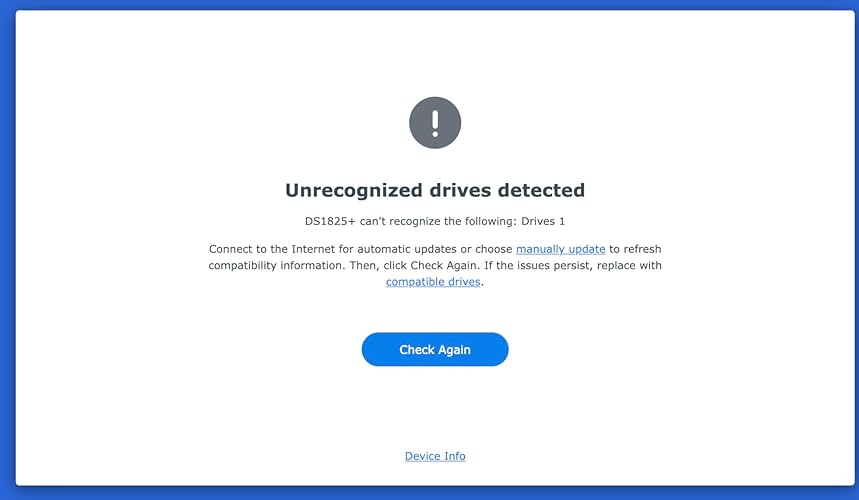
I’ve owned a synology DS nas for over a decade with no problems. Decided to get a new one because I didn’t want to have to start upgrading all the existing 8tb drives as I would have to buy 3 20tb drives just to start getting more storage. Some people stated that this only accepts Synology drives. I don’t doubt that they would do that because of greed. But I was able to use WD Red Pro drives. They are far from cheap but they were properly detected and setup. It does say that they are not on the compatibility list and they won’t guarantee compatibility but everything works up front. Obviously it updated the OS before I did anything so perhaps they loosened the restrictions on drive compatibility I know in my old DS I was able to use Green drives but mostly use the Red drives now days. I will not be able to talk about longevity on this model as I wouldn’t expect any issues for years. As my old unit just turned 13 years old and is still running just fine. The only problem it has is not compatible with future OS upgrades as my old unit is now to old. ... show more
Reviewed in the United States on December 7, 2025 by Stephen

  • Third-Party Drives Supported as of DSM 7.3
Three-time Synology owner (DS1812, DS1819, DS1825) and almost wasn't given the now short-lived decision by Synology to only support first-party drives (Synology branded) on the DS25 series. So it is clear, as of DSM 7.3 Synology has silently walked back their short-lived first-party only experiment and now third-party drives are supported on the DS25 series. There are still some first-party requirements around NVMe (be sure to read up on it, search "synology drive compatibility policies"), but third-party 3.5" spinning disks work just fine. I have a fleet of Western Digital Red Pro 18TB drives working very well in the DS1825. Comparing Synology CPU, memory, networking, etc. against Synology's competition is missing the forest for the trees. It is rather well-known (and accepted) that Synology NAS's do not have the latest, greatest, best, fastest CPU's and memory "per dollar". We buy Synology for the best software and support, not for bleeding edge bountiful hardware. DSM (the OS) and the package management is second to none for prosumers looking for something that is feature rich and "just works" without fidgeting, tinkering, and hacking around (although you can certainly do that as well). My Synology runs as a SMB share, DNS Server, and DHCP Server. It also provides the backend NVR functions for several non-Synology cameras through Surveillance Station and serves to backup my personal OneDrive (natively through Synology Cloud Sync and Hyper Backup) and iCloud Drive (through some third-party tooling given the security enabled on my iCloud account and Synology Hyper Backup). Other functions I've used over the years include the Container (Docker) manager, Active Directory integration, and using it as an iSCSI target. From a software standpoint, each of these use cases have worked very well over the years and remain the principal reason I look to Synology for my NAS needs. They just work without much care and feeding (other than software updates). I evaluated and built out a TrueNAS host (with ECC memory, LSI HBA and everything) given first-party drive requirement from Synology (I was frustrated like everyone else). TrueNAS is fine, but I just don't want to tinker anymore. After reading about Synology DSM 7.3 supporting third-party drives, quickly picked up a DS1825 and some fresh WD Red Pro's over Black Friday 2025. If Synology decides to go down the road of "first-party drives only" again on the prosumer lines (like the DS), it'll be on a future series and equally as frustrating. Fingers crossed they've learned their lesson. For now, I've got 7 years of Synology DS1825 with third-party drives to enjoy until I am in the market again when the DS1832 is released. We'll see what it looks like then. ... show more
Reviewed in the United States on December 10, 2025 by J. Urbanek

  • Quality Product!
Now that Synology has once again seen the light to allow us to use whatever hard drives (HDD) we want this is a good buy.
Reviewed in the United States on June 3, 2026 by Charles Antonelli

  • Cannot use non-Synology hard drives! Cannot use non-Synology hard drives!
The product description is not clear - you must purchase Synology branded harddrives in order to use this at all. The product description said "reduced functionality" with drives not on the compatibility list. Reduced functionality must mean it only functions as a paperweight+space heater because you cannot install the operating system onto a drive that isn't Synology brand. I do not understand why normal hard drives (Western Digital, Seagate, HGST, etc) are blocked from this device. If Synology branded drives are required they I'd think they'd just be included and configurable. Just like buying a MacBook. I'm forced to return this as I'm not replacing my existing hard drives that I've spent thousands of dollars on. ... show more
Reviewed in the United States on September 16, 2025 Reviewed in the United States on September 16, 2025 by Ben

  • Overall system is worth the money.
Hardware is topnotch. Easy to install hard drives without tools. Nicely done. Setup software couldn't find Synology's own webpage. REALLY??? That part of the setup was clugey. However, once DSM was installed, setup went smoothly. I installed 4 Synology 16TB hdd's and the unit runs very quiet. Can barely hear it running. In contrast, my other NAS with 4 Seagate 14TB hdd's, I can hear from the other room. I would definitely buy it again and would recommend this to others. ... show more
Reviewed in the United States on January 19, 2026 by Russell H.

  • Multiple units exhibited high pitched coil whine
I've owned quite a few Synology NAS units over the past 14 years—the DS1812+, DS1813+, DS1815+, DS1819+, DS1621xs+, and DS1821+. With the exception of the DS1815+ which had a design flaw that practically guaranteed premature failure, the rest have been reliable 5-star products. Unfortunately, the DS1825+ is not a 5-star model. Historically, Synology has used Delta power supplies in these units. They have always been whisper quiet. Synology chose a different power supply for the DS1825+. (I suspect it isn't sourced from Delta because the power cord is plugged in at a different orientation than all my previous Synology units.) This power supply emits what sounds like coil whine, a high-pitched noise that can be heard above everything else in my office. I found it to be very distracting. After returning my first DS1825+, I ordered a second DS1825+ from a completely different high-volume vendor. It exhibited the same high-pitched noise. I spent more than a week working with Synology Support, which was excellent (as usual). The determination was that this noise is just the way that the DS1825+ sounds. They offered to do an exchange but conceded that a third unit was likely to sound like the first two. I will not be ordering a third unit. It's worth noting that if this unit is going to be kept in a dedicated server room, then the noise doesn't matter at all. And I have no reason to think that the unit has any other issues. That said, most users are going to use it in an office. For this type of deployment, I cannot recommend it. Two stars. ... show more
Reviewed in the United States on June 6, 2026 by tlinn-com

  • It's dated hardware but even with the reduced software made it still worth it to me.
For me works as well as my DiskStation DS1821+, which is as of 2025 four years old. Did not have the Synology branded HDD's forced upon me as Synology was originally going to do. So far works well and is relatively easy to setup. Just hoping Synology doesn't cripple or remove some of the essential software that comes bundled with the DS1825+ the way they stopped supporting (essentially removed) software that was bundled with DS1821+, namely a very useful program called Video Station among a few others. The hardware specs aren't that good compared to others in this arena but the ease of use of the software that hasn't been removed in my use case is worth it. ... show more
Reviewed in the United States on January 18, 2026 by JohnnyCaps

  • Excellent recommended
Excellent , quick shipment , very well packed hope to use it soon
Reviewed in the United States on June 10, 2026 by haim primo

Can't find a product?

Find it on Amazon first, then paste the link below.
Checking for best price...