Search  for anything...

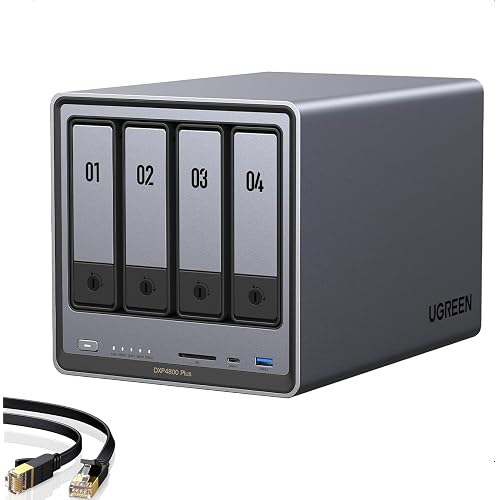
UGREEN NAS DXP4800 Pro 4-Bay Desktop Network Attached Storage,(Diskless) | Intel Core i3-1315U 6-Core CPU, 8GB DDR5 RAM, Built-in 128GB SSD, 1x 10GbE, 1x 2.5GbE, 2X M.2 NVMe Slots, 4K HDMI (Diskless)

  • Based on 1,069 reviews
Condition: New
Checking for the best price...
$719.99 Why this price?
Save $80.00 was $799.99

Buy Now, Pay Later


As low as / mo
  • – Up to 36-month term if approved
  • – No impact on credit to apply
  • – Instant approval decision
  • – Secure and straightforward checkout

Ready to go? Add this product to your cart and select a plan during checkout.

Payment plans are offered through our trusted finance partners Klarna, Affirm, Afterpay, Apple Pay, and PayTomorrow. No-credit-needed leasing options through Acima may also be available at checkout.

Learn more about financing & leasing here.

Selected Option

Free shipping on this product

FREE 30-day refund/replacement

To qualify for a full refund, items must be returned in their original, unused condition. If an item is returned in a used, damaged, or materially different state, you may be granted a partial refund.

To initiate a return, please visit our Returns Center.

View our full returns policy here.


Availability: In Stock.
Fulfilled by Amazon

Arrives Sunday, Jul 19
Order within 15 hours and 19 minutes
Available payment plans shown during checkout

Protection Plan Protect Your Purchase
Checking for protection plans...

Model: DXP4800 Pro,4-Bay (Diskless)


Features

  • Pro-Performance NAS Engineered for Demanding Workflows: This NAS is built for offices, businesses, and power users who need serious performance. Powered by a pro-performance Intel processor, it serves as a versatile private workstation that delivers smooth performance for running virtual machines and Docker containers. It functions as an IT hub for video editors, developers, virtualization tasks, and growing teams with advanced workflows
  • Pro-Grade Core Hardware Performance: Features the Intel Core i3-1315U Processor (6 Cores, 8 Threads, up to 4.5GHz Turbo), offering a significant performance lead. It's paired with 8GB of high-speed DDR5 RAM (expandable to 96GB) and 13th Gen Intel UHD Graphics for smooth multitasking. Dual high-speed network ports (10GbE + 2.5GbE) enable blazing-fast transfers, reaching up to 1.25GB/s
  • Ultimate Flexibility with Docker, VMs & Smart AI: It offers comprehensive support for Docker and Virtual Machines, unlocking endless possibilities to run personal websites, smart home hubs, or private development environments. The local AI-powered Photo Album automatically recognizes faces, scenes, and content. All AI processing happens on-device, ensuring your privacy while managing massive photo libraries effortlessly
  • Massive Storage & Intuitive All-in-One System: It supports a colossal 144TB capacity (4x HDD + 2x M.2 SSD), enough for approximately 4.2 million 35MB RAW photos, 3.6K 40GB 4K movies, 5 million 30MB lossless music, or 150 million 1MB files. Dual M.2 PCIe 4.0 SSD slots can be used as a high-speed cache or storage pool to eliminate HDD bottlenecks. The intuitive UGOS Pro operating system integrates a media center, photo management, cloud sync, downloads, and more for a one-stop experience
  • Enterprise-Grade Data Security & Privacy: Provides multiple RAID configuration options (0, 1, 5, 10) for flexibility between capacity, speed, and protection. Features granular user permission controls (supporting up to 2048 accounts). The Data Vault offers an extra layer of security by hiding and encrypting sensitive files. Certified for strong privacy and data protection by TV SD (ETSI EN 303 645) and TRUSTe

Description

The Performance Flagship NAS for Offices & Businesses. Powered by Intel pro performance — Your Powerful, Versatile Private Workstation. Run VMs, Docker Containers, and More with Uncompromising Smoothness. All DXP series models support Docker and virtual machines. Plex can be run via Docker. Visit the Store Visit the Store Visit the Store Visit the Store Visit the Store Visit the Store Visit the Store Visit the Store Visit the Store

Digital Storage Capacity: 144 TB


Hard Disk Interface: Serial ATA


Connectivity Technology: SATA


Brand: UGREEN


Special Feature: Docker Support, Virtual Machine Support, AI-Powered Photo Recognition, RAID Configuration, Data Vault Encryption, Tool-Free Drive Trays, Dual M.2 NVMe Slots, 4K HDMI Output, Multi-Zone Cooling System See more


Hard Disk Form Factor: 3.5 Inches


Hard Disk Description: Mechanical Hard Disk


Compatible Devices: Desktop, Laptop, Smartphone, Tablet, Television


Installation Type: Desktop


Color: Grey


Digital Storage Capacity: 144 TB


Hard Disk Interface: Serial ATA


Connectivity Technology: SATA


Additional Features: Docker Support, Virtual Machine Support, AI-Powered Photo Recognition, RAID Configuration, Data Vault Encryption, Tool-Free Drive Trays, Dual M.2 NVMe Slots, 4K HDMI Output, Multi-Zone Cooling System


Hard Disk Form Factor: 3.5 Inches


Compatible Devices: Desktop, Laptop, Smartphone, Tablet, Television


Hard Disk Rotational Speed: 7200 RPM


Specific Uses For Product: Data Storage, Video Editing, Virtualization, Running Docker Containers, Photo Management, Media Center, Cloud Sync, Smart Home Hub, Development Environment


Read Speed: 1.25 Gigabytes Per Second


Media Speed: 1.25 gigabytes_per_second


Data Transfer Rate: 1250 Megabits Per Second


Form Factor: 3.5-inch


Hardware Platform: x86


Installation Type: Desktop


EU Spare Part Availability Duration: 2 Years


Color: Grey


Enclosure Material: Aluminum


Brand: UGREEN


Model Number: DXP4800 Pro,4-Bay (Diskless)


Hard Disk Description: Mechanical Hard Disk


Built-In Media: NAS Enclosure, 8GB DDR5 RAM, 128GB SSD, Power Adapter


Model Name: DXP4800 Pro


Manufacturer: UGREEN GROUP LIMITED


Mfr Part Number: DXP4800 Pro 4-Bay


Warranty Description: 2 Year Manufacturer


Hard-Drive Size: 144 TB


Item Weight: 3.98 Kilograms


Number of Items: 1


Unit Count: 1.0 Count


Frequently asked questions

If you place your order now, the estimated arrival date for this product is: Sunday, Jul 19

Yes, absolutely! You may return this product for a full refund within 30 days of receiving it.

To initiate a return, please visit our Returns Center.

View our full returns policy here.

  • Klarna Financing
  • Affirm Pay in 4
  • Affirm Financing
  • Afterpay Financing
  • PayTomorrow Financing
  • Financing through Apple Pay
Leasing options through Acima may also be available during checkout.

Learn more about financing & leasing here.
Top Amazon Reviews


  • WOW!
Size: DXP2800 2-Bay | Diskless
This company has a great product. It is full of free included apps for all kinds of desires. I could not be more happy with the Amazon recommendation. Mine is handling my small business as well as allowing personal and family desires, linked to LAN or remote. I am no expert but was very capable to set it up and get running in very reasonable time. Now having it for months, not one bug, a few updates and expanded the apps offered. Exactly what I needed. I have had 2 NAS in the past years and then paid monthly for online cloud storage backl ups. Price kept climbing. I only wish I went back to a NAS again as the capabilities are far above the old day NAS systems. ... show more
Reviewed in the United States on March 9, 2026 by Ray V.

  • Great entry level NAS with advanced features to explore
Size: DXP2800 2-Bay | Diskless
VERY solidly constructed with a thick, HEAVY aluminum unibody, no sharp edges or unfinished surfaces. The design is well thought out and easy to access the M.2 drives and RAM. I thought there were 2 RAM slots but realized you can upgrade to a single 16 GB stick. It would be nice if there were 2 slots so I didn't have to keep a spare 8 GB stick, plus a 16 GB stick adds another big chunk of money to the total cost. Everything was easy to setup and works flawlessly with 2x12TB HDDs and 2x2TB M.2s. With an HDMI port this functions as a low cost HTPC and NAS in one box that doesn't require me to get too deep in the weeds managing things. I was considering the UGREEN mini PC with 4x M.2 drives but this one allows for much cheaper, larger capacity drives with the option for M.2 speed. ... show more
Reviewed in the United States on January 10, 2026 by Will

  • Ugreen NASync DXP2800: The Best Value for a Home Media Server Ugreen NASync DXP2800: The Best Value for a Home Media Server
Size: DXP2800 2-Bay | Diskless
The DXP2800 is a powerhouse for families moving their data off expensive cloud subscriptions like I have done. For anyone running Plex for home media server and Immich to replace google photos, this 2-bay unit delivers incredible performance at a stellar price. Key Highlights: Plex & Immich Heaven: The Intel N100 CPU handles 4K transcoding and Immich’s AI-heavy tasks effortlessly. It’s perfect for creating your own private, fast, and secure media cloud. Massive & Fast Storage: Supports two large SATA drives (up to 30TB each) and includes two M.2 NVMe slots. Put your app metadata and database on the SSDs for instant responsiveness. Premium Build: The aluminum chassis feels solid and durable, far superior to competitors' plastic designs. Easy Setup: UGOS Pro software is user-friendly and makes setup a breeze, even if you’re new to NAS systems. Docker support expands functionality hugely. The Caveat (The Noise): The only real drawback for large media libraries (like my 16TB drives) is the chassis can amplify HDD vibrations during heavy writing. Quick Fix: Placing the unit on a silicone mat or adding some felt pads inside the bays silences this minor quirk immediately. Verdict: This NAS is an absolute winner. It has the hardware to crush any home media task and is easily the best self-hosting solution I've used. A must-buy if you want to take ownership of your digital life! ... show more
Reviewed in the United States on January 20, 2026 Reviewed in the United States on January 20, 2026 by Arunabh

  • Excelent device, I'm very happy! Excelent device, I'm very happy!
Size: DXP2800 2-Bay | Diskless
I'm new to NAS devices. I always dreamed of having my own home server to store old family photos from digital cameras and access them from anywhere without having to pay for a lifetime cloud service. The same goes for my music—dozens of CD albums from years ago that I can still listen to anywhere. It's like my own personal Spotify. This little NAS solves all my problems. I used it for a month and a half with hard drives from old PCs in RAID 1 while I waited for an 8TB Seagate Red (for NAS) drive, which I've now installed. Now I can add my entire anime and movie collection. Honestly, I couldn't be more thrilled. The UGOS operating system comes with some native applications; the best is the Theater app for watching movies and TV shows. It's like streaming! The photo app is good (it has face recognition) and the music app is so-so (it could be improved). Anyway, if you don't like any of the native apps, you can install other application options via Docker. I haven't done it yet because I think it's best to use NVMe SSDs for Docker, and I haven't installed one yet. To access the NAS from your phone, the Android app isn't available on the Play Store in my country, Venezuela (I don't know why), but you can download the APK from their website, and it updates automatically without problems. There's also an APK available for Android TV, although currently it only works for streaming. This NAS has more features that I haven't explored yet, or haven't tested much. I find its HDMI port rather useless and don't use it; it doesn't display an interface, it's just a streaming output that you have to control with your phone. I haven't used other more technical file-sharing functions much, but they are included, such as DLNA for multimedia, SFTP, SMB, and others. User management is very intuitive; you can create user accounts for each family member, whether they live with you or not. User security includes 2FA with Microsoft Authenticator, which is optional but recommended. It supports RAID 1 technology, which slightly improves speed. Physically, it's small. I've included a couple of US coins in the photo for size comparison. It's slightly heavy due to its aluminum casing. The trays are plastic and easy to handle. I like the elegant design. In short, I'm very happy! ... show more
Reviewed in the United States on March 16, 2026 Reviewed in the United States on March 16, 2026 by Alfredo Villegas

  • Very high quality hardware, but instructions leave a LOT to be desired...
Size: DXP2800 2-Bay | Diskless
The UGreen 2800 NAS is an exceptionally well built, very high quality unit that comes well packaged with quality connectivity cables. However, even if you have been working with PCs the better part of your life do not be expecting a simple 'plug and play' setup. If you are not technologically adept or able to navigate your way through setting up devices to communicate with each other through your home or budiness network, I'd strongly suggest you don't attempt to set this up without the aid of someone who can. The connection of the unit itself is straight forward. Drives load easily and connecting instructions up to the formatting of the drives are fairly clear and easy to understand. But that is where 'easy to understand' takes a holiday for what I would guess is probably 65% of the people who buy this thinking it's going to be like plugging a USB cable in between your PC and a desktop storage drive. A NAS is a computer, not a simple data storage device. The instructions that come with it cover nothing about setting the unit up to properly communicate with your PC through your home network. You are going to have to find out how to do that through your own research. When you have finished familiarizing yourself with the formatting and setup process for the hard drives in your NAS (drives are a seperate purchase and you need to check for their compatibility with your NAS on UGreen's site) be prepared to take VERY careful notes the whole way through the setup process. All the passwords, network addresses, administrator info...write down everything about the setup in detail as you will be using that information to set things up later. I personally found the UGreen site somewhat difficult to navigate, but what you will need to do is go there initially for instructions and app downloads. Even then, you will want to have your AI equipped search engine handy to research the plethora of additional questions that will come up for everyone but a person who has worked with this technology at work or been exposed to it by an associate. UGreen needs to get a layman who is NOT an engineer to write a soup to nuts set up manual covering all aspects of both PC, Mac and mobile device setup and connection of everything to your network so all devices can find and communicate with the NAS and each other. That manual will also need to be written so a kid can understand it. UGreen (like all NAS manufacturers and most You Tube video producers) seems to be of the opinion that producing exhaustively detailed setup instructions on any mental level below that of an IT expert would somehow 'insult' the average user's intelligence. And as most of you will find out, nothing could be further from the truth. This review has already turned into War & Peace, so I will not attempt to leave such a set of instructions here (although I produced one for myself). Still, UGreen really needs to develop one and INCLUDE that manual with the purchase of the device or at the very least on a very obvious spot on their website. If such instructions exist, I was unable to locate them. The best advice I can give is for people new to NAS system technology is to download the UGreen NAS desktop app to your PC or MAC and their mobile app to your phone. Everything you will need to get the NAS to find your PC, Mac or phone through your network is in those apps. It is just a real pain to get all the details correct so it will function. The good news is, once you figure it out, it does practically run itself. The bad news is, unless you are very persistent and have a good AI model search engine to assist you, you may have a lot less hair left once you get to that point. Please note...the UGreen NAS product itself is five stars all the way...my four star rating is due solely to the lack of simplified instructions that anyone could follow. ... show more
Reviewed in the United States on August 9, 2025 by PorscheBob

  • Great NAS, UGREEN is awesome Great NAS, UGREEN is awesome
I'm an IT nerd by trade. Normally, i build my own NAS units out of old machines. This time i decided to bite it and just buy a NAS because i'm lazy in my older age. This NAS is easy to set up and get running. has a ton of options for anyone, completely user friendly, easy to upgrade. Flexible thatit supports most x86/x64 based operating systems. you'd just need to upgrade the primary boot drive internally which is a 128gb SSD i believe. Yes you can run windows server on this thing but the default UOS has everything you'd need with less overhead. You can run TrueNAS or UnRaid if you want. tons of videos online showing you what to expect. Note that if you do change / swap the OS, you should either image the default boot drive or pull the drive and replace it then store the original drive in a safe place because ugreen has said you cannot download the stock base OS and restore it. The image i included or attached is the desktop. this is the web interface. the unit has a physical HDMI port and does supply video but i have not used it. Do yourself a favor though. upgrade the ram. the 4 bay unit has 1 ram slot. uses DDR5 i have DDR5 5900 in it, a single 32GB module. The Ram module runs at 1.1v i believe too. it will speed up the transfers and help the unit do what it needs to. Also drop in a pair of 512gb NVME drives and assign them as cache drives. this will boost the overall throughput too. i dropped in a pair of 2tb nvme drives just because i have a couple of them laying around. My unit i stuffed in 4 24TB sata NAS drives. you can use desktop drives but just know this thing will hammer on those drives so desktop drives might suffer in longevity and might prematurely fail. NAS / Enterprise grade drives will last longer and they are built to suffer. I have NAS grade drives in my unit. All are 7200 RPM. i get anywhere from 240MB/s to about 290MB/s transfer speeds this is before i added the cache drives. now i usually get around 730MB/s the unit manages the cache automatically. it will fill the cache drives then shove the data from cache to long term storage as it goes. I have mine configured for RAID 0, BFS file system. it asks you how you want it configured when you plug drives in and do the initial setup. ... show more
Reviewed in the United States on July 13, 2025 Reviewed in the United States on July 13, 2025 by Burn0u7

  • Excellent NAS for Personal Online Storage
Size: DXP2800 2-Bay | Diskless
Pros Small compact size allows for effective placement. Quiet on standby mode. Storage expandability, reliability and security. UI keeps updating with better features including AI interface. Durable casing with polished metal finish feels more premium. Fast upload and download speed. Cons A bit heavy than I had expected. Experience minor lag for videos (Probably due to the network) Conclusion I use Ugreen NAS for personal storage including photo and video gallery along with some records. I've experienced that photos applications that are unable to detect some people and animals, but I do like the location tagging feature carried over to the application. Also dealing with backup and organizing seems a bit of a hassle for me from which I eventually gave up organizing on how I wanted by rather let the application keep regular back up. Music application UI could be improved rather than feels more like a generic google music application. On the other hand, the UI keeps updating very frequently but for every update I do notice improvement and changes to the application and security but during the update you would be expected loose access for your NAS for a couple of minutes. Apart from it, I love the UI for application like Theater that organize the videos very effectively. As the update progresses, I believe Ugreen would be improving the applications and OS over time. The minor downside I had was to reroute network connection since Ugreen NAS requires ethernet connection, but it seems understandable for faster transfer rate. I highly recommend Ugreen NAS for people that deals with constant online storage subscription. Trust me as I had lost 5 years of photos and in multiple cases due to phone damage and switching. ... show more
Reviewed in the United States on April 3, 2026 by Niyaz

  • Attractive, high-performance home-office NAS; poor documentation
Size: DXP2800 2-Bay | Diskless
My old Diskstation DS411 died so I was in the market for a new NAS. I chose this one due to great reviews from the likes of Macworld, its decent price (despite a recent increase thanks to tariffs), and the fact it actually accommodates up to 4 drives: 2 SATA drives (3.5 inch or 2.5 inch) and 2 NVMe M.2 SSDs. I played around with a few configurations and eventually settled on using a pair of Fanxiang NVMe M.2 S880E drives in RAID 1 as storage pool 1 and a pair of old SATA SSDs that had been lying around also in RAID 1 as storage pool 2. I'm using pool 1 as my primary storage and pool 2 as backup; or eventually if I need more storage space I can simply use pool 2. The DXP2800 has two USB 3.2 Gen 2 ports at the front -- one C and one A -- so you can hook up a fast external SSD and achieve up to 10Gbps speeds for backing up your NAS storage itself. I downloaded the UGREEN NAS app to my Mac; it's similar to the web interface but runs faster and seems more stable. The initial software bundle is barebones but satisfies my need which is simply network storage. If you want to run this as a media server, just download apps from the App Center. Otherwise, UGREEN supports all the protocols out there. Hardware-wise, you can hook up a monitor via HDMI and a keyboard and a mouse via a pair of rear USB 2 ports. There's a C-type USB 3.2 gen 1 port back there. Ethernet support is up to 2.5GbE. To install one or two NVMe M.2 drives, you need to access the left side of the drive bay. It's not hard to do but a little harder than necessary, to get each M.2 in place. It took me about 5 minutes to get the hang of it and succeed. The DXP2800 runs fast and feels fast. Even as it indexes the terabyte of files I have stored its CPU usage does not go above 20%, whereas even at idle the DS411 is always above 90% in CPU utilization. The DXP2800 has been quiet so far, and UGREEN puts a magnetic mesh desk filter over the fan outlet, which is really a thoughtful touch because it makes dust cleaning sooooo easy. My only complaint is the lack of documentation from UGREEN. It's disappointing they built a really nice hardware system and puts in a stable and growing software system, yet didn't go the last 1 yard of giving us decent documentation. IF you try to search for anything in the Support app, it's more likely to give you a terse "not found" error than helping you. I'd recommend using ChatGPT or DeepSeek if you have questions; they really helped me navigate a few relatively tricky issues. ... show more
Reviewed in the United States on July 24, 2025 by Old-and-Wise

Can't find a product?

Find it on Amazon first, then paste the link below.
Checking for best price...