


Buy Now, Pay Later
- – 6-month term
- – No impact on credit to apply
- – Instant approval decision
- – Secure and straightforward checkout
Ready to go? Add this product to your cart and select a plan during checkout.
Payment plans are offered through our trusted finance partners Klarna, Affirm, Afterpay, Zip, Apple Pay, and Google Pay. No-credit-needed leasing options through Acima may also be available at checkout.
Learn more about financing & leasing here.
Selected Option
FREE 30-day refund/replacement
To qualify for a full refund, items must be returned in their original, unused condition. If an item is returned in a used, damaged, or materially different state, you may be granted a partial refund.
To initiate a return, please visit our Returns Center.
View our full returns policy here.


Color: White
Features
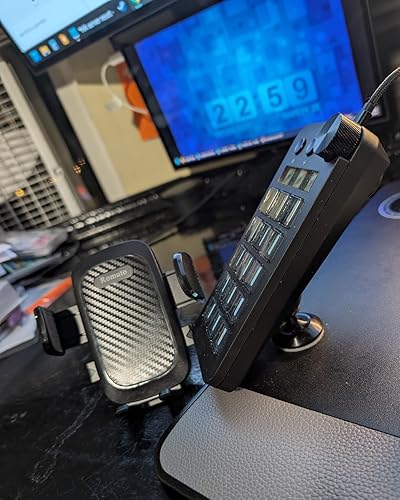
- Vertical Space-Saving DesignWhile traditional horizontal stream controllers tend to take up desk space, the Stream Dock N1 adopts a vertical layout. It saves valuable desktop space while expanding shortcut keys.
- Freely Customizable Drag and drop your desired actions onto the 15 customizable LCD macro keys and LCD bar, then set their properties to assign single or multiple actions. Additionally, you can assign your own images, logos, screenshots (JPG, PNG), or animations (GIF) to each LCD key, enhancing button recognition and memorization. The large dial makes it easy to adjust the volume and button brightness.It provides solid support for fine adjustments during creative work such as video editing.
- Freely Customizable Drag files, browsers, apps, images and videos to 15 LCD keys for one-click access without searching manually before work, greatly boosting efficiency. You can also customize each key with images, screenshots and GIFs for unique visual styles.
- Automate Repetitive TasksFor office use, launch apps, input preset text, send template emails and open files or websites instantly. For photo & video editing, bind custom shortcuts and multi-step macros to speed up workflows. During livestreams, easily toggle scenes, mute mics, hide/show sources and go live with a single press. Gamers can save intricate combo moves as macros for smoother in-game controls.
- Multiple CompatibilityThis macro keyboard is compatible with both Windows and macOS. It works seamlessly with popular software such as OBS, PowerPoint, YouTube, Twitter, Discord, Excel, Word, Photoshop, and Adobe Premiere Pro, making your workflow even smoother.Download ready-made plugins from SPACE STATION(plugin market) to easily control mainstream apps and optimize your workflow.
- Meet a Variety of NeedsThe application space of this macro keypad offers hundreds of plugins, including schedule reminders, weather, calendars, etc., making it not only a productivity tool but also the perfect desktop companion. In addition, there are 60 icon packs available for you to download and use according to your needs.
- Warranty Period The product warranty period is 24 months from the date of purchase.
- Customer Support If you are still unsure about the setup or operation of the streaming deck after reading the Quick Start Guide that came with it, you can get support in the following ways: 1. Please scroll down the product detail page to watch the tutorial videos in the product videos section. 2. Please select the "Ask a Question" button to contact us.
Description
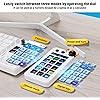
Effortlessly toggle between three modes using the handy adjustment dial.This macro keyboard integrates macro shortcut, calculator and standalone number pad all in one compact unit.Access your custom commands instantly with a single tap under shortcut mode to slash repetitive desktop operations.When typing plenty of figures on laptops without an integrated numpad, switch to numeric keypad mode for effortless data input. Swap to calculator mode to compute directly without launching extra software. Refresh your stream dock’s look freely with abundant interchangeable keypad cap skins. We provide 15 exclusive downloadable skin options for this macro keypad. Pick from various styles and hues to coordinate seamlessly with your mechanical keyboard’s color scheme, letting you craft a unique desktop setup that matches your personal aesthetic. Swap designs anytime to refresh your workspace vibe easily. Drag and drop your desired operations onto the 15 customizable LCD keys and LCD bar, set their properties, and instantly execute one or more shortcut commands with one-touch automation. With just one touch, you can launch macros, enter text, open documents and websites, perform game combos, launch apps, edit videos, control media, switch scenes in OBS, hide sources, start streaming. Assign single or multiple actions to 15 customizable LCD keys and LCD bar by dragging and dropping the desired operations onto them and setting their properties. You can choose an icon downloaded from the icon library, or capture a part of a website logo or image and set it as the icon to make your button more recognizable and memorable. By utilizing the "Action Flow" function of "Operation Flow," you can execute multiple macro actions in a specific order and freely control tasks. The application space of this macro shortcut keyboard offers hundreds of plugins and 60 icon packs maks it not only a productivity tool but also a perfect desktop companion. The numeric keypad mode neatly covers your keyboard’s numeric shortage. It conserves desk space while drastically boosting efficiency for all figure-intensive daily office jobs. Compatible with mainstream office tools,including Excel,PowerPoint,and Zoom.One-click shortcuts:send template emails,launch target software, files, or webpages, improving your daily work efficiency. Assign tedious,repetitive editing actions from Photoshop,Premiere Pro,and After Effects to 15 keys to reduce repetitive clicks,streamline the editing process,and significantly shorten production time. Compatible with OBS,YouTube,Twitch.Assign actions such as scene switching,microphone mute,source display switching,and live stream start to15 keys.Manage core live streaming functions with just a tap. Seamlessly integrates with Spotify,allowing you to assign actions like play/pause, previous/next track,and volume control to keys for direct control with a single key,or intuitively adjust the volume. 1.Is the stream dock N1 a wireless stream controller deck? No, it is not wireless. It connects to your PC or laptop via a USB cable. 2.Does the stream controller N1 work without the software running? No, it needs its supporting software installed and running to function properly. 3.Can the Macro pad N1 be used as an external keyboard to store programs? No, it does not support program storage functionality. 4.Does the Stream Dock N1 have Bluetooth? The Stream Dock N1 does not have Bluetooth. 5.What should I be aware of if I need to connect a device to my computer via a USB hub? If a USB hub is absolutely necessary, ensure your hub has both power supply and data transmission capabilities.Otherwise, the Stream Dock N1 may not be recognized.
Brand: ActionRing
Compatible Devices: PC
Connectivity Technology: Usb
Keyboard Description: Programmable keyboard with 15 Customizable Macro Keys, Three Modes (Shortcut Keys, Calculator, and Numeric Keypad), Customizable LCD Bar, Large Dial See more
Recommended Uses For Product: Gaming, Video Editing, Photo Editing, Live Streaming, Content Creation, Office Work
Special Feature: Angled design optimized for comfortable numeric keypad use, Customizable numeric keypad cap skins, Three Modes (Shortcut Keys, Calculator, and Numeric Keypad), Vertical space-saving design See more
Color: White
Product Dimensions: 5.89"L x 2.98"W x 1.43"H
Material: Acrylonitrile Butadiene Styrene
Included Components: Stream controller deck N1 *1 , USB A to C port data cable *1, User manual *1
Compatible Devices: PC
Connectivity Technology: Usb
Additional Features: Angled design optimized for comfortable numeric keypad use, Customizable numeric keypad cap skins, Three Modes (Shortcut Keys, Calculator, and Numeric Keypad), Vertical space-saving design
Language: English
Power Source: Usb Powered
Switch Type: Mechanical
Keyboard Layout: QWERTY
Hand Orientation: Left
Water Resistance Level: Not Water Resistant
Total USB 2.0 Ports: 1
Minimum Required Operating System Version: Mac OS 14 Sonoma, Windows 10
Compatible Operating System Family: Windows
Number of Keys: 15
Color: White
Item Dimensions L x W x H: 5.89"L x 2.98"W x 1.43"H
Enclosure Material: Acrylonitrile Butadiene Styrene
Brand: ActionRing
Keyboard Description: Programmable keyboard with 15 Customizable Macro Keys, Three Modes (Shortcut Keys, Calculator, and Numeric Keypad), Customizable LCD Bar, Large Dial
Antenna Location: Gaming, Video Editing, Photo Editing, Live Streaming, Content Creation, Office Work
Built-In Media: Stream controller deck N1 *1 , USB A to C port data cable *1, User manual *1
Model Number: N1
Item Highlight: 15 Customizable Macro Keys and LCD Bar,Large Dial,Workflow Controller,Compatible with Windows and Mac(N1 White)
Unit Count: 1 Count
Manufacturer: Shenzhen An Rui Xin Technology Co., Ltd.
UPC: 769029386020
Number of Items: 1
Warranty Description: 2 Year Manufacturer
Frequently asked questions
To initiate a return, please visit our Returns Center.
View our full returns policy here.
- Klarna Financing
- Affirm Pay in 4
- Affirm Financing
- Afterpay Financing
- Zip Pay in 4
- Financing through Apple Pay
- Financing through Google Pay
Learn more about financing & leasing here.







Top Amazon Reviews