Search  for anything...

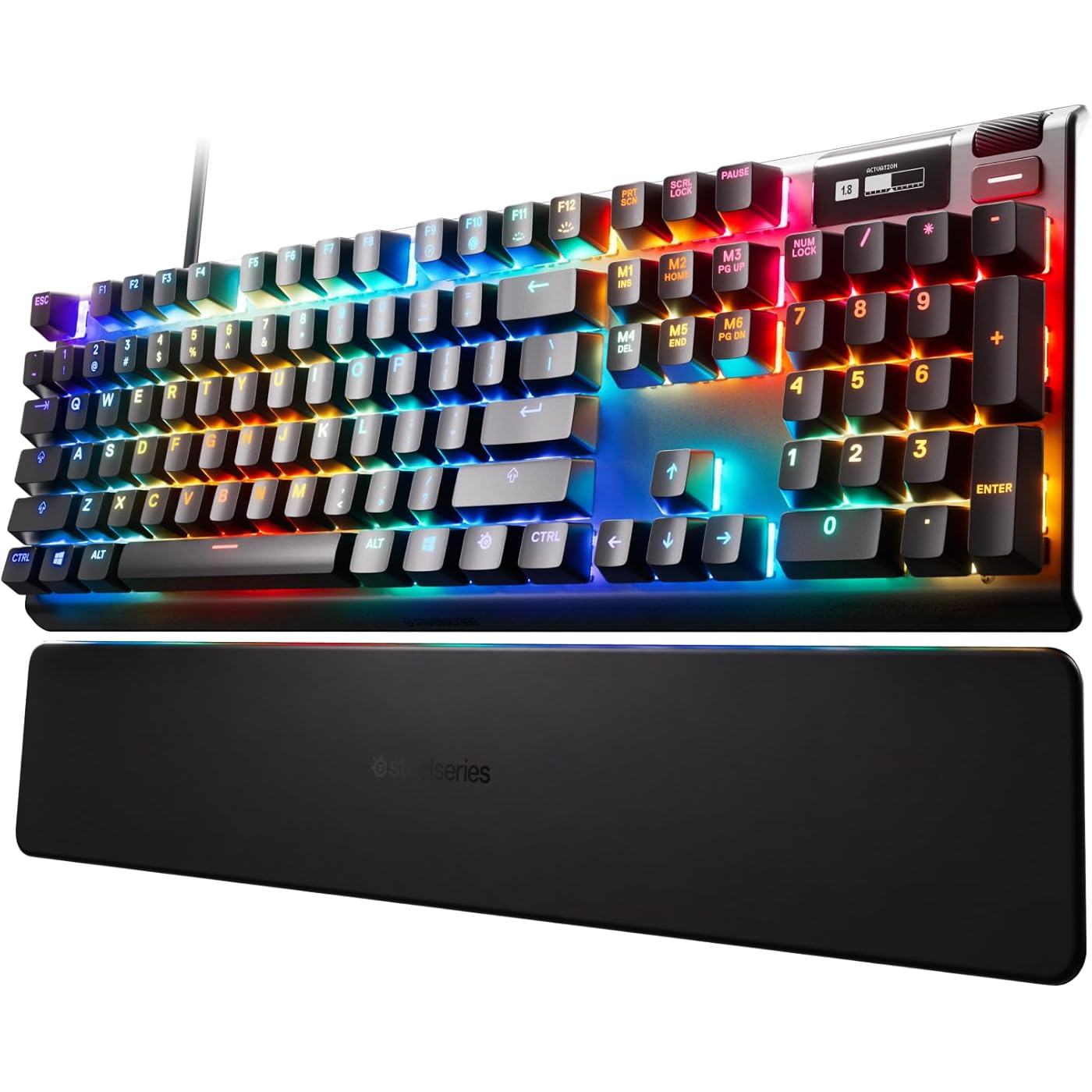
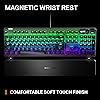
SteelSeries Apex Pro HyperMagnetic Gaming Keyboard — Adjustable Actuation — OLED Screen — RGB – USB Passthrough​

  • Based on 6,627 reviews
Condition: Used - Like New
Checking for the best price...
$172.84 Why this price?
Save $87.15 was $259.99

Buy Now, Pay Later


As low as $28.81 / mo
  • – 6-month term
  • – No impact on credit to apply
  • – Instant approval decision
  • – Secure and straightforward checkout

Ready to go? Add this product to your cart and select a plan during checkout.

Payment plans are offered through our trusted finance partners Klarna, Affirm, Afterpay, Apple Pay, and PayTomorrow. No-credit-needed leasing options through Acima may also be available at checkout.

Learn more about financing & leasing here.

Selected Option

Free shipping on this product

This item is eligible for return within 30 days of receipt

To qualify for a full refund, items must be returned in their original, unused condition. If an item is returned in a used, damaged, or materially different state, you may be granted a partial refund.

To initiate a return, please visit our Returns Center.

View our full returns policy here.


Availability: Only 1 left in stock, order soon!
Fulfilled by Amazon

Arrives Sunday, Jun 14
Order within 22 hours and 16 minutes
Available payment plans shown during checkout

Protection Plan Protect Your Purchase
Checking for protection plans...

Size: Pro Full Size


Style: Gen 2 Wired


Features

  • FULLY CUSTOMIZABLE & STUPIDLY FAST with OmniPoint 2.0 Adjustable HyperMagnetic switches
  • RAPID TRIGGER Eradicate latency arising from the physical movement of the switch through dynamic activation and deactivation of keys based on travel distance rather than a fixed point in the key travel
  • ULTIMATE CONTROL 40 levels of per-key actuation (0.1 4.0mm) set WASD for light, ultra-fast movements and set ability keys to deep presses to avoid accidentally triggering specials
  • 2-IN-1 ACTION KEYS Program two different actions to the same key, such as walking with a light touch or sprinting with a deep press
  • OLED SMART DISPLAY Delivers information at a glance from games and apps alongside a clickable metal roller and media key
  • USB PASSTHROUGH Connect an additional USB-powered device
  • 20x faster actuation, 11x faster response than traditional mechanical keyboards

Description

The Apex Pro is the world's first Hall Effect magnetic switch gaming keyboard. Featuring OmniPoint 2.0 Adjustable HyperMagnetic Switches with Rapid Trigger, total adjustability of actuation points, and 2-in-1 Acton keys for 20x quicker actuation and 11x faster response, all while playing on a full-size keyboard.

Brand: SteelSeries


Compatible Devices: Gaming Console


Connectivity Technology: Wired


Keyboard Description: Gaming


Recommended Uses For Product: Gaming


Special Feature: Backlit, Ergonomic, Integrated Stand, Spill Proof


Color: Pro Gen 2


Keyboard backlighting color support: RGB


Style: Gen 2 Wired


Product Dimensions: 5.5"L x 20"W x 1.6"H


Compatible Devices: Gaming Console


Connectivity Technology: Wired


Additional Features: Backlit, Ergonomic, Integrated Stand, Spill Proof


Keyboard Backlighting Color Support: RGB


Language: English


Power Source: Wired (USB)


Switch Type: Magnetic


Keyboard Layout: QWERTZ


Hand Orientation: Ambidextrous


Button Quantity: 104


Mechanical Keyboard Switch Model: steelseries_omnipoint


Minimum Required Operating System Version: Mac OS 10.15 Catalina, Windows 10


Compatible Operating System Family: MacOS, Windows


Is Electric: Yes


Number of Keys: 104


Color: Pro Gen 2


Style Name: Gen 2 Wired


Item Dimensions L x W x H: 5.5"L x 20"W x 1.6"H


Enclosure Material: Aluminum


Brand: SteelSeries


Keyboard Description: Gaming


Antenna Location: Gaming


Built-In Media: Apex Pro Gaming Keyboard|Download Arctis Pro Product Information Guide|Magnetic Wrist Rest|Product Information Guide


Model Number: 64622


Model Name: Apex


Series Number: 64622


Unit Count: 1.0 Count


Manufacturer: SteelSeries


UPC: 813682029432


Mfr Part Number: 64626


Item Type Name: Keyboard


Item Weight: 2.1 Pounds


Warranty Description: 1 year


Frequently asked questions

The Adjustable Actuation feature allows you to customize the sensitivity of each individual key. That means you can set keys to a higher actuation for typing or lower it for gaming, where quick response is typically needed.

The USB Passthrough is a feature that allows you to connect another device (like a mouse or a headset) directly into the keyboard. This can help in reducing cable clutter on your desk and make it easy and quick to connect and disconnect devices from your computer.

The term 'World's Fastest Keyboard' refers to the Apex Pro's unique mechanical switch design that provides the fastest reaction time and the shortest travel distance among keyboards in the market. Essentially, it improves your response time whether you are gaming or typing because the keys register the input quicker.

The OLED screen on the Apex Pro acts as a mini-dashboard on your keyboard. You can use it to adjust settings, keep track of system information, and even display custom images or gifs.

Top Amazon Reviews

🚀 Abunda's Overview

This is our summary and key points to consider based on customer reviews.


The SteelSeries Apex mechanical keyboard is hailed for its robust and durable construction, and user-friendly features for gaming. It also comes with customizable RGB lighting, programmable keys, and macros. However, there are concerns about the key layout being slightly narrower which may affect typing accuracy.

Pros

  • 🌟 Exceptional build quality and durability.
  • 🎮 Affords high personalization for your gaming style with programmable keys, macros, and customizable RGB lighting.
  • 👨‍💻 Ergonomic design made for long gaming sessions.
  • 🎹 Good tactile and audible sensations from keys.
  • 🔧 Compatible with SteelSeries Engine, an intuitive software for keyboard personalization.

Cons

  • 😥 The narrower key layout may affect typing accuracy.
  • 😕 Heavy typing may wear out the finish on the keys rather quickly.
  • 🔌 Cord is non-detachable and kind of stiff.
  • 😒 The keyboard has two USB plugs, one of which is oddly placed on the left side, which may not be ideal for right-handed technology users.

Should I Buy It?

If absolute typing accuracy and aesthetics are not your top priorities and you're a gamer looking for a reliable, highly customized, and ergonomic piece, SteelSeries Apex mechanical keyboard could be well worth the consideration despite its high-end price tag.


  • Pricey and awesome mechanical keyboard
Size: Pro Full Size Style: Gen 2 Wired
When a rogue Win 10 update took out my Gskill KM780 RGB unexpectedly, I had to pull the trigger fast on a new KB instead of having to endure using my spare membrane board. After a solid day of research, I took a chance on the Apex Pro. Coming from Cherry MX Browns, I had some reservations about OmniPoint. The Browns have a tactile point which I liked. I had tried MX Reds, and wasn't a fan of the linear feel. With these Omni switches being linear, I was unsure but somehow compelled to pass on the Apex 7 with MX Browns and go Pro. TBH, I was half expecting to return it. Needless to say.... I was surprised when I hooked this up! First off... dat switch. Wow. SUPER smooth. The inherent scratchiness of linear MX switches is GONE. It feels like the keycaps are just sort of floating over the brushed aluminum base. The adjustment ability is unique compared to most mechanical boards, bringing a true Hall Effect switch to people. (Look up Hall Effect... gets a little complex for explanation here, but very cool) Actuation can be adjusted from a light brush on the keys (probably overkill) to making the switch bottom out completely. This can also be done on a per key basis. Lot of range to play with! Another key strength... the RGB lighting. Its nothing short of fantastic. The raised caps let the bright and vibrant lighting spill over the board itself, creating a very cool and clean lighting effect. Even for those who don't much care about RGB lighting, it's very tastefully done here. Typing is unreal. I spent 15 mins just typing random weirdness on a word doc just for them feels when I first hooked it up. And for some reason, I find myself with a lot less errors compared to old board with the Browns. I'd commonly get keypress duplication (as if I held the key down) with that switch, and with these Omni switches, it doesn't happen anymore. Of course, these Omni switches are much quieter than the tactile Browns given their linear nature. Not much bad to say here. Some minor gripes would be somewhat "meh" software from Steelseries and the keycaps being ABS instead of something like double-shot PBT caps. The latter feel much sturdier and more premium, and I suppose one could buy some PBT caps if it was a huge issue. Not sure how that would affect the lighting though. The small B&W OLED screen in the upper right doesn't add much in reality, but its kind of a geeky fun thing that you can customize with whatever you want. It does have some functionality with brightness and other features, which is nice to have versus having to use the software. Also, only the primary keys have Omni switches. All the F keys, num pad, and extra function keys are on a generic linear switch that feels good enough. Would be nice to have all keys on omni switches, but it makes sense from a cost perspective and isn't a big deal to me. All in all, fantastic keyboard that towers over my old Gskill in every respect. I really wish MS terrible updates hadn't bricked old board, but I guess things happen for a reason. If you have the cash and want a great analog-based mechanical keyboard with adjustable hall effect switches.... this is the one for you. Very hard to fault this board. Steelseries done good here. ... show more
Reviewed in the United States on March 8, 2020 by P-Town Cracker

  • Nice keyboard, nice features, amazing RGB!
Size: Pro Full Size Style: Gen 2 Wired
This keyboard is great. It's good for typing or gaming. The whole board feels well made and solid, I think it'll last a while. The dual USB (one connector for keyboard and one for USB passthrough) is a bit thick and stiff, but not unmanageable by any means. The programmable keys make a HUGE difference when going between typing and gaming, and with the Steelseries software it's extremely easy to set up. I went into it assuming the programmable keys were more of a marketing gimmick and never actually intended on adjusting them...but that changed when I realized that they're definitely a feature I'll use. The RGB is nice and bright and very customizable with the software. Lots of options for colors. Something to note, they board turns on/off keys white when active (caps lock, num lock, etc stay white when on). This confused me at first, I thought the LEDs in my NumLock key were broken because it stayed white. Definitely not an issue, but not a feature that's pointed out anywhere either. The OLED screen is the one part of the keyboard that I'll admit, while cool, is a bit gimmicky. It does have it's use for sure, like changing saved profiles without the software, but it's not necessary. It's a neat little addition that allows another level of customization, but I feel Steelseries could have left it off and made they keyboard $10 less or something. It gives the "pro" keyboard a premium feel, but seems wholly unnecessary once the "neatness" wears off. Overall it's a great keyboard, definitely a purchase I'm glad I made. If the board holds up, which I think it will, I'll definitely look into other Steelseries products in the future. ... show more
Reviewed in the United States on May 6, 2022 by RFM

  • Very impressive high quality product
Size: Pro Full Size Style: Gen 2 Wired
The Steelseries Apex Pro is a superb keyboard. (Apology for the superlative!). It has been my favorite for the 10 days during which I tried seven other brands of keyboards. The typing was my easiest and best with this. I found out how much the keyboard wrist pad is useful. This, and other brands, I tried are for committed gamers. I have never played a single game, so you might wonder why I want it. This keyboard is more rugged, more resistant to passionate keyboard pounding during games. This can, and I believe, it does give it extra durability. Of course, durability and feature come with a price, but I have never regretted the keyboard design and manufacturing on that account. I do not want to paraphrase the features which are more than plenty in the ads. I like them all. The keyboard lighting is exceptional compared to others I have tested. My case has to do with guide and instruction the manufacturer publishes with the product. I must say the worst I had been exposed to was Logitech, even though I owned their products for several decades. In their case, it is a flimsy 2-page paper, where essential Logitech write-up shares its space with 9-10 other languages. My primary use of any keyboard is office type. My primary interest in the high-end gaming keyboards is the ability to create and use macros. Those macros can be used in non-gaming software, such as MS Office, Adobe, Movavi, and just about anything else. That was the place where my problem started. Inadequate documentation is common. Manufacturers count on the internet users to provide instructions for any aspect of the advertised features. If you cannot find what you are looking for you are ready for time consuming guesses. Actually, Steelseries Apex Pro is amongst the better ones. Unfortunately, there are those of us users, who had to be spoon fed the instructions despite decades of computer experience. I give Steelseries five stars, even though my initial bad guesses with the keyboard necessitated a return. But guess, the replacement is none other than Steelseries. ... show more
Reviewed in the United States on October 17, 2024 by Bill_Ben

  • The Absolute Pinnacle of Customization and Performance
Size: Pro Full Size Style: Gen 2 Wired
This is easily the most impressive keyboard I've ever had on my desk. While it skips the over-the-top, flashy lighting animations in favor of some solid, high-quality standard themes, it more than makes up for it with sheer engineering brilliance. The level of configuration is staggering—it's not just about RGB; it's about how the keys actually behave. For instance, I've set mine up so a full press acts as rapid-fire for gaming, but a slight lift and lower triggers a reload at the half-up position. The dual-actuation and rapid trigger features are game-changers, allowing for a level of control that feels almost like cheating. Your imagination is truly the only limit to what you can do with this hardware. It's a powerhouse for anyone who takes their setup seriously. ... show more
Reviewed in the United States on February 11, 2026 by Bobby S

  • Good keyboard.
Size: Pro Full Size Style: Gen 2 Wired
I’ve been using this for a few years now and it’s held up really well and I enjoy using this keyboard . I love all of the settings and customization options that you have, including customizable actuation. This keyboard is really fast, I have no input issues and overall has a nice feel. It also has a USB port on the back side of the keyboard which I thought was a nice touch. If you have the chance to get it I recommend it! ... show more
Reviewed in the United States on August 16, 2025 by Joseph S.

  • Not perfect, but great. Plenty of room for improvement.
Size: Pro Full Size Style: Gen 2 Wired
Going to keep this to a simple pros and cons list, although it is rather extensive. Pros ----- • Typing feel is great. Similar to Cherry red. • Subjectively satisfying typing sound from bottoming out keys. • Adjustable actuation is a fantastic feature and helps working from home without swapping from a gaming keyboard. • Backlight looks fantastic • Software actually isn't all that bad. It gets the job done. Automatic profile switching has thus far been reliable. • Keyboard profile is small enough to not get in the way, unlike some competitors with extended frames and fluff. • Wrist rest is well made, ,magnetic attachment is convenient. • OLED screen controls double as limited media controls. • Not overly heavy. • Raised / exposed cap design makes it easier to clean. • Subjectively, it's just a very good looking product. Cons ----- • Stock key caps are sub-par for a $200 product. Should have had PBT. • The proprietary switches don't always behave with third-party caps. I swapped out the caps for HyperX Pudding PBT caps and had to put O rings on my space bar and both shift keys to prevent them from getting stuck in a depressed position. • The OLED screen is next to useless, unless you don't want to use software profiles. It has some gimmick features, but I would have preferred to ditch it for dedicated lock LEDs or media keys. • No dedicated lock LEDs. Num, scroll, and caps lock are conveyed via the key switch LED, which can throw off your designs and the overall look of the board. • The scroll wheel and button for the OLED screen are very low quality. They feel stiff and are generally unsatisfying to use. The scroll wheel seems to hang up on some parts of the rotation and move more smoothly on others. • The keyboard feet are low quality and cheap, although 90% of people should not be using them, anyway. Using feet on keyboards forces you to bend your wrists, causing further strain, and I can't for the life of me figure out why so many people do this. Keyboard feet exist to allow you to see the keys better, which is something someone in the market for a $200 keyboard probably shouldn't have trouble with. Off topic... • The angle of the board is rather extreme while using the feet, so this problem is made worse. • The wrist rest, while well made, is also not very ergonomic. The angle at which it sits is necessitated by the very low profile it offers. A proper wrist rest should be flat and flush to the board and sit higher. It is also not long enough to accommodate my hands, but may be a better fit for someone with small hands. It is being relegated to a drawer and replaced with a soft, large rest. • The wrist rest has a soft texture but is still rather hard. This has pros and cons and is often a preference point, but it's usually a bad thing when the rest is poorly angled and fit to your hands, as you're dealing with added pressure and poor ergonomics. ... show more
Reviewed in the United States on May 19, 2020 by Joshua G.

  • Best Gaming Keyboard
Size: Pro Full Size Style: Gen 2 Wired
This keyboard has it all. I played around with the sensitivity settings of the keys and it is day and night. If I want the slightest touch to activate it then it works. If I want that mushy feel it does it also, that is just awesome how you can adjust the travel of the keys. The LED colors are also very good and they have fun settings. Like for instance if you press a key I have my keyboard to give the affect of a splash effect so the other keys ripple away from the one I depressed. The small LCD screen is good enough to read and I hope in the future they build off of that. The palm rest is good, but I can see that it attracts everything. So wiping it down from time to time is a good thing. I was asked how to keep the gaps of the keys so clean? A paint brush will get all those food particles, dust and anything else out and it is gentle on the keys. The volume control is great to have and the USB ports are also a good measure to add peripherals. You can change the LED patterns and what they do; lots to choose from. On thing though is that if you are not use to seeing no indicators of CAPS on or Number Lock ON then you will need to get use to this keyboard as this is handled by color. Caps on will have the CAPS button turn white. When it is off it just becomes what color your scheme is. Same with numbers lock. It is not cheap, but if you are gamer and love keyboards like this then it is worth the cost; I am loving it. ... show more
Reviewed in the United States on June 17, 2020 by Steve

  • Nice mechanical keyboard.
Size: Pro Full Size Style: Gen 2 Wired
Bought one to replace an aging Corsair K-70 Mk.2 RGB. Comparing the two, the Steelseries has easier to use software (less buggy or resource heavy) and the color range and intensity of the LEDs is greater than on the Corsair. The Corsair software seems to allow you to do a bit more with regards to effects, but I am still learning the ins and outs of the SS app. The cons to this keyboard is the LCD menu has various options (like brightness) buried several levels deep and I miss having a dedicated brightness key that I could just tap. Also, for some odd reason the Enter, Tab and Caps Lock keys are not labeled but rather just use symbols. A very small nit to pic but I would have preferred these were still labeled as on other keyboards. I really like the wrist guard with its slightly pliable rubber coating. the keys are sufficiently clicky without being too loud. As for the adjustable sensitivity setting, seems a bit overhyped. I just left everything at the default and seems to work ok but then I am not trying any competition gaming so YMMV. One last comment is with the scroll wheel. It can be clicked or scrolled but I have found that if you try and rotate it away from the edge, it can seem to *stick* a bit. You have to scroll it from just the top edge and then it scrolls more or less freely, but never as smoothly as the one on the Corsair keyboards. ... show more
Reviewed in the United States on August 26, 2024 by Madmatt

Can't find a product?

Find it on Amazon first, then paste the link below.
Checking for best price...