




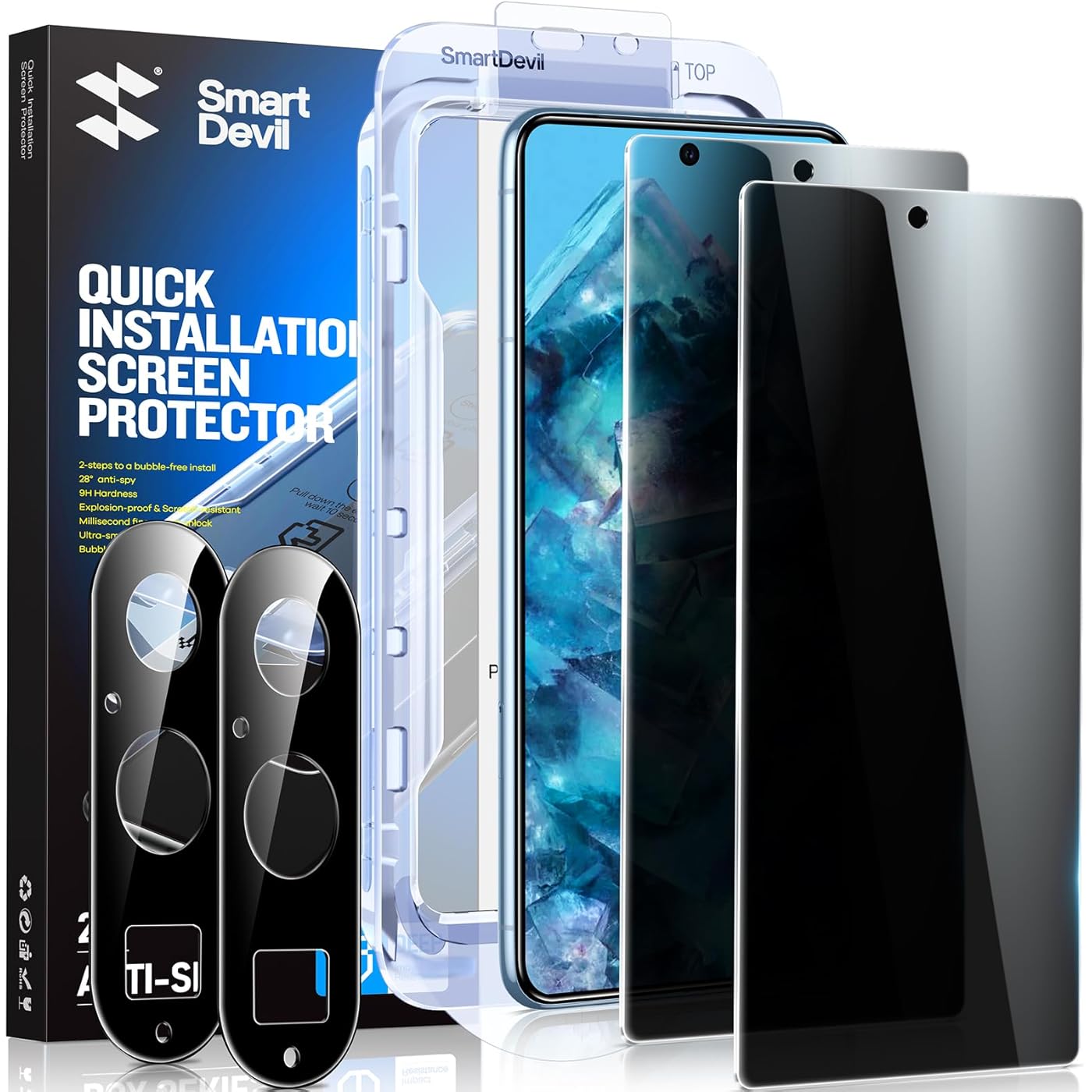
SmartDevil 2 Pack for Google Pixel 8 Pro Privacy Screen Protector with 2 Pack Camera Lens Protector, Finger Print Reader Compatible, Fast & Easy Installation, Clear 9H Tempered Glass Film, Alignment Frame




Notify me when this product is back in stock
Buy Now, Pay Later
- – 4-month term
- – No impact on credit
- – Instant approval decision
- – Secure and straightforward checkout
Payment plans are offered through our trusted finance partners Klarna, Affirm, Afterpay, Apple Pay, and PayTomorrow. No-credit-needed leasing options through Acima may also be available at checkout.
Learn more about financing & leasing here.
Selected Option
30-day refund/replacement
To qualify for a full refund, items must be returned in their original, unused condition. If an item is returned in a used, damaged, or materially different state, you may be granted a partial refund.
To initiate a return, please visit our Returns Center.
View our full returns policy here.
Recently Viewed


Size: Pixel8pro
Features
- Just Cover and Pull Revolutionary quick and easy Installation with SmartDevil alignment kit. Innovative automatic positioning, dust removal, and absorption technology, making the installation is just effortlessly easy in seconds. No more worrying about bubbles and dust!
- Perfect Fit for Google Pixel The Screen Protector is meticulously designed to provide a perfect fit for your Google Pixel. Enjoy seamless coverage and protection for your device's screen with our specially tailored Screen Protector.
- 9H hardness & 5X Stronger Scratch resistant SmartDevil tempered glass for Google Pixel screen protector film made of nano-sized super-strong shatterproof tempered glass material. SMARTDEVIL Lab has tested thousands of times, even if the edge of the tempered film is squeezed more than 10,001 times, it will not break and scratch. (Certified by SGS) Its hardness has far exceeded the other screen protector on the market.
- Responsive Touch Enjoy the same touch sensitivity, feel, and response on your phone as you would with the original screen. The film also Features a fine oleophobic coating, it effectively resists scratches, oil, and fingerprints.
- Anti-Fingerprint Resistance for a Cleaner ScreenThe SmartDevil screen protector comes with a transparent hydrophobic oil repellent layer. After testing, they effectively prevent 99.99% of fingerprints caused by sweat and oil stains.
Brand: SMARTDEVIL
Compatible Devices: Pixel8pro
Material: Tempered Glass
Item Hardness: 9H
Product Dimensions: 7"L x 3"W
Compatible Phone Models: Pixel8pro
Special Feature: Touch Sensitive, Anti-Shatter, Anti-Fingerprint, Bubble Proof, Scratch Resistant
Finish Type: Glossy
Screen Surface Description: Matte
Clarity: 9.5
Product Dimensions: 7 x 3 x 0.5 inches
Item Weight: 3.84 ounces
Special features: Touch Sensitive, Anti-Shatter, Anti-Fingerprint, Bubble Proof, Scratch Resistant
Manufacturer: SmartDevil
Date First Available: June 27, 2024
Frequently asked questions
To initiate a return, please visit our Returns Center.
View our full returns policy here.
- Klarna Financing
- Affirm Pay in 4
- Affirm Financing
- Afterpay Financing
- PayTomorrow Financing
- Financing through Apple Pay
Learn more about financing & leasing here.


![Ailun Screen Protector Compatible for iPhone 11 / iPhone XR [6.1 Inch], 3 Pack Case Friendly Tempered Glass](https://m.media-amazon.com/images/I/81MZ5D1wHpL._AC_US500_.jpg)
![Ailun Privacy Screen Protector for iPhone 16e / iPhone 14 / iPhone 13 / iPhone 13 Pro [6.1 Inch] 2 Pack Anti Spy Private Tempered Glass Anti-Scratch Case Friendly [Not for iPhone 16 6.1 Inch]](https://m.media-amazon.com/images/I/71dYa8XZ3iL._AC_US500_.jpg)
![Ailun Screen Protector for iPhone 16 Plus/iPhone 15 Plus/iPhone 15 Pro Max [6.7 Inch] Display 3 Pack Tempered Glass, Dynamic Island Compatible, Case Friendly[Not for iPhone 16 Pro Max 6.9 Inch]](https://m.media-amazon.com/images/I/71S7Ej-DfQL._AC_US500_.jpg)

![DIMONCOAT 4-PACK TOP 9H+ Glass for iPhone 15 Pro Max Privacy Screen Protector [Auto Alignment Kit] [10X Military Protection] UNBREAK Tempered Glass Film for iPhone 15 Pro Max 6.7 inch Case-Friendly](https://m.media-amazon.com/images/I/71pccThG8cL._AC_US500_.jpg)
![Mothca Matte Privacy Screen Protector for iPhone 15 Pro Max[6.7 inch] with Easy Installation Tool, Anti Spy Anti Glare Full Coverage Tempered Glass Film, Anti-Fingerprint, Case Friendly Smooth as Silk](https://m.media-amazon.com/images/I/61M9R9gt7YL._AC_US500_.jpg)
![Ferilinso [6 Pack] Camera Lens Protector for iPhone 14 Pro Max iPhone 15 Pro Max iPhone 14 Pro iPhone 15 Pro Accessories camera screen Cover 9H Glass Unbreakable Protection Case Friendly](https://m.media-amazon.com/images/I/71ZxrSrL4gL._AC_US500_.jpg)


![Ailun Camera Lens Protector for iPhone 13 Pro & iPhone 13 Pro Max,Tempered Glass,9H Hardness,Ultra HD,Anti-Scratch,Easy to Install,Case Friendly [Does not Affect Night Shots][2 Pack]](https://m.media-amazon.com/images/I/71I7S1XMaTL._AC_US500_.jpg)
