Search  for anything...

Redragon M810 PRO Wireless RGB Gaming Mouse 10000 DPI Remapping Keys

  • Based on 3,905 reviews
Condition: New
Checking for the best price...
$34.99 Why this price?
Save $44.99 was $79.98

Buy Now, Pay Later


As low as $8 / mo
  • – 4-month term
  • – No impact on credit to apply
  • – Instant approval decision
  • – Secure and straightforward checkout

Ready to go? Add this product to your cart and select a plan during checkout.

Payment plans are offered through our trusted finance partners Klarna, Affirm, Afterpay, Zip, Apple Pay, and Google Pay. No-credit-needed leasing options through Acima may also be available at checkout.

Learn more about financing & leasing here.

Selected Option

Free shipping on this product

FREE 30-day refund/replacement

To qualify for a full refund, items must be returned in their original, unused condition. If an item is returned in a used, damaged, or materially different state, you may be granted a partial refund.

To initiate a return, please visit our Returns Center.

View our full returns policy here.


Availability: In Stock.
Fulfilled by Amazon

Arrives Oct 21 – Oct 22
Order within 3 hours and 51 minutes
Available payment plans shown during checkout

Protection Plan Protect Your Purchase
Checking for protection plans...

Color: Black


Style: M810 PRO


Features

  • Wireless for Boundless Winning - Cables truly will affect your detailed battle reaction, Redragon M810 pro wireless gaming mouse with 2.4Ghz nano receiver offers you the purest mouse moving experience and hype your KDA rise again.
  • Adjustable DPI to 10000 - Geared with 5 on-board DPI levels (500/1000/2000/3000/10000) which allow your mouse movements to be registered to each pinpoint location. 5 DPI levels are free to DIY with software, for gamers to switch swiftly in game.
  • Easy Keybinding with Macro - All 8 programmable buttons are all editable with customizable tactical keybinds in whatever game or work you are engaging. 1 rapid fire + 2 side macro buttons offer you a better gaming and working experience.
  • Ultra Long-lasting Core - Equipped with the PAW3325 Optical Pixart sensor, the mouse consumption is further optimized with 1000Hz Polling Rate in dual mode. Rechargeable battery keeps the mouse working up to 45 hours at maximum (eco-mode).
  • Adjustable True Color - With Redragon Pro driver, DIY endless style like dynamic streaming, breathing, waving. The game closely linked with various lighting modes makes your room full of competitive vibe.

Description

Snug right-hand grip design with skin-friendly finish, keeps your hand clean with less fatigue after a long gaming or work session. Assures your excellent using experience in all aspects. The powerful software supports DPI redefinition, that makes your learning curve smoother and seamlessly adapt to the new mouse. Notice: Download the software from the Redragonshop website. Weighs only 178g (6.2 oz) Comfortable to wear all day long! Pink! Yes, that is PINK available now, cute & hot. 6 Types Available for Any Keyboard Moding Tactile, Linear, Silent, We Got What You Want

Brand: Redragon


Color: Black


Connectivity Technology: 2.4Ghz Wireless, USB-C


Special Feature: Comfort Grip, Programmable Buttons, Rapid Fire Key, Wireless


Movement Detection Technology: Optical


Connectivity Technology: 2.4Ghz Wireless, USB-C


Additional Features: Comfort Grip, Programmable Buttons, Rapid Fire Key, Wireless


Movement Detection: Optical


Button Quantity: 8


Hand Orientation: Right


Compatible Devices: Gaming Console, Personal Computer, Tablet


Operating System: WINXP/Vista/WIN7/WIN8/WIN10


Battery Average Life: 45 hours


Number of Batteries: 1 Lithium Polymer batteries required.


Hardware Platform: Laptop, PC


Power Source: Battery Powered


Mouse Maximum Sensitivity: 12000 dots_per_inch


Minimum Required Operating System Version: Windows 10


Embellishment Feature: RGB


Range: 10 meters


Item Weight: 4 ounces


Item Dimensions L x W: 8.07"L x 6.1"W


Unit Count: 1 Count


Brand: Redragon


Model Name: Taipan Pro


Antenna Location: Gaming


Model Number: M810 PRO


Manufacturer: Redragon


Mfr Part Number: 289803088


Warranty Description: 1 year


Color: Black


Style Name: M810 PRO


Theme: Video Game


Enclosure Material: ABS


Finish: Matte


Frequently asked questions

If you place your order now, the estimated arrival date for this product is: Oct 21 – Oct 22

Yes, absolutely! You may return this product for a full refund within 30 days of receiving it.

To initiate a return, please visit our Returns Center.

View our full returns policy here.

  • Klarna Financing
  • Affirm Pay in 4
  • Affirm Financing
  • Afterpay Financing
  • Zip Pay in 4
  • Financing through Apple Pay
  • Financing through Google Pay
Leasing options through Acima may also be available during checkout.

Learn more about financing & leasing here.

Top Amazon Reviews


  • I finally made the jump to wireless and this does not disappoint
Color: Black Style: M810 PRO
I am using this mouse primarily for gaming, so features like sensitivity control, comfort and latency are important for me. This mouse does all of these well. In fact, I think it would be easier for everyone if I just list the few minor things I don't like: The texture on the right side of the mouse irritated my pinky a bit, but I either got used to it or started holding my pinky differently so I do not really notice anymore. The "rapid fire" button only does three click bursts. I cannot even find a way to change this in the reddragon software -- you can change the function of the button, but the rapid fire can only be done in a 3 click (or shot, in an FPS) burst. You can even change things like the speed of the burst, but not just have it go full auto clicking when held down. I would often use this button for example in games where I am managing an inventory to rapidly sell large quantities of items -- I now have to click (although only 1/3 as much as I normally would), but this still gets annoying if I am trying to dump say 100 things. My old mouse with true rapid fire would drain stuff in a second. **** The downloadable software is pretty nice. You can map any button to any function and control the LED colors and patterns. The mouse stores 5 DPI settings that you can customize both in DPI scale and the color that it illuminates the mouse wheel. I was really worried about latency too, but there is no perceptible latency for me when using it wirelessly. I as a disclaimer, I do have my PC and the wireless dongle only about 3 feet from the mouse at any given time, but so far it has seemed effectively instant to me. I also have large (specifically wide) hands and this is still pretty comfortable. No more soreness than any other gaming mouse I have used after long use. I have not truly tested battery life but after a full charge, I used the mouse for about 8-9 hours in eco mode (RBG off) and was showing 90% battery life in the app. All in all, this seems to be a great mouse by any standard, let alone at the price point of $30-40. I do not think a more expensive mouse would increase my gaming experience in any way. I have only had the mouse for a few days though, so the only thing to worry about is its longevity. If the mouse stops working or acting weird, I will update this review accordingly. Edit 4/18/24: just wanted to add a positive comment about battery life. I have been using the mouse for about a month in ecomode. I use it nearly everyday for 3-4 hours and am just now charging it for the second time (the software says it is at 40%). That's definitely better than I expected when I purchased. It's USB-c so you can use whatever USB-C cable you want, and it does not have to be the one included. It will still function wirelessly while being charged. Bringing this up because I used a wireless mouse once that would shut off when charging and the only way to use it was to plug it directly into the computer while charging -- this one can be used with any power source. Very happy with that ... show more
Reviewed in the United States on March 17, 2024 by Ddock

  • Finally a decent mouse
Color: Black Style: M810 PRO
I was having a ridiculous amount of difficulty finding a decent wireless mouse for home and light gaming. Several mice from big name brands had left click problems, others seemed to stutter with movement, and price didn't seem to matter. There was something I hated about all of them. I bought this because the price was good, I figured it wouldn't be any worse. I set it up, the movement is smooth, the clicking is good. That's all I wanted. I can turn off all the lights too. It was a little confusing at first because the website requires you to actually type "www", and the software download isn't obvious. Once it was installed, I found I could set the 5 DPI levels however I wanted and refine the movement speed precisely. Don't bother with the Windows built-in cursor controls, you'll just confuse things. Use the software instead. Note that the DPI defaults to the lowest setting out of the box, which is very slow. You'll need to click one of the top buttons on the mouse or set the DPI differently in the software to make the cursor move at a respectable speed. Once past that, it feels well built, no worse than any other mouse I've tried for the price. Fits my hand well too. Very pleased. ... show more
Reviewed in the United States on September 16, 2026 by B. Villanueva

  • Broke After four months of use.
Color: Black Style: M810 PRO
UPDATE: I reached out to the company directly about the mouse issue. After some troubleshooting they are sending me a replacement. I am grateful for their fast responses, and willingness to help in this situation. A good company, and worth the money. I got this mouse in September 2025 as an accessory to my brand new gaming laptop. It has been great up until yesterday. Yesterday it started acting up in a way that's hard to describe. I was just playing Solitaire on my laptop, and it kept turning one click into multiple so I'd draw three or four cards instead of one at a time, and sometimes when I went to drag and drop cards it would stop dragging them itself despite still holding the left mouse button down, and it would often times click when I wasn't clicking. This has made gaming next to impossible. Even trying to play Peak is difficult, because it either doesn't register that I am pressing the left mouse button to start climbing or just releases my grip despite not letting go of the button. I've died in the game a few times because of this. I came here to try to get product support, but it wasn't an option for this mouse. I'm hoping this review will get some attention so I can get help with this, because I'm a gamer who needs to be able to game. I've tried using a different mouse pad, and cleaning the mouse. Neither of those things fixed it. I of course did the "turn it on and off" again thing, and even tried uninstalling the software from my laptop and reinstalling it. Nothing has worked. Anyone have any ideas? ... show more
Reviewed in the United States on January 14, 2026 by Willow Monk

  • Best Mouse EVER!
Color: Black Style: M810 PRO
I picked up this mouse recently for work and I’m honestly really happy with it. The buttons feel super responsive and have a nice clean click to them, and there are plenty of extra ones you can customize which makes it really convenient. The overall quality feels great too. It’s solid without being heavy and nothing feels loose or cheap. The ergonomics are very good. It fits my hand really comfortably and I can use it for long sessions without any strain. The customization options are also awesome. I can adjust the DPI, change what each button does, and play around with the lighting. The lights are one of my favorite parts because they look really cool on my desk and give it a nice glow. Accuracy has been excellent as well. Tracking is smooth and precise whether I’m gaming or doing normal work. Overall, I’m super impressed with it and I highly recommend it to anyone looking for a great mouse that looks good and performs even better. Compared to other mouse’s at triple the cost, this is the best mouse I’ve ever owned! The charger is a nice and solid rope USBC cable, not some plastic cheap cable that will eventually break. You can also have it connected and use it wired as well. The battery life is amazing though. Also included some really cool stickers, that I HIGHLY appreciated! 10 out of 10! ... show more
Reviewed in the United States on November 21, 2025 by ibrahim

  • Logitech G306
Color: White Style: M810 PRO
I have been using a G Pro wired for the last 3 years followed by both a black and a white G305 on a desktop and a laptop for the last year. This review is about what I’d like to see in an updated version of the G305 mouse. I really hope that there will be an update because despite various points I will discuss below, it is the best mouse that I have used both in terms of performance and shape. The devil is in the details, and since most of the good design considerations that lead to better mice for us, the consumers are now well established and understood it is more important than ever to really pay attention to the details. 1. Sensor: Bad sensors in gaming mice have become a thing of the past. Sadly this is not true for mice in general, but hopefully soon the “non-gaming” mice will catch on. More on this below. It is important to remember that laser sensors at one point almost took over. Market pressures and advertising every so often can lead to bad decisions. 2. Connection: With the introduction of G305, wireless has become a viable option. I use my G305 with an AA to AAA adapter and a rechargeable AAA battery to reduce weight. My estimation is that I get about 400 hours on a fully charged AAA battery having set the mouse on HI Performance, 1000Hz. This is more than enough, and I think a very good option for both desktop and laptop use, having the ability to easily change rechargeable batteries a few times a year. This is an important accomplishment in the world of computer mice in general, as it should put more pressure on non-gaming mice and their sensors, which currently it hasn’t. Another great option introduced by Logitech is the charging pad, especially for a desktop. A battery whether integrated or replaceable will always add some weight compared to a wired mouse, but having no cable (no matter how flexible) has its own advantages. In order to reduce even more weight what I would really like to see in the future is the use of one AAA battery instead of AA (an adapter has its own weight) and rechargeable mice with a POWERCORE module integrated into the body, rather than requiring an add-on piece. A further reduction in weight might be possible by even removing the charging port, so it would be strictly designed for the recharging pad. 3. Weight: G305 is light in weight, especially with an AAA battery, just under 90g, but it can be even lighter with a more aggressive design. Of course punched holes in the shell are not necessary and even not ideal as stronger and lighter thin shell is possible with a well designed construction. Although it is a marketing strategy, it reveals that consumers are not scared of seeing electronic components. It might be a useful thing to keep in mind when designing mice with replaceable batteries in order to reduce unneeded plastic used around battery compartments. 4. Shape: I am a fingertip grip user. My hand is slightly over 7 inches from the end of my wrist to the tip of my middle finger. I probably have smaller than average hand for a guy, but likely about average overall. I really like the shape and size of G305 as well as the placement of its buttons and the texture of the plastic. It is not perfect, but it comes the closest compared to many gaming mice I’ve tried or used over the years. I do think that there is a small room for improvement, which I am showing in the image that I have included, but any changes made to the shape need to be handled with restraint. The only two areas of improvement that I see is making the mouse slightly wider with more ergonomic curves designed for right hand use only (with a separate left hand version). 5. Buttons: I really like the number of buttons on G305 as well as their placement and mechanism. The mechanism for the two main buttons in particular is a great design which has been used by many of the top Logitech mice for years now, but it does lower the tension which makes the buttons too sensitive. My favorite buttons on a mouse were from Logitech G9x, and although great I wish the main buttons on G305 had the same mechanism as the ones on G9x. Additionally, there is a flaw and an obvious overlook during quality control in the design of G305’s two side buttons. The small PCB onto which the side switches are mounted is either thinner than originally intended, or ended up not quite in the right place, allowing a small gap between the plunger of the switches and the plastic buttons, making it necessary to press the buttons much deeper than they need to be in order to actuate the switches. I was able to fix the issue, but not without opening the mouse. 6. Switches: This is an area that is long overdue for an overhaul. I’m not sure which company first started the trend many years ago of publishing the durability of their switches in number of clicks (10, 20, 30, 40 million), but sadly we have all fallen into a trap set by marketing pressures. Omron, the company that manufactures the switches do sell retail Omron switches with a branding on them Omron Japan, but not rated for this high number of clicks. Apparently some time ago mouse manufacturers decided to start using non-retail switches from Omron, likely at lower prices, which they then tested in-house and assigned the 20 million clicks that their marketing department made us think we need to have in our mice. The only problem being is that those non-retail switches are actually more often than not lower quality than their retail versions and the 20 million clicks rating being absolutely meaningless as it doesn’t represent real life variable pressure usage over time. When once the buttons of a regular mouse that came with an old PC might last for 10 years now might only last a few months before a “20 million” switch starts to misbehave. In case somebody is wondering, Omron D2F-01F for the primary buttons and Omron D2F-01 for the secondary buttons is what we need to have back in our mice. The F version has about half the actuation force, which is great for instant response and effortless repeated clicks, while the other version gives better tactility. 7. Scroll wheel: It seems that for the most part a good design has become a standard among gaming mice. This means no side tilt, no free-spin, and step scrolling with just the right amount of force and feedback. Before buying G Pro I used G303 for about a year and a half. I can see a very clear evolution in the mechanism and encoders being used between G303, G Pro wired and G305. G303 had a fantastic scroll wheel with the only flaw being prone to debris interfering with the encoder sensor. G Pro wired used an encoder that becomes too loose, while G305 is pretty much perfect. There is room for improvement, however. The rubber ridges on the wheel of the G305 are unnecessarily small and pronounced, feeling unpleasantly sharp. The rubber texture of the G903 is a good example of a perfect rubber ring for a scroll wheel. The other area that can be improved is the middle button, and more specifically its switch. The mechanism of the wheel in G305 looks great and will likely allow the middle button to actuate with the same amount of force and give the same feedback as the other secondary buttons, but the switch needs to be Omron D2F-01. Currently the small switch that’s used is fine, but there are mice with Omron sized switches in the middle button and it is definitely an improvement. 8. Software: G HUB needs refinement. This has always been a strong point for Logitech, and their software continues to be great both in terms of functionality and stability, but their new interface needs to be simplified for ease of use. 9. Feet: The original feet are fine, but I didn’t use the mouse with them very long as I had to remove them in order to open the mouse to fix or change some of the parts as discussed above. Unfortunately Logitech still does not sell spare mouse feet for this mouse. This might be due to the fact that for some reason they decided to make one of them very small and with a different thickness than the other four mouse feet. Can we please have all mouse feet the same thickness, not have too many and too small, and not have them cover the screw holes? This would have to be it for now. As always don’t forget to disable “Enhance pointer precision” in Windows mouse settings, and in the unlikely event that somebody from Microsoft reads this, if possible, please kindly make it disabled by default, or better yet, remove the option completely. Thank you very much, and we’ll be grateful for years to come. ... show more
Reviewed in the United States on May 23, 2026 by Ryan McKee

  • It's a light mouse. Came from Logitech g502 wired. Full weighted
Color: Black Style: M810 PRO
So I actually replaced another Red Dragon (Rd in future) keyboard that I had bought earlier this week it was the RD K673 pro 75%. I am loving this keyboard a lot better it was overall $10 cheaper and so far to this keyboard I like the color scheme a little bit better even though I don't like white I can always paint this one if I wanted to but I like the blue feel a little bit the control knob for the volume I like a little bit better it's a little bit smaller and I like having the number pad back. I do also like on the side of this keyboard I can set it to Bluetooth or 2.4 GHz mode I can set it to maca Windows and it does use USB-C for charging. Originally I had thought of this company RD was a cheap brand but so far their products which I have one of their mouse to is pretty good and I'm going to copy paste this review because I'm going to review the mouse at the same time I'm going to take this review and put it over there for the mouse as well because their mouse is great I have the m810 pro wireless and it is an amazing mouse I love it it can go into Eco mode or I can go into full mode The only thing I don't like about it is it's a little bit light for me I'm used to a heavier mouse like the Logitech g502 I have it full weighted out and I like that but I didn't want to spend the money on the wireless version of it. So I'm giving both of these products both the RD EISA K686 Pro keyboard and the RD M810 pro wireless gaming mouse both 5 out of 5 stars. ... show more
Reviewed in the United States on January 30, 2025 by Loona Lombax

  • It was pretty good for a few weeks,
Color: Black Style: M810 PRO
Update: 2 year review. This mouse turned out to be a great mouse. I don't miss my G604 at all. The mouse itself is still holding strong, ZERO issues with it, but now i need a new one as the USB dongle broke (my fault) I can't buy just the dongle. Plus, i'm itching for a new mouse anyway. I WILL be lookin at other RedDragon products. Logitech was great back in the day, but they're really not making anything good anymore. These products may seem and be cheap, but damn if they're working well and holding up to the test of time. Updated review to 5 stars. So I'm a 3-6hr a day gamer. Ya, no life, but i do have a job lol. I've been using a Logitech G604 since it released, but my buttons are now double clicking. So inlue of opening the mouse to replace the buttons, i tried out a new mouse. At first i didn't want a non-replaceable battery in my mouse as the Taipan Pro uses. I use rechargeable batteries in my house, so i have a lot, and the G604 used them. They would last me over a month of constant gaming in the g604, but the Taipan Pro lasts me 3 days before i have to plug in the usb cable and use it wired. Battery life is crap with the leds on. Haven't tried with the leds off , because what's the point of getting an RGB mouse if you turn off the led? The click noise of the buttons is normal, a tiny bit louder than my G604 , but really not noticable. Clicking pressure is nice, no accidental clicks. The wheel on the Taipan Pro is very quiet, compared to the G604 mouse which is louder than the button clicks, which I've always disliked about it. I rarely use the wheel button on any mouse though , but the g604 is the quiest button I've ever heard. Taipan Pro wheel button is just as loud as all the other buttons. As for the feel of the mouse in my hand. I use a palm grip and It fits very much like the G604, as they're both right 60mm wide in the grip. I don't quite like the plastic body in the grip areas. It your hands are slightly oiley, which most naturally are, the mouse feels greasy. I'm constantly wiping my hands dry while using it. The G604 has that rubberized grip that never felt greasy in my hands. The Taipan Pro weighs 111grams while the G604 weighs 140grams. The weight difference is noticeable, but didn't affect my gaming. ... show more
Reviewed in the United States on November 8, 2024 by Kevin R.

  • Impressive mouse particularly for the price.
Color: Black Style: M810 PRO
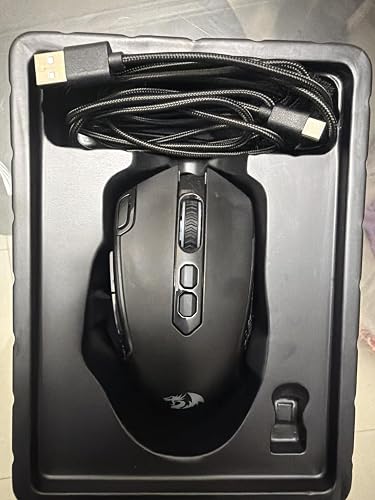
Great mouse, especially for the price. The mouse has a slight more weight to it than the corded mouse I previously used (Cyberpower Elite M2); however, is still fairly light. The shape and counters of the mouse fits my hand like a glove, feels excellent to use. The button clicks are not too loud, but are satisfying and provide sufficient auditory feedback to know the button was pressed. The mouse has 7 buttons on top, along with the scroll wheel which contains an eighth button also. On the bottom of the mouse is a "mode" button (more on that in a bit) and selector switch to turn the mouse of or on into either "regular" or "eco" mode. The mouse charges quickly with the included USB-c to USB-a cable, and the battery last quite a while in either eco or "regular" on mode. One slight downside, and one not necessarily useful (at least for me) feature. The RGB on the mouse is dim. Using the software that is freely available from Redragon's website, you can adjust a number of features, including the brightness level of the RGB. To my surprise, the light was already set to as bright as it gets. The manufacturer picture and the picture I included does not do it justice regarding how dim it actually is. It is much dimmer than the mouse I previously used. While it was slightly disappointing, it is no where near a deal breaker, and honestly, my hand is covering the mouse during use, so it doesn't really matter, I had just expected it to be brighter based on the picture. The other item that I found not needed was the mode button on the bottom of the mouse. It allows the user to set two preset dpi settings. While this sounds awesome, and would be on some mouse, there is two buttons on the top center of the mouse that is set to cycle up and down between five dpi settings. Using the manufacturer software, you can set the individual five settings to whatever dpi settings you prefer, between 200 and 10000. While the mode button doesn't take away from the mouse, I just don't need it personally, but I could see where someone else might, particularly if they remapped the top two buttons to different actions or macros. Also, speaking of the software, as noted above, it is very useful; however, it looks quite dated. Regardless, I find it particularly useful and appreciate the functionality built-in. Overall, I am really enjoying this mouse, and I find it hard to beat for the cost. ... show more
Reviewed in the United States on January 2, 2026 by N. Lockhart

Can't find a product?

Find it on Amazon first, then paste the link below.
Checking for best price...