Search  for anything...

Razer Tartarus V2 Gaming Keypad: Mecha Membrane Key Switches - One Handed Keyboard - 32 Programmable Keys - Customizable Chroma RGB Lighting - Programmable Macros - Snap Tap - Black

  • Based on 16,247 reviews
Condition: New
Checking for the best price...
$74.95 Why this price?
Save $5.03 was $79.98

Buy Now, Pay Later


As low as $12.49 / mo
  • – 6-month term
  • – No impact on credit to apply
  • – Instant approval decision
  • – Secure and straightforward checkout

Ready to go? Add this product to your cart and select a plan during checkout.

Payment plans are offered through our trusted finance partners Klarna, Affirm, Afterpay, Apple Pay, and PayTomorrow. No-credit-needed leasing options through Acima may also be available at checkout.

Learn more about financing & leasing here.

Selected Option

Free shipping on this product

FREE 30-day refund/replacement

To qualify for a full refund, items must be returned in their original, unused condition. If an item is returned in a used, damaged, or materially different state, you may be granted a partial refund.

To initiate a return, please visit our Returns Center.

View our full returns policy here.


Availability: Only 10 left in stock, order soon!
Fulfilled by Amazon

Arrives Apr 21 – Apr 22
Order within 22 hours and 25 minutes
Available payment plans shown during checkout

Protection Plan Protect Your Purchase
Checking for protection plans...

Color: Classic Black


Style: Tartarus v2 - Mecha Membrane Switches


Pattern: Keypad


Features

  • HIGH-PERFORMANCE MECHA-MEMBRANE SWITCHES Provides the tactile feedback of mechanical key press on a comfortable, soft-cushioned, membrane, rubber dome switch suitable for gaming
  • 32 MECHA-MEMBRANE KEYS FOR MORE HOTKEYS AND ACTIONS Perfect for gaming or integrating into creative workflows with fully programmable keys
  • THUMBPAD FOR IMPROVED MOVEMENT CONTROLS The 8-way directional thumbpad allows for more natural controls for console-oriented players and a more ergonomic experience
  • FULLY PROGRAMMABLE MACROS Razer Hypershift allows for all keys and keypress combinations to be remapped to execute complex commands
  • ULTIMATE PERSONALIZATION and GAMING IMMERSION WITH RAZER CHROMA Fully syncs with popular games, Razer hardware, Philips Hue, and gear from 30 plus partners; supports 16.8 million colors on individually backlit keys

Description

The Razer Tartarus V2 provides endless commands at your fingertips with 32 fully programmable Mecha-Membrane keys, including an 8-way directional d-pad and 3-way scroll wheel. The keypad also features individually programmable backlit keys with 16.8 million color options, all easily set through Razer Synapse. And with its improved ergonomic form factor and adjustable palm rest with two positions, you get the exact angle of comfort you need. Razer Synapse 3 (PC)/ Razer Synapse 2 (Mac) enabled.

Brand: Razer


Compatible Devices: PC


Connectivity Technology: USB-A


Keyboard Description: Membrane


Recommended Uses For Product: Gaming


Special Feature: Ergonomic


Color: Classic Black


Keyboard backlighting color support: RGB


Style: Tartarus v2 - Mecha Membrane Switches


Product Dimensions: 6.02"L x 2.36"W x 0.8"H


Compatible Devices: PC


Connectivity Technology: USB-A


Additional Features: Ergonomic


Number of Keys: 32


Keyboard Backlighting Color Support: RGB


Power Source: Corded Electric


Switch Type: Mecha-Membrane


Keyboard Layout: QWERTY


Hand Orientation: Ambidextrous


Button Quantity: 20


Mechanical Keyboard Switch Model: Razer Mecha-Membrane


Number of Sections: 3


Processor Count: 4


Color: Classic Black


Style Name: Tartarus v2 - Mecha Membrane Switches


Theme: Gaming


Item Dimensions L x W x H: 6.02"L x 2.36"W x 0.8"H


Enclosure Material: Rubber


Brand: Razer


Keyboard Description: Membrane


Antenna Location: Gaming


Built-In Media: keypad


Model Number: RZ07-02270100-R3U1


Model Name: RZ07-02270100-R3U1


Generation: 2nd Generation


Series Number: 702270100


Global Trade Identification Number: 10


Manufacturer: Razer Inc.


UPC: 814855024810


Item Type Name: Razer RZ07-02270100-R3U1 Tartarus V2 Chroma - Mecha-Membrane Gaming Keypad


Item Weight: 12.8 ounces


Unit Count: 1.0 Count


Warranty Description: 2 Years


Frequently asked questions

If you place your order now, the estimated arrival date for this product is: Apr 21 – Apr 22

Yes, absolutely! You may return this product for a full refund within 30 days of receiving it.

To initiate a return, please visit our Returns Center.

View our full returns policy here.

  • Klarna Financing
  • Affirm Pay in 4
  • Affirm Financing
  • Afterpay Financing
  • PayTomorrow Financing
  • Financing through Apple Pay
Leasing options through Acima may also be available during checkout.

Learn more about financing & leasing here.

Top Amazon Reviews


  • Wish I had purchased this years ago
Color: Classic Black Style: Tartarus v2 - Mecha Membrane Switches Pattern: Keypad
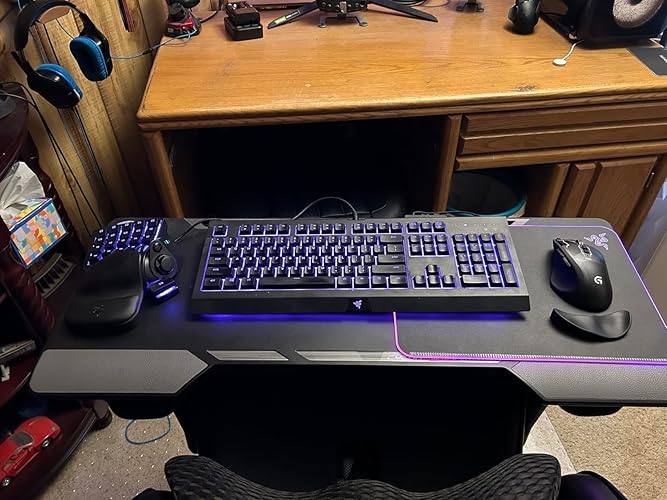
Pros: -Ergonomics -Added game functionality within easy reach -Great RGB -Quality, tactile keys Cons: -Noisy keys (sone might like this, personal preference) Amazing device. I have been a keyboard and mouse gamer since the days of Doom and Sim City Classic. I was skeptical for years about these and asked myself, “how would this be different than using the keyboard?” It is… so much better. I have always been the guy that has to remap everything to the arrow keys on a keyboard and the surrounding area. As a result, I also had to either have my wrist at an angle or the keyboard at an angle to reach them. I tried many times over the years to use WASD but the alignment of those keys wasn’t right. My brain needed them to be perfectly aligned like the arrow keys…. And this keypad. Maybe that is why there was almost zero learning curve when I started using this keypad. The keys are all perfectly aligned just like my brain already expected having used the arrow keys for so many years. And now, there’s all these additional keys within easy reach! The only minor learning curve was therefore my thumb. For years it had sat idle while I game. Now I have trained it to operate the buttons on this controller and it has been a game changer. I think the best part though is the ergonomics. Everything feels more comfortable when I game now. I use a CouchMaster that rests on my gaming chair and now when I game my arms are in comfortable positions with the mouse on the right of my keyboard and this keypad on the left. Still handy to have the keyboard accessible for when you need it during gaming but now used rarely for gaming and more for work. The wrist rest is perfect. There’s only two positions for adjustment of it but it works great for me. I went with the Mecha Membrane keys and I really like the feel of them. I will say they are louder than I would usually go for, but I almost always game with headphones so it hasn’t bothered me. I have seen in reviews that people pull out the metal clip to make them more quiet but I like the clips as they aid in the “snap back” feel when you release the key. I didn’t go with the upgraded keys because I didn’t think I would use the additional features that were advertised. Specifically, I don’t think my brain would utilize the concept of having different functions or commands based on how hard you press a key. The RGB is great. I always create game profiles so games have unique lighting that matches the theme or feel of the game. It uses the Synapse software which all Razer users will know is a bit of a love-hate relationship. Super powerful software that lets you control not just the lighting but remap keys. Some games I have specific remaps in this software if the game itself doesn’t let me remap a button I want to. For example, I have the far upper left key remapped to ESC because it’s used in some games but they sometimes won’t let you remap it in the game. All that said, Synapse can be frustrating and unintuitive at times. It has a steep learning curve. I am lucky to have pushed past that curve, but for newcomers to Razer just understand that and be ready to hit YouTube. I would highly recommend this product, especially for keyboard and mouse gamers that are already used to using the arrow keys. ... show more
Reviewed in the United States on November 6, 2025 by DeceptiveMind

  • I like this thing. A lot.
Color: Classic Black Style: Tartarus v2 - Mecha Membrane Switches Pattern: Keypad
I am loving this thing. I have always been a controller guy until I bought Doom Eternal, and it was obvious from the very first level that this game was made with mouse and keyboard in mind and I decided it was time to make the switch and I'm really glad I did. I stopped playing the game and waited for this to arrive, along with the Corsair Harpoon gaming mouse. It took A LONG time to start feeling comfortable with the new set up but once it started to click it made all the difference in the game. The learning curve for me was huge, maybe the biggest one I've had to go through in decades for gaming, but it was worth it. This keypad is great. I bought this used from a seller here, something I don't normally do but the price was more than half off the new price and I knew it was a gamble that I might not take to it and go back to controller, which would have made this a waste of money. I feel like I got lucky, the used product of this looks brand new and is in great shape, and since it worked out and I ended up loving the keypad it was money well spent. I specifically went with the Tartarus because I really liked the idea of having the thumb stick, and I feel like that was a good move. In Doom Eternal, now I can control the Slayer in a way I'm already familiar with while freeing up the rest of the keyboard and my fingers to the different melee attacks and switching equipment. That way I don't have to move my fingers all over the keyboard as I normally would have had to, fumbling around hoping I hit the right keys. The learning curve was huge for sure and for awhile, I probably put in enough time in the first three levels over and over again trying to get accustomed to the new control style as it would take someone else to actually beat the entire campaign, but once it all clicked, I can't imagine playing a game like this any other way and I already knew from the first level that a controller was a huge disadvantage. In regards to the quality of the actual device- it's solid. The keys all have a great feel and click to them, and the thumb stick has the exact same feel. It feels like pushing a key on the board with the mechanical click and all in every direction, it's great feedback to know you're pushing it in the right direction and for learning how to use it. It's also very comfortable to use, and the wrist rest beneath the keyboard reduces any normal strain I would feel by hovering my hand over a typical keyboard. And lastly if you care, the rgb lighting on this is good and bright and every color in the rainbow is represented just fine. I don't care that much about this, but I know some freaks do so there you go. To summarize, this purchase was worth every penny. The keyboard is solid, it feels solid, it is quality. The thumb stick works great and I really struggle to find anything to complain about here. I can see this falling short on games with tons of keybinds, and Doom Eternal is really pushing it in that regard, but it still worked out great with just enough keys to accommodate all the things you need to do. Purchasing this along with a gaming mouse has changed the way I play a game like this and for the better. Highly recommended, especially if you can get one at the used price I did if it shows up at your door in the condition mine did. On a quick side note I do want to point out that Windows 10 by default had this keypad configured to shut down randomly to preserve power in the device settings. You're going to want to figure out how to go into the USB options and make sure to uncheck the box letting Windows do that because if you don't this will disconnect randomly out of nowhere for like fifteen seconds here and there, and obviously that is not ideal unless you like losing due to some technical crap. ... show more
Reviewed in the United States on April 6, 2020 by NastyB

Can't find a product?

Find it on Amazon first, then paste the link below.
Checking for best price...