


Search  for anything...

PowerColor Hellhound AMD Radeon RX 7900 XTX Graphics Card

  • Based on 894 reviews
Condition: New
Checking for the best price...
$1,219.99 Why this price?
Save $625.01 was $1,845.00

Buy Now, Pay Later


As low as / mo
  • – Up to 36-month term if approved
  • – No impact on credit to apply
  • – Instant approval decision
  • – Secure and straightforward checkout

Ready to go? Add this product to your cart and select a plan during checkout.

Payment plans are offered through our trusted finance partners Klarna, Affirm, Afterpay, Apple Pay, and PayTomorrow. No-credit-needed leasing options through Acima may also be available at checkout.

Learn more about financing & leasing here.

Selected Option

Free shipping on this product

30-day refund/replacement

To qualify for a full refund, items must be returned in their original, unused condition. If an item is returned in a used, damaged, or materially different state, you may be granted a partial refund.

To initiate a return, please visit our Returns Center.

View our full returns policy here.


Availability: Only 1 left in stock, order soon!
Fulfilled by RECSTORE (SN Recorded)

Arrives Monday, May 11
Order within 2 hours and 50 minutes
Available payment plans shown during checkout

Protection Plan Protect Your Purchase
Checking for protection plans...

Style: 7900 XTX 24GB Hellhound


Features

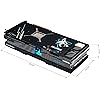
  • Card Dimensions: 320 x 118.5 x 62 mm; 12.6 x 4.7 x 2.5 in
  • Minimum System Power Requirement: 800W
  • Video Memory: 24GB GDDR6
  • Stream Processor: 6144 Units
  • Game Clock: 2330 MHz (OC)/ 2270 MHz (Silent)
  • Boost Clock: 2525 MHz (OC)/ 2500 MHz (Silent)
  • Memory Clock: 20.0 Gbps
  • Memory Interface: 384-bit
  • 1 x HDMI 2.1 , 3 x DisplayPort 2.1

Description

PowerColor Hellhound AMD Radeon RX 7900 XTX Graphics Card.

Graphics Coprocessor: AMD Radeon RX 7900 XTX


Brand: PowerColor


Graphics Ram Size: 24 GB


GPU Clock Speed: 2525 MHz


Video Output Interface: DisplayPort, HDMI


Graphics Coprocessor: AMD Radeon RX 7900 XTX


Graphics Card Ram: 24 GB


GPU Clock Speed: 2525 MHz


Video Output Interface: DisplayPort, HDMI


Graphics Ram Type: GDDR6


Compatible Devices: Desktop


Graphics Card Interface: PCI Express


Memory Clock Speed: 2000 MHz


Number of Fans: 3


Display Resolution Maximum: 7680x4320


Item Dimensions L x W: 13.31"L x 5.79"W


Brand: PowerColor


Video Processor: AMD


Antenna Location: Gaming


Built-In Media: Graphics Card


Model Name: RX7900XTX 24G-L/OC


Graphics Description: PowerColor Hellhound AMD Radeon RX 7900 XTX with 24GB GDDR6 memory, 6144 stream processors, up to 2525 MHz boost clock


Manufacturer: PowerColor


Mfr Part Number: RX7900XTX24G-L/OC


Model Number: RX7900XTX24G-LOC


Warranty Description: 2 year limited


Item Weight: 1.5 Kilograms


Frequently asked questions

The PowerColor Hellhound RX 7900 XTX is ideal for high-end gaming, 4K video editing, and content production. It supports the latest gaming architectures and technologies, offering top-notch performance for demanding tasks and enabling smooth, immersive gaming experiences at high resolutions.

Yes, the RX 7900 XTX does support ray tracing. With RDNA 3 architecture, it can handle real-time ray tracing in games and other applications, providing more realistic lighting, shadows, and reflections.

Absolutely, the PowerColor Hellhound RX 7900 XTX has the power and capabilities to run VR applications. It is equipped with the latest technologies to deliver smooth and immersive VR experiences.

The RX 7900 XTX features a high-performance cooling system with multiple fans, a large heatsink, and heat pipes designed to maintain optimal temperatures and performance during intensive gaming or computing tasks. This helps prevent overheating and ensures the stability and longevity of the card.

Top Amazon Reviews

🚀 Abunda's Overview

This is our summary and key points to consider based on customer reviews.


The RX 7900 XTX graphics card has received high praise for its outstanding gaming performance, superior cooling and noise management, and customizable RGB lighting. It offers a significant value proposition, being more affordable than its competitors while delivering comparable or better performance. Users appreciate features like AMD Freesync and Smart Access Memory, and the transition from Nvidia to AMD is reported as smooth. The Red Devil version is noted for its silent mode, substantial heatsink, and the easy fit into the user's case.

Pros

  • 🎮 Exceptional gaming performance, even at 4K resolutions and high settings.
  • 🛠 Customizable RGB lighting sync with motherboard and can react to sounds.
  • 💰 Reasonable price for the offered performance when compared to competitors.
  • 🌀 Excellent cooling and quiet operation; no coil whine even when overclocked.
  • 🔧 User-friendly features like Freesync, Adrenaline UI, and Smart Access Memory.
  • 🎨 Sleek design with metal backplate and aesthetic color scheme.

Cons

  • 🗜️ Size may be an issue for some cases due to its large dimensions.
  • 🔇 Silent mode causes minimal impact on performance but may confuse users looking for significant differences.
  • 🔄 Transitioning from Nvidia could require some adjustment for users.

Should I Buy It?

Given the overwhelmingly positive feedback, particularly regarding performance and value, the RX 7900 XTX is an excellent investment for gaming enthusiasts who want top-tier performance without the premium price tag. The Red Devil variant specifically offers an impressive silent mode for those who prioritize a quiet setup. It's a strong recommendation for gamers and power users alike.

  • A Great value high end GPU for the price.
Style: 7900 XTX 24GB Hellhound
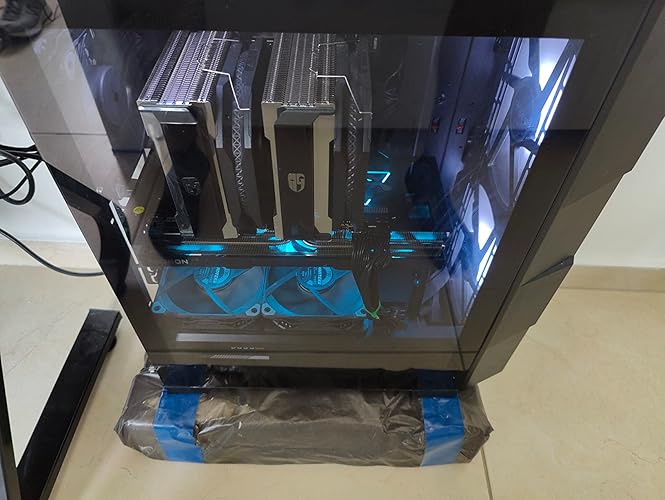
Just like my 3080 12GB it’s quiet. It stays between 70c under load . I get over 150fps at max settings on 1440p. The hellhound wins for half the money you get better performance than a 4090. Pros : + Card contains a huge heat sink with 8 copper heat-pipes for high cooling + in hot summer.. Temperature does not exceed 63c at 100% usage.. and with a OC it does reach 67c + Fans speed are quiet and even with OC it's barely audible + Watt consumption around 360w & the max OC is 415w, while other models with OC consume around 460w (less watts = less heat) + The fans have cyan and violet lights, and they can be turned off if you don't like them + The card came with a small holder (the card is huge, so you need to put a small holder under it to reduce weight and heaviness so that it does not affect the motherboard) + Aluminum back cover to dissipate heat and help hold the card together + The price of the card is cheaper than other cards of the same class, as well as its cooling is very excellent for its price + Better than Sapphire Pulse.. which have smaller heatsink (Pulse have 6 heat-pipes Vs Hellhound 8 heat-pipes) & more aggressive annoying fans (Pulse 1600RPM Vs Hellhound 1200RPM).. it's like 5c less temps compared to Pulse, while it's like 9c if U match it with1600RPM speeds Negatives: - Needs excellent case fans, given that all cards that exceed 300w or higher cause heat to the internal parts - As far as I know.. majority of modern high-end cards contain Coil whine.. and it is cannot be heard unless you are very close to the case.. and coil whine is also present with NVIDIA cards as well Final Note: The card is worthy and considered a class 3080 & sometimes it's beat 3080 by a little margin, it comes with 24GB Vs 12GB of RTX 3080, which is something that will benefit you in modern games and upcoming heavy games, 750w is the minimum .. But if you have a high wattage processor like 12700k or beyond, than you may need 800w, and it needs a Mid Tower case or bigger, because the length of the card is 32cm (big but not huge like Merc310 which is like 35cm) The card is worth it as long as it does not exceed the official price or less.. and sometimes you can get it for less than the official price, but it is preferable to buy it if you have a 4k screen, and it is not suitable for regular 1080p screens.. after all, this is high-end GPU which is 2nd strongest card in performance after 4090 (7900xtx is more like OC 4080 with RT off) ... show more
Reviewed in the United States on December 18, 2025 by Joseph Harris

  • READ HERE! RX 7900 XTX HellHound
Style: 7900 XTX 24GB Hellhound
Thermaltake Full Tower Chaser MK-II i7 4790k (Not Over Clocked) Gigabyte Z97-UD5H MOBO 16 GB TeamGroup DD3 @ 2400 MHZ CS 10 (I set the command rate from 2 to 1 with no voltage changes) Corsair H80i AIO CPU cooler (fan1 is pull from inside, fan2 is push out back). I have a Thermaltake! I can! Acer 27" 2K 144hz with FreeSync Started with a 750W Platinum PSU, Switched to a 1000W Platinum PSU. The card is very big, barely got it in an old Full Tower (I haven't bought a MID Tower in 14 years, so not sure how a new one would do it). The Back stand does work if you install it right! I don't wanna have to try to find another Z97X MOBO! It's very adjustable, just keep it off the fans please! I have a 120MM 2,000 RPM fan next to the power supply for more air, but the base is MAGNETIC and it fit really snug next to that fan to give the support it needs on the back. It lifted the back about a 1/8 ", which I need because I still have a PCI SoundBlaster X-Fi Extreme that I use and it sits 2 slots below it. This would cause HEART PROBLEMS for Rookies, But I have a Thermaltake Filtered case and all is good. Before I bought the RX 7900 XTX HellHound, I did some research on older CPU'S with newer video cards. I found a video of a guy using an i7 4790K with an RX 7900 XTX Sapphire. The 1080p, 2K, 4K results showed that A bottle neck from the CPU at 1080P was inevitable, however; The 2k vs. 4k results were astounding.! He Overclocked the CPU to 4.6 GHZ but used DD3 1600 MHZ Memory. He ran the RX 7900 XTX on PCIE 3.0 X16 (which is the same as PCIE 4.0 X8) And lost may be 10 frames/sec vs. a modern CPU but using 100% of his overclocked CPU. The thing I picked up on was the memory speed and overclocking. If Amazon will allow me to explain. Computer Memory also has TIMMINGS.! Going to a higher Grade of DDR also means the TIMMINGS increase. So, you can achieve better timings (The LOWER the BETTER) On DDR3 VS. DDR4. My build is above. DDR3 at 2400 MHZ is DDR4 speed but with much better timings. I researched a review that put 2400 MHZ at the sweet spot for Memory on gaming. Anything Higher was a waste, and anything lower really sucked. So here I am in the same boat but with much better Memory. All my games worked fine except 1 (War THUNDER). I did a test drive of an Israeli Tank to test the game with the new card and drivers (Highest Settings) and it restarted my PC. As in all Science I had to recreate the same conditions. It happened again. I Knew it was because the POWER FEAUTURES of my PSU! In the Morning I got a 1000W Platinum PSU and had to take my Computer apart and put it back together! WHEW! It sucks. But IT WORKED! Got it all right the first shot (And some good cable Management). YOU WOULD NOT BELIEVE WHAT IM TELLING YOU NOW! On a 2k 144HZ FreeSync Monitor I'm 201 frames/sec in War Thunder with no glitches! IT GETS BETTER! Rome 2 Total War test is at 119 FPS. All games look and play magnificent! But my CPU USAGE STAYS AT 25%! I've tested, retested, used several programs! All Confirm that the most CPU usage I use with a i7 4790k with DDR3 2400 MHZ case 10 and manually set to a 1T command rate is MAX 28% at 2K. Thank You. ... show more
Reviewed in the United States on February 27, 2023 by Steve B.

  • It keeps crashing on simple games on medium settings for me i dont understand why. please help me.
Style: 7900 XTX 24GB Hellhound
Its a great GPU but for some reason I think mine is broken. since day one its not done much. no its not being bottlenecked. no i didnt install it incorrectly, YES i do have a sufficent power supply box in my pc. ive had this GPU since Nov 24th, 2024. almost a whole year. from day one its been a little strange, it felt broken but i toughed it out because i thought i just wasnt using the settings right in the amd software adrenaline edition thing. but needless to say. its been giving me issues with playing games. it will crash on games that it should handle with ease. for example fortnite. that game should be easy for it to handle on MEDIUM settings. and it continues to crash. its strange to me. crashes on other games as well all on MEDIUM settings. and its mind boggling. it will be fine for a moment then suddenly the gpu will spike to 100% usage then crash. and usually thats fine, but for some reason its doing it and crashing. which means somethings absolutely wrong with the GPU. and before you say that it must be a software update that i need. Its up to date. from the website. IF YOU could please reach out to me and maybe, if possible send me a replacement and i send the one i have back i would appreciate it so much. I believe that this GPU is GREAT i just dont understand why its doing this to me. and if you are wondering why i took so long to post my review. its because i wanted to make sure it was something that i tried fixing myself and its not something that i can easily fix. even with lowering game settings on a BIG GPU and wot not. it is still not capable of running without crashing. at least 3 times per game session. until i just give up and stop playing the game. My name is Brian. I really would like some help please. ... show more
Reviewed in the United States on November 16, 2025 by Brian M.

Can't find a product?

Find it on Amazon first, then paste the link below.
Checking for best price...