Search  for anything...

Philips DVD Players for TV with HDMI Port 1080P All Region HD DVD Player for Smart TV USB Input Remote Control Device, Mini DVD CD Player for Home Stereo System, HDMI and RCA Cable Included

  • Based on 1,273 reviews
Condition: New
Checking for the best price...

Buy Now, Pay Later


As low as $11.66 / mo
  • – 6-month term
  • – No impact on credit to apply
  • – Instant approval decision
  • – Secure and straightforward checkout

Ready to go? Add this product to your cart and select a plan during checkout.

Payment plans are offered through our trusted finance partners Klarna, Affirm, Afterpay, Zip, Apple Pay, and Google Pay. No-credit-needed leasing options through Acima may also be available at checkout.

Learn more about financing & leasing here.

Selected Option

Free shipping on this product

FREE 30-day refund/replacement

To qualify for a full refund, items must be returned in their original, unused condition. If an item is returned in a used, damaged, or materially different state, you may be granted a partial refund.

To initiate a return, please visit our Returns Center.

View our full returns policy here.


Availability: In Stock.
Fulfilled by Amazon

Arrives Wednesday, Oct 21
Order within 12 hours and 40 minutes
Available payment plans shown during checkout

Protection Plan Protect Your Purchase
Checking for protection plans...

Color: Black


Features

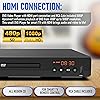
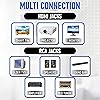
  • HDMI Connection: DVD Video Player w/ HDMI connection. 1080P Upconvert enhances playback of DVD from 480P up to 1080P resolution. RV DVD Player for smart TV with HDMI brings audio and video to life! It is Portable and simple to set up for all elderly.
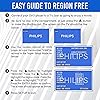
  • All Region DVD Player: This DVD-player is a universal DVD Player. Multi Zone 1,2,3,4,5,6. Play virtually any disc you want with this Multi Region CD Player. Compatible with DVD : CD, (S),VCD,DVD,DVD+R/RW,DVD-R/RW, or MP3.
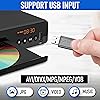
  • Remote Control: The USB DVD remote control player combo is conveniently used to link PCs, peripherals. It has AV Output/ USB Input. With USB Media Link all you have to do is plug in your USB device select the movie, music, photo and play away!
  • Screen Fit: Whatever you're watching on your compact DVD Player for TV, Screen Fit ensures that the picture fills the whole screen. Simply press the Screen Fit button and enjoy your movie in full screen. The perfect CD players for home stereo system.
  • Dolby: 10-bit/108 video DAC is superior Digital to Analogue Converter on DVD Players blu ray and regular that preserves every detail of authentic picture quality. The Built-in Dolby decoder chip provide you with the most immersive audio experience.
  • Note: THIS IS A STANDARD HDMI DVD PLAYER AND NOT A BLU-RAY DVD PLAYER AND IS THEREFORE UNABLE TO PLAY WITH BLU-RAY DISCS.

Description

SCREEN FIT: Whatever you're watching on your compact DVD Player for TV, Screen Fit ensures that the picture fills the whole screen. Simply press the Screen Fit button and enjoy your movie in full screen. The perfect CD players for home stereo system.

Brand: PHILIPS


Media Type: CD, DVD, VCD


Special Feature: Compact, Progressive Scan


Resolution: 1280x800


Connector Type: HDMI


Connectivity Technology: HDMI


Model Name: PLD2030P7


Color: Black


Item Weight: 2.3 pounds


Audio Output Mode: Surround


Media Type: CD, DVD, VCD


Other Special Features of the Product: Compact, Progressive Scan


Resolution: 1280x800


Connector Type: HDMI


Connectivity Technology: HDMI


Audio Output Mode: Surround


Supported Audio Format: Dolby Digital


Surround Sound Channel Configuration: 5.1


Total Number of HDMI Ports: 1


Video Encoding: MPEG-2


Compatible Devices: AV Receiver, Home Stereo System, Television


Video Output Resolution: 1080p


File Format: JPEG, MP3, MP4


Item Weight: 2.3 pounds


Brand: PHILIPS


Model Name: PLD2030P7


Built-In Media: DVD Player, HDMI Cable, RCA Cable, Remote Control


Unit Count: 1 Count


UPC: 850041387796


Number of Items: 1


Manufacturer: Philips


Warranty Description: /


Color: Black


Frequently asked questions

If you place your order now, the estimated arrival date for this product is: Wednesday, Oct 21

Yes, absolutely! You may return this product for a full refund within 30 days of receiving it.

To initiate a return, please visit our Returns Center.

View our full returns policy here.

  • Klarna Financing
  • Affirm Pay in 4
  • Affirm Financing
  • Afterpay Financing
  • Zip Pay in 4
  • Financing through Apple Pay
  • Financing through Google Pay
Leasing options through Acima may also be available during checkout.

Learn more about financing & leasing here.

Top Amazon Reviews


  • Finally! A DVD player that REALLY plays all discs!!
(***UPDATE: A year later and it is still working. Other reviewers state that this is not the case for them, and I'm sorry that is so. It really is a great little DVD player.) I had a DVD player that wouldn't play burned DVDs, nor would it play mp3s, so I bought this after reading the rave reviews. This unit works so well (and fast!) that I want to buy one for each member of my family. No other unit works as well as this one for under $100. >>>> Something other than what all the other reviewers are saying: - Plays my Verbatim DVD-R 8x, Memorex CD-R 52x, Maxell CD-R 40x discs, Princo, TYuden and a no-name brand DVD-R (all white with a small white star at spindle.) Note: The discs I have were burned on Sony DRU-530A and DRU-810 burners with MANY hours on them. - Remote must be pointed AT the unit in order for it to "see it." Pro: keeps interference with other Philips unit to a minimum. Con: you have to point it at the unit, so if you are used to the really sensitive / receptive remotes this might bug you. - Loads DVDs and CDs quite fast (compared to my JVC, Toshiba and no-name brand.) - It would be nice of Philips to have a screen saver for when you play mp3s. Menu may burn into TV / monitor if you don't turn off the TV. - They did, however, design the "Philips DVD" idle screen (for when the mp3s are not playing) so that it doesn't burn into your TV / monitor. - Being a single disc unit, this thing goes from "OFF" to playing a DVD in under 20 seconds. Nice for those of us that have carousel DVD/CD players, which take years to turn on and open. - (other than having to point the remote virtually AT the unit) the response time for the command is pretty fast. I didn't notice any lag time. - Buttons (on the unit and the remote) feel sturdy and should last the life of the player. - Thankfully, the front panel doesn't light up like a Christmas tree - a player for those of us that don't care to read by the glow of a bunch of unnecessary lights and indicators on the unit, but would rather just have it play the disc. - Great diagrams / drawings in the manual. Anyone could hook it up according to the pictures and easy to follow instructions. - mp3s load in a respectable amount of time. Not lightening quick, but doesn't take all day either. It's just right. - Comes with one remote, two batteries, one set of RCA cables, and is packed in a non-Styrofoam box. The box is built to be shipped, and is a better design than others I have come across. What I'm saying is, the box has some room designed into it for getting crushed during shipping; whereas the Styrofoam-type boxes usually just transfer the damage to the unit. In short: good shipping box for those worried about a piece of electronics getting shipped. - The instructions are in English, French and Spanish ... show more
Reviewed in the United States on July 27, 2005 by Tristan

  • Great player for the price
I ordered the Phillips DVP642 a few weeks ago and I am very impressed with its performance. I actually received the 642/37 (some places charge extra for the region-free pre-hacked version). Here are the pros and cons: Pros: 1. It plays DivX/XviD (without QPEL/GMC) and MP3 files with great quality. 2. It has progressive scan 480P output. 3. It is "hackable" to be region-free by opening the tray, pressing "7 8 9 OK 0", then closing the tray and powering off. It can play NTSC and PAL DVDs on NTSC and PAL TVs. I am buying a second one for relatives in South America for the region-free ability alone. 4. Great price tag (<$70). Cons: 1. Only displays 8 characters of the DivX/XviD filename. "moviename part 1.avi" becomes "movienam.avi" then "moviename part 2.avi" becomes "movie000.avi" and is displayed BEFORE "movienam.avi" due to alphabetizing, making the play order the opposite of what it should be. This can be remedied by burning discs in ISO 8+3 mode renaming beforehand, but long filename support (Joliet or UDF) would have been a huge bonus. I find it no surprise because I am not aware of any DivX/XviD DVD players with long filename support for under $200,besides my hacked XBox ;) 2. Subtitle files (.srt and .sub) are supported, but don't always work unless named the same as the .avi (recommend 8+3 again) and selected before playing the movie. Many people in forums have reported issues with subtitles in foreign languages, but I only have experience with english subtitles. 3. When you insert a DVD+-R with DivX/XviD files, the player takes a long time to bring up a menu with all the filenames for play selection (about 20-40 seconds). This is enough of a wait time to be mildly annoying. Hint: Always use the "stop" button to return to the generated menu, not the "Disc Menu" button. 4&5. The drive can be VERY noisy when reading DVDs. Some people have returned their players for this reason. In my opinion, this is the player's biggest drawback as it can be very distracting while listening to the movie or music. No other player that I have encountered makes this much drive noise. In Summary: I recommend this player to anyone looking for a great priced progressive scan, DivX/XviD, or region-free DVD player with the only major drawback being a noisy drive. ... show more
Reviewed in the United States on June 15, 2005 by Matt

  • Parental Permission Denied!
Simple is often best. This was allegedly a simple product, which I purchased to perform a simple task: play DVDs. It tends not to do that. Although it frequently ignores discs, and has a special affinity at not being able to play Disney products, especially the Studio Ghibli flicks they released and the Pie Rats of the Carob Bean trilogy, that's not the most critical problem. For a while I noticed this problem on the special features on children's films. Maybe a short film, maybe a fun activity for kids. You know, unrated material. Please enter password. The parental controls, however, are disabled. Please enter password. It doesn't accept the default. You know, on account of the parental controls being disabled. I'm the parent - I'm the parental control for my kids. I don't need a piece of poorly coded software determining what does or doesn't meet some programmer's - or disc creator's - idea of what is safe for my kids to watch. Especially when it is, you know, safe. Veggie Tales. Disney. Kids stuff. So I can use the password to set the parental controls, but even then, at the lowest-but-not-off setting, it asks and refuses to acknowledge the password I set or the default password. So why am I writing this, long after I gave it a quick one star, moaned and complained to Philips Customer Disservice, picked apart the software bugs in their website that prevented me from reporting it on the first try, ripped them apart in a survey because they wanted to know how my experience using their website went, and figured that was more than enough time spent on such a useless, non-functioning product? I was just attempting to watch a brand new DVD on some nice, relaxing qigong. You know, an exercise video. Which is, conveniently, not rated G, PG, PG-13, R, or anything else. So... I get the STOP hand. And then I try to go around that, and I get the non-functioning password prompt. At least with most of the DVDs I can skip the opening few seconds of the movie and get them to play, but because this brings the password problem in for the entire DVD, not the features, it's useless. And no, it's not the DVD. It's running right now, attempting to help me relax, played on the PS2. Philips, I promise you one thing: you may have invented the CD, and I will continue to buy things based on that technology, but never will I purchase another product with your name on it. You've made a lifelong anti-Philips consumer out of me. Great job! Well, to be fair, it does play some DVDs some of the time. Curiously enough, most of the time it hangs up, it's on that FBI warning. Perhaps I could involve the FBI in this? Maybe I should give the field office a call each time it stops? It would probably be more productive than contacting the irresponsible, incompetent manufacturer. And, hey, maybe if I was lucky, they'd raid Philips and convince them to update the code on the product so it, you know, plays DVDs. ... show more
Reviewed in the United States on April 5, 2008 by Mina Ellyse Warren

  • Great DVD / CD player
Color: Black
Just purchased this recently. I have it hooked up to my receiver with the RCA cables. All I use this for is music. I have a collection of 70s and 80s light rock classics. The sound is crisp and clear. The unit was very simple to hook up. the sound you get depends a lot on your speakers. My stereo system is a Sony from 1979. The right and left speakers are about 4 foot tall, weight around 40 pounds. The sound is simply outstanding. I highly recommend this DVD / CD player and I would buy it again. Just be sure to hook it to a sound bar / TV or great speakers, you won't regret it. ... show more
Reviewed in the United States on October 1, 2026 by Jimmy W. Ford

  • Does what it promises, hope firmware is fixed for 1.5x zoom
First of all, let me say that this unit is very well worth the money. As "just a dvd player" I give it FIVE over FIVE points (or ten/ten if you wish). The unit comes locked for Region 1 DVDs, but can be easily unlocked (just google for the asnwer) to make it region-free. I have tested my unit purchased on amazon.com and unlocked with Region 1, region 2 dvds purchased from Britain, and region 4 DVDs purchased in South America. It just works. The unit's COMPONENT-VIDEO output is superb, even if you use an CRT TV. I recommend you get a quality component video cable and use that instead of the "composite video" output. When playing MPG and AVI files, the component video output shows pixelation and artifacts on low-quality or low-resolution avi/divx/mpg files, but when playing back the same files and switching the tv to component video, these problems go away!. Component video, it should be noted, is superior to "s-video" (which just separates color information from luminance), as each basic color (Red-Green-Blue) travels on a separate shielded cable. Now, the "extras" besides basic DVD playback 1. DIVX and XVID are supported. But some .avi files will play back with NO SOUND if the original file was encoded with a "codec" (compression algorithm) that is not supported by this unit. Just because a file plays back ok on your PC with "Windows Media Player" it doesn't mean it will playback in this unit. 2. DVD-R media *IS* supported. You might need, however, to update the firmware (it's available for download from the philips.com web site. You have to download a .iso image, burn the data to a cd-r, press a key combination on the remote and then insert the cd-r disc). Now the problems: 1. Even while DivX is supported, mpeg4/divx files compressed with the Divx Pro software using the "QPEL" (advanced motion optimization and prediction) will NOT PLAY on the unit. The unit will display an ugly "QPEL CODEC NOT SUPPORTED" message and stop there. There's no way to play back QPEL encoded files on this unit (it would require a much faster processor inside). 2. ZOOM LEVELS ARE INCONSISTENT. On DVD movies, zoom levels featured are 1.5x, 2x, 3x, 4x. However when you are playing back ".avi" (mpeg4/divx) files, you will find that often the only zoom levels available are "normal" (no zoom) and "2x", and that's it!. There is no 1.5x zoom level when paying back mpg and divx files! So forget about watching that wide-screen (4:3 format) movie in full screen by switching to 1.5x zoom mode. If it's a DVD movie you can. But if it's a DivX/MPEG4 movie you can't!. 3. A-B loop doesn't work most of the time on DivX/AVI files. Sometimes, when it does work, after you selct an a-b loop, you turn the feature off by pressing the a-b key once again, and when you want to create another a-b loop, the feature no longer works! (unless you press STOP and PLAY the file once again). VERY annoying. 4. PHILIPS doesn't seem very interested in updating the firmware. The last update is dated May 2004, and there has been no update since then, even while the number of bugs is high (see above). However, even after all this, I think that for ~$70 dollars or less including Amazon.com's free ground shipping, you can't go wrong with this unit, as DVD playback is superb, and the ability to play most (but not all!) .mpg / .avi (DivX/MPEG4/Xvid) video files is just a nice extra to have in there as a "bonus". Burning .avi and mpg files to DVD recordable media also works. ... show more
Reviewed in the United States on September 7, 2004 by FERNANDO

  • Absolutely NO EXCUSE Not To Have One, Folks.
Let's get this right out of the way: the whole schpiel about multi-region or region free/worldwide DVD players being "finnicky", "overpriced", "prone to failure", "impractical due to the inavailability of imports to watch in the first place" and "needing to be sent all the way to Malaysia to be repaired" is a myth perpetuated by Best Buy supervisors who have been indoctrinated to do one thing: Sell DVD players that only play the DVDs they sell in their stores. It's a bogus myth, and this player is proof. I'm a cult film buff and not a geekanoid tech nerd so pardon me if I pass over a technical evaluation of the deck: It plays any DVD made anywhere on the planet regardless of region code, converts PAL to NTSC and vice-versa, has S-Video and component output capacity, *LOVES* DVD-R media (even PAL DVD-R), and you can bring it home for a reasonable enough price to have some coinage left over to buy some Region 2 PAL releases to go with it. Like, stuff not available in the US. Get it? If you love movies, take your viewing needs seriously and resent having the media companies decide what you can & cannot watch, then you need a multi-region player. Period. This is a good one to start with: I concede that we are only watching our stuff on a standard 4:3 analog TV set without a DTS or surround setup (though both are supported) and just use it to watch movies. Not sure what else one would need a DVD player to do, though I will admit a certain amount of chagrin at the maximum 8x FFWD advance speed. Even my $30 K-Mark Apex deck has 16x but if you get hung up on how fast you can skip through your movies I would recommend getting a life or something. It plays any DVD right out of the box, no need to "crack" or modify anything, supports a bunch of other media formats, and has yet to do anything hostile like throw a brick at me or try and cheat at checkers. It plays all of the DVDs in my library just as well as the deck I paid $350 for in 2003, and having one will instantly quadruple the number of DVDs you can watch. Why settle on the crap movies they sell at Best Buy? Once you watch your first Japan made Region 2 NTSC format DVD of an ultra-obscure Spaghetti Western you will wonder why you waited on getting yourself set up to make up your own mind about what you watch, and why you let yourself get suckered into thinking that DVDs made in Germany were like, weird or something. This DVD player is liberation and I would recommend it to anyone who loves watching movies. The End. :-) ... show more
Reviewed in the United States on March 24, 2006 by S. Nyland

  • Very mixed review
This product is still under observation, as I have only had it a month. But some characteristics are very obvious, and should be considered before buying this model. First the good. If you are looking for something to play burned media from your computer, this may be right for you. Everything I convert from avi. and burn to DVD+/-R has worked great. And that is why I bought it in the first place. Now the bad. I would highly recommend NOT using this in a home as a primary player, and especially in a home with children. Some store bought DVD's do not play properly or at all. It will not play 90% of the DISNEY movies we have. It will come to FBI or a rating screen and freeze. And can only be restarted by unplugging the player. The only bypass of this is to use Scene Selection and start at scene one to skip the intros that freeze for whatever reason. So depending what your use purpose is, this may or may not be the dvd player for you. Love the burnt media playability. Hate the fact not compatible with Disney and probably other movies. ... show more
Reviewed in the United States on March 8, 2007 by JerC44

  • Excellent DVD player
Color: Black
Excellent DVD Player. Better then the Sony I had.
Reviewed in the United States on October 2, 2026 by Steve Martin

Can't find a product?

Find it on Amazon first, then paste the link below.
Checking for best price...