Search  for anything...

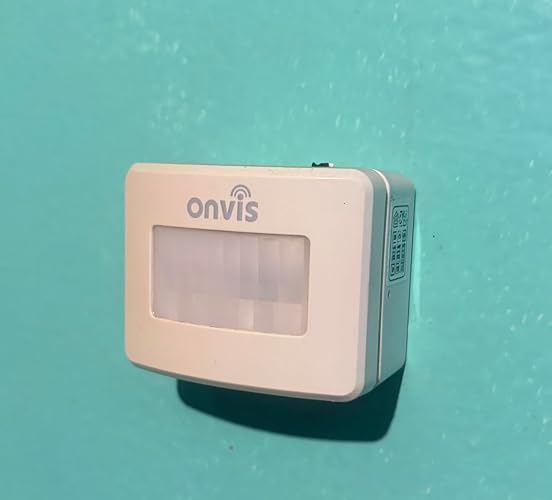
Onvis Smart Motion Sensor, Wireless Hygrometer, Thermometer, Works with Apple HomeKit, Smart Home Automation, PIR Motion Detector-Thread ((iOS 17.4 and Above is Required)

Based on 1,762 reviews
Condition: New
Checking for the best price...
$31.99
Save $31.00 was $62.99

Buy Now, Pay Later


As low as $7 / mo
  • – 4-month term
  • – No impact on credit to apply
  • – Instant approval decision
  • – Secure and straightforward checkout

Ready to go? Add this product to your cart and select a plan during checkout.

Payment plans are offered through our trusted finance partners Klarna, Affirm, Afterpay, Zip, Apple Pay, and Google Pay. No-credit-needed leasing options through Acima may also be available at checkout.

Learn more about financing & leasing here.

Free shipping on this product

FREE 30-day refund/replacement

To qualify for a full refund, items must be returned in their original, unused condition. If an item is returned in a used, damaged, or materially different state, you may be granted a partial refund.

To initiate a return, please visit our Returns Center.

View our full returns policy here.


Availability: In Stock.
Fulfilled by Amazon

Arrives Monday, Nov 2
Order within 13 hours and 50 minutes

Available payment plans shown during checkout

Protect Your Purchase

Easy claims online, fast replacements, no fees

Checking for protection plans...

At a glance

Condition
New
Model
SMS2
Weight
3.52 oz
Color
white
Power Source
Battery Powered
Maximum Range
7 meters
Mounting Type
Wall Mount
Works with
Apple HomeKit

Features 8

  • More Responsive with ThreadThis motion sensor is enabled with Thread technology, which makes it more responsive and efficient. You will get real-time notification once movement is detected, HomePod mini as a home hub keeps you informed while you're not at home.
  • Smart Activation & DeactivationCustomize motion alerts in the Onvis app to suit your schedule. Choose when to receive notifications, giving you complete control over your monitoring and enhancing your home security.
  • [Multipurpose Sensor] Smart hygrometer thermometer, Humidity temperature, bright/dark detection activation records are automatically updated every 15 minutes ; Access to Apple Home App or ask Siri for current room temperature and humidity, access to Onvis Home App to check the temperature, humidity and motion records.
  • 100% PrivacyNo cloud, no tracking. Works with Apple HomeKit, all data is end-to-end encrypted and stored in your iOS devices.

Description

Control multipe smart devices ,such as smart lights and smart plugs by setting automation or scenes tgigger by SMS2, Just customize your own smart actions to your needs . Smart hygrometer thermometer, Humidity temperature, records are automatically updated every 15 minutes and kept for 32 days, Access to Apple Home App or ask Siri for current room temperature and humidity, access to Onvis Home App to check the temperature, humidity and motion records. Enhance your home security with our Smart Motion Sensor featuring a scheduled detection function – customize when motion alerts activate for tailored monitoring, providing peace of mind on your terms. Compatibility: Apple HomeKit-Enabled Accessories (No Hub Required) Trigger: Motion Trigger, Temperature Trigger, Humidity Trigger, Bright/dark Trigger Remote Control Hub: HomePod mini Motion Detection: 7 meters, 120°, infrared activation Connectivity: Bluetooth 5.0 Application: Indoor Use Only Motion Push Notification: Real Time, 100 recent logs, 32 days records of motion Stats Humidity/Temperature Record: Every 15 minutes App: Apple Home App, Onvis Home App Power Supply: 2xAAA alkaline Replaceable battery Package Includes: 1*Onvis Motion Sensor, 1* User Manual, 2 pcs AAA alkaline batteries, 1 reset pin

Specs 18

Brand ONVIS
Color white
Power Source Battery Powered
Item Weight 3.52 ounces
Maximum Range 7 meters
Mounting Type Wall Mount
Battery Description AAA Replacement Alkaline Batteries
Battery Average Life 8760 hours

Frequently asked questions

If you place your order now, the estimated arrival date for this product is: Monday, Nov 2

Yes, absolutely! You may return this product for a full refund within 30 days of receiving it.

To initiate a return, please visit our Returns Center.

View our full returns policy here.

  • Klarna Financing
  • Affirm Pay in 4
  • Affirm Financing
  • Afterpay Financing
  • Zip Pay in 4
  • Financing through Apple Pay
  • Financing through Google Pay
Leasing options through Acima may also be available during checkout.

Learn more about financing & leasing here.

Top Amazon Reviews


Disabling a motion sensor is finlly possible!
If you use motion sensors to turn on lights, there are times where you want certain lights to not turn on at all. If you are a HomeKit user, the only way to make this happen is to use a Homebridge dummyswitch, which for nontechnical user is a lot to ask. The other option is to use another HomeKit accessory, like a light bulb, as a condition in your automation. While this works, you need to find an unused accessory or buy a new one to use as the on/off switch. Enter the new Onvis SMS2 motion sensor, which gives the user the ability to disable the motion sensor within their app, and in HomeKit. In the app, you can easily disable the motion sensor from the main page. In HomeKit, there is an “Active” flag that can be accessed in various 3rd party HomeKit apps. Further, since this flag is exposed to HomeKit, you can use it in HomeKit Scenes, Automations, and Shortcuts. Now, if you just don’t want the motion sensor to trigger accessories at all, you can create a Scene and then say: “Hey Siri, disable the bedroom sensor” and now that motion sensor will be completely disabled. If you want to disable the motion sensor based on an IOS focus mode, this is also now possible via a Shortcut. The great thing about this solution is the average user can now enable/disable the sensor without any need of additional technical knowledge like Homebridge, programming a Hue Bridge, etc. It just works. When the motion sensor is disabled, then those disabled accessories do not trigger even when you use scenes and automations if those accessories are a part of it. If you have other motion sensors, you can now include this new “Active” flag in their HomeKit automations to disable them as well. This is a problem that has plagued motion sensors since HomeKit gained support for them. We now have the ability to turn off the Onvis motion sensor as easily as turning off a light switch. So, if you have guests over, you can quickly disable all automations until they leave. The other interesting thing about this motion sensor is that the motion sensor timeout is also exposed to HomeKit. Therefore, if you need the motion sensor to have a different timeout depending on certain scenarios, you can do this now. For instance, during the day, the timeout in my bathroom motion sensor is set to 5 minutes. But late at night, it’s set to 1 minute. The motion sensitivity is also exposed to HomeKit. If you find the motion sensor is not triggering as you like, because of the ambient temperature, you can dynamically change the motion sensitivity to compensate. There is also a "Reminder" feature that tells you when the countdown timer gets to a percentage of the total countdown time. For instance, if the countdown timer is set to 10 minutes, you can set the reminder to 50% of that value. Then in the Onvis app, you can create a custom automation to dim the lights when that value is reached. This feature appears to allow the user to simulate the slow dimming feature of the Philips Hue lights when paired with their motion sensor. Lastly, the sensor also includes a temperature and humidity sensor. And finally, these sensors can b calibrated to match the values of other temperature and humidity sensors you may have in the same room. This is another feature that has always been missing from multi-sensor products. The only feature that is really missing from this product is a true light sensor, like Eve Motion and the Hue motion sensor has. Therefore, automations based on lux values are not possible. But with that said, I’m still giving it 5 stars because of the activation/deactivation feature of this motion sensor and being able to change the motion sensor timeout and sensitivity via HomeKit. The activation/deactivation feature alone is saves a lot of time and aggravation. So, even if you have another HomeKit motion sensor, I highly suggest buying this new Onvis motion sensor and use it in conjunction with what you have in order to be able disable automations more easily. ... show more
Reviewed in the United States on December 24, 2023 by RPL

Comes with limitations of Bluetooth
I had very high expectations for this motion sensor as it got rave reviews by a lot of people. I specifically bought this to use in my garage/shop so everything herein is based on my experiences in the garage. Let me stay the good things first. I was able to pair the sensor to my home kit network in under 10 seconds by scanning the QR code on the side of the box using the iPhone Home.app. Awesome. From there everything appeared to be working as designed. Awesome. The sensor was able to move from within my home, out the back door, 35 feet out, and into the garage. As far as I could tell The connectivity remained stable during transport. Awesome. I mounted the sensor on the garage door because I felt that would be a good test area for coverage. In testing motion-sensing, I found that I could be roughly 25 feet from the sensor and have it read motion and relay results immediately to the Home app. Accuracy and reporting motion seems to be on par with business-class sensors. There was virtually no delay relaying to my iPhone. For giggles, I decided to open the garage door while I stood still to see if it would trigger the motion-sensor, but it didn’t, which leads me to believe that it uses passive infrared (confirmed). I did not test response time outside my network or on cellular wireless connection. I found that the sensor dropped connection as I was setting up scenes or automations. I ruled out all I could during troubleshooting. Removing/ reinserting the battery brought it back online pretty quickly. In the second round of testing, I was able to customize an automation that when the sensor sensed motion in the garage it would trigger a lamp in my home-office to turn on. The automation would then reset after three-minutes. I was able to successfully test the automation for 15 minutes without an issue or delays using different test scenarios. That was exactly what I was looking for in this device. But here’s the issue... I have a 32 x 32 shop that is partially insulated. About 25-30 feet from home, Apple TV (hub) and where the sensor is located. I suspect that it is connected via Bluetooth to the AppleTV in the bedroom, but am wondering if sensor used my iPhone XR as the relay to Apple.com. Confusing.... I also live in a cold region in North America. The average temperature in the garage this week is about 42° F. I say all that because the following day the sensor disconnected sometime the night before. My suspicion is that either the sensor doesn’t like the cold temperatures in the garage or perhaps the range limitation/interference of Bluetooth. I could probably extend the Bluetooth range by adding another AppleTV, but that adds to the cost. I specifically bought it for the garage so I’m mostly disappointed. I likely won’t return it because I can find a use for it inside the home by a window, stairwell, cookie jar, doggy door, etc, What I really need is a WiFi capable motion-sensor. i was a bit excited to find this one though... I haven't been able to test inside the home so I can’t testify to that. I’ll come back and update my review as time allows. ... show more
Reviewed in the United States on January 7, 2020 by JEM

Long lasting battery, Apple Home integration
Color: white
The motion sensor works quite accurately. The batteries last a long time. I've had it installed for 1.5 years, and I still haven't needed to replace them. I appreciate the Thread connectivity with Matter. It works flawlessly. I've never had any issues. The sensor is installed in my garage. I needed to tweak the temp sensor in the app, which works well. I don't use the Onvis app regularly, but I have it included in my Apple Home app. Worked well. ... show more
Reviewed in the United States on September 30, 2026 by Keno

Worth the price
It's totally worth it, low price and instant response quality. For something that doesn't even need an app, it's really worth it. The temperature sensors add more value to the product and there are no false positives or anything like that. The range is quite considerable and notifications with Apple HomeKit are almost instantaneous. It would be great if it had Matter, but really, it's the best motion sensor I've found. ... show more
Reviewed in the United States on September 21, 2025 by Aura

Very disappointed
I had high hopes for the Onvis smart motion detector but it turned out to be a very frustrating piece of garbage. I needed a smart motion detector for my garage, one that would turn on the lights when someone walked through the door. Setup was pretty straight forward, install the batteries then use the Home app to scan the code and set it up on my network. After it was setup I created an automation script which when motion was detected would turn on my two overhead garage lights and one work bench light. All three of these lights are being controlled by Koogeek smart outlets. And it worked, the first time. As soon as it detected motion all three lights came on and ran for the 20 minutes I had programmed in the automation. Later that evening I went back out to the garage, opened up the door and walked in, no lights! Checking on my iPhone, Onvis said “not responding”. I reinstalled the batteries but it still said not responding so I reset it and reinstalled it in the Home app. Again, everything worked fine until it sat for a bit then it would drop off the network and would become unresponsive. I have a mesh network in my garage so it was getting a good strong network signal. The next day I downloaded the Onvis app to see if it had a newer firmware that I could download and install, it did. But even after the firmware was updated it would continuously drop off the network. After several days of battling with it I decided to send it back and purchased another motion sensor, this one a Philips Hue. The Philips has been working non stop for several months now. ... show more
Reviewed in the United States on July 18, 2019 by Mike

Mostly good, but with some slight issues.
Color: white
TLDR - The Snesor Includes a Humidity Sensor, Temperature Sensor, and Motion Sensor, and IS Homekit Compatible. This sensor okay. It's one of the cheapest options that you can get that is directly homekit compatible. It does what it's supposed to, the setup is easy, and it is responsive. The only issue that I have is that it doesn't have a very good field of view. You can adjust the sensitivity and range within the Onvis app, but if you're mounting it high up, keep in mind that the unit needs to be pointed towards what ever you're looking to register for motion. It will not register motion if the subject is too low. Unfortunately this system does not come with any mounting options other than a simple double sided tape, so keep in mind that while it is cheap, it lacks the common things that other modules do in response to this. Overall, it does register lighting accurately, provding the correct values of the surrounding area, it can be mounted in many different areas due to it's small form factor, so versatility is not an issue. It does excellent at capturing motion when set up correctly in respect to what i mentioend above, so utilizing it as part of a broaader security system should be no issue, and it was very simple to connect within the app. As long as your expectations are set correctly, this should do fine. ... show more
Reviewed in the United States on September 14, 2026 by Tyler I.

Fast Reliable Motion Sensor
Color: white
We have smart switches and lights in our kitchen so we have been looking for a smaller battery powered Matter or HomeKit motion sensor. We wanted some of the lights to turn on and off automatically when you enter or leave the room. I setup the motion detector on a shelf about 20 feet from the entrance to the kitchen and near another hallway that someone might walk in from in the dark. I angled the motion detector so it’s seeing activity also in the kitchen to trigger motion. Works perfectly with the automation I setup to turn on the under-counter lights if anyone enters the kitchen between sunset/sunrise and if the overhead can lights were turned off. I needed to use the convert to shortcut feature to achieve this when creating the automation. Another thing I appreciate about this other than how fast it triggers the lights to turn on/off and its motion detection distance is that it is built on thread so that it isn’t connecting as another device to Wi-Fi but instead connecting through the Apple TV or HomePod Mini we have. Nice that it includes a temperature sensor and humidity sensor which were almost exactly the same readings as my smart thermostat. The Onvis app definitely needs an interface overhaul to update it to iOS design language but it functions well. Really easy to adjust settings within the Onvis app such as the interval that it is checking for motion, motion sensitivity or even if you want it to only detect motion in the light/dark or always. I did run into an issue with Apple Home when setting up an automation saying if the motion detector turns on versus detects motion but I just force quit Onvis and the Apple Home app and restarted creating the automation then it populated the detects motion trigger. ... show more
Reviewed in the United States on January 29, 2026 by Jacob Whitehead

Reliable and easy to setup
Color: white
I purchased the "Onvis Smart Motion Sensor, Wireless Hygrometer, Thermometer" smart sensor to replace some old analog temperature and humidity sensors in our Apple HomeKit system. It installed without issue in 1-2 minutes. It's been running for a month and I haven't noticed any connectivity issues. I haven't had to perform any resets or re-pairings. It seems to work pretty reliably with our Unifi wireless network. The motion sensor is reliable and triggers the automation attached to it every time we walk by. The temperature and humidity sensors consistently report a temperature that is 1-2 degrees higher and a humidify that is 1-2% higher than the old analog sensors and the sensors attached to our furnace controls. That's close enough for my use. If you require exact temperatures you are going to want to do some testing with this sensor. Overall, I'm happy with this sensor and will likely buy more when/if they go on sale. ... show more
Reviewed in the United States on February 13, 2024 by EvilDrJerkBerg
Checking for best price...