Search  for anything...

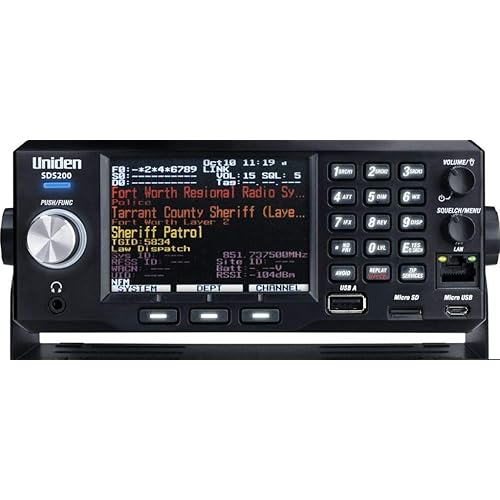
Uniden BCD536HP HomePatrol Series Digital Phase 2 Base/Mobile Scanner with HPDB and Wi-Fi. Simple Programming, TrunkTracker V, S.A.M.E. Emergency/Weather Alert. Covers USA and Canada.

  • Based on 4,309 reviews
Condition: New
Checking for the best price...
$552.49 Why this price?
Save $97.50 was $649.99

Buy Now, Pay Later


As low as / mo
  • – Up to 36-month term if approved
  • – No impact on credit to apply
  • – Instant approval decision
  • – Secure and straightforward checkout

Ready to go? Add this product to your cart and select a plan during checkout.

Payment plans are offered through our trusted finance partners Klarna, Affirm, Afterpay, Apple Pay, and PayTomorrow. No-credit-needed leasing options through Acima may also be available at checkout.

Learn more about financing & leasing here.

Selected Option

Free shipping on this product

FREE 30-day refund/replacement

To qualify for a full refund, items must be returned in their original, unused condition. If an item is returned in a used, damaged, or materially different state, you may be granted a partial refund.

To initiate a return, please visit our Returns Center.

View our full returns policy here.


Availability: In Stock.
Fulfilled by Amazon

Arrives Wednesday, Jun 24
Order within 20 hours and 47 minutes
Available payment plans shown during checkout

Protection Plan Protect Your Purchase
Checking for protection plans...

Color: BCD536HP


Style: Base/Mobile Scanner


Features

  • TrunkTracker V - Receives all unencrypted, non-proprietary radio systems including, APCO-25 Phase I and Phase II digital, Motorolla, EDACS, LTR, conventional analog and P25 digital channels.
  • Close Call RF Capture with DND - Provides information about nearby radio transmissions. Comes with Do-Not-Disturb feature which checks for Close Call activity in between channel reception so active channels are not interrupted.
  • Location Based Scanning - Connect to a compatible GPS receiver and it will automatically select programmed systems based on your exact location.
  • 25,000 Dynamic Channels - Scan and search 25,000 channels. This scanner will automatically tune to the signals nearest you, so you can keep track of what's going on in your area.
  • DCS/CTCSS Rapid Decode - Instantly detects and displays the sub audible tone so you can quickly determine the system settings.
  • How can we help? Uniden Customer Support web site is designed to conveniently walk you through product setup and troubleshooting, Contact customer support phone: .

Description

Troubleshooting : Scan Mode, Nothing to Scan 1. Make sure you Set Your Location to scan the Database. 2. Make sure Favorites Lists are enabled in Set Scan Selection. 3. Make sure Service Types are enabled for the Channels you want to hear. 4. Make sure you have locations programed if Use Location Control is On. 5. Make sure longitude and latitude are N and W (for N America). 6. Make sure Systems/Departments/Channels are not Avoided. 7. Make sure Favorites List/System quick key is enabled. 8. (Search with Scan) Make sure Troubleshooting Search with Scan is enabled in Select Lists to Monitor and the Search for Menu and for the Custom Search. With Scanning Interrupted 1. Turn off Priority Scan. Change Priority Interval. 2. Turn off Close Call Priority. 3. Turn off Weather Priority. 4. Set Channel Delay longer. 5. Set positive Channel Delay. All Channels Out of Range 1. Increase your range. 2. Turn Location Control off for the Favorites List.. Backlit Keypad & LCD. Simple-to-use Sentinel PC Software keep your scanner’s database and firmware up to date. Instant Replay – Plays back up to 240 seconds (4 minutes) of the most recent transmissions. Audio Recording – Capture transmissions for later playback.

Brand: Uniden


Color: BCD536HP


Number of Channels: 5


Special Feature: Emergency Alarm, Weather Alert


Frequency Range: 25.0000 to 49.9900 MHz


Talking Range Maximum: 5 Mile


Water Resistance Level: Water Resistant


Product Dimensions: 12.8"D x 8.5"W x 3.23"H


Number of Batteries: 2 AA batteries required.


Item Weight: 5.35 Pounds


Number of Channels: 5


Additional Features: Emergency Alarm, Weather Alert


Frequency Range: 25.0000 to 49.9900 MHz


Talking Range Maximum: 5 Mile


Water Resistance Level: Water Resistant


Number of Batteries: 2 AA batteries required.


Compatible Devices: Desktop, Laptop, Smartphone


Connectivity Protocol: Wi-Fi


Item Dimensions D x W x H: 12.8"D x 8.5"W x 3.23"H


Item Weight: 5.35 Pounds


Color: BCD536HP


Brand: Uniden


Model Number: BCD536HP


Built-In Media: BCD536HP scanner


Global Trade Identification Number: 14


Unit Count: 1.0 Count


Manufacturer: Uniden


UPC: 050633650714


Mfr Part Number: BCD536HP


Warranty Description: 1 year


Frequently asked questions

If you place your order now, the estimated arrival date for this product is: Wednesday, Jun 24

Yes, absolutely! You may return this product for a full refund within 30 days of receiving it.

To initiate a return, please visit our Returns Center.

View our full returns policy here.

  • Klarna Financing
  • Affirm Pay in 4
  • Affirm Financing
  • Afterpay Financing
  • PayTomorrow Financing
  • Financing through Apple Pay
Leasing options through Acima may also be available during checkout.

Learn more about financing & leasing here.

Top Amazon Reviews

🚀 Abunda's Overview

This is our summary and key points to consider based on customer reviews.


The BCD536HP scanner is highly praised for its sensitivity, user-friendly interface, and solid build. Most users enjoy its functionalities and consider it worth the price. However, programming issues and the difficulty of keeping programs in memory have bugged some users. Software and firmware updates are said to tackle this issue. Other minor issues include potential LCD backlight dimming and clock battery problems.

Pros

  • 👍 Highly sensitive and robust.
  • 🌟 User-friendly with well-appointed controls.
  • 👏 Solid build and great audio quality.
  • 📦 Contains SD card for programming data.

Cons

  • 💡 Potential dimming of LCD backlight over time.
  • 💾 Programming and keeping channels in memory can be challenging.
  • 🔋 Clock battery may fail after a period of use.
  • 🐌 Scanning might be slow due to unnecessary channels.

Should I Buy It?

If you are seeking a solid, user-friendly scanner and are willing to overlook some minor issues, the BCD536HP scanner would be a good choice. Its positives seem to outweigh the negatives making this product a viable option to consider.


  • For A Busy Dad, This Plug & Play Scanner is Perfect
Color: BCD436HP Style: Base/Mobile Scanner
With over 700 reviews of this product, there is a lot of material out there. If you're like me and have limited time to read reviews, let me sum this product up for you: 1. It is plug & play. Enter your zip code and it knows what frequencies to scan in your area. Game on! 2. If you travel, buy the Uniden-brand GPS unit available on Amazon (Uniden BC-GPSK Serial GPS Receiver for Scanner and Marine Products). The reason to buy the Uniden unit is A) As you travel, the GPS feeds your location into the scanner and the scanner updates the frequencies it is scanning to those near you and B) because it is also plug & play. Mine arrived with the necessary cords to plug directly into the scanner, and it worked from that moment. Perfect! 3. You can connect the scanner to your PC to update the firmware and the frequency database from Uniden. It is easy. No need to buy a third-party web database. Uniden regularly updates their database. I purchased my unit in 9/2014 and used it nine months before performing updates. It works fine out of the box. 4. The scanner has two batteries, a main battery for scanning and a secondary battery for the clock. Charge the main battery first, then turn on the scanner to charge the secondary battery. Oddly, the clock battery charges when the unit is on. 5. On trips, an external antenna will extend your range. I purchased a magnetic mount antenna on Amazon for about $30 (ASIN B004HM9RHE) and it works great. Almost a plug & play device, you do not need an SWR meter as it is pre-tuned. Plug & play caveat: You will need a BNC Female/SMA Male Adaptor (ASIN B00CLFFM4G) to plug the antenna into the scanner. 6. When using in a vehicle, know the law. States may have laws restricting scanner use in a vehicle. UPDATE: As of May 1, 2006, a permit from the Michigan state police is no longer required to have a scanner in your vehicle on Michigan roadways. I have been told by the Ontario Provincial Police it is legal to have a scanner in a vehicle in Canada but have not been able to find the law on the books. UPDATE: March 7, 2021: A Spectrum Management Officer of the Canadian Innovation, Science and Economic Development department (Canada's equivalent to the U.S. Federal Communications Commission) wrote me that an amateur radio operator's license is required to use a scanner in a vehicle in Canada. Canada recognizes U.S.-issued amateur licenses, so if you're a licensed ham operator, you're set. 7. That's it. This scanner is as simple or complex as you wish it to be. For a busy dad, the simplicity is welcome and the Plug & Play No Fuss Ready-to-Use attributes actually let me enjoy the thing without brushing off my kids to learn how to make it work. It reminds me of the original Apple MacIntosh computer: A product so smart you can turn it on and use it without devoting hours of study to get it to function :-) ... show more
Reviewed in the United States on May 12, 2016 by E. Fisher

  • Great Unit & Future Proof
Color: BCD436HP Style: Base/Mobile Scanner
Make sure you read the review item next to the name of the user. Amazon mixes reviews of different units in one. Before I get into the scanner I would like to address some complaints in general on scanners and the frustration of programming and using them and resulting in a bad review and complaints about a scanner be it a simple scanner or a complex one. Radio systems (simplex, trunking, digital, etc) and all the frequencies assigned worldwide is a complex matrix. It's not a simple as scanning every frequency under the sun to find some activity, its more complex. And truth be told 95% of scanner enthusiast like the complexity as it adds to the hobby. Learning and gaining knowledge and always figuring out new tricks, etc. If it was simple it would not be a fun. But there are some who want quick and easy. So you must to 1 of 2 things. 1: Make sure any scanner you purchase you can hook up to the computer (some use serial so be patient) and use FreeScan software (free) and subscribe to a frequency database. It's cheap and worth it. I paid 30 a year that's pennies a day to have an awesome database at your fingertips. This will load and label all the systems in your area and put them on the scanner. 2: Purchase a more expensive with a built in database and other features (like this Uniden 436HP). Even if you do #2 it's always good to do #1 also. And be patient. While watching TV or hanging out, mess with the scanner nightly and learn little things as you go. Watch some videos on YouTube like Scanning 101, etc. Enjoy the process and do not get frustrated. On to my quick review of the BCD436HP. I had purchased the BC346XTC and used it for a week. Great unit highly recommend if you want analog with trunking. I wish the display was bigger so you can see more of the 3 areas system, dept and channel. But it worked great and I rated it 5 stars. But I wanted something digital with a larger display so I plunked out more than double the price of the BC346 for the BCD436HP. Love the large display, it really shows a lot. A separate line for the system, department and channel which you can hold each one and scan subs of them. When I first turned it on I entered my postal code and was scanning in minutes. The BC346 I had to manual scan or load it with FreeScan to get it really working. I have not hooked the BCD436HP to the computer yet but will this week to load detailed databases. This has a ton a features and essentially has unlimited channels (no cap). Firmware will future proof this unit. It pretty much does everything (trunked, digital, etc). The Micro SD card is a great feature to load a ton of databases and this unit will record and playback transmissions. Some users commented on the cheap feel of the unit. That's a slippery slope with a lot of opinions. Its light weight and feels good to me, the plastic is not super tough industrial but Uniden most likely weighed the pro and cons. Example: A Motorola VHF 2 way 99% of the time will be used in a work environment and be dropped, thrown on a dash or ledge, etc. That is why they also do not put displays on most of them for durability. Now a scanner is typically a hobbyist device and I can imagine 95% of the time it would not be used in a rugged work environment, so to me Uniden chose well with light weight plastic. The display screen plastic seems like it may get scratched easy but I have not had it long enough determine that. Some people do not like the Uniden clip on the back since it sticks out, but if you see why they did that it nice. It's basically the same CB mic mount to when you take the clip off it slides real nice into a CB mic mount. I bought a CB mic mount and use it in my van. Very nice feature. Battery life is dependent on processing, led, etc. I have not used it long to determine but if I had to charge it every night no big deal. Bottom line with anything you buy there is always things some people like and others do not. Is this unit a little pricey, probably but then it has a lot of R&D in it and they do not sell tons of them so there has to be a price point to make money. So I am ok with the price. You basically have a little computer in your hand ready to scan the RF Spectrum and should be future proof for a long time. If your trying to figure out if you like scanning buy a smaller Uniden or Whistler and program it via your computer and check it out. If you want to move up into the full spectrum (trunking, digital, etc) then you need something like this. I would recommend this to someone who knows what they want and ready to shell out a few bucks. For a beginner maybe start smaller. I had a chance to mess with hooking this up to my computer. Turns out the FreeScan does not support this unit. BUT Uniden makes free software for this called Sentinal which has a real good database with it. Its all installed on the 436 already so you really do not need to use the software unless you want to make easy edits or import stuff from freescan, etc. Sentinal software may not be as in depth for the hard core seasoned scanner users but for me its good. So in reality the BCD436 is a unit that will have you scanning in minutes with little to no programming and has the capability for the seasoned users to program till the cows come home. Update: I love this scanner. The screen showing all the info is great. The hold for each area is awesome I cannot say enough about that. I have NOT needed software like on other scanner I have used. Maybe I will one day but Uniden shipped this will ALL the frequencies in my area and nationwide for the most part! ... show more
Reviewed in the United States on February 26, 2015 by Raven

  • Good product, worth the purchase and cost
Color: BCD436HP Style: Base/Mobile Scanner
The last scanner that I purchased was in the 80’s. Man they’ve come a long way! The ease of use for basic features like zip code scanning is really simple. I didn’t need the book to tell me. You can choose the type of services that you want to receive press zip code entry set distance and sit back and enjoy. As you receive a freq that it stops at you can store it in a bank that you name yourself and if that isn’t enough you can temporarily avoid that one and move on. A huge upgrade to less functional scanners is that the 436 tells you what the freq belongs to, no more book or internet lookups for what it’s for. That’s basic features I have yet to delve into the complete features that the 436 is capable of. It’s very intimidating. Purchasing a longer range antenna, a Bluetooth transmitter as this scanner does not have Bluetooth built in. I don’t like to use corded ear phones and much prefer Bluetooth. Purchase 3 extra rechargeable batteries and a battery charger so that you have extra batteries to install when others die. The unit has a built in charger but it’s major downfall is that the scanner doesn’t charge when the unit is on. I hate built in chargers anyway. Don’t bother with non rechargeable batteries, even the best brand will die quite rapidly. The quality of the casing is of poor quality, if dropped it will surely break. Buy a leather covering for protection, I’ve already inadvertently knocked it over. The base is very small so it does not provide a substantial surface to stand up very securely fortunately it’s of good weight so it stands adequately. I’ve ran the buttons and knob through there paces and they’ve upheld well. UPDATE: The channel knob is failing. It loosened up and is so sensitive in the functions it’s used for that it has a mind of its own so the screen selection jumps anywhere it feels like it. Again the features are beyond my scope of knowledge. I’m looking forward to learning all of them. I’m glad that I waited to submit this review. I purchased the home base equivalent of the 436. It operates the same functionality with just a few button location mods. I also purchased the upgrade handheld, the SDS100. It’s a hundred dollars more than this one and it’s being returned. The SDS does not have the speaker quality the differences is water proofing, I don’t use them under water, the battery is unique of course so you’re pressured to purchase the exact battery. I just can’t get around the sound quality. I mentioned that the selection knob is failing which led me to the SDS. But I don’t like the SDS so I bought another 436. If you enjoy scanning and beyond features that this one has the I highly recommend the 436. The price is right for what it has to offer. ... show more
Reviewed in the United States on September 19, 2020 by Kyle and Michelle

  • Very Good Item! Simple basic setup. Some learning required for New Users.
Color: BCD436HP Style: Base/Mobile Scanner
This is a very good scanner, and fairly easy to set-up. You simply attach the pieces in the box to it like the antenna, carry clip, and install the 3 AA rechargeable batteries which will not be charged so I had to plug it in to a USB port charger to power up until the batteries were fully charged. The cord plugs into the bottom of the 2 ports on my scanner, and the top port is for adding GPS Then I simply powered it on set my time which may be slightly confusing at first, set the backlight which I watched a YouTube video to learn. Lots of helpful how to YouTube videos on this model, and then you will be prompted to enter your zip-code, and it will automatically download most of your local frequencies within 20 miles.I found this to work very well to hear my local police but I had to open my menu and get to the area where I could choose and check other things like local fire, utilities, RR, Aviation and many other choices. However, this is where it gets more complicated. You will find a lot of online and very helpful articles and videos on the subject of firmware and database updates. You will also need to download your models Uniden app on your laptop or PC to load updates. Take your time and use whatever help and learning materials you can find and the instructions on the Uniden page, and you will be able to get it done. So I would say after getting through that part of it, I am relaxing and back to listening to everything in my area and enjoying it. There are also ways to set-up favorites, and a lot of different features, but for now I'm just going to let it scan through everything in my area. ... show more
Reviewed in the United States on February 24, 2026 by Ratman Willy G

  • Nice, Takes A Little Work, A+Quality
Color: BCD436HP Style: Base/Mobile Scanner
I needed another scanner. My older were, older. I got this one. "Easy programming" it says. Zip code mode works pretty easy. I downloaded the "Sentinel" app and made a favorites list. Somehow, maybe plugging in the cable, the favorite list got in the scanner. The zip code frequencies are a mess of freq's. Some useful, lots not. Biggest issue for me, NO FIRE freq's. Went on to Radio Reference and put out a help message. Turns out you have to "turn on" the fire frequencies! And there are a few other issues, maybe I'm getting too old for all this "programming crap"! Anyway, after a week, I did something and one of my favorite lists started to work. Then I had to re-create what I did. I'm good now, but it does take some learning and work. Lots of on-line info. Good Luck! Once it works, it's great! Volume may be a little low if it's in your car, you may need an external speaker. ... show more
Reviewed in the United States on March 1, 2026 by Ron R

  • Should have never been released
Color: BCD536HP Style: Base/Mobile Scanner
Like another reviewer stated that it has more bugs than a roach motel is true. Uniden knew this when they announced they were coming out with it back in November. They released it anyway in January! Profits before performance! Uniden said it is WI-FI capable and it is not. Not yet! Maybe never! It does come with a WI-FI dongle but it is useless at the moment.They said you could use an app for either Android or Apple devices. You can not because the app is still in development.Or so it is said. They knew this when they released this scanner but did not tell anyone about it OR that the analyze function that they highly advertised does not work either. These were 2 of the main features why I purchased this scanner.Their website has no mention of the analyze function not working but they still have it on their site as being available on this scanner. Oh it is there. It just doesn't work. Their website also says the app for the WI-FI will be available 1st quarter of 2014. It is now May 25th. I purchased mine near the end of February and realized that there was no CD with it that contained the app. I immediately started searching the Internet to find out why there was no app. If you go to [...] you'll find all the questions and answers you'll need to make your own determination as to purchase or stay far away. I kept mine thinking that Uniden would release the app and have a fix for the analyze function by the end of the 1st quarter. But the time has passed for me to return it so I'm stuck with it. You can use it as a functional scanner but I along with countless others paid for features we didn't get and probably never will. Uniden will not answer emails either. Purchase the scanner and then try to find out info about it.Not one email was ever answered. I personally will not buy another Uniden product of any kind. Period! They're dead to me. I would bet my last dollar that there will be a class action suite over this. Check out the Uniden forum at radio reference and see for yourself how many other unhappy customers Uniden has. I also personally think that the good reviews are from people that didn't want/need the unavailable features or are affiliated with Uniden to try to boost sales. There are people in the forums that constantly belittle the people that complain that Uniden is doing nothing and not listening to them. You know the people that paid $600 dollars for something and didn't get what they paid for. I call them customers. Those people will think long and hard before buying anything with a Uniden label on it again. Update 7/29/2014 7 months have passed since the release of this scanner and there is still NO Wi-Fi/Siren App or Analyze function. Yet everywhere you look, including Amazon.com, they still advertise these features. WHY! Do they enjoying making customers mad and have to deal with returns once the customers realized they've been lied to. Or they've had their head under a rock since January! Uniden is still not returning emails or taking calls regarding this scanner but Uniden continues to send their propaganda emails advertising! Our government is always wanting to get in on everyone's business but never there to protect the consumers from liars and thieves! Update 2/3/2015 Here we are over a year since it was released and still DO NOT have the features that were advertised. A YEAR! REALLY! And to add another slap in the face from Uniden, the 1 year warranty will be expiring soon. So once, I mean IF, these features ever do materialize and something goes wrong, then good old Uniden will happily charge you/me for out of warrenty repair. It's a win/win for Uniden and a loose/loose for us! So to all that went ahead and purchased this while ignoring the those of us that tried to save you your hard earned money and a lot of headaches, I TOLD YOU SO! So much for consumer protection laws. But I have said before Uniden is dead to me. Yeah I got screwed along with a lot of others but I will make it my life goal to bash Uniden until I take my last breath or they go out of business! I sure hope I'm around to see it! ... show more
Reviewed in the United States on May 26, 2014 by tal7901

  • BCD536HP Works Great! Almost Too Plug and Play. Some assembly required!
Color: BCD536HP Style: Base/Mobile Scanner
Works Great:I have had this for 3 months without a glitch. If you need to listen to a Motorola or Harris P25 public safety system this is the best way to go for most people. Previously I was using a Motorola Spectra to listen to this system in analog mode (I have skills). But the county switched to P25 and shut me out. So this Christmas after a long delay I treated myself to a BCD536HP. Pros: Very sensitive receiver Receives analog and P25 digital and capable to upgrade the common digital modes Provoice and DMR at small cost. Small, well appointed controls, WiFi connectivity for Android and IOS. Powerful audio (when used with an external speaker) Easy to upgrade firmware and channels using Sentinel. Cons; You will have to get latest firmware and channels using Sentinel to get started. Not hard to do, it requires a PC and a USB cable (supplied). Ditch the internal speaker, plug in an external communications speaker 3 or 4 inch diameter. Getting Started Programming can be somewhat frustrating for the newbie. I am used to programming commercial LMR radios and understand all the parameters. So I would say I am "expert", however this experience turns out to be unneeded and perhaps misleads me. This radio is quite different in that Sentinel will download a fire hose full of nationwide channels. Your radio will require you to provide your Zip code (or connect optional GPS) and it will activate all the systems in a radius you provide. This will probably be way more than you need. The solution is to use Sentinel to create a Favorites List and use Quick Keys to activate only the channels or systems you wish. Otherwise you will spend a lot of time pressing the Avoid Button to ignore the dog catcher (no kidding). The database comes FREE from www.Radioreference.com Visit that site, the forums etc, and learn about the system you wish to monitor. Simulcast Systems You will hear a lot of favorable and unfavorable things about this receiver. The largest complaint is the reception of P25 simulcast systems. It is true that the scanners available today (Both Uniden and Whistler) use a "discriminator" to decode the P25 signal. This is not the best way to decode P25 in a simulcast system. The best way is a DSP receiver, and you can only obtain that by buying a Motorola, Harris radio (which you cannot legally program properly), a Pricey Unification Pager, or set up a software defined radio (for geeks). Personally my experience is that my radio works fine on my local simulcast system and I am in an overlap area. Occasionally the bit error rate is high and the audio garbles. P25 itself is not a perfect mode and you will find dispatchers and officers sound like the have marbles in their mouths. It is the nature of P25. If you have any concerns contact local users and ask them their experience with this scanner in your area. Encryption If your local agency uses encryption on some or all of their talk groups you will NOT be able to decode them. The radio lacks an encryption card and even if equipped you would NEVER be able to obtain the lengthy 256 bit key. It would be illegal as well. If I haven't scared you off, you will be very pleased after you get it up and running. Uniden also makes a portable version of this radio, the BCD436HP. I bought the mobile/base version as then I do not have to worry about batteries and the BCD536HP has better shielding and so receives with less noise. ... show more
Reviewed in the United States on March 17, 2017 by MaryinOviedo

  • so close yet, so far
Color: BCD436HP Style: Base/Mobile Scanner
I like to use a scanner to monitor events (fire, police, etc...) around the house, listen to weather spotters, listen to aircraft, so I thought having the frequency database built in would be great. It is - but unfortunately Uniden doesn't understand user interfaces and EVERY FUNCTION is buried beneath a quagmire of menu selections. The scanner works great! Battery life is solid. build quality is good as well. There are a couple of (not so) little complaints that I have. First - and this is huge: You can not charge the batteries WHILE using the scanner. You can either scan or charge. This to me is a huge setback. This day and age you should be able to do both. The radio isn't big so add a little space for a recharge circuit. Second - you cant really use it mobile. Since everything is buried in menu's you can't really do anything while driving. It even takes 2 clicks to adjust the volume. To me, and I'm a very novice hobbyist, there is a lot of needless complexity to the menu. Third - the software is probably the worst written thing I have ever used. (I'm an IT Project Manager, so I've seen a lot of bad code). You have to have the software in order to update the database. you also want to use it so that you can add "favorites" or "lists" (these are frequencies that you divide up - for example Airport, or local police, etc...). It is possible somehow to make these lists on the scanner, but I have no idea how. You would think you would just add frequencies to a list in the software and upload it to the scanner...no, no, no...if you do that you end up erasing all your stored favorites. Honestly, I have no idea how to make it work. I usually end up watching a youtube video and following along. fourth - frequency holds. you have 3 frequency hold buttons: one for system, dept and channel. sounds great doesn't it? Except that by the time you get to the scanner, find the button and press it, it has already started to scan. Of course there is a delay so you end up holding a non-related frequency. You can try to scan backwards, but usually you end up missing the entire transmission. It's a good scanner, but it does have some pretty big tradeoffs. The internal database is great, but the terrible UI and software is just maddening. couple that with no ability to charge while listening and you have a recipe for mediocrity. ... show more
Reviewed in the United States on May 7, 2019 by Dewey P.

Can't find a product?

Find it on Amazon first, then paste the link below.
Checking for best price...