Expanding Connectivity for a Clean Build
Style: Internal USB Hub 3
First Impressions & Build Quality Upon unboxing the NZXT Internal USB Hub 3, the immediate impression is its compact and sleek design. NZXT is known for its minimalist aesthetics, and this hub follows suit with a black, often magnetic, casing that allows for discrete placement within the PC case. It
feels solid and well-constructed, a testament to its durability. The hub typically comes with a single input cable (connecting to one motherboard USB 2.0 header) and multiple output ports (often three or more internal USB 2.0 headers, plus one standard USB Type-A port for external devices if needed). The cables are usually black and flexible, aiding in clean cable management, and the connectors fit securely. The magnetic backing is a thoughtful touch, allowing for easy, tool-free mounting to any steel surface inside the case. Functionality & Performance The core purpose of the NZXT Internal USB Hub 3 is to expand internal USB 2.0 connectivity without compromising data integrity or power delivery, and it performs this task exceptionally well. USB Header Expansion: This is its primary and most crucial function. For motherboards with only one or two USB 2.0 headers, this hub allows you to connect multiple devices that require this connection (e.g., AIO coolers, RGB controllers, fan controllers, front panel USB ports, etc.) Stable Data Transfer: Unlike some cheaper, passive hubs, the NZXT Internal USB Hub 3 is typically an active hub, meaning it draws power directly from the PSU (via a SATA power connector). This ensures stable power delivery to all connected devices and maintains consistent data transfer speeds, preventing connectivity issues or dropped signals that can plague unpowered hubs. Clean Cable Management: By consolidating multiple USB connections into one central hub, it significantly reduces cable clutter around the motherboard's headers. This leads to a cleaner-looking build and can improve internal airflow. Broad Compatibility: It's generally compatible with a wide range of internal USB 2.0 devices from various manufacturers, making it a versatile solution for diverse PC builds. In practice, the hub silently and effectively manages the additional USB connections, allowing all components to function as intended without conflicts or performance degradation. Installation & Placement Installation is remarkably simple. You connect the hub to one available internal USB 2.0 header on your motherboard and plug in a SATA power connector from your PSU. Then, you connect all your internal USB 2.0 devices to the hub's output ports. The magnetic backing is a major convenience, allowing it to be easily mounted to any steel surface within the case – behind the motherboard tray, on a drive cage, or even directly on the PSU shroud. This flexibility ensures a clean, hidden installation, which is a hallmark of good cable management. Areas for Improvement While the NZXT Internal USB Hub 3 is highly effective, a few minor considerations exist: Price: It is typically priced higher than generic, unpowered USB hubs. However, the active power delivery and build quality often justify the cost for reliability and a cleaner aesthetic. USB 3.0/3.1 Limitations: This hub is specifically for USB 2.0 headers. If you need to expand USB 3.0/3.1 internal connectivity, a different type of hub or PCI-e card would be required. This is not a flaw, but a design focus. Redundancy (for some builds): For very basic builds with minimal internal USB devices, this hub might be an unnecessary expense if the motherboard already provides sufficient headers. Its value shines in complex or aesthetic-focused builds. Cable Lengths: While generally good, in very large cases, the included cables might sometimes be a stretch to reach desired mounting locations, though this is rare. Conclusion The NZXT Internal USB Hub 3 is an elegantly designed and highly functional solution for PC builders grappling with a shortage of internal USB 2.0 headers. Its robust build quality, active power delivery for stable performance, and thoughtful magnetic mounting make it a superior choice compared to passive alternatives. While it comes at a slightly higher price point, its ability to streamline cable management and ensure reliable connectivity for numerous internal peripherals makes it an invaluable component for clean, modern, and complex PC builds. For those seeking to expand their internal USB connectivity without compromise, the NZXT Internal USB Hub 3 is a highly recommended and insightful upgrade.
...
show more
Reviewed in the United States on June 25, 2025 by Logan Faris
Justo lo que necesitaba
Style: Internal USB Hub 3
excelente producto... funciona sin problemas
Reviewed in the United States on July 12, 2025 by Camilo andres agudelo
Very useful!
Style: Internal USB Hub 3
Well built and fits in my case perfectly, very compact and the magnetic attachment is nifty
Reviewed in the United States on June 27, 2025 by Kindle Customer
Great hub.
Style: Internal USB Hub 3
Works as expected. A must have for adding components that require usb headers when motherboards have limited headers. I also noticed that because it’s a powered hub, devices are recognized and start up quicker.
Reviewed in the United States on May 25, 2025 by Greg G.
Excellent!
Style: Internal USB Hub 3
Worth the money. Bought a cheap hub before that kept connecting/disconnecting. This was rock solid.
Reviewed in the United States on May 22, 2025 by Jerry
Great hub but one thing to note
Style: Internal USB Hub 3
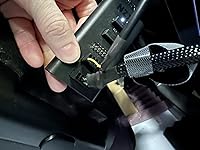
Hub is great however, if you have a usb that needs to have the last slot connected(yellow in picture) it will not register the device as plugged in, as the hub wire does not have this wire included in the connection wire to the motherboard.
Reviewed in the United States on May 3, 2025 by E. L. E. L.
Love this thing! No more USB header shortage on my mother board!
Style: Internal USB Hub 3
Great product. Solved my mother board usb header shortage issue is minutes. Magnetic mounting and extra usb ports for peripherals in my latest build made this a no brainer. Couldn’t be happier and still have extra usb ports now. Installed in minutes and makes cable management much easier to.
Reviewed in the United States on April 27, 2025 by Rich
No words works great
Style: Internal USB Hub 3
Hub works
Reviewed in the United States on May 27, 2025 by pinkbearpink_