Search  for anything...
msi

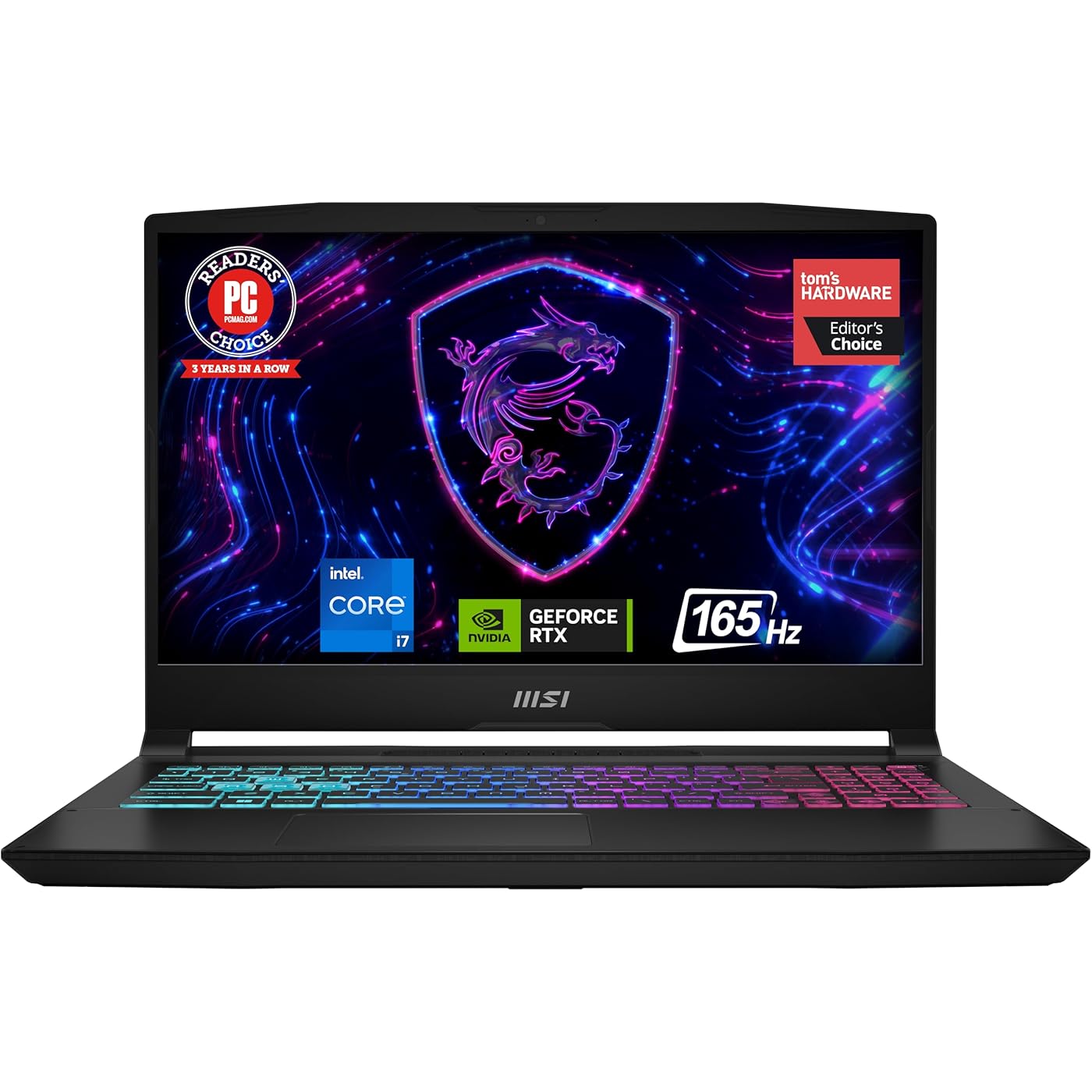
msi Katana 15 15.6” 165Hz QHD Gaming Laptop: Intel Core i7-13620H, NVIDIA Geforce RTX 4070, 16GB DDR5, 1TB NVMe SSD, Cooler Boost 5, Win 11: Black B13VGK-2000US
  • Based on 551 reviews
Condition: New
Checking for the best price...
$1,448.00 Why this price?
Save $751.98 was $2,199.98

Buy Now, Pay Later


As low as / mo
  • – Up to 36-month term if approved
  • – No impact on credit to apply
  • – Instant approval decision
  • – Secure and straightforward checkout

Ready to go? Add this product to your cart and select a plan during checkout.

Payment plans are offered through our trusted finance partners Klarna, Affirm, Afterpay, Apple Pay, and PayTomorrow. No-credit-needed leasing options through Acima may also be available at checkout.

Learn more about financing & leasing here.

Selected Option

Free shipping on this product

FREE 30-day refund/replacement

To qualify for a full refund, items must be returned in their original, unused condition. If an item is returned in a used, damaged, or materially different state, you may be granted a partial refund.

To initiate a return, please visit our Returns Center.

View our full returns policy here.


Availability: 18 left in stock
Fulfilled by RockyStone Electronics

Arrives Monday, Jun 1
Order within 8 hours and 10 minutes
Available payment plans shown during checkout

Protection Plan Protect Your Purchase
Checking for protection plans...

CPU: 13th Gen i7


RAM Size: 16 GB


Hard Disk Size: 1 TB


Graphics Description: RTX 4070


Style: QHD 165Hz


Features

  • Supercharged Process: The 13th Gen. Intel Core i7 processor delivers the ultimate immersive experience in gameplay, multi-task work and productivity.
  • Simplistic Design: Enjoy the latest generation of Windows 11 Home for your everyday needs. *MSI recommends Windows 11 Pro for business use.
  • Beyond Fast: The NVIDIA GeForce RTX 4070 GPU powered by the Ada architecture unleashes the full glory of ray tracing, which simulates how light behaves in the real world.
  • QHD Display: The 15.6 165 Hz QHD display brings more vivid colors and pixel density for the ultimate gaming experience.
  • Powerful Cooling: Cooler Boost 5 to ensure optimal thermal dissipation and provide the best gaming experience.

Description

MSI Katana 15 15.6” 165Hz QHD Gaming Laptop: Intel Core i7-13620H, NVIDIA Geforce RTX 4070, 16GB DDR5, 1TB NVMe SSD, Cooler Boost 5, Win 11: Black B13VGK-2000US

Brand: msi


Model Name: Katana 15 B13VGK-2000US


Screen Size: 15.6 Inches


Color: Black


Hard Disk Size: 1 TB


CPU Model: Core i7


Ram Memory Installed Size: 16 GB


Operating System: Windows 11 Home


Special Feature: Backlit Keyboard, HD Audio


Graphics Card Description: RTX 4070


Color: Black


Hard-Drive Size: 1 TB


Operating System: Windows 11 Home


Other Special Features of the Product: Backlit Keyboard, HD Audio


Graphics Description: RTX 4070


Graphics Coprocessor: NVIDIA GeForce RTX 4070


Hard Disk Description: 1


Item Weight: 4.96 Pounds


Video Processor: NVIDIA


Specific Uses For Product: Developer, Gaming, Student


Webcam Capability: Yes


Graphics Card Ram: 8 GB


Form Factor: Clamshell


Voltage: 230 Volts


Camera Description: Front


Graphics Ram Type: GDDR6


Compatible Devices: External displays, keyboards, mice, storage devices, printers, and other USB/HDMI/BT/Wi-Fi enabled accessories


Warranty Type: Limited


Item Dimensions L x W x Thickness: 14.13"L x 0.98"W x 10.2"Th


Video Output: HDMI


Virtual Reality Ready: Yes


Screen Size: 15.6 Inches


Resolution: 2560 x 1600 pixels


Native Resolution: 2560 x 1600 pixels


Display Type: LED


Display Resolution Maximum: 2560x1600 Pixels


Display Technology: LED


Supported Monitor Maximum Quantity: 3


Has Color Screen: Yes


Screen Finish: Matte


Connectivity Technology: Bluetooth, Ethernet, HDMI, USB, Wi-Fi


Wireless Technology: Bluetooth, Wi-Fi


Wireless Compability: 802.11ax, Bluetooth


Bluetooth Version: 5.3


Bluetooth support?: Yes


Wi-Fi Generation: Wi-Fi 6E


Human-Interface Input: Keyboard


Keyboard Description: Gaming


Keyboard Layout: QWERTY


Touchpad Feature: Standard Touchpad


Audio Output Type: Headphones, Speakers


Speaker Description: Built-In Stereo Speakers


Microphone Form Factor: Built-In


Audio features: Speaker, Microphone


Audio Recording: Yes


Processor Series: Core i7


Processor Speed: 2.4 GHz


Processor Count: 1


Processor Brand: Intel


CPU Model Number: i7-13620H


CPU Model Generation: 13th Generation


CPU Model Speed Maximum: 4.9 GHz


CPU L2 Cache: 12 MB


CPU L3 Cache: 24 MB


Brand: msi


Model Name: Katana 15 B13VGK-2000US


Model Year: 2024


Model Number: KATANA15132000


Built-In Media: Charger, Manual


Manufacturer: MSI


UPC: 824142357620


Unit Count: 1.0 Count


Warranty Description: 1 Year Manufacturer Limited


RAM Memory Installed: 16 GB


RAM Memory Technology: DDR5


Ram Memory Maximum Size: 64 GB


Memory Speed: 5200 MHz


RAM Type: DDR5 RAM


RAM Memory Slot Total Count: 2


Memory Slots Available: 2


Battery Cell Type: Lithium Polymer


Battery Life: 10 Hours


Battery Average Life Standby: 10 Hours


Number Of Cells: 1


Lithium-Battery Energy Content: 52 Watt Hours


Total Usb Ports: 4


Hardware Interface: Ethernet, HDMI, Headphone, USB 3.2 Gen 2


Number of Ports: 4


Number of Ethernet Ports: 1


Total Number of HDMI Ports: 1


Available M2 Slot Count: 1


Frequently asked questions

If you place your order now, the estimated arrival date for this product is: Monday, Jun 1

Yes, absolutely! You may return this product for a full refund within 30 days of receiving it.

To initiate a return, please visit our Returns Center.

View our full returns policy here.

  • Klarna Financing
  • Affirm Pay in 4
  • Affirm Financing
  • Afterpay Financing
  • PayTomorrow Financing
  • Financing through Apple Pay
Leasing options through Acima may also be available during checkout.

Learn more about financing & leasing here.

Top Amazon Reviews


  • Desktop performance in a laptop
CPU: 13th Gen i7 RAM Size: 16 GB Hard Disk Size: 1 GB Graphics Description: RTX 4070 Style: FHD 144Hz
I bought the Katana 15 B13V with 16 GB of DDR5 Ram, RTX 4070 gpu, and i7-13620H cpu on Prime Day marked down to $1349 from $1599. I primarily bought this because my desktop's motherboard uses DDR4 and is becoming dated and I wanted to play Baldur's Gate 3 at max settings. I'd like to build another desktop, but want to drop that kind of money until DDR6 is a thing instead of building it in the middle of the DDR5 Lifecycle. That's still a few years out. So this was a great purchase for my needs. It is literally desktop performance in a laptop at a mid-range price. Let's start with the cons and why I don't care The display isn't the best. Don't get me wrong, its great, but not anything special. That doesn't bother me, because its connected to my 4k monitor. Who cares about laptop screens anyway. 4k resolution doesn't make much of a functional difference on a small screen. Costs were cut there for sure. Costs were probably also cut on the battery. It doesn't last long not plugged in on normal loads, and its probably not even feasible to use it unplugged while gaming. This would suck if I planned to use it unplugged, but again, this matters not to me. There is also a technology implemented called CoolerBoost 5. Its pretty necessary to run when gaming newer games at max settings. It gets PlayStation loud. If you're an audiophile, then you're going to need some good noise-canceling headphones to really enjoy anything on this machine. This doesn't bother me, because I'm not an audiophile, and even if I was, I have a couple great sets of noise-canceling headphones. It also doesn't bother me because without it, all of the great things about this thing wouldn't mean squat.... let me explain... Now for the Pro's This thing runs great without load on balanced power settings (No CoolerBoost). Without CoolerBoost, its about as quiet as it comes. I only use it for browsing and playing music outside of gaming. It does great. I haven't tried watching any 4k videos on it yet, but I imagine it would handle that well on balanced power settings as well. Remember when I mentioned the noise level from the CoolerBoost 5 as a con. Well, Coolerboost is probably just as important of a feature as any of the hardware this machine packs. Gaming laptops get a bad rep, mostly because they literally burn up a lot faster than a desktop and are difficult and expensive to fix when they do. The reason being is inadequate cooling. This is a tiny box to fit all of those extreme heat producing components in. Getting desktop-like cpu temps and gpu temps in a laptop should be a pipedream. Seeing temps in the 85-90 degree Celsius range or higher is just part of the territory. With CoolerBoost on, this thing hangs in the 60-75 degree range with BG3 running max settings. That's as good or better than my desktop. Have you heard of temp-throttling? Yeah, that's only a thing if you let it be a thing with this machine. That said, without CoolerBoost active while running BG3 at max settings, I watch those temps move to the Upper 80s and low 90s, like one would expect with this kind of hardware in such a small box. It is well worth the noise to have a machine packing an i7 13th gen chip and RTX 4070 gpu that can sport desktop temps while actually using the hardware at its potential. Final Thoughts This machine is fantastic if you're looking to replace a desktop with a laptop that will likely last. All of the right corners have been cut. Due to the temps sitting at desktop level, I anticipate the hardware components to potentially last indefinitely. This will still be a very serviceable and more portable machine when I do get my desktop built. The potential issues I see are needing to replace fans at some point due to the CoolerBoost. They could also last too, its just a possible logical consequence of running the fans at high RPMS. I imagine the most important fix that I'll run across is replacing the battery. Those things will always go bad eventually, but more quickly if there are periods of high humidity in your gaming area. Think about spring or fall days where the AC isn't running. Years of that will kill a battery. ... show more
Reviewed in the United States on August 11, 2023 by The Bearcat

  • An excellent gaming laptop for the price
CPU: 13th Gen i7 RAM Size: 16 GB Hard Disk Size: 1 GB Graphics Description: RTX 4070 Style: FHD 144Hz
I purchased this laptop to replace my 2021 ASUS ROG Strix G15 gaming laptop, and I am not disappointed. Pros: - Not too heavy. Definitely lighter than the ASUS! - Not as loud as my ASUS when the fan kicks on - For the price, it is pretty snappy! I got 1TB of SSD space, and 16GB RAM, and so far, I've played games like Starfield at high or higher settings. - The Gaming Mode is intelligent enough to clock down when the laptop is under light load, and clock up when a game starts, which is nice Cons: - The battery life sucks. I expected that, so I'm not upset about it. Kinda par for the course for gaming laptops - The screen is 1080p. It looks fine, not the nicest I've seen, but it is decent and has a good refresh rate, so it isn't a *big* deal. - The fan does get loud when playing game. Once again, I kind of expected that. - When playing a game, and the fan spins up, the left side of the laptop gets pretty warm, so watch your hand! Overall I am very pleased with this purchase! ... show more
Reviewed in the United States on November 2, 2023 by Adam Presley

  • CHANGE FACTORY SETTINGS!!!!
CPU: 13th Gen i7 RAM Size: 16 GB Hard Disk Size: 1 TB Graphics Description: RTX 4070 Style: QHD 165Hz
LISTEN UP! You MUST go into the hidden bios and turn down the power limit from P1 and P2 to 80w and 120w. Also, you need to enable overclocking so it will actually get benefits from these power limits. It was factory set to disable overclocking AND maintain a power draw of 200w???? This laptop got EXTREMELY hot, and i understand why because of these settings, but the average Joe isn’t gonna know to deep dive into a bunch of settings to fix things. Since I’ve made these changes, the laptop runs sooooooo much cooler, quieter, and faster! It was really sluggish at first because of thermal throttling, I legit started a return and packed it up to be sent back. But then I gave it another chance and deep dived into the intimidating settings and fixed the poor thing, and it’s sooooo snappy! It responds and loads applications wildly fast, I actually feel like I got this thing for an absolute STEAL at $1,000!!! ... show more
Reviewed in the United States on March 4, 2025 by Sydney

  • It's a good laptop but...
CPU: 13th Gen i7 RAM Size: 16 GB Hard Disk Size: 1 GB Graphics Description: RTX 4070 Style: FHD 144Hz
Honestly, this laptop is pretty good. I did upgrade the ram and added another m.2 drive (hardware not included...really?) If you contact support they will give you the hardware plus a thermal pad, make sure when you are putting the m.2 in that the thermal pads are on the top of the m.2 and not on the bottom. Then remove the protective film from the bottom chassis of the laptop. Some complaints I have, this may be a personal preference though. The charging port on the left side really doesn't work for me. I feel that the charger is always laying on top of your feet or laptop. The charging port is also quite loose as well. The other thing is, is the FN keys are to the left why are you putting FN command key on the right? The volume control buttons could also be FN and the arow keys instead of it being F3. I use the volume control more often than fan control and a crosshair for FPS games. Other than that, it is a good laptop. Update: I have been using this laptop for some time now, and can get over some of the cons that I noticed when I first bought it. However, 1 thing that I will say is the charging port needs to be improved. The charger keeps popping out of the charging port, all the time. I know one reason is, that it is on the left side but it is EXTREMELY loose. I have never had a laptop with such a loose charging port and is a real inconvenience. Every time I have this laptop charging, the power cord constantly falls out of the port. Gets really annoying that most of the time I end up having to hold the plug into the port to keep it charging. Second update: Well the charger no longer stay plugged in, it's very loose. I can not recommend this laptop at all. ... show more
Reviewed in the United States on August 13, 2023 by Nicholas Evans

Can't find a product?

Find it on Amazon first, then paste the link below.
Checking for best price...