




Macro Pad, Streaming Deck Stream Controller Soundboard Keypad, Programmable Keys USB Shortcut Keyboard for Gamer Streamer, Audio Mixer for OBS, YouTube, Office Desk Setup, PC, Mac






Buy Now, Pay Later
- – 6-month term
- – No impact on credit to apply
- – Instant approval decision
- – Secure and straightforward checkout
Ready to go? Add this product to your cart and select a plan during checkout.
Payment plans are offered through our trusted finance partners Klarna, Affirm, Afterpay, Zip, Apple Pay, and Google Pay. No-credit-needed leasing options through Acima may also be available at checkout.
Learn more about financing & leasing here.
Selected Option
FREE 30-day refund/replacement
To qualify for a full refund, items must be returned in their original, unused condition. If an item is returned in a used, damaged, or materially different state, you may be granted a partial refund.
To initiate a return, please visit our Returns Center.
View our full returns policy here.
Recently Viewed


Color: White
Features
- Full Customizable 10 LCD Keys, 4 RGB Knobs & Interactive Touch Bar: Tailored for content creation and gaming, the VSD N4 Pro stream controller supports fully configurable hotkeys and multi-scene modes. You can set single commands or multi-step chained operations, plus custom PNG/JPG/GIF icons for quick identification. It stores unlimited independent scene presets for streaming, editing, gaming and office use to skip repeated setup.
- One-Tap Multi-Step Macro Activation, Zero Coding Needed: Simplify tedious computer workflows with the VSD N4 Pro macro pad. It converts complex repeated operations into one-tap triggers, ideal for editing shortcuts, app launches, webpage access and text presets. No coding or technical knowledge required; gamers and creators can set custom macros effortlessly.
- USB Sound Deck & 500+ Expandable Downloadable Plugin Ecosystem: The VSD N4 Pro works as a professional USB soundboard for streamers. Trigger sound effects, switch background audio and adjust audio atmosphere with one tap. Note: It only sends audio control commands to your computer to trigger play, pause and other audio operations, without built-in speakers for sound output. Unlock full features via 500+ official plugins on VSDinside; preloaded widgets improve daily efficiency.
- Dynamic RGB Visuals & Built-In USB Dock: Upgrade your desktop look and device connectivity with VSD N4 Pro. It features fully adjustable audio-synced RGB lighting, compatible with GIF, MP4 and MOV media files. Carbon-fiber panels and switchable haptic keys let you customize typing feedback. The built-in passive USB dock adds extra ports for mice, keyboards and storage drives.
- Adjustable Ergonomic Stand & Cross-Platform System Compatibility: Designed for long streaming, editing and gaming sessions, VSD N4 Pro comes with a foldable 60 ergonomic stand for comfortable viewing and easy storage. USB-C plug-and-play design works seamlessly with Windows 10+ and macOS 11.0+. Automate batch tasks for live production, video editing, gaming shortcuts and daily office work.
Description
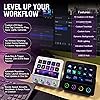
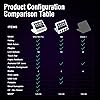
Eliminate messy keyboard shortcuts and repetitive manual computer work with the VSD N4 Pro Stream Controller Deck - a professional macro controller, macro pad and USB sound deck built for live streamers, video editors, competitive gamers and office users. This all-in-one macro keypad centralizes all desktop controls in a compact body, simplifying complicated workflows and greatly boosting long-term productivity. Equipped with 10 programmable LCD macro keys, 4 customizable RGB rotary knobs and a sensitive touch bar, this streaming deck supports fully personalized scene configuration for all usage scenarios. Users can upload static images and animated GIF icons to each programmable hotkey for clear function identification. Unlimited customizable layout pages store exclusive settings for streaming, gaming, video editing and office work, supporting one-tap profile switching without repeated manual setup. Every key and knob supports single-tap activation and multi-step chained macro sequences. Users can bind one-click commands for scene switching, software launching, file opening, text insertion and gaming combos with zero coding required. Fast and intuitive configuration is completed through the official VSDinside software. Serving as a high-performance USB sound deck and soundboard controller, this device supports one-click triggering and mode switching for background music, live stream sound effects and local audio file playback. Important Note: This macro keyboard only outputs audio control commands to your connected computer. It contains no built-in speakers and does not generate sound on its own. It assists users in adjusting audio rhythm for live streams, gaming atmosphere and video editing, greatly enriching creative and interactive effects. Maximize the potential of your stream controller deck with 500+ official downloadable plugins available on the VSDinside website. It delivers seamless compatibility with OBS Studio, Streamlabs, Twitch, YouTube, Discord, Spotify, Photoshop, Final Cut Pro, Lightroom, Word, Excel and other mainstream creative and office software. Preloaded practical widgets including real-time weather, digital clock, calendar, stopwatch and memo tools turn this device into a multi-functional desktop assistant for daily productivity. This versatile macro keypad features independently adjustable RGB knob lighting and audio-synced dynamic backgrounds supporting GIF, MP4 and MOV formats, creating immersive and stylish desktop ambiance. The premium carbon-fiber textured panel delivers a sleek high-end appearance, while switchable haptic feedback adapts to quiet office environments and immersive gaming scenarios. The built-in passive USB dock with 2×USB3.0 and 1×USB-C ports expands peripheral connectivity for mice, keyboards and USB storage devices without extra adapters. The 60° adjustable foldable ergonomic stand delivers comfortable viewing angles to reduce neck fatigue during long streaming, editing and gaming sessions, and folds flat to save valuable desktop space. Adopting USB-C plug-and-play design, this professional macro controller is fully compatible with Windows 10+ and macOS 11.0+ systems. It integrates all complicated desktop operations into one portable compact device, effectively improving overall workflow efficiency for streaming, content creation, gaming and office work. Ideal for all types of creative and productive users: Is software required to operate the device? Yes. You need to download and install VSD Craft software, and keep the software running in the background of your computer for the device to function properly. Where can I download the software? Windows users may download it from the official VSDinside website or the Steam Store. macOS users can only get the installer via the official VSDinside website. Does VSD Craft feature cloud storage or server data reporting? It does not. All custom presets, operation logs and other related data are saved locally on your personal computer only. This is my first time using VSDinside device & software, what should I know? Read the user manual thoroughly, it covers most operations and tips. Feel free to reach us via Discord or official support email for further questions. I have product issues past Amazon’s return window. For technical assistance and replacement service, contact Amazon Seller Support, the VSD Discord community or VSD official support email. VSD N4 Pro VSD N4 Pro VSD M18 VSD M18 VSD Mini VSD K1 Pro
Brand: VSDINSIDE
Compatible Devices: Mac, PC
Connectivity Technology: USB-C
Keyboard Description: Mechanical
Recommended Uses For Product: Gaming
Special Feature: Ergonomic, Multiuse, Rumble, Trackpad
Color: White
Material: Plastic
Included Components: USB Cable
Power Source: Corded Electric
Compatible Devices: Mac, PC
Connectivity Technology: USB-C
Additional Features: Ergonomic, Multiuse, Rumble, Trackpad
Power Source: Corded Electric
Switch Type: Mechanical
Keyboard Layout: QWERTY
Hand Orientation: Ambidextrous
Minimum Required Operating System Version: Mac OS 11 Big Sur, Windows 10
Compatible Operating System Family: Windows
Number of Keys: 10
Color: White
Enclosure Material: Plastic
Brand: VSDINSIDE
Keyboard Description: Mechanical
Antenna Location: Gaming
Built-In Media: USB Cable
Unit Count: 1.0 Count
Manufacturer: Shenzhen An Rui Xin Technology Co.,Ltd.
UPC: 717813964039
Item Weight: 0.48 Kilograms
Warranty Description: 1 Year Warranty
Frequently asked questions
To initiate a return, please visit our Returns Center.
View our full returns policy here.
- Klarna Financing
- Affirm Pay in 4
- Affirm Financing
- Afterpay Financing
- Zip Pay in 4
- Financing through Apple Pay
- Financing through Google Pay
Learn more about financing & leasing here.
Similar Products






Top Amazon Reviews


