Search  for anything...

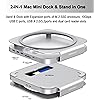
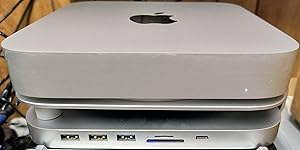
Mac mini Dock and Stand with NVMe/SATA M.2 SSD Enclosure, USB-A/C Connector, TF/SD Card Reader, Compatible with Mac M1/M2.

  • Based on 17 reviews
Condition: New
Checking for the best price...
$79.98 Why this price?
Save $5.51 was $85.49

Buy Now, Pay Later


As low as $13.33 / mo
  • – 6-month term
  • – No impact on credit to apply
  • – Instant approval decision
  • – Secure and straightforward checkout

Ready to go? Add this product to your cart and select a plan during checkout.

Payment plans are offered through our trusted finance partners Klarna, Affirm, Afterpay, Apple Pay, and PayTomorrow. No-credit-needed leasing options through Acima may also be available at checkout.

Learn more about financing & leasing here.

Selected Option

Free shipping on this product

FREE 30-day refund/replacement

To qualify for a full refund, items must be returned in their original, unused condition. If an item is returned in a used, damaged, or materially different state, you may be granted a partial refund.

To initiate a return, please visit our Returns Center.

View our full returns policy here.


Availability: 13 left in stock
Fulfilled by Amazon

Arrives Wednesday, May 6
Order within 15 hours and 39 minutes
Available payment plans shown during checkout

Protection Plan Protect Your Purchase
Checking for protection plans...

Model: MC50M


Features

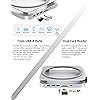
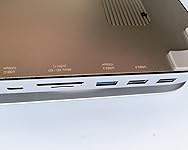
  • 9-in-1 Expansion Ports This Mac Mini docking station features an NVMe/SATA M.2 SSD enclosure and a highspeed USBC data/PD port (10 Gbps), two USBA ports (5 Gbps), one highspeed USBA port (10 Gbps), plus Micro/SD card readers. By connecting multiple peripherals such as external drives, monitors, and input devices through a single dock, it transforms your Mac Mini/Mac Studio into a powerful workstation, enhancing productivity and streamlining your workflow.
  • Expand Internal Storage Maximize your Mac Minis capabilities with the builtin SSD enclosure. It offers a simple way to add extra storage space to your system without replacing the Mac Minis internal memoryideal for users who need more room for apps, files, and media. Enjoy ultrafast data access with speeds up to 10 Gbps, plus compatibility with 2242, 2260, and 2280 SSDs for effortless storage expansion. (SSD NOT INCLUDED)
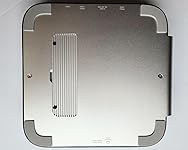
  • Optimized Cooling Keep your Mac Mini running smoothly with the integrated dock stand. Strategically placed ventilation openings promote effective temperature regulation and airflow, ensuring peak performance even with multiple connected devices. It's not just a dock for your Mac Mini M2, M1, or Mac Studio its a cooling stand that enhances heat dissipation while keeping your workspace neat and organized.

Brand: GEWOKLIY


Color: Silver


Hardware Interface: USB 3.1 Type C


Compatible Devices: Mac mini Studioa、Mac mini M1/M2


Total USB Ports: 6


Number of Ports: 6


Item Weight: 0.5 Kilograms


Total HDMI Ports: 1


Wattage: 50


Manufacturer: Gewokliy


Hardware Interface: USB 3.1 Type C


Compatible Devices: Mac mini Studioa、Mac mini M1/M2


Total Usb Ports: 6


Number of Ports: 6


Total Number of HDMI Ports: 1


Wattage: 50


Item Weight: 0.5 Kilograms


Brand: GEWOKLIY


Manufacturer: Gewokliy


Color: Silver


Frequently asked questions

If you place your order now, the estimated arrival date for this product is: Wednesday, May 6

Yes, absolutely! You may return this product for a full refund within 30 days of receiving it.

To initiate a return, please visit our Returns Center.

View our full returns policy here.

  • Klarna Financing
  • Affirm Pay in 4
  • Affirm Financing
  • Afterpay Financing
  • PayTomorrow Financing
  • Financing through Apple Pay
Leasing options through Acima may also be available during checkout.

Learn more about financing & leasing here.

Top Amazon Reviews


  • Great, simple upgrade that everyone should have.
Model: MC50M
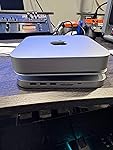
Nice addition to my Mac mini computer, easier now to connect thumb drive to port on front of stand without having to reach around back of unit to access.
Reviewed in the United States on May 17, 2025 by PHILIP BOVA

  • Nice for the Mac Mini but stay away if you have a Mac Studio
Model: MC50M
This hub is nicely built. Very solid. My issue with it has to do with the stand the computer sits on. It’s probably fine for a light weight Mac Mini but they also advertise this working with a Mac Studio which is much bigger. The Studio fits in the opening, but the vents get covered and the Studio weighs so much that the stand bends. You end up with a tilting Studio instead of something that looks nice. Can’t recommend for Mac Studio users. ... show more
Reviewed in the United States on March 29, 2025 by Michael J. Dean

  • Worked as advertised.
Model: MC50M
Easy to set up and use. The USB ports in the front make it very accessible to hook up any accessories you might need. Would definitely by again.
Reviewed in the United States on December 5, 2024 by Bill

  • Slow NVMe data rate, no power adapter
Model: MC50M
PROS: - Accepts NVMe or SATA m.2 SSDs - Faster than expected card reader - Extra screws for SSD bay included - Metal construction CONS: - NVMe speeds slower than standalone 10Gbps USB enclosure - No USB power adapter (advised) included - Rubber bumpers for unsupported side are 1-2 mm too tall Per the included instructions, two USB ports on the Mac Mini will be used: One USB-C for the data connection, and one USB-A for power. In return, one gets two 10 Gbps back (one USB-C, one USB-A). This is a slight gain already, as the Mac's own USB-A ports are only 5 Gbps. These ports are all on the front, however. A better move would be to use a USB power adapter for the power connection. The bottom of the unit indicates "5W/10W/20W" for this connection. The manual indicates a 20 watt power adapter should be used if two drives are mounted. This model mounts only one drive, but that still might be advisable if external USB drive enclosures were attached to the USB ports. Additionally, one gets two USB 2.0 ports per both the labeling on the product and the manual (although the product listing currently erroneously lists "dual USB-A data ports ( 5 Gbps)" instead), both full size and micro SD card reader slots, and of course the m.2 drive bay that accepts either NVMe and NGFF (SATA) drives. The USB-C to USB-C cable included to connect to the Mac is approximately 12 inches in length, while the USB-C to USB-A cable for the power connection is approximately 32 inches in length. The included rubber bumpers to support the left side of the gap in the unit stay in place via friction, with no adhesive, and no guidance on exact placement. They appear to be 1-2 millimeters too tall, however, resulting it the platform the Mac sits on being slightly higher on one side than the other. It is one of those things one might not notice at a glance, but once seen it becomes bothersome. SSD DRIVE BAY NOTES: While the product listing currently notes "“The NVMe M.2 SSD enclosure support NVMe PCIe Gen3x1 (single channel) protoco.”, which should give read/write rates of around 875 megabytes per second, but testing (see image) gave a result of only 688.6MB/s write, 662.1MB/s read. This was lower than the same drive in a standalone 10Gbps USB enclosure, which had results of 817.2MB/s write and 825.4MB/s read using the same drive. I had initially thought perhaps the drive was perhaps using only a 5GB/s USB connection instead of 10GB/s, but that would have limited it to a maximum of less than 625MB/s. A positive is that the screws used to secure the drive bay hatch and the SSD as well as the thermal heat pad are duplicated in the accessories box. This gives one a second chance if losing any of these items during mounting of the SSD. It also includes two small screwdrivers for each screw type. It should be noted the thermal pad includes plastic film on both sides that should be removed before placing over the SSD. Also, I found the screw to secure the SSD to be a bit finicky, as the end of the SSD PCB needs to fit into the groove in the head of the screw. CARD READER NOTES: Currently the 4th gallery image in the product listing notes "104 MB/s" for the card reader, but my test results with a 128GB Samsung Pro Plus micro SD card gave faster results (126.8 megabytes per second write, 148.9 Megabytes per second read). The micro SD card slot and SD card slot are the typical "push to eject" type. While these give a nicer appearance, they are also more prone to problems than those that simply leave most of the card hanging out to grab onto. The micro SD card is inserted label up, while the full size SD card is inserted label down. SUMMATION: The reason for the 4 instead of 5 stars are the slower than expect SSD speed (even for a 1x PCIe connection), the slight tilt with the rubber feet in place, and the need for additional power but no included USB power adapter, weighed against the current cost ($79.99 at the time of review). ... show more
Reviewed in the United States on September 27, 2024 by Lonnie M.

  • They work
Model: MC50M
They work
Reviewed in the United States on October 15, 2024 by dictator

  • This docking station breathes new life into my old M1!
Model: MC50M
I absolutely LOVE this docking station! First, finally having access to my ports in front is a complete game changers as well as adding 2 SD ports... one normal and a mini SD! I haven't had a single issue with connectivity with anything I've connected to them. Feels just like being connected to the Mac itself. I also put in a 2TB SSD in it and it also works flawlessly fast! The only thing I find a bit odd is the design as it only supports the Mini on one side and it causes it to bend a little but I have absolutely NO worries of it breaking or anything so I won't take any stars from it. Plain and simple, it does everything it says it does perfectly! It also comes with all the cables you need. Note, you will have to use one of the thunderbolt ports in the back but it is WELL WORTH IT! I've had the unit for about 3 months and it has completely improved my workflow at home. If you're looking for one, this one is amazing! ... show more
Reviewed in the United States on December 10, 2024 by Jorge Perez

  • A great stand for a Mac Mini with a small USB hub built in
Model: MC50M
First off, I'm in one of the hardest hit areas of the NC Blue Ridge Mountains. I have no power and no internet. I'm trying to use my phone to do my reviews, and the pictures are just not uploading. When I have power and internet, I will upload the pictures. This small Mac stand is really packed with features! It has a built in USB hub in the base with lots of ports. There are 2 USB-A 2.o ports, a USB-A .2 port with gigs throughput. It has both a microSD port and a standard SD port, both 5 gigs. It has a USB-C 10 gig port as well. It has a USB-C .2 host port to connect to the computer. Best of all, it has a dock for a SSD drive in the base! It also has a built in HDMI port too. The product listing says the size limit for the SSD is a two terabyte SSD drive. It supports the SATA m.2 drive architecture. The base provides air vents blowing on the Mac for cooling while the dock is in use. The dock is plug and play. You don't need to download any drivers to use it! Nice! ... show more
Reviewed in the United States on October 3, 2024 by Grambo

  • Good, but there are better
Model: MC50M
I like the way this dock looks. It's a pretty slick design. What I don't like about this particular one, is that it only accommodates a single m.2 ssd, and nothing more. There are other models that will take an m.2 and a 2.5 inch that are just a bit more expensive, but I think that adds a lot of upside. There are a lot of docks similar to this one on the market, all in the same price ranges, and unfortunately not much differentiates one from another as far as usb ports go. I'd really like to seem more usb-c ports, but it is what it is. I think if you don't need a second internal drive this is a good choice, since it really does look nice. I just prefer more storage. ... show more
Reviewed in the United States on September 26, 2024 by AlphabetSoup

Can't find a product?

Find it on Amazon first, then paste the link below.
Checking for best price...