



Search  for anything...

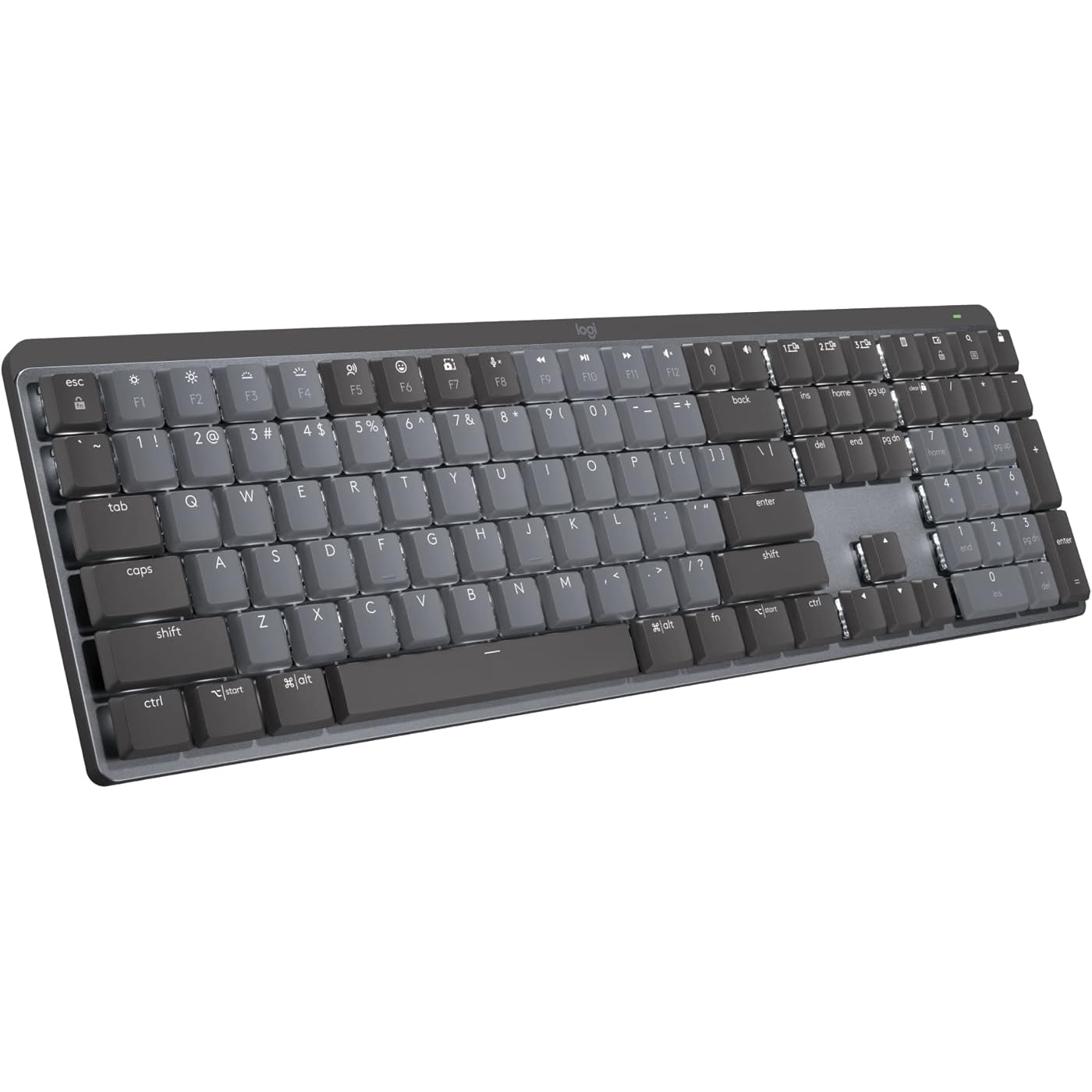
Logitech MX Mechanical Wireless Illuminated Performance Keyboard Linear | USB-C, macOS, Windows, Linux, iOS, Android, metal construction

  • Based on 514 reviews
Condition: New
Checking for the best price...
$179.99 Why this price?

Buy Now, Pay Later


As low as $30.00 / mo
  • – 6-month term
  • – No impact on credit to apply
  • – Instant approval decision
  • – Secure and straightforward checkout

Ready to go? Add this product to your cart and select a plan during checkout.

Payment plans are offered through our trusted finance partners Klarna, Affirm, Afterpay, Zip, Apple Pay, and Google Pay. No-credit-needed leasing options through Acima may also be available at checkout.

Learn more about financing & leasing here.

Selected Option

Free shipping on this product

FREE 30-day refund/replacement

To qualify for a full refund, items must be returned in their original, unused condition. If an item is returned in a used, damaged, or materially different state, you may be granted a partial refund.

To initiate a return, please visit our Returns Center.

View our full returns policy here.


Availability: In Stock.
Fulfilled by Amazon

Arrives Wednesday, Aug 5
Order within 19 hours and 32 minutes
Available payment plans shown during checkout

Protection Plan Protect Your Purchase
Checking for protection plans...

Size: Full Size


Style: Linear (smooth typing)


Pattern: Keyboard


Features

  • Linear mechanical key switches with uninterrupted key travel and minimal spring force - for fast reactivity and an ultra-smooth typing feeling
  • Low-profile keys, more comfort: A keyboard layout designed for effortless precision, with a full-size form factor and low-profile mechanical switches for better ergonomics
  • Smart illumination: Backlit keys light up the moment your hands approach the cordless keyboard and automatically adjust to suit changing lighting conditions
  • Faster workflow, more customization: Customize Fn keys, assign backlighting effects, enable Flow cross-computer, multi-device control, and more in the improved Logi Options+ (1)
  • Multi-device, multi-OS: Pair MX Mechanical Bluetooth wireless keyboard with up to 3 devices on nearly any operating system via Bluetooth Low Energy or included Logi Bolt receiver(2)
  • USB-C quick charging: MX Mechanical keyboard stays powered up to 15 days on a full charge or up to 10 months with the backlighting turned off (3)
  • Plastic parts in MX Mechanical include certified post consumer recycled plastic (Graphite: 45%(5))
  • In case of wireless keyboard or combo (keyboard and mouse), the USB receiver is usually provided either inside the mouse (under the battery cover) or attached within the product packaging

Description

Logitech MX Mechanical Wireless Illuminated Performance Keyboard Introducing MX Mechanical - a full-size keyboard with extraordinary feel, precision, and performance. Low-profile mechanical typing delivers satisfying feedback in your choice of key switches – Tactile Quiet, Clicky, or Linear. MX Mechanical is crafted for ergonomic comfort, with smart illumination and easy-switch – allowing you to connect up to 3 devices and stay in your flow for hours. Product details: Weight: 29.2 oz (828 g) Dimensions (including keycaps): 1.02 x 17.08 x 5.18 in (26.1 x 433.85 x 131.55 mm) Compatible with Windows, macOS, Linux(4), Chrome OS(4), iOS(4), iPadOS(4), Android(4) operating systems Rechargeable Li-Po (1500 mAh) battery Optional software(1): Logi Options+ Important: FileVault might be enabled on your macOS computer, which could prevent you from entering your password at start or reboot when connected to Bluetooth. In this case, use Logi Bolt USB Receiver. Footnotes: (1) Requires Logi Options+ software, available for Windows and macOS (2) Not compatible with Logitech Unifying technology (3) Battery life may vary based on user and computing conditions (4) Device basic functions will be supported without software for operating systems other than Windows and macOS

Brand: Logitech


Compatible Devices: PC


Connectivity Technology: Bluetooth


Keyboard Description: Mechanical


Recommended Uses For Product: Office


Special Feature: Illuminated


Color: Graphite


Keyboard backlighting color support: Single Color


Style: Linear (smooth typing)


Product Dimensions: 17.8"L x 5.9"W x 2.1"H


Compatible Devices: PC


Connectivity Technology: Bluetooth


Additional Features: Illuminated


Keyboard Backlighting Color Support: Single Color


Number of Batteries Required: 1


Power Source: Battery Powered


Switch Type: Linear


Keyboard Layout: QWERTY


Hand Orientation: Ambidextrous


Button Quantity: 110


Compatible Operating System Family: ChromeOS, Linux, MacOS, Windows


Number of Keys: 104


Number of Sections: 3


Color: Graphite


Style Name: Linear (smooth typing)


Theme: Keyboards


Item Dimensions L x W x H: 17.8"L x 5.9"W x 2.1"H


Enclosure Material: Information Not Available


Keyboard Plate Material: Metal


Brand: Logitech


Keyboard Description: Mechanical


Antenna Location: Office


Built-In Media: Logi Bolt Receiver, Master Series MX Mechanical Wireless Illuminated Performance Keyboard, USB Cable, User Documentation


Model Number: 920-010548


Model Name: MX Mechanical Master


Series Number: 1


Global Trade Identification Number: 66


Manufacturer: Logitech


UPC: 097855174666


Item Weight: 2.5 pounds


Item Type Name: Keyboard


Mfr Part Number: 920-010548


Warranty Description: 1 Year Limited Hard Warranty


Frequently asked questions

If you place your order now, the estimated arrival date for this product is: Wednesday, Aug 5

Yes, absolutely! You may return this product for a full refund within 30 days of receiving it.

To initiate a return, please visit our Returns Center.

View our full returns policy here.

  • Klarna Financing
  • Affirm Pay in 4
  • Affirm Financing
  • Afterpay Financing
  • Zip Pay in 4
  • Financing through Apple Pay
  • Financing through Google Pay
Leasing options through Acima may also be available during checkout.

Learn more about financing & leasing here.

Top Amazon Reviews


  • Premium keyboard for the office
Size: Full Size Style: Linear (smooth typing) Pattern: Keyboard
Since being relegated to 100% remote work as a programmer, I finally put together a dedicated desk space at home. Unfortunately, my Corsair Strafe mechanical keyboard didn't agree with my new docking station and it was doing downright dangerous things like repeating keystrokes or dropping out altogether. Not a good thing for someone working with live production machines. So I tried the only other keyboard/mouse that I had, which was the entry-level Logitech wireless set. Not terrible for the money, but not really the caliber of keyboard/mouse that you'd want to work on all week. So I decided to splurge and step up to a premium wireless keyboard and mouse. I chose the Logitech MX Mechanical with linear (red) switches and the Logitech MX Master 3S mouse. Honestly, I wish that I had made this choice a long time ago, because I am deeply in love with both of these items as daily drivers for work. The keys are so satisfying to type on. They're not clicky (that'd be the blue switches instead) but they have a very pleasant resistance and overall feel to them. It just feels...premium. There are more shortcut keys than I will likely ever take advantage of, but I've already taken a liking to the mic mute, volume controls, and brightness adjustment shortcuts. The size and weight are perfect for my setup. It's a full-size keyboard with 10-key numpad but it's noticeably more compact than my Corsair mechanical keyboards. Wireless connectivity is a plus, which keeps the desktop uncluttered and allows me to type on my lap if I want to lean back for a while. Bluetooth setup was painless, and it allowed me to connect directly to my laptop instead of using the included USB dongle. I only have a couple of gripes about it. First is that the function key row is too close to the number key row. There isn't a familiar gap between the two, so it's been tough for me to use the function/media and number keys by feel. And the num lock key isn't immediately identifiable by its icon so I have to hunt for it any time I need to toggle it. Overall I'm extremely happy with the keyboard, and I'd highly recommend it to anybody looking for an office-worthy piece. ... show more
Reviewed in the United States on October 12, 2022 by Chad P.

  • Great premium looking keyboard
Size: Full Size Style: Linear (smooth typing) Pattern: Keyboard
Great keyboard with a premium feel. The build quality is solid and sturdy, and the design looks very clean on the desk. The keys have a soft touch with a pleasant, quiet sound that makes typing comfortable. The backlighting is also excellent and very convenient in low light. Overall, a great mechanical keyboard for both work and everyday use. ... show more
Reviewed in the United States on March 13, 2026 by CARLOS EDUARDO APPEZATTO

  • The best keyboard I've used. And, I've used many.
Size: Compact Style: Linear (smooth typing) Pattern: Keyboard
A typical keyboard snob here. I've used all different kind of cherry, panda, topre, kailh, etc. So many HHKB, Leopold, Drops, Das, Ducky, and so many customs. But, last a few years I used nothing but Logitech MX Keys just because being flat was easier on my wrists. And, high-end keyboards almost always come with own quirks. I absolutely thought my days with mechanical keyboards are over until I tried this, MX Mechanical Mini. By far this is the best keyboard I've ever had. It's not as flat as I want it to be. There is no palm rest that works with this low profile. But, the build quality, function, and the typing experience. Yes, the typing experience is actually quite amazing. It's better than topres I had. I got the linear and if you know how to type lightly - which is perfect with low profile keyboards like this. This really does feel as good or better than many $400 customs I had. Oh, and how fast it switches between devices. I have PC connected via Bolt and iPad via Bluetooth. It almost instantly switches. By far this is the best keyboard for me. ... show more
Reviewed in the United States on July 12, 2023 by moonsurf

  • Perfect and comfortable, some glitches on MacOS
Size: Full Size Style: Linear (smooth typing) Pattern: Keyboard
The good - I'm using this keyboard with MacOS and Linux; got the Tactile switches and are really comfortable and fluent, I haven't heard complains from others while typing close to the mic. - The built quality is excellent, is not as heavy as MX Keys but is not moving around while typing either. - On Linux, the Solaar application helped nicely to set it up with the only exception of the lights presets which get reset each time I connect to that PC. the good point here is thanks to the Open Source Community though. - The battery seems to last longer than the short lived MX Keys battery The bad? - Anything said below is overcome by the good things and comfort. - It was hard to decide and get to the idea of having the mouse taking other USB because it uses a different sensor than previous MX devices. - The low profile switches are not as low as MX Keys, consider adding some 0.7" thick wrist rest. - And finally The only glitch I've got so far is on MacOS some applications stop detecting the Options|Start key after pressing another key once (for example while scrolling up at iTerm) the workaround was to change the shortcut to something else (pageup instead of Options+pageup). - Lack of official support for Linux. ... show more
Reviewed in the United States on July 28, 2022 by Carlos A. Morales Ramirez

  • The best keyboard for work and semi gamer
Size: Full Size Style: Linear (smooth typing) Pattern: Keyboard
I love this keyboard. I had a chance to test it at Office Depot and eventually went home and and shop for one on Amazon. 2 days later it arrived and I'm using the keyboard now to type this review. I bought the linear version because I prefer the smooth key stroke. But you can't really go wrong with tactile or clicky version either. It's just personal preference. The keyboard itself is very well built and stable. It also has the perfect size keys width. The best part is also great for gaming too. It's expensive for a keyboard but imo it's worth the investment. Im a very picky person when it come to device that i use everyday so it need to be premium and has good features. I prefer full size keyboard because it's more versatile and i need the 10 keys for calculating numbers at work. Imo this keyboard is excellent. Thanks Logitech. ... show more
Reviewed in the United States on December 22, 2023 by danny pham

  • Great Keyboard... until you have a problem outside the *way too short* 2 year warranty period.
Size: Full Size Style: Linear (smooth typing) Pattern: Keyboard
Loved my MX Mechanical KB that I purchased in 2022, until about a month ago when a key broke off. The switch is fine, but the "plus sign" shaped post on the bottom of the key broke, and now the key will not stay in the switch! Tried to pull the plastic out of the port / switch, and glue it back to the key, but then the key would just stick. Looked around and can't find replacement keys, nor does Logitech offer replacement parts. So a $180 keyboard that works perfectly fine, is now basically useless, as the "S" key (a common used key) simply pops off every day or so, and there doesn't seem to be an apparent solution to resolve this. Reached out to Logitech, and am attempting to file a warranty claim,. but given it outside of the 2 year warranty, is is seemingly unlikely they're going to do anything about it. REALLY disappointed, as I truly do love the keyboard, but if a company can't replace a single key on such an expensive device, I'm going to have to buy a new KB, and it certainly won't be a Logitech. The 3 device option is something I heavily use, but can't replace it / spend another $180 bucks., knowing this could happen again. If anyone else has had this happen, or know where to get replacement keys for the MX Mechanical Master w/ Lineary Switches, would LOVE to be able to salvage the one I have, but be weay since the switches are soldered, and the low profile keys aren't (to the best of my knowledge) available 3rd part. ... show more
Reviewed in the United States on November 18, 2025 by Justin

  • Impressions after one day
Size: Full Size Style: Linear (smooth typing) Pattern: Keyboard
This is not a cheap keyboard, but, if you have the scratch, you should try it. It takes awhile to get use to it, but once you do, you can fly on it, if you know how to touch type. The lighting is nice and done very logically. The Cap key blinks when you have it on. You can set it so you don't have to hold down the fn key while you use the functional keys. It's rechargeable and built solidly. I don't know about its longevity yet. But, at first impression I am impressed. Not cheap for sure. ... show more
Reviewed in the United States on October 15, 2024 by NYCSteve

  • A great low profile mechanical keyboard with one caveat
Size: Compact Style: Linear (smooth typing) Pattern: Keyboard
For my own usage, I want a low profile mechanical keyboard with a great typing experience. Moreover, I value battery life and wireless connection with low latency greatly over other features such as hot swappable keys or RGB back lights. When I start searching for low profile mechanical keyboards, 3 products immediately get my attention: logitech mx mech mini, keychron k3, and nuphy air75. After using and comparing all three keyboards, I realize that none of them is perfect, and I have to sacrifice certain things in order to get the features I value the most. For logitech mx mech mini, it is pretty much the perfect keyboard for my use case except the keycaps. I really dislike the default keycaps because of how they feel, and logitech makes it impossible to switch all the keycaps because the spacebar's stabilizers are not standard. Each stabilizer stem is about 2mm closer to the center than the standard one, and these abs keycaps will get a shine with minimum use from the skin oil on your finger tips. No matter how much I like the rest of the product, this one issue with keycaps is almost enough for me to turn it down since keycaps is what I have contact with the most on a keyboard. At this point, the only nitpick I have is the keycaps. Therefore, I replaced the keycaps with Nuphy's air75 twilight keycaps. I have to modify the stabilizers placement on the spacebar in order to make the spacebar fit the keyboard. After some chiseling and applying some super glue, the logitech mx mechanical mini keyboard now looks awesome and feels even better! ... show more
Reviewed in the United States on October 7, 2023 by Guangzhao Yang

Can't find a product?

Find it on Amazon first, then paste the link below.
Checking for best price...