Search  for anything...

Logitech G Farm Sim Vehicle Side Panel for Farm Simulation 2025

  • Based on 1,730 reviews
Condition: New
Checking for the best price...
$149.99 Why this price?
Memorial Day Sale · 16% off was $178.65

Buy Now, Pay Later


As low as $25.00 / mo
  • – 6-month term
  • – No impact on credit to apply
  • – Instant approval decision
  • – Secure and straightforward checkout

Ready to go? Add this product to your cart and select a plan during checkout.

Payment plans are offered through our trusted finance partners Klarna, Affirm, Afterpay, Apple Pay, and PayTomorrow. No-credit-needed leasing options through Acima may also be available at checkout.

Learn more about financing & leasing here.

Selected Option

Free shipping on this product

FREE 30-day refund/replacement

To qualify for a full refund, items must be returned in their original, unused condition. If an item is returned in a used, damaged, or materially different state, you may be granted a partial refund.

To initiate a return, please visit our Returns Center.

View our full returns policy here.


Availability: Only 3 left in stock, order soon!
Fulfilled by Amazon

Arrives Tuesday, May 26
Order within 11 hours and 56 minutes
Available payment plans shown during checkout

Protection Plan Protect Your Purchase
Checking for protection plans...

Style: Side Panel


Features

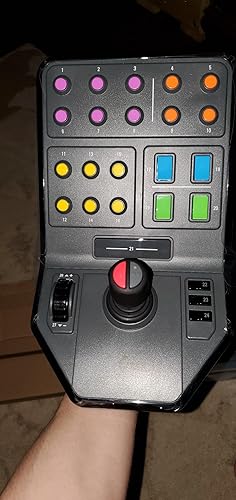
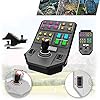
  • Side Panel Loader Control Stick, with 6 axes to operate so that even complex Logging machines are rendered simple to operate
  • Set and Forget Cruise Control Speed Dial and 37 programmable buttons, give you the flexibility to control your entire farm from just the one controller
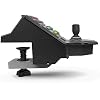
  • Durable Clamp featuring Saiteks proven screw-thread adjustment, ensuring your controllers stay locked in place on your desk
  • Open Game Compatibility offers the ability to use the Side Panel in more than just Farming Simulator. Elite Dangerous, Star Citizen, Euro Truck Simulator just a few of the other titles in which you can easily use the Side Panel for control.

Description

Care for your farm with these realistic tools to gain a sense of immersion and enjoyment from the many vehicles in Farming Simulator. Enhance command of farming machine attachments or even the thrusters of a space craft with the control stick and a host of programmable buttons.

Compatible Devices: PC, Windows


Controller Type: Joystick


Connectivity Technology: USB


Additional Features: Programmable Side Panel Controls


Button Quantity: 37


Hardware Platform: Desktop


Power Source: ['USB Powered']


Item Weight: 1.1 Kilograms


Package Quantity: 1


Color: Black/Multicolor


Brand Name: Logitech


Model Name: Logitech G Farm Sim Vehicle Side Panel


Warranty Description: 2 year manufacturer


Manufacturer: Logitech


Global Trade Identification Number: 94


UPC: 097855152794


Model Number: 945-000064


Manufacturer Part Number: 945-000064


Frequently asked questions

If you place your order now, the estimated arrival date for this product is: Tuesday, May 26

Yes, absolutely! You may return this product for a full refund within 30 days of receiving it.

To initiate a return, please visit our Returns Center.

View our full returns policy here.

  • Klarna Financing
  • Affirm Pay in 4
  • Affirm Financing
  • Afterpay Financing
  • PayTomorrow Financing
  • Financing through Apple Pay
Leasing options through Acima may also be available during checkout.

Learn more about financing & leasing here.

Top Amazon Reviews


  • Great product but a bit too pricey...
Style: Side Panel
This product is high quality and very functional, but the price is a bit steep for what you get. For reference, I also have the Logitech/Saitek Flight Sim Switch Panel, which costs about 80 USD. This panel costs ~150 USD, a huge price difference. Now, this panel is better for convenience: instead of needing to interface with 3rd party software like the Switch Panel to use it for non-sim games, this panel by default uses standard key inputs (~30 new inputs total, listed as Button x) which makes it VERY easy to use for any game when setting keybinds. The Switch Panel, by comparison, needs a 3rd party software such as DCSFlightPanels to be used outside of plane sims, and even then, it can only emulate keystrokes, meaning it adds no extra keys to your computer to be used (i.e. it can only mimic standard keyboard buttons). As for physical quality, however, the Switch Panel takes the cake. For just about half as much money, you get far higher quality switches that feel much more premium and satisfying to use. The switches on this farming panel are more like standard, shallow buttons (albeit clicky/high quality) than actual switches that you would imagine in a heavy work vehicle. The addition of a joystick and the presence of far more buttons is a good advantage over the Switch Panel, but each button is less satisfying than Logitech's other switch panels. Overall, it's a good choice for sheer practicality - if you want more potential keybinds, with the addition of a high quality joystick, as well as a neat aesthetic, then this is a good choice. If you just want some satisfying, high quality switches to fiddle with or mimic key presses, look at getting Logitech's Flight Sim Switch Panel instead, as it's cheaper and better built. Recommended! ... show more
Reviewed in the United States on June 19, 2022 by z.hash

  • Steam PC Games: Farming Simulator 19 & 22
Style: Complete Bundle
I use this controller to play Farming Simulator 19 and 22 on PC through Steam, and overall, it works very well. I don’t use it heavily, so I can’t fully speak on long-term durability, but I’ve owned it since November 2024 and everything still functions like new. I take good care of my equipment and used to store it in the original box between uses. I recently bought a stand for it, so now it stays set up all the time. I purchased this bundle on sale. Personally, I wouldn’t buy it at full price—after taxes it was a little over $200. There are likely higher-quality options if you’re paying regular price. The plastic does feel somewhat cheap, but because I only use it occasionally, it hasn’t been an issue. It typically gets used for about a week every few months, so it doesn’t see heavy wear and tear. Overall, I do recommend it, especially if you can get it on sale. Side note, when the game Sonic Generations was being configured, it actually read the steering wheel and side panel as an input device! I didn’t use it, but I thought it was funny that I could have had I wanted to. ... show more
Reviewed in the United States on December 7, 2025 by Sharon

  • Great enhancement to my farming sym experience, but is a pain to get up and running.
Style: Side Panel
First, this unit really enhances your farming sym experience once you get it working, but as I stated above the configuration process can be painful. Logitech does not provide any useful documentation on how to get this set up and the device is NOT supported by their gaming software. That said, you can at least test and confirm everything is working by right clicking on the driver and selecting properties. While there are a few buttons that work by default when connecting this to either a PC or a PS4(I have both) the default functionality leaves most buttons unused with the exception of the joy stick which does work on both gaming platforms out of the box and is a JOY to use when working with front loaders and the like. To get other buttons working you need to either go into the pre-game options menus or reconfigure the default key bindings in game. This needs to be done VERY carefully but once you get the hang of it is actually quite easy. Basically you have to go into the key binding section, then switch from keyboard to the controller option and then click on a default command that you want to rebind. After pressing enter or the A button on your controller a small box pops up. When this happens press the key you want to use on the side panel and move on to the next command and repeat. When you have finished be sure to save your binding changes. Note, be careful not to replace the default controller bindings as this will lead to big problems later. When you are editing the bindings after switching from keyboard to controller binding options, you should see at least two columns of commands. One column will have the default bindings and the other can be used to bind an alternative on your side panel or actually any other device that is configured. One last comment I have tested this unit on both platforms using both a Logitech G25, a G29 and a G929 and all three worked just fine, but have to admit I liked the G25 the most because of the extra 6 buttons on the wheel but basically all have the same feel in game. It is worth mentioning that while FS19 supports wheels, it does not provide any in-game force feedback, so the wheels are basically in their default state. Also if you have shifters as I do they are not supported by default in the game but there are mods that add support if you take the time to edit the bindings again. Last, while I do like this unit once it was configured correctly, I will mention that it is not very well made and does not have the same level of quality as other Logitech products. That said it does work well enough if you are willing to put up with manually rebinding all 28 of its keys(leave the joy stick bindings alone!!!) ... show more
Reviewed in the United States on September 14, 2021 by Mad_Sailor01

Can't find a product?

Find it on Amazon first, then paste the link below.
Checking for best price...