Search  for anything...

Logitech Crayon Digital Pencil for All iPads (2018 Releases and Later) with Apple Pencil Technology, Anti-roll Design, and Dynamic Smart tip - Grey

  • Based on 6,698 reviews
Condition: New
Checking for the best price...

Buy Now, Pay Later


As low as $11.66 / mo
  • – 6-month term
  • – No impact on credit to apply
  • – Instant approval decision
  • – Secure and straightforward checkout

Ready to go? Add this product to your cart and select a plan during checkout.

Payment plans are offered through our trusted finance partners Klarna, Affirm, Afterpay, Apple Pay, and PayTomorrow. No-credit-needed leasing options through Acima may also be available at checkout.

Learn more about financing & leasing here.

Selected Option

Free shipping on this product

FREE 30-day refund/replacement

To qualify for a full refund, items must be returned in their original, unused condition. If an item is returned in a used, damaged, or materially different state, you may be granted a partial refund.

To initiate a return, please visit our Returns Center.

View our full returns policy here.


Availability: Only 3 left in stock, order soon!
Fulfilled by Amazon

Arrives Monday, Jul 13
Order within 22 hours and 8 minutes
Available payment plans shown during checkout

Protection Plan Protect Your Purchase
Checking for protection plans...

Color: Grey


Style: Retail


Features

  • For any iPad (2018 releases or later), iOS updated to 12.2 and above
  • Uses Apple Pencil technology so you can write and draw naturally without fear of missing a single line or detail, or convert your hand-writing to text with Scribble
  • Need a thicker or thinner line? Just tilt and the smart tip adjusts line weight automatically
  • Logitech Crayon connects to iPad instantly. You just turn on and draw. No complex device pairing or other delays required. Need a thicker or thinner line? Just tilt the smart tip adjusts line weight automatically
  • Crayon delivers precise and fast input with hundreds of indispensable Apple pencil supported apps and the list is growing bigger every day
  • Logitech Crayon stays where you put it down. Throw it in a bag or stick it in your pocket assured that Logitech Crayon is tough enough to go anywhere you do
  • Logitech Crayon gets up to 7.5 hrs of writing time from a single charge
  • Uses FSC-certified paper for responsible packaging

Description

Grab a Crayon and make your mark Logitech Crayon is a pixel-precise digital pencil for all iPads (2018 releases and later) that helps unleash your creativity and productivity in hundreds of Apple Pencil supported apps. Crayon uses Apple Pencil technology including Scribble for a seamless writing experience that's as natural as pencil and paper. Need a thicker or thinner line? Just tilt. Logitech Crayon is built tough with 4 ft drop protection, a unique roll-proof shape, and up to 7.5 hours of active writing time. Palm rejection technology allows you to rest your hand right on the screen while you write.

Color: Grey


Brand: Logitech


Material: Polyoxymethylene


Number of Batteries: 1 Lithium Polymer batteries required. (included)


Item Weight: 0.7 Ounces


Battery Average Life Standby: 7.5 Hours


Compatible Devices: Tablet


Item dimensions L x W x H: 0.3 x 0.5 x 6.5 inches


Are Batteries Included: Yes


Batteries Required?: Yes


Number of Batteries: 1 Lithium Polymer batteries required. (included)


Battery Average Life Standby: 7.5 Hours


Compatible Devices: Tablet


Battery Description: Rechargeable Lithium-Ion


Compatible Tablet Computer Models: Apple iPad (6th generation), Apple iPad (7th generation), Apple iPad Air (3rd generation), Apple iPad mini 5


Item Weight: 0.7 Ounces


Item Dimensions: 0.3 x 0.5 x 6.5 inches


Color: Grey


Enclosure Material: Polyoxymethylene


Brand: Logitech


Model Number: 914-000051


Are Batteries Included: Yes


Are Batteries Required: Yes


UPC: 097855154101


Global Trade Identification Number: 01


Unit Count: 1.0 Count


Manufacturer: Logitech


Mfr Part Number: 914-000051


Item Type Name: Crayon


Built-In Media: Crayon Stylus, Documentation


Warranty Description: 1 Year Limited Hardware Warranty


Frequently asked questions

If you place your order now, the estimated arrival date for this product is: Monday, Jul 13

Yes, absolutely! You may return this product for a full refund within 30 days of receiving it.

To initiate a return, please visit our Returns Center.

View our full returns policy here.

  • Klarna Financing
  • Affirm Pay in 4
  • Affirm Financing
  • Afterpay Financing
  • PayTomorrow Financing
  • Financing through Apple Pay
Leasing options through Acima may also be available during checkout.

Learn more about financing & leasing here.

Top Amazon Reviews


  • Great utility and value
Color: Orange Style: Retail
The Apple Pencil is the best stylus accessory for the iPad but if you are like me and only spent 300 bucks on your Ipad, the idea of spending a third of that price on an accessory seems excessive. Thankfully, Logitech's alternative is a great solution for those of us who want Apple Pencil features without the cost. The Logitech Pencil is a well-constructed, aluminum-built accessory that is designed in a rectangular shape that as a lefty, I find easier to grip than the Apple Pencil. Additionally, this shape doesn't roll or shift nearly as easily as does Apple's Pencil. I also like the charging implementation better than that of the 1st gen Apple Pencil as you don't have to worry about damaging the pencil by placing it awkwardly inside the iPad. This one just requires plugging into the standard lighting connector that shipped with your iPad. The major drawback of the Crayon is its incompatibility. The Crayon only works with 6th Gen iPads, 3rd Gen iPad Air and the 5th Gen iPad Mini. This incompatibility error stems into cases as well. Most iPad cases that have dedicated slots/silos for the Apple Pencil will not accommodate the Crayon. In fact, I have not found any cases that have built-in slots that are made specifically for the Crayon but have heard Logitech offers one on their site. I can't confirm the veracity of that claim as I have opted to use a separate pencil carrier for my Crayon. I did see that replacement tips are currently $15 on Logitech's website and they last about as long as those for the Apple Pencil. As for the functionality of the Crayon, it's as responsive as the Apple Pencil. In fact, you get all of the features of the Apple Pencil, except pressure sensitivity. If you are an artist, designer or the like you'll have to step up to the Apple Pencil or acclimate yourself with continually switching the thickness settings inside each app you intend to use. While you will see the 'tilt' feature advertised by Logitech as a means of adjusting from a fine line to a thicker one, in my usage I could not consistently trigger this functionality as it would work sometimes and fail others. I eventually gave up on it. If you're a student or a professional or anyone else who has to take digital notes, highlight portions and/or add handwritten markups to them this is an excellent, cost-effective choice. You get 75% of the Apple Pencil's functionality at roughly 60% of the price. You also get a product that is easier to charge and cheaper to maintain. If you can live with the incompatibility issues you'll face with this offering and do not need pressure sensitivity for your workflow I recommend the Logitech Crayon over any other alternative to the Apple Pencil. However, if you are invested in the Apple Ecosystem or want to be certain you will have Day 1 access to all forthcoming features of Ipad OS, spending the extra $40 on the Apple Pencil is the way to go. ... show more
Reviewed in the United States on July 9, 2019 by Derek

  • The Logitech Crayon Exceeds Expectations. Easy to draw Digital Art on my ipad: The Logitech Crayon Exceeds Expectations. Easy to draw Digital Art on my ipad:
Color: Grey Style: Retail
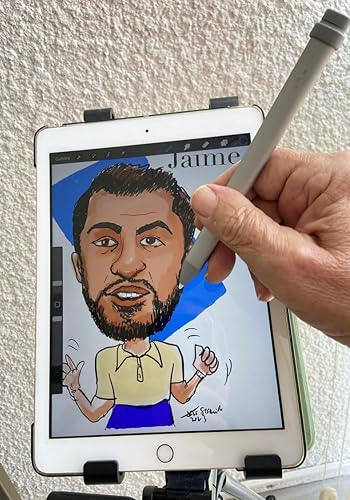
Although I have a Generation One Apple Pencil, I needed a backup stylus for my second (newest) ipad. I work as a Professional Caricature Artist at both private and corporate events in Southeast Florida between Miami and West Palm Beach. Due to budget, most gigs opt for standard 'Traditional' Caricatures (Marker on Paper). Traditional Caricatures average between $100 to $150 per hour in Southeast Florida. Last June (2021) at my request, another Caricaturist and friend taught me how to use the IOS program on my ipad called Procreate, allowing me to expand my art skills specifically at large Corporate venues where money is not an object. Digital Caricature Artist charge between $220 to $300 per hour. The 'WOW' factor where the ipad is connected via HDMI cable to a large monitor is amazing and attendees can view the Digital Art 'come to life.' Sometimes, the 'charge' of both the Apple Pencil and ipad drains quickly when doing lots of drawings at gigs. Unlike the Gen 2 Apple Pencil, which 'attaches' magnetically to the ipad the First generation Apple Pencil MUST be inserted into the ipad 'lightning port'for charging and it takes between 15 to 25 minutes (depending on how much residual charge is left) I recently purchased a second ipad (Gen 9) as a 'back up' and decided to investigate options. The Logitech Crayon works flawless. Once fully charged (30 to 50 minutes at most) you press an area and the green light appears. It automatically works on your ipad. No 'pairing' which is required on Apple Pencils. I did not see any significant change between the Logitech Crayon and my Apple Pencil Gen 1..except..the Apple Pencil is quieter. The Logitech Crayon has more of a mild 'metallic' sound when writing or drawing on the ipad screen. The point looks like plastic (not metal) and it is not a problem. As far as 'pressure sensitivity', since I use the Software Digital Art Software called Procreate, I can easily adjust the opacity and width of the pen or brush strokes on the Procreate interface! The Logitech Crayon arrived promptly (same day, if I recall) from Amazon in South Florida and I now use it more than the Apple Pencil. Highly recommended. A great investment at about $70 for a high quality devise. ... show more
Reviewed in the United States on July 24, 2023 Reviewed in the United States on July 24, 2023 by Amazon Customer

  • It’s a good alternative to apple pencil for less money.
Color: Grey Style: Retail
really good value for the money if you can’t afford apple pencil. i wish it had pressure sensitivity and could be charged magnetically on the ipad like apple pen but otherwise it does the job in regards to drawing and note taking.
Reviewed in the United States on December 16, 2025 by Amanda

  • Good alternative to the Apple Pencil Especially for new iPad Pro Owners
Color: Orange Style: Retail
This is a great alternative to Apple's more expensive pencil especially for those with the newer iPad 11 or 12.9 Pro devices. Typically those new iPads require the 2nd generation pencil that is double the cost of this one. The Crayon functions largely the same as the actual Apple pencil, featuring the same low latency and wrist detection. As someone who's been using the Apple pencil for the last couple of years this felt very similar if not identical to the original's functionality. This is using Apple's pencil hardware which is better than the many capacitive based styluses out there. The Crayon will mirror the Apple pencil's ability to do an angled/tilted line in apps that support it but the Crayon does not support Apple's pressure detection. The lack of pressure sensitivity means this is not a good choice for artists but it should function just fine for notetakers and children. I also like that it can be shut off to preserve its rechargeable battery. Overall this is an excellent alternative to the Apple branded stylus. Here's the full compatibility list: iPad Pro 12.9-inch (3rd gen) Model Numbers: A1876, A2014, A1895, A1983 iPad Pro 11-inch Model Numbers: A1980, A2013, A1934, A1979 iPad Air (3rd gen) Model Numbers: A2152, A2123, A2153, A2154 iPad mini (5th gen) Model Numbers: A2133, A2124, A2126, A2125 iPad (6th gen) Model Numbers: A1893, A1954 ... show more
Reviewed in the United States on July 10, 2019 by Lon J. Seidman

  • Simplicity is good
Color: Grey Style: Retail
Works perfect, bought to work on all iPads old and new but has antiquated connector for charging. Pros - universal compatibility No weird connection process Never fails to connect Always works Cons - lightening charger Missing some high end pencil features (but it’s good enough for me)
Reviewed in the United States on March 1, 2026 by James D

  • Just the replacement we needed, when we needed it.
Color: Orange Style: Eco Sleeve
We use several of these for our business with iPads. They are cheaper and more durable for us than an Apple Pencil would be, and since none of our iPads have the magnetic/charging pad on them for a Pencil those have less utility as well. I will say these were discontinued by Logitech, and whatever firmware you get on them is what they are stuck with. The update program itself can be found in places on the internet, but the servers that they try to connect to for getting a new firmware image are gone, so the update fails. The tips are durable and we have only ever had to replace 2 of them over the last several years out of the 6 we have, and they all see heavy use drawing in Notability. Great product, and I just wish Logitech was still making them, going to be a sad day when stock runs out from 3rd parties like this wonderful shop. ... show more
Reviewed in the United States on June 22, 2026 by James H.

  • The best option - IF you don't need the pressure sensitivity feature
Color: Orange Style: Retail
I compared this to the apple pencil, which no doubt is cool and all, But i found a few things about this Crayon which for my needs, made it a way better option than the Apple Pencil. If you need the pressure sensitivity feature for drawing or any such artwork, then no doubt this doesn't have that particular feature, so it would not even list as an option for you. BUT, if you don't need pressure sensitivity, then get this without hesitation. Here's why... 1. Pairing. This doesn't use bluetooth, so it doesn't need to be paired. It just works! Switch it on and use it. It works like magic. Also this means that it can work with multiple iPads at once without any need to pair / unpair etc etc. 2. Flat sided design. This is a simple design concept that helps prevent the device from rolling off your desk or what have you. Also I find this design makes it really nice to hold. 3. Aluminum body. Feels way nicer (compared to the Apple Pencil) to hold even tho. it feels a tad cold initially. 4. Charging port. This was pretty much the biggest factor for me while considering the options. This "Crayon" has a lightning port for charging. Fully charges in 50 minutes according to their website. To me this seems way better than plugging in the Apple Pencil to your iPad, or even the magnetic charging on the Apple Pencil 2 (for the iPad Pro). Overall, the apple pencil options for charging seem clumsy to me. To summarize, this is a great (if not the best) accessory for your iPad if you don't need pressure sensitivity. Cheers! ... show more
Reviewed in the United States on February 22, 2020 by Macfreak

  • Battery Life and Charging time not accurate with reviews of this device.
Color: Orange Style: Retail
I did research to confirm that the battery life was worth the purchase price of this item, however, it takes more than 30 minutes to fully charge - almost three hours for the Green Light to turn steady. And the battery life is under an hour. If I charge it and let it sit for a day, the battery charge is gone. Is this typical for this device? Of did I get a lemon? If the battery life is to last for at least 4 to 5 hours of writing or use, then it might be worth the $50 plus price tag. Or perhaps I should get a replacement for free. Not happy with this item. A waste of money. ... show more
Reviewed in the United States on February 23, 2026 by Catriney

Can't find a product?

Find it on Amazon first, then paste the link below.
Checking for best price...