Search  for anything...

Logitech Brio 501 Full HD Webcam Auto Light Correction Show Mode - Black

  • Based on 1,166 reviews
Condition: New
Checking for the best price...
$129.99 Why this price?

Buy Now, Pay Later


As low as $21.67 / mo
  • – 6-month term
  • – No impact on credit to apply
  • – Instant approval decision
  • – Secure and straightforward checkout

Ready to go? Add this product to your cart and select a plan during checkout.

Payment plans are offered through our trusted finance partners Klarna, Affirm, Afterpay, Zip, Apple Pay, and Google Pay. No-credit-needed leasing options through Acima may also be available at checkout.

Learn more about financing & leasing here.

Selected Option

Free shipping on this product

FREE 30-day refund/replacement

To qualify for a full refund, items must be returned in their original, unused condition. If an item is returned in a used, damaged, or materially different state, you may be granted a partial refund.

To initiate a return, please visit our Returns Center.

View our full returns policy here.


Availability: In Stock.
Fulfilled by Amazon

Arrives Saturday, Sep 5
Order within 23 hours and 32 minutes
Available payment plans shown during checkout

Protection Plan Protect Your Purchase
Checking for protection plans...

Color: Black


Style: Webcam


Features

  • Compatible with Nintendo Switch 2s new GameChat mode
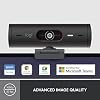
  • Advanced Image Quality: Full HD 1080p webcam resolution provides outstanding image quality so everyone can see you clearly during meetings
  • Auto Light Correction (RightLight 4): RightLight 4 video lighting technology automatically adjusts to the lighting in your environment, so you can be seen clearly even in low light
  • Auto-Framing (RightSight): Auto-framing (1)(3) centers the video camera on you, allowing you to stand and move during meetings without leaving the frame
  • Show Mode: Present your work or other objects on your desk with Show Mode, which lets you tilt the web camera up or down with one hand
  • Dual Noise Reduction Microphones: Be heard clearly in noisy environments thanks to noise canceling mics that filter out background sound during calls
  • Webcam with Privacy Cover: To protect your privacy between meetings, simply rotate the integrated webcam privacy shutter to completely block the camera
  • 90-Degree Field of View: A wider-than-normal FOV gives you extra space to move around or have a second person on the camera with you; use Logi Tune to zoom in or out to a full 90o width
  • Logi Tune: Pair with Logi Tune to customize your Logitech Webcam experience; zoom in or out, mute the microphone, adjust color and image resolution, manage auto-frame, and set automatic updates

Description

Show up to every video call feeling confident, seen, and heard. Logitech Brio 500 includes features like auto light correction for low-lighting conditions, auto-framing so you can move during calls, and Show Mode for presenting objects on your desk. Brio 500 Webcam creates a more authentic Google, Teams, or Zoom meeting experience, allowing you to connect genuinely with others.

Brand: Logitech


Photo Sensor Technology: CMOS


Video Capture Resolution: 1080p


Maximum Focal Length: 3.8 millimeters


Maximum Aperture: 2 f_stop


Flash Memory Type: SD


Video Capture Format: MPEG


Supported Audio Format: AAC, MP3


Screen Size: 3


Connectivity Technology: USB-C


Sensor Type: CMOS


Connectivity Technology: USB-C


Color: Black


Special Feature: Low Light


Water Resistance Level: Not Water Resistant


Image stabilization: False


Form Factor: Compact


Item Weight: 121 g


Style Name: Webcam


Item Dimensions D x W x H: 1.24"D x 4.33"W x 1.24"H


Operating System: Proprietary


Maximum Focal Length: 3.8 millimeters


Maximum Aperture: 2 f_stop


Minimum Focal Length: 1


Lens Type: Zoom


Minimum Aperture: 2 f_stop


Focus Type: Auto Focus


Screen Size: 3


Display Resolution Maximum: FHD


Flash Memory Type: SD


Flash Memory Speed Class: C4


Flash Memory UHS Speed Class: C4


Flash Memory Video Speed Class: V60


Zoom: Digital


Brand: Logitech


Model Number: 960-001514


Camcorder Type: Webcam


Model Name: 960-001514


Built-In Media: Webcam


Antenna Location: Camera,Webcam


Unit Count: 1 Count


Manufacturer: Logitech


UPC: 097855181510


Warranty Description: 1 Year Limited Hardware Warranty


Video Resolution: 1080p


Video Capture Format: MPEG


Effective Still Resolution: 2.07 mp


Shooting Modes: Automatic, Shutter Priority


Image Aspect Ratio: 169


Supported Image Format: JPEG


White Balance Settings: Auto


File Format: JPEG


Exposure Control Type: Automatic


Effective Video Resolution: 1080 pixels


Supported Audio Format: AAC, MP3


Compatible Devices: Office


Frequently asked questions

If you place your order now, the estimated arrival date for this product is: Saturday, Sep 5

Yes, absolutely! You may return this product for a full refund within 30 days of receiving it.

To initiate a return, please visit our Returns Center.

View our full returns policy here.

  • Klarna Financing
  • Affirm Pay in 4
  • Affirm Financing
  • Afterpay Financing
  • Zip Pay in 4
  • Financing through Apple Pay
  • Financing through Google Pay
Leasing options through Acima may also be available during checkout.

Learn more about financing & leasing here.

Top Amazon Reviews


  • Logitech knocked it out of the park with the Brio 501
Color: Black Style: Webcam
I recently upgraded my home office setup, and let me tell you, the Logitech Brio 501 Full HD Webcam has taken my video calls to an entirely new level! As soon as I unboxed it, I was impressed by its sleek design—definitely a great addition to my workspace. The picture quality is crystal clear, and I can’t get over how vibrant the colors are. It features full HD resolution, and combined with its auto light correction, I've never looked better on a video call—even in those less-than-ideal lighting situations. Gone are the days of looking like a shadow in the corner of my room! The Show Mode is a neat touch, too. It lets me effortlessly shift between discussing what's on my screen and drawing attention to myself when I need to present—a killer feature for team meetings. Speaking of meetings, whether I’m on Microsoft Teams, Google Meet, or Zoom, this webcam seamlessly connects via USB-C, making the setup a breeze. No more fiddly cords or constant reconnections! Sound-wise, the dual noise reduction mics do wonders. My colleagues have commented on how crisp my audio is, and the ambient noise has effectively been filtered out. It’s like having a personal recording studio right on my desk! Let’s not forget the privacy cover—it gives me peace of mind, knowing I can just slide it whenever I’m not using the camera. Overall, the Logitech Brio 501 has truly elevated my work-from-home experience. This webcam is worth every penny and deserves a solid five stars! Whether you're a professional juggling video conferences or someone who just wants to connect more personally with loved ones, the Brio 501 will not disappoint. Highly recommended! ... show more
Reviewed in the United States on September 24, 2024 by J. Bowman

  • good camera with good audio
Color: Black Style: Webcam
The Logitech Full HD 1080p Webcam is a versatile and high-quality webcam that is perfect for professionals who need to communicate and collaborate remotely. With advanced image quality, auto light correction, and auto-framing, this webcam provides me with an outstanding video conferencing experience. This has fixed all the audio and camera issues that I face in a year of remote work. One of the features of this webcam is its full resolution, which provides clear and crisp image quality. I did not want too much details in 4K giving too much details in remote work, so this was perfect for me. This was also higher than my macbook's 720p. This is perfect resolution for me. The auto light correction feature works well for me w/ zoom. even in low light environments. The webcam adjusts to the lighting in your environment to provide the best possible image quality. I had severe issues with zoom previously, due to sun and early morning/evening calls. The auto-framing feature, centers the camera on you, even as you move around during meetings. This allows you to stand up or move around without worrying about leaving the frame. I personally have this feature turned off. The Show Mode feature lets you tilt the webcam up or down with one hand, allowing you to present or hide your work or other objects on your desk. This is perfect for remote presentations or demonstrations. The dual noise reduction microphones ensure that you are heard clearly, even in noisy environments. The noise canceling mics filter out background sound during calls, ensuring that your voice is the focus of the conversation. To protect your privacy between meetings, the webcam features an integrated privacy shutter that can be rotated to completely block the camera. This is a valuable feature for professionals who are concerned about their privacy. With a 90-degree field of view, this webcam provides extra space to move around or have a second person on the camera with you. The Logi Tune software allows you to zoom in or out to a full 90º width that I use. Overall, the Logitech Full HD 1080p Webcam is an outstanding choice for me who needs high-quality video and audio for remote meetings. Its advanced features, including auto light correction, auto-framing, and dual noise reduction microphones, make it a standout option for me. ... show more
Reviewed in the United States on April 9, 2023 by techuser

  • Good HD camera
Color: Rose Style: Webcam
It’s a pretty decent camera with high picture quality. Pretty easy to connect to the computer and the video looks pretty good. It has a clamp so it’s easy to set up on top of your monitor. However it made of plastic and for something that is not an entry level mic it does feel a bit cheap. Also I could never the mic to work so it’s a bit annoying. ... show more
Reviewed in the United States on April 9, 2026 by Zoe

  • One of the best Logitech Cameras
Color: Black Style: Webcam
One of the better webcams out there. I tried the MX Brio before this and it was not very good. Great clarity and works well with Zoom backgrounds.
Reviewed in the United States on July 25, 2026 by Joe Blow

  • Great buy
Expensive, but great product. I needed am external webcam for remote work that requires many video meetings. This webcam has a very high quality image and the audio quality is great. It is pricey but so far (I've had it a month) it has been consistently working well and meets expectations!
Reviewed in the United States on May 3, 2026 by Big Toad Feet

  • Fantastic video quality (even with poor lighting), useful features.
Color: Black Style: Webcam
I have regular videoconference meetings for work, and my aging webcam was having trouble with Google Meet. I'm usually pretty cheap, but I was hoping to find a replacement that would make the video a little more flattering. I have fluorescent lights right above my head in my home office, and I'm bald, so no matter what I tried, the picture was always harsh and my head shiny. After some research I found the Logitech Brio 501, and decided to splurge a little since I could always return it if I didn't think the results justified the price. Spoiler: I did NOT return it! The Brio arrived well packaged in earth-friendly packaging, and was easy to set up. There was no complicated configuration in order to get Google Meet, Zoom or other services to recognize the video and audio from the Brio. I was bracing for problems since the camera is connected to my laptop (Lenovo Yoga) through a USB hub, and not directly to the computer; but had no issues whatsoever. The monitor mount is well designed, and only comes down about 1/8", less than the width of my monitor's bezel, so it doesn't interfere with my screen. If you have an ever narrower bezel, you could easily put some tape under it so it sits slightly above your monitor frame; but most people won't need to do anything. Even before checking out the included LogiTune software, my first video call looked great. The glare off my head was gone, and the color seemed much more natural not just compared to my old webcam, but also to the highly rated Vitade HD Webcam with ring light. While the Vitade was about $45 less, the Brio was absolutely worth it, even without the tuning options in LogiTune. I also like the physical privacy shutter, which is always easy to get to and close quickly. Upon launching LogiTune I quickly found settings that allow you to customize the angle of view, zoom level and camera positioning. This is really useful with my dual monitor setup, as it allows me to position the camera on the right side of my left screen so I can look at either screen without it seeming obvious, and still be centered. Love the zoom, which allows me to appear close to the camera, but not too close. There are numerous settings for exposure, focus, white balance and more, as well as filter effects, I just left all of the settings on auto, except sharpness, which I turned down a bit to hide a few wrinkles. The software does not have backgrounds or blur effects, but the blur and background options in most videoconference services still work just fine. The nice thing about the LogiTune settings is that they stay how you leave them, and are picked up automatically by the different conferencing services without having to retune for each call, or each day. Now, my video is always the best looking on my calls, and the sound is super clear. So yes, a bit more expensive than typical webcams, but the video performance and tuning software are now features I can't live without. ... show more
Reviewed in the United States on February 21, 2024 by Benjamin S.

  • Good product, self-sabotaging setup
This is a great webcam that looks nice, has good visual quality (arguably better than some of Logitech’s higher priced offerings), the whole 9 yards. Just a great camera. The setup process though is a classic Logitech mess. When you open the box there’s a 6 part pictorial setup process which, if followed, makes your camera waaay too high up. It only captured the very top of my head. That wouldn’t be an issue if you weren’t gluing the thing to your monitor. I had to pry the thing off, leaving behind a sticky patch on the back of my display, and then re-position it. It’s now barely attached to the monitor but correctly aligned. In summary DO buy this camera but DON’T listen to Logitech. I stead line up the camera, test out the line of sight, and only then attach it. Because I guarantee you the flat alignment they specify in their guide sucks. ... show more
Reviewed in the United States on January 5, 2026 by Myles Barros

  • Great light adjustment next to bright window, great features, great (free) app
Color: Black Style: Webcam
This webcam is a huge improvement over my last Logitech webcam. I selected Logitech Brio 501 because of its promise to auto-balance brightness in difficult environments. I work from home next to a window and bright sunlight streams into my office. On my last Logitech webcam, my face would lose all color when the sun was shining, making me look like a ghost. I always had to close the blinds, which I hated to do on nice days. The Logitech Brio 501 corrects the color and brightness automatically with the shades drawn or shades open. I also like that the Logi Tune app sits in my taskbar tray but in the background automatically applies all of my settings when I join a meeting or Zoom call. So I just set the cropping, brightness, color etc one time in the Logi Tune app, and then I never have to adjust it when I join my meetings. One last note: I was not expecting the webcam to use a USB-C cable (I keep forgetting that USB-C has gotten somewhat standard in recent years) and was concerned that I would have to dedicate my one USB-C port for this webcam. However, the Logitech Brio 501 works fine with a simple USB-C to USB-A adapter (so I have it plugged into a standard USB-A port on the back of my desktop). ... show more
Reviewed in the United States on June 18, 2026 by Daniel Z

Can't find a product?

Find it on Amazon first, then paste the link below.
Checking for best price...