


Search  for anything...

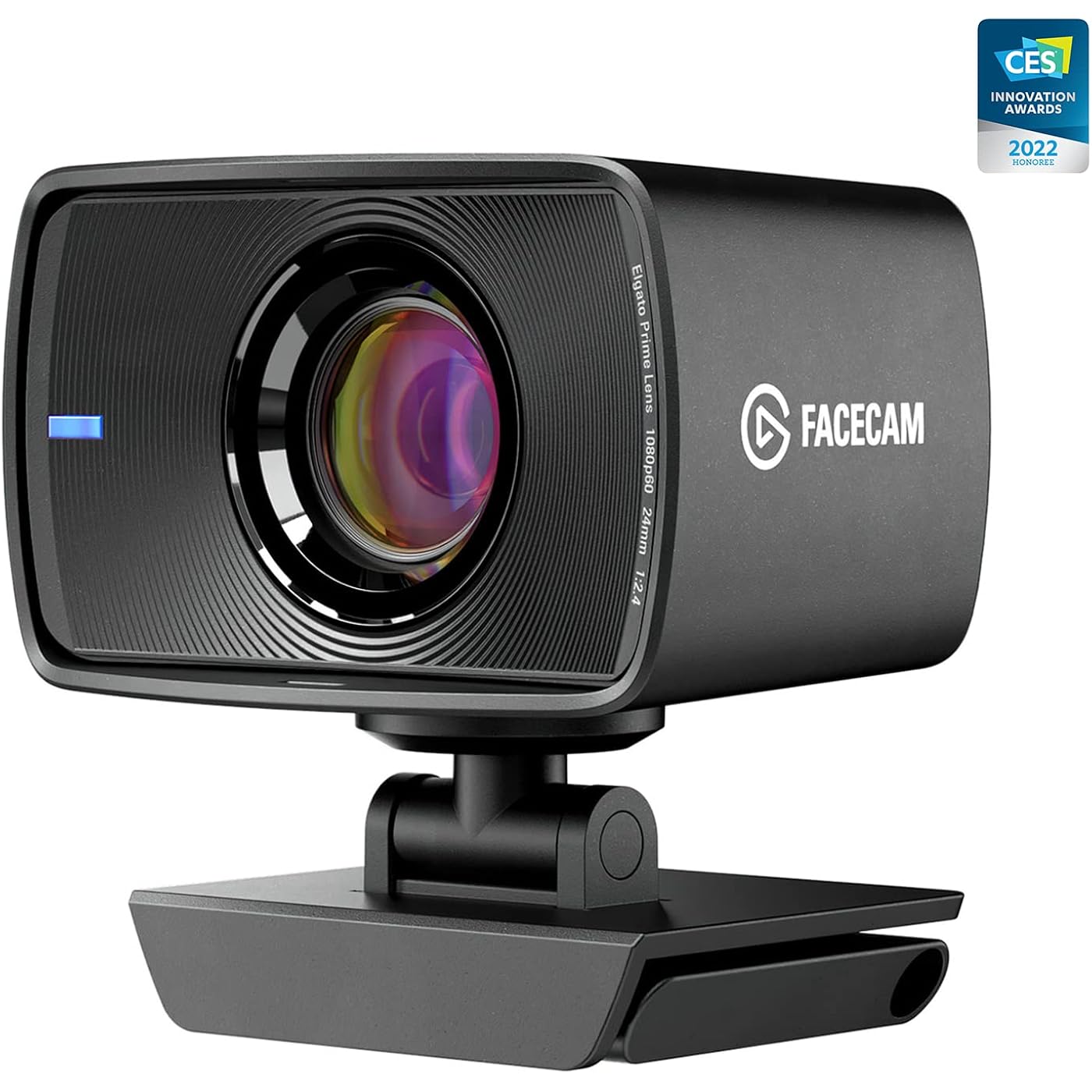
Elgato Facecam - 1080p60 True Full HD Webcam for Live Streaming, Gaming, Video Calls, Sony Sensor, Advanced Light Correction, DSLR Style Control, works with OBS, Zoom, Teams, and more, for PC/Mac
  • Based on 6,228 reviews
Condition: Used - Very Good
Checking for the best price...
$129.99 Why this price?
Save $70.00 was $199.99

Buy Now, Pay Later


As low as $21.67 / mo
  • – 6-month term
  • – No impact on credit to apply
  • – Instant approval decision
  • – Secure and straightforward checkout

Ready to go? Add this product to your cart and select a plan during checkout.

Payment plans are offered through our trusted finance partners Klarna, Affirm, Afterpay, Zip, Apple Pay, and Google Pay. No-credit-needed leasing options through Acima may also be available at checkout.

Learn more about financing & leasing here.

Selected Option

Free shipping on this product

This item is eligible for return within 30 days of receipt

To qualify for a full refund, items must be returned in their original, unused condition. If an item is returned in a used, damaged, or materially different state, you may be granted a partial refund.

To initiate a return, please visit our Returns Center.

View our full returns policy here.


Availability: 17 left in stock
Fulfilled by Only1deal

Arrives Monday, Aug 24
Order within 7 hours and 30 minutes
Available payment plans shown during checkout

Protection Plan Protect Your Purchase
Checking for protection plans...

Style: Webcam


Size: Facecam


Features

  • Elgato Prime Lens: f/2.4 24 mm all-glass studio quality optics
  • Sony STARVIS CMOS Sensor: optimized for indoor use
  • Advanced Image Engine: uncompressed video without artifacts
  • True Full HD: stunning 1080p resolution at a fluid sixty frames per second
  • High-Speed Circuitry: USB 3.0 interface transfers image data with lowest latency
  • System Requirements: Windows 10 (64-bit), Intel or AMD CPU, macOS 11.0, Intel or Apple CPU, USB 3.0 or higher

Description

Facecam packs a pro-grade lens with a cutting-edge image sensor. High-speed circuitry that outputs uncompressed 1080p60 video without artifacts. App control and onboard memory to recall image settings on all your computers. Up to 82 degree field of view lets you frame your face or reveal your surroundings, while a fixed focus range ensures that you always stay in crystal-clear focus. Optimized for indoor use, a premium SONY® STARVIS™ CMOS sensor enables Facecam to capture extraordinary detail and minimal noise. So you’ll look amazing on Twitch, YouTube, Zoom, everywhere online — in all lighting conditions. Introducing Facecam — professional optics in a webcam form factor. Engineered to make you look amazing.

Brand: Elgato


Photo Sensor Technology: CMOS


Video Capture Resolution: 1080p


Maximum Focal Length: 24 millimeters


Maximum Aperture: 3.5 millimeters


Flash Memory Type: SD


Video Capture Format: MP4


Supported Audio Format: Common audio formats for video conferencing and streaming


Screen Size: 2.3 inches


Connectivity Technology: USB


Sensor Type: CMOS


Connectivity Technology: USB


Color: Black


Special Feature: Low Light


Water Resistance Level: Not Water Resistant


Image stabilization: false


Form Factor: Dslr


Item Weight: 103 g


Style Name: Webcam


Item Dimensions D x W x H: 2.28"D x 3.15"W x 1.89"H


Number of Batteries: 1 Lithium Ion batteries required.


Operating System: Proprietary (Windows 10, Macos 11.0 Compatible)


Maximum Focal Length: 24 millimeters


Maximum Aperture: 3.5 millimeters


Minimum Focal Length: 24 millimeters


Lens Type: Zoom


Minimum Aperture: 22 f_stop


Focus Type: Fixed Focus


Screen Size: 2.3 inches


Display Resolution Maximum: 1080p or 1920x1080


Flash Memory Type: SD


Flash Memory Installed Size: 128 GB


Flash Memory Speed Class: C10


Flash Memory UHS Speed Class: U3


Flash Memory Video Speed Class: V30


Optical Zoom: 3 x


Zoom: Optical


Brand: Elgato


Model Number: 10WAA9901


Camcorder Type: Video Camera


Model Name: Facecam


Built-In Media: Facecam, Privacy Cap, Mount with 1/4“ Thread, Detachable USB-C Cable, Quick Start Guide


Antenna Location: Live streaming, gaming, video calls


Unit Count: 1 Count


Manufacturer: Elgato


UPC: 840006637806


Global Trade Identification Number: 06


Warranty Description: 2 year


Video Resolution: 1080p


Video Capture Format: MP4


Effective Still Resolution: 540


Shooting Modes: High Speed, Low Light


Image Aspect Ratio: 169


Supported Image Format: JPEG, PNG


White Balance Settings: Auto


File Format: JPEG


Exposure Control Type: Automatic


Effective Video Resolution: 1080 pixels


Supported Audio Format: Common audio formats for video conferencing and streaming


Compatible Devices: Personal Computer, Laptop, Tablet


Frequently asked questions

Yes, the Elgato Facecam is equipped with advanced light correction, making it a great choice for use under varied lighting conditions, including low light. Thanks to the Sony sensor, it delivers clear, well-lit images even in less than ideal lighting conditions.

Absolutely! The Elgato Facecam delivers 1080p60 True Full HD, which makes it ideal for live streaming, gaming, and video calls. It also seamlessly integrates with popular streaming and video call apps like OBS, Zoom, and Teams.

Yes, the Elgato Facecam is compatible with both PC and Mac environments. Regardless of your operating system, you can enjoy the high-quality, crystal clear imaging that the Facecam provides.

The DSLR style control feature of the Elgato Facecam allows you, the user, to take full control of your recordings. You can adjust focus, exposure, and other video parameters much like you would in a sophisticated DSLR camera. This feature makes it a top choice for users who desire advanced customization options in their webcam.

Top Amazon Reviews

🚀 Abunda's Overview

This is our summary and key points to consider based on customer reviews.


The Elgato Facecam 1080p has received primarily glowing reviews from customers who used it for streaming, gaming, and video conferencing. It was cherished for its high-quality motion capture, remarkable performance even in low-light conditions, and crisp autofocus. Many users praised its ease of setup and comprehensive customizability via the Elgato Camera Hub software. A few users experienced issues with software, but they were not deemed deal-breakers given the impressive hardware performance.

Pros

  • 🎦 High-definition video quality with 1080p resolution.
  • 💡 Superior performance in low-light conditions.
  • 🎯 Crisp and accurate autofocus, consistently staying in focus.
  • 🚀 Easy setup and seamless integration with various platforms like OBS and Zoom.
  • 🛠️ Comprehensive adjustability via the Elgato Camera Hub software.

Cons

  • 📦 Some users found the case slightly bulky.
  • 💾 A number of users faced issues with the Elgato Camera Hub software such as unable to save settings and occasional crashes.

Should I Buy It?

If you are in search of a high-quality webcam for streaming, gaming, or video conferencing, the Elgato Facecam 1080p is a strong contender. While it has some minor software hiccups, its exceptional video quality, versatile adaptability, and user-friendly setup justify the investment. Accordingly, the Elgato Facecam 1080p is recommended, particularly for those who prioritize video quality and performance.


  • I Purchased the B11 in 2023 and am still using it! It's great!
I bought this camera to monitor my husband at night, but he moved around so much that I was constantly awakened! Since then, we bought a puppy and I use the camera to monitor her in her XPen (we call it her Play Pen) and it works great. I can tell if she is settled when we are away or if she is having a panic attack. The sound quality is fine, it is super easy to set up, and I mounted it on a piece of wood so I can move it from one room to another easily. It is very adjustable that way. It gives me a lot of comfort being able to see what she is doing in real time. I highly recommend it. ... show more
Reviewed in the United States on June 15, 2026 by Wendy Shoemaker

  • quality webcam
I really like this webcam that Elgato offers. Quality picture, functionality is superb in my opinion, Focus is great and is adjustable via the camera hub. Size well it's a little larger than others that are available but this is user preference I guess, fit's on my center monitor well with the provided mount and this could be mounted to a stand as well. Windows compatibility is good plug and play ... show more
Reviewed in the United States on January 11, 2026 by Marc Pierce

  • More Convenient than a DSLR & Works Almost as Good!
I'm use to do professional photography, so I just streamed on a $2500 Mirrorless Camera (Canon EOS-R). It was a nightmare of adapters, wires, software plug-ins & changing settings when I wanted to shoot. Bought this $130 Elgato & with decent lighting, it works almost as good! If you're a new streamer with disposable income, buy anything else before you invest in a beefy camera. It's a huge hassle & unless you're doing some really fancy stuff, it's not worth the money or time. At first my image looked really grainy, but I had to swap my ring light from RGB to white mode for it to be properly lit. For those that are used to manually shooting on professional cameras, sadly there are no aperture settings in the software. The aperture is fixed f/2.4 You can only change ISO and shutter speed. The fixed focal length is 24mm. So if you want to zoom in, keep in mind it is a DIGITAL zoom. If you want to shoot on a 50mm focal length? Your 1080p image will go down to a 720p image. For this reason, I wish I could have gotten the Elgato Facecam Pro. 4K at a 2X zoom would be 1080p and that's the highest I shoot at. BUT this standard version still works great. It really was a seamless setup for streaming. That's Elgato's thing. Just be sure to download "Camera Hub" software & run THAT through OBS for the best control on your settings. If you want to use the Effects tab, I had to download an NVidia Graphics Card plugin. It's mostly for greenscreen or blurring. I use the background blurring at 30%. It works pretty good even without a greenscreen & sub-par lighting. My only complaint is that I wish the Camera Hub software had the option to save multiple color profiles. I'd like to have one saved that I use for standard white lighting. But I'd also like to have ones that I can play around with for RGB lighting or maybe silhouettes. However, there might be some form of plugin for this. So I'm not going to drop my 5-star rating for that. (Image of me with a mustache was me using room lighting on my pro camera. Baby face is how I look on the Elgato Facecam w/ one ring light & backlighting.) ... show more
Reviewed in the United States on February 26, 2023 by Gibby

  • Fantastic image quality- with usability issues
Overall this is a stellar webcam, but points taken off for serious issues. As other have mentioned, the Hub software has many issues... freezing, crashing, refusing to open on another screen etc. In my case, I had an ongoing issue where I could only use the camera once per reboot. After it turned off for the first time, it fully disconnects from the PC, no longer even showing in Device Manager. Tried different cables, power settings, USB ports, but nothing fixed the disconnect issue. When it's working, the image quality is stellar. I'll give the company a little time to refine the software issues, I'm sure this will be a fantastic product after things get ironed out. ... show more
Reviewed in the United States on November 15, 2023 by Tyler Martel

  • Elgato does it again, good quality, flawless OBS integration, would recommend
This was purchased for streaming and work use. The camera set up quickly and was immediately recognized by Elgato Camera Hub, integration into OBS and Zoom was completely painless, it all just works. At this price point I doubt it's possible to find a better 1080p webcam. Motion is smooth and never choppy, and low-light performance is far ahead of any other webcam I've used to date. The autofocus is spot-on and has not had any issues with hunting or randomly going out of focus, even when being used in rooms with various non-white lighting, such as all blue or all purple. Some may find the case to be somewhat bulky, I feel this is a decision was made in order to support the large primary lens element, which is no-doubt to blame for low light performance. Also included is an attractive plastic lens cap that positively snaps into place to allow for worry free transit in a laptop bag, or to ensure privacy when the device is attached but not in use. I would recommend this to anyone in the market for a top-shelf 1080p webcam and the sort of consumer who values smoothness of motion, performance in most reasonable indoor/gaming lighting situations, and crisp autofocus. Particularly I feel that this is targeted towards the streaming or gaming content creation crowd specifically, as 4k is inapplicable in a vast majority of practical applications within this field. ... show more
Reviewed in the United States on August 22, 2023 by Jack S.

  • Gorgeous camera...if you know what you're doing.
Right off the bat, I have to start my review by telling you the about the previous item. I'm coming from a Razer Kiyo, the camera with the little ring-light connected to it. Now, that camera lasted me a WHILE, and was a rather durable camera. Had a little more weight to it than this one, had an auto-focus feature, it was wonderful. So when I heard about this one, and all the features it could do, well I had to try it. At first, I'll be honest. I wasn't impressed in the slightest. I thought my previous camera had better quality video, I thought the auto-focus on that one was better than this camera which doesn't seem to do that at all (e.g. no differentiation between foreground and background), and it was a little blury. But that was MY fault. You see, you have to, HAVE TO, download a program onto your computer from the Elgato website called "Camera Hub", and it'll give you all these wonderful settings to full around with. Much like Kiyo had! Contrast, Saturation, Sharpness, Exposure, White Balance, Shutter Speeds, Noise Reduction...a whole bunch of stuff to full around with. ALSO, the effects? AI Background feature gives you the option to...you guessed it...give a focus to the foreground, which is what I was missing from the beginning. Only this time, it does a MUCH BETTER job than the Kiyo did (at the cost of a tiny bit of resources, naturally, it IS blurring your background in real time, after all). If you're using OBS or Streamlabs or something like that, I implore you to also add a LUT filter to your camera to change it up even more. It gives it even more quality than without it. Lastly, I recommend turning OFF Noise Reduction, as it adds an unnatural blur to the entire camera and does take up a tiny bit of resources, turn OFF Automatic Exposure and set your Shutter Speed and ISO to 1/60s and 200 respectively. That'll add a beautiful balance. Temperature to 3400 so that it gives a more natural color (and easier to tweak quality with LUT filters more accurately), and you've got yourself a professional camera you will never replace. This thing will carry you to the depth of your streaming and content creation career until the end of time...or at least make you the best looking person in your at-home Zoom meetings, if you're not touching the YouTube or Twitch side of things. Good luck! ... show more
Reviewed in the United States on July 21, 2023 by The Bowtie Artist

  • Ease of Software APPS
I went on the gaming websites and discovered the reviews on this Elgato Facecam and decided to get it. I am so glad that I got it. It has DSLR lens inside of the FACECAM and excellent focus. I needed a Facecam where I could control the focus so it was not doing the "autofocus". I needed "focus" only. I do sign language translation work and this FaceCam did the trick. I had a Logitech Brio 4K Pro webcam and it was just terrible - the video quality was very poor and it was always on "autofocus" which was very bad especially if you are signing in ASL. Also the APPs were not friendly with MAC OS. FaceCAM came to the rescue and I was able to download the APP onto my desktop and now I can do Zoom in, light adjustments, set to focus or autofocus, and many other options and features. It is wonderful to have that with the MAC OS and also have DSLR features in the webcam without having to pay for a DSLR Camera. Excellent quality videos. Price is right and worth it. I have been using mine everyday since I bought it and for several hours a day without any issues. It is very good quality. I bought two of them for using on my different devices. ... show more
Reviewed in the United States on July 8, 2023 by chirpbird

  • Overpriced and underperforms
For starters, I don't like writing negative reviews; if I don't like a product, I return it worst case, and say nothing. However, this product has made me change that philosophy, so here we go. I bought this webcam for streaming a game from my Nintendo 3DS. The cord that connects it to your computer is surprisingly thick and sturdy, often times moving the very light camera. But the camera itself is shaped very blocky, yet indestructible like a Nokia phone. Unfortunately, not only is the picture quality questionable, the Elgato Camera Hub program is a joke. The picture is grainy with only one option to slightly reduce the issue. It does not have an auto focus or any options to fix the focus, so you have to put whatever you're trying to capture very far away to get decent focus, and zoom in incredibly close to get a proper picture. (The first picture is the game up close, and the second picture is pushed to the very edge of my desk.) There are next to no options to fix the lighting - and believe you me, I scoured Google trying to find any and all fixes. There is another brand's webcam that costs like $80 less and works 4x better. If you're looking to use this for any streaming/video chat purposes, gaming or face cam or otherwise, I highly recommend finding another model whose features can be edited by your streaming service. I love Elgato and sing their praises regarding most of their equipment, but this is not worth its price at all. ... show more
Reviewed in the United States on June 19, 2023 by Kat

Can't find a product?

Find it on Amazon first, then paste the link below.
Checking for best price...