Search  for anything...

llano V12 Laptop Cooling Pad, Gaming Laptop Cooler Stand with 5.5inch Powerful Turbo Fan, Adjustable Speed, Touch Control, 3-Port USB A, for Fast Cooling Laptop 15.6-19in, Black (No RGB)

  • Based on 2,821 reviews
Condition: New
Checking for the best price...
$89.99 Why this price?
Save $22.50 was $112.49

Buy Now, Pay Later


As low as $15.00 / mo
  • – 6-month term
  • – No impact on credit to apply
  • – Instant approval decision
  • – Secure and straightforward checkout

Ready to go? Add this product to your cart and select a plan during checkout.

Payment plans are offered through our trusted finance partners Klarna, Affirm, Afterpay, Zip, Apple Pay, and Google Pay. No-credit-needed leasing options through Acima may also be available at checkout.

Learn more about financing & leasing here.

Selected Option

Free shipping on this product

FREE 30-day refund/replacement

To qualify for a full refund, items must be returned in their original, unused condition. If an item is returned in a used, damaged, or materially different state, you may be granted a partial refund.

To initiate a return, please visit our Returns Center.

View our full returns policy here.


Availability: 20 left in stock
Fulfilled by Amazon

Arrives Friday, Jul 24
Order within 3 hours and 35 minutes
Available payment plans shown during checkout

Protection Plan Protect Your Purchase
Checking for protection plans...

Color: Black NO RGB


Features

  • Larger Fan, Faster Cooling: The llano New Upgraded Version ice cooler boasts a powerful 5.5inch(14CM) large-diameter turbo external fan, ensuring an impressive 44C(111F) temperature drop (CPU+GPU) in just 90 seconds. Whether immersed in intense gaming sessions or tackling high-demand tasks, enjoy uninterrupted, rapid cooling without delays or screen flickers.
  • Advanced Dust Protection: Protect your laptop with our dust filter and specially designed structure. The llano PC gaming computer laptop cooler acts as a shield against dust intrusion, significantly extending your device's lifespan. Each package includes an extra dust filter for added convenience.
  • 15-19'' Laptop Compatibiliy: llano air laptop radiator fits gaming laptops from 15 to 19 inches. Compatible with Acer Nitro 5, Alienware, MSI, Dell, Lenovo Legion, Asus ROG, and more, it's ideal for gamers, graphic and video editors. Revitalize older laptop models for extended gaming sessions with ease.
  • Smart Display & Touch Controls: Elevate your cooling with the llano PC laptop cooler. Its elegant design features a real-time LED display, precisely showing fan speed. With touch-sensitive buttons, make instant adjustments for the ideal balance of cooling efficiency and noise levels.
  • Non-Slip Baffles& Adjustable Height: Find perfect stability and comfort with our laptop fan stand cooling pad. Double non-slip baffles securely anchor your laptop on any surface. The adjustable height function reduces neck strain during extended use, ensuring comfort throughout.
  • High Power Output: Equipped with a 36W power output, the cooling pad provides robust performance, ensuring that your laptop remains cool even during demanding tasks.
  • What 's in the Box: 1* Laptop Cooler, 1* 36W AC Power Adapter, 1* Dust Filter, 1* Memory Foam Seal, 1* USB-A to C Cable.

Description

V12 (RGB) V11 Pro V12 Ultra (Intelligent) V12 (No RGB) V10 PRO (RGB) V10 SE (NORGB) V12 White (RGB) Visit the Store Visit the Store Visit the Store

Color: Black NO RGB


Brand: llano


Material: Acrylonitrile Butadiene Styrene (ABS)


Item Weight: 1.8 Kilograms


Product Dimensions: 16.9"L x 12.9"W x 2.7"H


Brand: llano


Manufacturer: llano


Number of Fans: 1


Model Number: V12 Black (USB A+No RGB)


Mfr Part Number: LJN-V13-NO RGB&MOUSE PAD


Unit Count: 1.0 Count


Warranty Description: 1 Year


Color: Black NO RGB


Enclosure Material: Acrylonitrile Butadiene Styrene (ABS)


Cooling Method: Air


Item Weight: 1.8 Kilograms


Item Dimensions L x W x H: 16.9"L x 12.9"W x 2.7"H


Frequently asked questions

If you place your order now, the estimated arrival date for this product is: Friday, Jul 24

Yes, absolutely! You may return this product for a full refund within 30 days of receiving it.

To initiate a return, please visit our Returns Center.

View our full returns policy here.

  • Klarna Financing
  • Affirm Pay in 4
  • Affirm Financing
  • Afterpay Financing
  • Zip Pay in 4
  • Financing through Apple Pay
  • Financing through Google Pay
Leasing options through Acima may also be available during checkout.

Learn more about financing & leasing here.

Top Amazon Reviews


  • Cooling Master, High Tier Must Have Investment
Color: White NO RGB
Welcome back Shoppers of the Amazonian style! The product you have before you is worth all the money, even if i felt i ordered the RGB, yet forgot to read the full name. Regardless, its a powerhouse of a system, while it can become loud, it also comes with the fact that its working. Definately would recommend going with this item rather than those Targus that might be good, but dont stand out. Read below for further understanding of my view and take on this equipment. 1. Price: If you want a durable, large, not so cheap feeling cooler. This will be a great choice. it's higher than most, but i tell you invest in it, it's hard shell plastic. 2. Technology: Good, but not top tier. For the price point, i would love to have USB C at least one additional, with the inital data input (where you plug the laptop into. So had this been a solid $100 for the white color, no RGB, please look into full supporting Type-C charging on all ports. 3. Fan Speed: How loud you need it, is how cool it will cool. Follow me on this, the faster you turn the speed, the coling power is inscreased, but it becomes loud. 12-1500 range works very well, while 300 is the ever so slight hum. Funny enough if you really want another idea for thjs item, its a white noise maker. Overall, it has great power. Consider this item, it'll be a worthwhile investment that will last if take. care of. Cheers Amazonian Shoppers, ill see you on the next one. ... show more
Reviewed in the United States on May 21, 2026 by Will B.

  • Real world performance gains Real world performance gains
Color: Black RGB
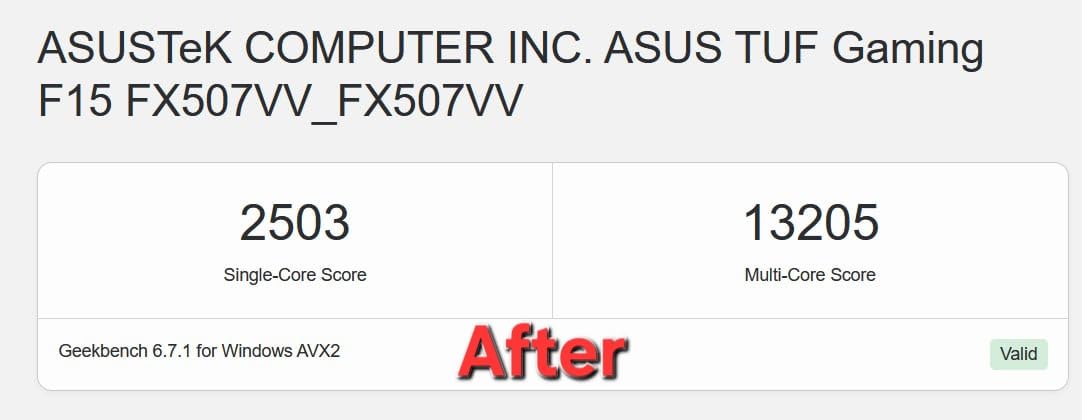
Works extremely well! I'm using this on an Asus Tuf A16 with the i7 and a 4060. The A16 already has pretty good thermals for a gaming laptop but it can get pretty loud and the keyboard can get sort of warm which is uncomfortable to rest my hand on for hours while I play games. This cooling pad has completely changed laptop gaming for me already. Temps in games like rdr2 have dropped from an average of 90°c to less than 65°c. That's crazy. I'm also getting better performance. I have mine set to 1200 on the little digital display. It's not very loud at all. It uses a centrifugal fan to force air into your laptop's intake and you can feel it come out the exhaust. Cold air comes out of the exhaust. This is so wild. You can set it to as high as 2800 and that's extremely loud, but unless you have a seriously terribly designed laptop I think it's unnecessary. Mine is set to 1200 and it's giving me temperatures almost 30° lower than stock, and it's quieter than stock. I've attached GeekBench scores that I got, testing without using the fan at all, and using the fan at full blast. According to GeekBench, I'm getting 18% better CPU performance using the fan. That is what I would consider a very substantial increase in power. ... show more
Reviewed in the United States on June 17, 2026 Reviewed in the United States on June 17, 2026 by Nick

  • Great Alternative! worth it for your laptop for max cooling and airfloe
Color: Black NO RGB
Been using it for 2-3 weeks now.. It works great on my ASUS ROG Strix G16. I turn it 500 -1000 in my hot room and keep my laptop temp cool (can feel the top of my keyboard and chassis being cool). If you put it above 1000, it will make a noise you can hear but not like a lightsaber type motor. Its quieter less than 1000 ... show more
Reviewed in the United States on June 29, 2026 by M. L.

  • Effective external cooling. Effective external cooling.
Color: White NO RGB
I'm one of those weirdos that likes to use a laptop on a huge monitor and when I'm not home I just take it with me. Laptops for a while now have had issues with cooling because they try to make them as thin as possible. Naturally this creates issues with cooling as you can imagine. I have a dell g15 5515 and it runs warm. It does not matter what kind of pads or paste I use, it just gets warm. Well I also live in the desert and thats an issue in its own right with the balming heat. So what's the solution? Well chill pads have come a long way since my 20's. They are no longer these basic plastic plates with 3 fans on them. We have THESE now. This chill mat is a pretty big evolution. It has a gusset that runs all the way around that creates a seal that forces air through the laptop. It's a very simple design that features just an ON button and a basic control knob that you can use to crank it up if you need to. It also features a USB hub that you can use if you so desire. So how does it function? Well it's pretty loud and you can hear the fan crank up. However, the temps are worth it. Normally my setup isles at 50. It's dropped it down to 37. Normally under max load I'm running at 77. It now sits at 55. Yea, the noise is worth it. It sports a pair of arms down at the bottom to hold your laptop up but if I lean my laptop on them I don't get a proper seal. It's not a big issue to me as it's up there pretty firmly and I don't believe that it's going anywhere anytime soon. I can't comment on how long it's going to last. It's only day 1 and only time will be able to tell what it's longevity is. It's worth the price I feel. If anything goes wrong it has a 1 year warranty. ... show more
Reviewed in the United States on March 4, 2026 Reviewed in the United States on March 4, 2026 by Rae

  • Works, but feels cheap and fragile
Color: Black NO RGB
First off, yes this does cool extremely well. I even saw another review claim it didn't work well for a ROG Strix 18 because of size but that is also what I have and it does a remarkable job because mine was having severe over heating issues while gaming. I don't use the placement hooks, it doesn't slide off the cooler so it doesn't seem to matter about the placement. Now for the bad. The power button concerns me since you have to hold it down for a moment to power on/off and you can't even tell you are pushing on it. From my experience, this button will likely wear out extremely quickly. The foam pad came off the first day, which may not be a big issue for everyone if it stays in the same place. and finally, this thing is very loud. It's not so bad at the lower speeds, but the lower speeds are worthless. Have to set to a minimum of 1000 to get good results. ... show more
Reviewed in the United States on April 11, 2026 by Richard

  • This is the one to get for larger laptops, best buttons compared to IETS
Color: Black RGB
UPDATE -- After having streamed with it, like the IETS 600, it's not a perfect solution my computer still runs pretty hot. I'd say maybe there's a 5-10% reduction in temps, I crank it up to about 1800 rpm for gaming/streaming. I do believe this fan is quieter than the IETS 600, another reason to pick this one up. Per the original review below, the power button is rather unpredictable to operate, it usually doesn't work, I'll live with it. Otherwise the color changing buttons are fun, but I can't turn the LEDs off, no key combo I can find does that. -------------- Original review: I had a "cheap" cooler over the years, but lately I'm trying to stream and play games on my laptop. It's a gaming laptop, and it ran really hot, certainly hot enough to get CPU throttling at times, though I never tested for that. We're talking Core Temp reporting peaks of 100 degrees and average temps in the 80s-90s. At rest, with the Llano fan at 1000 rpm, my Laptop 3060 GPU is reporting 37 degrees, as opposed to 48 degrees on the old cooling stand. (the old one is a Thermaltake you can't get anymore) I haven't gamed/streamed yet with the Llano cooling pad, I'm mostly writing this review to constrast this with the IETS 600 cooler using the same MSI Pulse GL76 laptop. BUTTONS -- the plus The reason I returned the IETS 600 cooler, it was working (not as well as the Llano at idle, though). But the button drove me crazy! They are "solid state buttons" meaning there's no movement in the button. It's just sensing your fingertip. On the IETS 600, all three buttons are like this. You'll read below why my laptop was overhanging these buttons, but it was frustratingly impossible to make the buttons do what I wanted on the IETS600. Much improved design is on the Llano cooler pad here, yes the on off button is a bit tricky and honestly as I write this I can't turn the thing off. But the fan control is a roller button, it's great! I can control the fan speed exactly where I want this running, no fuss, no frustration. Honestly I can live with the power button I'll just turn the fan down to 300 when the laptop is off, if I can't get the power button to work. And I have had issues with iPads in the past where at most angles my finger isn't recognized, so maybe I'm weird and the buttons will be fine for you. FIT - a minus on both cooling pads, but you can make it work Here's the real problem with these coolers and they can't really "fix it" unless they make a new foam piece for different laptops. Before you buy this, check out the bottom of your laptop. Do the cooling vents come to the edge of the base of your laptop? Then let's hope it's only on one edge, otherwise this cooler won't work for you. Basically, you set your laptop on the foam base and it makes an air seal. That means ideally there's at least about a 1/2" edge with no cooling vents around the base of your laptop. In my case, on the left side, the vents come right to the edge. In the back, they are within 3/8" of the laptops "rear edge" (the rear base is not a straight line on these MSIs). So this seems to work, I have the laptop barely sitting on the foam in the back, not at all sitting on the foam on the left side (just butted up against the foam to make a seal) and the bulk of the weight is on the right and front edges of the base. But your mileage may vary and you may find you can't use this type of cooler, depending on how funky your laptop base is. RISK -- don't blow up your built in fans If your laptop is anything like mine, apparently the fans are regular maintenance item, like brakes on your car. You just expect them to go out. Mine did after two years, and I replaced them recently. Now think about what this cooling does, it forces air into your laptop. If you force air into your laptop at a high enough rate, you create positive air pressure (higher than ambient pressure). If you are pushing air into your laptop so fast that there's positive pressure, then you're probably making your laptop's fans race along faster than they want to go. I would assume there's a point where the air being moved through the laptop, at higher rpms, will be too much. Bottom Line... So bottom line I strongly recommend this model even with the issues related to funky laptop bases where the cooling vents come to the edge. It cools my laptop a bunch at idle, I'm sure it will work as well as the the IETS 600 or better, but I'll maybe update this once I stream/game with this setup. ... show more
Reviewed in the United States on March 2, 2025 by Jim

  • Highly Recommend for High-Temp Tasks
Color: Black RGB
I’m not normally one to leave reviews, but this one has earned it. I have a gaming laptop that quite literally will become too hot to the touch during lengthy gaming sessions. Without a laptop fan, I am unable to play. Before this one, I went through about 3-4 others, and without me damaging them, they lasted anywhere from 3-6 months. This laptop fan is now one year and one week old and still working as it did on day one. No power supply issues, no reliability issues, no fan speed issues. The max setting is far more than you’ll ever need, and while not “quiet” in general, it is fairly quiet when compared to the other fans I’ve had. Build quality is sturdy, stable, my laptop sits at a comfortable height, and doesn’t feel cheap. It uses an outlet for power, and not your laptop/desktop, so compatibility is not an issue. ... show more
Reviewed in the United States on June 10, 2026 by Chris S

  • Provides powerful airflow and excellent dust protection Provides powerful airflow and excellent dust protection
Color: White RGB
I had been hesitant about buying this cooling pad, but a recent promotion convinced me to give it a try. After using it, I know it's really worth it. - Cooling Performance I tested it with my ROG Strix G16 and Alienware X16, and the results were excellent. The fan speed reaches up to 2800 RPM, and when playing Valorant, I set my laptop to gaming mode and maxed out the cooling pad’s fan speed. With this setup, my keyboard stayed completely cool, whereas without the cooling pad, the keyboard and metal casing would get uncomfortably hot. - Dust Filter – [My Favorite Feature] One of the standout features for me is the dust filter at the air intake. It prevents dust from being drawn into the laptop, which is a huge plus. I regularly clean my laptop’s cooling system and know how dust buildup can impact performance. This filter reduces the need for frequent disassembly and cleaning, helping to maintain efficient cooling over time. - RGB Lighting & USB Hub The adjustable RGB lighting looks great—not a must-have for me, but definitely a nice bonus. The USB hub on the side also adds convenience by reducing the number of peripherals directly connected to my laptop. Downsides - Noise: At max 2800 RPM, the fan is quite loud. One night, I went downstairs to grab a drink and could still hear it from another room. However, powerful cooling comes at a cost, and I find it manageable by wearing headphones while gaming. - Portability: I often take my laptop to work or different locations, and this cooling pad isn’t very travel-friendly due to its size and thickness. If you need something highly portable, this might not be the best choice. If you're serious about keeping your gaming laptop cool and want to minimize dust buildup, this cooling pad is absolutely worth it. While the noise and portability might be drawbacks, the strong airflow, impressive cooling efficiency, and dust protection more than make up for it. ... show more
Reviewed in the United States on March 26, 2025 Reviewed in the United States on March 26, 2025 by Chyane

Can't find a product?

Find it on Amazon first, then paste the link below.
Checking for best price...