Search  for anything...

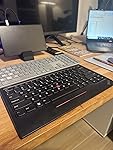
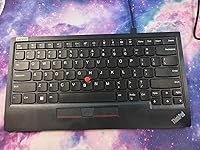
Lenovo ThinkPad TrackPoint Keyboard II (US English),Black

  • Based on 89 reviews
Condition: New
Checking for the best price...
$117.50 Why this price?

Buy Now, Pay Later


As low as $19.58 / mo
  • – 6-month term
  • – No impact on credit
  • – Instant approval decision
  • – Secure and straightforward checkout

Ready to go? Add this product to your cart and select a plan during checkout.

Payment plans are offered through our trusted finance partners Klarna, Affirm, Afterpay, Apple Pay, and PayTomorrow. No-credit-needed leasing options through Acima may also be available at checkout.

Learn more about financing & leasing here.

Free shipping on this product

Returnable until Jan 31, 2026

To qualify for a full refund, items must be returned in their original, unused condition. If an item is returned in a used, damaged, or materially different state, you may be granted a partial refund.

To initiate a return, please visit our Returns Center.

View our full returns policy here.


Availability: Only 6 left in stock, order soon!
Fulfilled by Provantage LLC

Arrives Feb 12 – Feb 16
Order within 15 hours and 52 minutes
Available payment plans shown during checkout

Protection Plan Protect Your Purchase
Checking for protection plans...

Features

  • Creates faster response times for users with long-lasting, productive life
  • Wired/Wireless keyboard/keypad connectivity technology for maximum dependability and easy usage
  • Trackpoint pointing device type for faster, dependable performance and better navigation of data and information
  • Ergonomic keyboard/keypad feature for maximum productivity with added dependability
  • Quickly and easily connect with the notebook
  • Plug and Play your keyboard with the PC and go

Description

The ThinkPad TrackPoint II Keyboard translates the ThinkPad notebook's iconic typing experience into a stand-alone device. True to form, it features the same dish-shaped ergonomic keycaps for comfort, as well as an integrated TrackPoint for easy navigation in tight spaces without a mouse. It's versatile and reliable Bluetooth or Wireless Nano USB Dongle allows up to 2 devices to connect, and supports both Android and Windows. Even the visually impaired can enjoy the TrackPoint II, thanks to its 6-point entry support.,Features & Benefits,Features dish-shaped ergonomic keys for comfort,Versatile and reliable Bluetooth or Wireless Nano USB Dongle allows up to 2 devices to connect,TrackPoint II's 6-point entry support for visually impaired use.

Brand: Lenovo


Compatible Devices: PC


Connectivity Technology: USB-A


Keyboard Description: Wired/Wireless


Recommended Uses For Product: Education


Special Feature: Ergonomic


Color: Black


Style: Modern


Product Dimensions: 13.5"L x 8"W x 1.25"H


Material: Information Not Available


National Stock Number: ‎0


Brand: ‎Lenovo


Series: ‎ThinkPad


Item model number: ‎4Y40X49493


Hardware Platform: ‎Android, Notebook, Windows


Operating System: ‎Android, Windows


Item Weight: ‎1.5 pounds


Product Dimensions: ‎13.5 x 8 x 1.25 inches


Item Dimensions LxWxH: ‎13.5 x 8 x 1.25 inches


Color: ‎Black


Power Source: ‎Battery Powered


Batteries: ‎1 9V batteries required.


Manufacturer: ‎Lenovo Group Limited


Date First Available: ‎July 10, 2020


Frequently asked questions

If you place your order now, the estimated arrival date for this product is: Feb 12 – Feb 16

Yes, absolutely! You may return this product for a full refund within 30 days of receiving it.

To initiate a return, please visit our Returns Center.

View our full returns policy here.

  • Klarna Financing
  • Affirm Pay in 4
  • Affirm Financing
  • Afterpay Financing
  • PayTomorrow Financing
  • Financing through Apple Pay
Leasing options through Acima may also be available during checkout.

Learn more about financing & leasing here.

Top Amazon Reviews


  • Awesome Bluetooth keyboard with an easy way to control the mouse pointer
I have a lot of Bluetooth keyboard, but I really love this one. The trackpoint makes this one special. It’s much easier to pinpoint areas of the screen to click on than a trackpad. It’s more like a little joystick. Dragging and dropping takes some getting used to, but works very well. I use this keyboard primarily with my AR glasses and it allows me to type and scroll around the screen in bed and on the sofa. Can’t do that with a mouse. The only function I seem to consistently have trouble with is scrolling. It can definitely be done with the middle button, but it’s more difficult than 2 finger scrolling on a trackpad or scrolling with a mouse wheel. Even with that minor issue, I love the keyboard and it feels like I snagged a piece of history since these are getting much harder to find. ... show more
Reviewed in the United States on August 25, 2025 by gadgetjunkie gadgetjunkie

  • The only wireless keyboard with trackpoint
It's the only wireless keyboard with trackpoint. It's not perfect: - Fn key is in lower left corner and left Ctrl is to its right; they should have been swapped - what bozo at Lenovo had that layout idea? - Quality of the keys is good but very far from the level of true Thinkpad laptops, say T40. - Keys are pretty flat. They should just copy the keys profile from a T40 - that feels so much more comfortable by comparison. - Mouse keys are stupidly flat ... on Thinkpads they are very distinct so one doesn't need to look, just touch and know instantly. - Should have included the typical group of 6 keys (home, end, insert, del, pg up, pg down), separate from other keys, even if that made keyboard a bit bigger. - Arrow keys should be full size - same as normal letter keys. They had the perfect recipe for best keyboard in the world, they used it for decades in Thinkpads ... but Lenovo had to mess it up ... I wonder, is it cheaper to make bad keyboards or new Lenovo engineers are incompetent? Regardless, it gets 5 stars from me ... because I need a wireless trackpoint keyboard and there's no alternative. ... show more
Reviewed in the United States on January 12, 2024 by Doru C

  • Good Compact Sized Keyboard, the TrackPoint Stick Rules
This wireless keyboard is a HUGE improvement over my previous USB TrackPoint keyboard. I would have given it 5 stars if it had a number and navigation keypad, I had to buy a standalone but with the two separates, it doesn't really do the job. It is nicely made. The Bluetooth connection is solid and reconnects quickly after waking the laptop. It's a little pricey but worth the cost. I would also appreciated if it had some lighting. Still, the TrackPoint stick is by far the only mouse pointer I'll ever use. ... show more
Reviewed in the United States on January 18, 2026 by M. Baraz

  • Works on Android and Windows
This is exact duplicate of the standard Lenovo laptop keyboard. It literally sat on top of a coworkers new Lenovo and there was very little difference in size and layout. I am not a Lenovo user, but, I've been searching for a replacement "desktop/laptop" setup using Android smartphones and external displays. This is helping make my vision a reality as I can get the mouse functionality without a mouse using the trackpoint on this keyboard. It's been a bit tricky but once connected is working as intended. Also, it's very slim and light. Easier to slip this into a travel bag than the low profile options I've found. ... show more
Reviewed in the United States on December 26, 2025 by WarEeyore WarEeyore

  • After some time, keys start sticking...
The keyboard was okay. I used it to connect to raspberry pi devices. After about a year, the keys started sticking on the right side. Weird. No spills, no mess, no dust. I couldn't find any information on how to fix the keys, nor how to order new keys. So I tried myself.... Too soon for a product to start malfunctioning. ... show more
Reviewed in the United States on February 1, 2025 by DrB DIY DrB DIY

  • Bad USB connection quality
This is a good keyboard in terms of being a keyboard. The keys feel responsive and the TrackPoint works as it should. However the USB receiver connection is awful. There are some places on my desk where it can get signal, but I find that some letters get lost while typing if the keyboard moves an inch to the right. The receiver has direct line-of-sight to the keyboard, and there are still issues. If you are using Bluetooth, then you might have better luck. I think that if Lenovo tried a third time, they might come out with a really good keyboard. As it stands, the issues make it an OK keyboard. ... show more
Reviewed in the United States on October 14, 2025 by Devon

  • RED NIPPLE
I want an aluminum body version. There is a slight bend in the middle of mine like others have reported, but it's mostly not noticeable. The key travel is supreme and has made me realize Logitch's best keyboards are garbage living in this keyboards shadow. I was most excited for the Trackpoint but it needs a higher mouse speed setting than I prefer when switching between Trackpoint and a real mouse. Turn off mouse acceleration in windows for the best results. Battery life seems fine, but it doesn't display accurately, it's always stuck at 28%. That doesn't matter much since good boys/girls use 2.4ghz. All in all a package you can't find anywhere else. ... show more
Reviewed in the United States on January 29, 2026 by Jared Carlson

  • It is for ThinkPad fans.
It is for ThinkPad fans. Fn is where it should be. Left bottom corner. So Ctrl is easy to be used with blind typing. That's said new trend in ThinkPads is to move back Ctrl into left bottom corner ...
Reviewed in the United States on December 7, 2025 by aNeutrino

Can't find a product?

Find it on Amazon first, then paste the link below.
Checking for best price...