


Search  for anything...

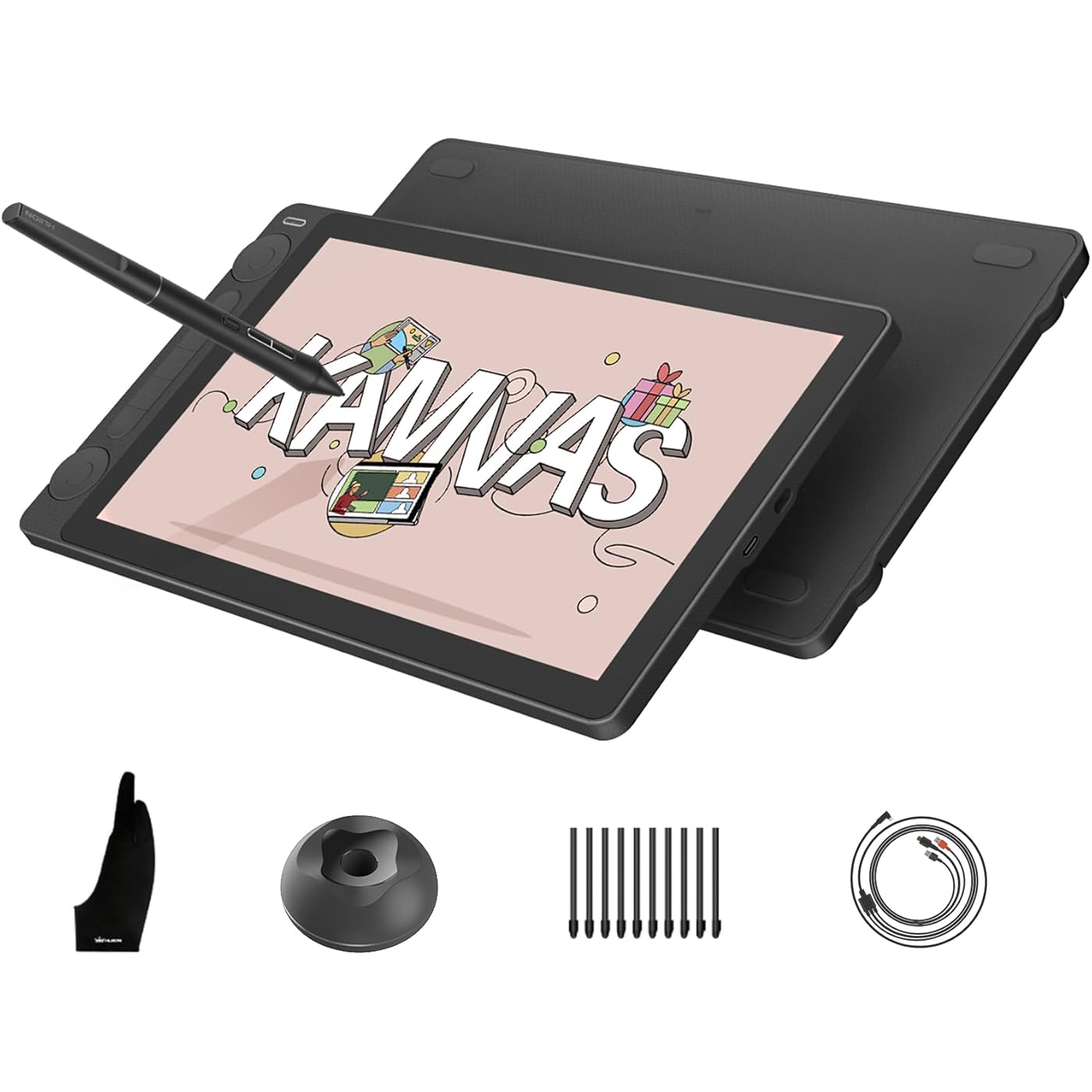
HUION Kamvas 13 (Gen 3) Drawing Tablet with Screen, 13.3-inch Full-Laminated Art Tablet with Anti-Sparkle Canvas Glass, 99% sRGB, PenTech 4.0, 16384 Pen Pressure, Dual Dials for Digital Art, Black
  • Based on 14 reviews
Condition: New
Checking for the best price...
$208.99 Why this price?
Memorial Day Sale · 16% off was $249.00

Buy Now, Pay Later


As low as $34.83 / mo
  • – 6-month term
  • – No impact on credit to apply
  • – Instant approval decision
  • – Secure and straightforward checkout

Ready to go? Add this product to your cart and select a plan during checkout.

Payment plans are offered through our trusted finance partners Klarna, Affirm, Afterpay, Apple Pay, and PayTomorrow. No-credit-needed leasing options through Acima may also be available at checkout.

Learn more about financing & leasing here.

Selected Option

Free shipping on this product

FREE 30-day refund/replacement

To qualify for a full refund, items must be returned in their original, unused condition. If an item is returned in a used, damaged, or materially different state, you may be granted a partial refund.

To initiate a return, please visit our Returns Center.

View our full returns policy here.


Availability: In Stock.
Fulfilled by Amazon

Arrives Wednesday, May 27
Order within 21 hours and 33 minutes
Available payment plans shown during checkout

Protection Plan Protect Your Purchase
Checking for protection plans...

Size: 13.3 Inch


Style: Black


Features

  • Please note: Kamvas 13 (Gen 3) Pen Display is not a standalone product; this device must be connected to a computer/laptop to work
  • All-New Canvas Full-laminated Glass: The Kamvas 13 (Gen 3) art tablet features upgraded anti-glare Canvas Glass 2.0 with nano-etching tech that reduces glare, sparkle and image noise while enhancing clarity. The paper-textured surface and full lamination offer natural drawing feel and better immersion.
  • Pro-Graded PenTech 4.0: Offers 2g IAF & 16384 pressure sensitivity for precise strokes. Its thin nib and tilt auto-alignment reduce parallax, while 3 side buttons and dust-proof grip enhance efficiency and pen-like control.
  • Accurate Color Presentation: Kamvas 13 (Gen 3) digital drawing tablet covers 99% sRGB/Rec.709 & 90% Adobe RGB coverage for true-to-life color accuracy, ensuring your artwork appears exactly as intended.
  • Rigorous Color Calibration: Each Kamvas 13 (Gen 3) digital art tablet is factory-calibrated to E<1.5 color accuracy, complete with calibration certificate. Enjoy perfect color fidelity for professional artwork creation.
  • Dual Dials, Double Productivity: Kamvas 13 (Gen 3) drawing tablet for pc is equipped with 2 dial controllers and 5 silent press keys, allowing you to precisely adjust canvas, brushes, sliders, flow, opacity, frames, parameter sliders, and more.
  • Stable & Convenient Connection: Kamvas 13 (Gen 3) computer graphics tablets retain a convenient dual-interface design with optimized connections. You can also use your own full-featured USB-C to USB-C cable for reliable PC/laptop/Android connectivity.
  • Board Compatibility: Kamvas 13 (Gen 3) animation tablet supports a variety of mainstream software. It is compatible with Windows 10 or later, Mac OS 10.12 or later, Android devices that support USB3.1 GEN1 and DP1.2, and Linux OS(Ubuntu 20.04 LTS).
  • Portable & Ergonomic Design: Ultra-thin 11.7mm profile and 865g weight make it ideal for on-the-go creators.
  • Left- and right-handed friendly: Kamvas 13 (Gen 3) drawing pad for computer's symmetrical design works for left/right-handed users. Easily rotate the workspace in driver settings for optimal comfort.

Brand: HUION


Connectivity Technology: 3-in-1 Cable, USB


Operating System: Android(USB3.1 DP1.2 or later), Linux(Ubuntu 20.04 LTS), Windows 10 or later, macOS 10.12 or later


Special Feature: 16384 Pen Pressure Sensitivity, 5 press keys+ 2 Dial, Canvas Glass 2.0, Full Lamination, PenTech 4.0


Model Name: Kamvas 13 Gen 3


Product Dimensions: 14.22 x 7.98 x 0.1 inches


Item Weight: 4.16 pounds


Item model number: GS1333


Date First Available: March 11, 2025


Manufacturer: Shenzhen Huion Animation Technology LTD.


Frequently asked questions

If you place your order now, the estimated arrival date for this product is: Wednesday, May 27

Yes, absolutely! You may return this product for a full refund within 30 days of receiving it.

To initiate a return, please visit our Returns Center.

View our full returns policy here.

  • Klarna Financing
  • Affirm Pay in 4
  • Affirm Financing
  • Afterpay Financing
  • PayTomorrow Financing
  • Financing through Apple Pay
Leasing options through Acima may also be available during checkout.

Learn more about financing & leasing here.

Top Amazon Reviews


  • Honest review and economical setup ❤️
Size: 15.6 Inch Style: Black
Okay so I have the Huion Inspiroy q11k pen tablet. That is a decent tablet but the pen is a bit glitchy and the customizable keys never worked. Still I'd give it 4.5 out of 5 so when I started to get the itch for a display tablet, I researched so many brands that I got sick of research 😔 Ultimately, I decided to go with the brand I was familiar with, Huion so I took the leap and got this. Here is my experience. I just got the tablet today and the first thing is that the delivery even came earlier than was announced ✅ It was packed in a huge Amazon box to protect the smaller product from damage ✅ Now for the unboxing and initial experience. Note that I will change my rating once I paint on this or if there's any trouble down the line. I was very nervous because of some bad experiences that others had, so I started up my tablet with a bit of concern. Prayed so hard and I was so happy when it actually worked first without the display. There was a little difficulty when I connected the HDMI cable for the screen though because first it was showing that there was no signal but then after toggling the HDMI cable it started to show the screen and everything. Another reviewer had said that it worked right out of the box and I was skeptical about that but it's true 😯 And I think that happened for me because I have the other tablet with driver installed. I had just tried it for fun before uninstalling the driver and was so pleasantly surprised that it works with my old Huion driver for my q11k pen tablet. I suspected that there would be some unity between drivers but still! But as the driver for the pen tablet was most likely outdated, I went to the website and downloaded the newest driver which was a 15.132 (or something) version when I was using the 14.1 version ( the newest driver was updated in 2022 so I got that and uninstalled the old one) The test: I did a few circles and lines in CSP to test the pen and it is working well 😏 The screen is a bit bright but it can be adjusted. The colors are nice too. I can't wait to paint on it but not tonight...I'm tired after pulling an all nighter to paint yesterday 😩 I also customized the keys on the side of the tablet and stuck the stickers they provided to identify which key is which. These stickers are such a nice touch for me ✅ because with my other pen tablet there weren't any stickers and it was always confusing to remember which key was which. And since I work in a darkened space that's even worse so I never used the keys. I'm grateful for this now. My laptop doesn't even have a battery but it works with it. I thought that would have been an issue but I use the adapter that comes with the display tablet just in case. I'm good to go and that's it I don't think I need to buy anything else because this is perfect. Even my setup is perfect for me because now I don't regret not buying a tablet stand at all. I am using the box that the Huion kamvas tablet came in as a stand 😅 How I do it is use half the box to rest the tablet and the other half the rest my laptop and I am as happy as ever because it has elevated the laptop and the tablet and is comfortable to use. So the box gets a 4/5 ⭐⭐⭐⭐ for being sturdy and having a recyclable purpose 😅 As my bed is my workspace, I only have a small space to sleep on now though but that is something I can work around. Do artists sleep anyways? 🙈 So that's it. Fast delivery. Very easy to use. No disappointment.... If I think of anything else or my experience changes I'll update this 👍 Update: 03/July/23 I have done a few paintings on this so far. The only problem I've experienced with it is how sometimes the hot keys will reset, particularly the long one that you can use to scroll / zoom in or out. But that isn't a huge issue for me because everything else is great. I love painting on this without the delay of making sure my pen tablet and my hand is cooperating. It's a lot less of a headache than what I was using before. Oh and I didn't buy a remote for extending the shortcut keys. I simply bought a wireless keyboard and mouse and that has been the best thing ever in using this. This display tablet is perfect for me. I use it for everything: watching movies, my writing, art and video editing. It's just so convenient to be able to recline with it on my lap. And let me say, I never thought that I'd be painting on a tablet while lying down! Works for the days when I'm tired after work or just woke up and I don't want to sit down and paint. Good for the back! So this encourages me to paint more since using it is painless. Plus it's already in my hand when I'm using it for something else so I'd just open CSP and start working on one of my many procrastinations. It doesn't get ignored like my pen tablet that would be to the side of my bed crying out to be used for art and getting used as a coaster instead 🙈 Conclusion: I love this display tablet. Painting is a whole lot more precise, fun and a tad bit easier. Will update with more as time goes along! ... show more
Reviewed in the United States on April 25, 2023 by T. Reyes T. Reyes

  • Great Budget Digital Drawing/Painting Experience
Size: 15.6 Inch Style: Black
The media could not be loaded. I had an old Wacom Intus3 6x11 for many years and had always wanted a screen tablet to draw on. I finally found one for the price I can afford in the Huion and ordered the Kamvas Pro 16 after seeing such glowing reviews. This tablet has made drawing and painting fun on the computer again. I feel like this is a good middle of the road size as if it's too small, your view might be blocked by your hands on the screen. The product seems well built with a premium feel to it. The experience is very good, strokes are mostly accurate (see below) and responsive. I had to contact support on a few occasions and they were very responsive which is great. My Wacom had 1024 levels of pressure sensitivity, this one has 8092. I thought it would make some difference but I was not able to feel the difference. I do wish that the driver allows you to tweak the pressure sensitivity curve better. I would like to make it more like a S curve, but it is not possible. The accuracy of the pointer is off as you move towards to edges. So if you maximized your window for example, and you want to hit the window controls at the edge, it's a bit of a "struggle" but it is manageable. Hopefully this is a driver issue that can be fixed. At time, I can hear the stylus drag over the screen and sometimes click. Not sure why that happens or if it's by design. Related to this, the screen may make a sound if you lean on it too much. I didn't think I had applied too much pressure with my hands, hopefully this is a non-issue. If the tips were more rubberized instead of being plastic it will help. The driver is not too stable and freezes or crashes sometimes. You also need to make sure you start it as an administrator else certain features may not work; like customizing buttons per app. I work primarily with Photoshop and when you enable tilt in your brushes, there is always a warning icon in the GUI (see the screenshot) and it doesn't seem to work very well. However, if you use the older legacy brushes that has tilt support but does not show the tilt enabled it seems to work better. Tilt does work in Krita. So I'm not sure if this is an issue with Photoshop and Huion, I don't have the Wacom to compare with anymore. When you see the reviewers on YouTube using it with the laptop screen on and connected to this tablet, they usually have the desktop mirrored on the tablet, and more likely than not, the laptop screen has the same resolution as the tablet. Otherwise it will look weird because one of the screens will be stretched. My ideal use case is to use it in a extended mode, so the Huion is an extended screen. However, to do that, you have to go into the driver to manually map the drawing surface to the Huion. This should be the default on the driver, or at least a button/checkbox to automatically enable it. Because of this, I now close the laptop screen and just have that one screen (the Huion). It would be nice to have this addressed so I can leave the laptop screen on and keep other apps in view like a reference photo, emails, chats etc. Overall, great product with great promise. Hoping that the drivers will keep improving and the product holds up well (see the notes about the click noises). ... show more
Reviewed in the United States on January 27, 2020 by Matthew S. Matthew S.

  • Better Value, great quality!
Size: 13.3 Inch Style: Black
As good a Wacom and way more affordable. Simpler setup as well with a single cable.
Reviewed in the United States on November 22, 2025 by Hans Varn

  • Great tablet for graphics
Size: 15.6 Inch Style: Black
I absolutely love this tablet! I’m using it for game development graphics and it works like a charm. Super easy to use, the shortcut keys are very helpful: Screen quality exceeded my expectations, the pen sensitivity can be adjusted, it mirrors my laptop perfectly. The cords are a little bit of a pain, but I purchased an adapter to keep them organized. The only reason I gave it 4 stars is because this is not the PRO model. I’m not sure why it’s labeled as that. But overall gray drawing tablet ... show more
Reviewed in the United States on March 31, 2025 by Joana

Can't find a product?

Find it on Amazon first, then paste the link below.
Checking for best price...