Search  for anything...
HP

HP Prime G2 Graphing Calculator – Multi-Touch 3.5" Color Display CAS Exam Approved SAT/AP/IB Scientific Calculator for School, Highschool, College Students – Programmable, 256MB, Includes Case + Cloth

  • Based on 1,777 reviews
Condition: New
Checking for the best price...
$149.99 Why this price?
Memorial Day Sale · 6% off was $159.99

Buy Now, Pay Later


As low as $25.00 / mo
  • – 6-month term
  • – No impact on credit to apply
  • – Instant approval decision
  • – Secure and straightforward checkout

Ready to go? Add this product to your cart and select a plan during checkout.

Payment plans are offered through our trusted finance partners Klarna, Affirm, Afterpay, Apple Pay, and PayTomorrow. No-credit-needed leasing options through Acima may also be available at checkout.

Learn more about financing & leasing here.

Selected Option

Free shipping on this product

30-day refund / replacement

To qualify for a full refund, items must be returned in their original, unused condition. If an item is returned in a used, damaged, or materially different state, you may be granted a partial refund.

To initiate a return, please visit our Returns Center.

View our full returns policy here.


Availability: In Stock.
Fulfilled by Amazon

Arrives Wednesday, May 27
Order within 19 hours and 40 minutes
Available payment plans shown during checkout

Protection Plan Protect Your Purchase
Checking for protection plans...

Style: HP x 2025


Features

  • ADVANCED GRAPHING & CAS Explore complex math with computer algebra system, dynamic geometry, advanced graphing, and spreadsheet applications plus RPN. This color graphing calculator lets you switch between symbolic, graphical, and numerical views with dedicated keys.
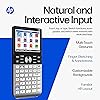
  • 3.5-INCH MULTI-TOUCH COLOR DISPLAY Graphing scientific calculator with a large high-resolution color screen, pinch-to-zoom, interactive graph manipulation, and customizable backgrounds. Add background images and use your finger to sketch and adjust functions for blended learning.
  • EXAM APPROVED & CLASSROOM READY Approved for PSAT/NMSQT, SAT, IB, and select AP exams. Suitable as an SAT calculator, statistics calculator, calculus calculator, precalculus calculator, engineering calculator for college, algebra calculator, or geometry calculator.
  • WIRELESS & APP INTEGRATION Use HP Prime Wireless + Connectivity Kits to poll students, share data, and project screens. HP Prime Mobile App (Windows, iOS, Android) mirrors full calculator functionality. Brushed metal design includes a slide-on cover and rechargeable lithium-ion battery.
  • EXPANDABLE MEMORY & STEM ECOSYSTEM 256 MB flash memory stores programs, exam configurations, and images. Integrates with optional accessories for advanced classroom control, real-time collaboration, and interactive engagement across the complete HP STEM environment.

Brand: HP


Color: Black


Calculator Type: Graphing


Power Source: Battery Powered


Screen Size: 3.5 Inches


Calculator Type: Graphing


Power Source: Battery Powered


Screen Size: 3.5 Inches


Number of Batteries: 1 Nonstandard Battery batteries required. (included)


Display Type: LCD


Color: Black


Enclosure Material: Metal


Item Dimensions L x W: 7.25"L x 3.66"W


Brand: HP


Model Name: HP Prime


UPC: 199284807082


Manufacturer: HP Inc.


Mfr Part Number: HP Prime G2


Model Number: HP Prime G2


Warranty Description: 1 Yea Manufacturer's Warranty


Frequently asked questions

If you place your order now, the estimated arrival date for this product is: Wednesday, May 27

Yes, absolutely! You may return this product for a full refund within 30 days of receiving it.

To initiate a return, please visit our Returns Center.

View our full returns policy here.

  • Klarna Financing
  • Affirm Pay in 4
  • Affirm Financing
  • Afterpay Financing
  • PayTomorrow Financing
  • Financing through Apple Pay
Leasing options through Acima may also be available during checkout.

Learn more about financing & leasing here.

Top Amazon Reviews


  • Unlock Your Calculator’s Power
Style: HP
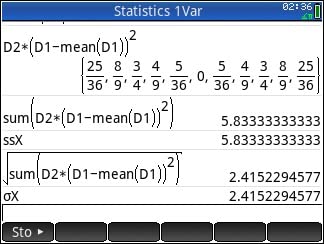
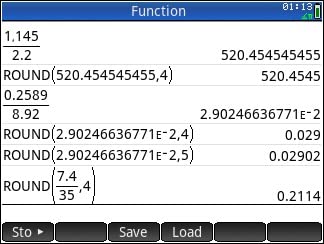
Set Amazon search category to Books. Type “HP Prime Calculator”. Find textbook quality Arithmetic, Algebra, and College Math resources for the cost of a fast-food meal. Don’t let the inexpensive prices fool you. These are great resources that help you unlock your calculator’s power. Best Math Tool in Today’s Classroom. Most powerful Math assistant allowed in today’s classroom. With phones and other Internet electronic devices being banned, the HP Prime Calculator will give you a virtual assistance that allows to acquire and become proficient with any math skill from arithmetic to advanced calculus. HP Prime Calculator is a real sleeper, the usefulness of Matlab or Wolfram Mathmatica in a tool that is easy to use. Textbook style input by templates with vibrant color touch screen allow for easy entry of math problem, plus flyout popup menus and soft key tabs make work a pleasure. Its textbook output with built-in power functions and applications is easy augmented by your functions. Start your understanding of your calculator by using your familiarity with Arithmetic to concentrate on the Prime’s interface and textbook style input and output feature. After the quick review of your Arithmetic, use the Algebra and College Math textbooks to learn advanced features of your calculator be viewing their hundreds of applications. The same applications can serve as invaluable aid for High School Algebra, Advanced Algebra, and Statistic courses. Let the eBook listed serve as a handy reference. It can be viewed on your phone, tablet, or computer. Note that the Arithmetic and College Math paperbacks found includes references to YouTube videos using screenshots and virtual emulator. These screenshots and emulator allow you to see your calculator in action. A web reference is given in the paperbacks for free parallel web-based material that is digital linked to all the paperbacks’ references and their YouTube videos. See Amazon Book HP Prime Calculator. Search listing for explanations of the shown screens in this review. HP Prime Calculator has a download identical virtual version for Windows and Mac and plus HP connectivity program that allows you to use your computer for work at home and then easily transfer your work to your handheld HP Prime Calculator for classroom use. To augment your HP Prime handheld classroom Calculator, there is a free/lite version of the HP Prime Calculator for iPhone and Android phones and tablets. Plus, a paid Pro version with programming. The phone and tablet free/lite and Pro version allow you to have a HP Prime with you at all times. Using variables for functions and nested functions you can accomplish limited programming but extremely powerful programming tasks on any versions of HP Prime, free/lite, Pro, virtual, or physical calculator. Below, we give you some possible starting points for variable creations in math courses. We like programming through variables as it works for handheld, virtual, pro, and free/lite versions. Search the internet for text and video instructions on how to use these powerful variables. You can easily add these variables to your handheld. Using copy and paste highlight the desired collections of functions you wish to add. Transfer them to your virtual Window or Mac HP Prime Calculator. Next backup the virtual and use this backup to restore your handheld HP Prime Calculator. Remember to rename handheld as it now has virtual name. Note for copy and paste are in computer form but will show in calculator in textbook form. College Algebra Plus Algebra of Calculus Lines slopeln(x1,y1,x2,y2):=((y2-y1)/(x2-x1)) lineptm(x1,y1,m):=(m*('x'-x1)+y1) linept1pt2(x1,y1,x2,y2):=lineptm(x1,y1,slopeln(x1,y1,x2,y2)) (line for two, points, linept1pt1, requires slopeln and lineptm) Rational Expressions - Algebra of Calculus msec(a,h):=((F1(a+h)-F1(a))/h) mtan(a):=limit(simplify((F1(a+h)-F1(a))/h),h,0) mtan2(a):=limit(simplify((F1(x)-F1(a))/(x-a)),x,a) secline(x1,h):=simplify(lineptm(x1,F1(x1),msec(x1,h)))) tanline(x1):=simplify(lineptm(x1,F1(x1),mtan(x1))) (all functions use F1) (secline requires slope of secline, msec) (tanline requires slope of tanline, mtan) (secline and tanline requires Finite Math line point slope, lineptm) Algebra Absolute Value and Distance distrnl(a,b):=ABS(b-a) dist(d,r,t):=solve(d=r*t,x) arithn(d,f,n):=(f+(n-1)*d) arithsum(f,l,n):=(n/2*(f+l)) arithsum1(d,f,n):=(n/2*(f+arithn(d,f,n))) Trigonometry Complex Numbers P_to_R(r,a):= (r*COS(a)+r*SIN(a)*i) R_to_P(x,y):=(CAS(collect(ABS(x+y*i)))+"∡"+CAS(collect(ARG(x+y*i)))) Finite Math Finance sint(a,p,r,t):=ROUND(solve(a=p*(1+r*t),x),2) cpint(fv,pv,r,m,t):=ROUND(solve(fv=pv*(1+r/m)^(m*t),x),2) loan(pv,pmt,r,m,t):=ROUND(solve(pv=pmt*((1-(1+r/m)^(-m*t))/(r/m)),x),2) ira(fv,pmt,r,m,t):=ROUND(solve(fv=pmt*(((1+r/m)^(m*t)-1)/(r/m)),x),2) Linear Programming - Step by Step to check manual work pivmat(m,r,c):=CAS(pivot(CAS(mRow(1/m(r,c),m,r)),r,c)) Sets and Probabilities prsubL1(a,b):=DIFFERENCE(a,b) prsubL2(a,b):=DIFFERENCE(a,b) complement(a,b):=DIFFERENCE(a,b) For these added powerful programming examples, there are free text/screenshot webpages and YouTube videos with emulator instructions to get you started with these. The internet search function is your friend. Lastly, we not that the HP Prime Calculator is two calculators in one. A quick startup would be to use the simpler HOME calculator arithmetic side. The other calculator is the CAS, Computer Algebra System, an algebraic, calculus, and advanced math calculator that requires more time and resources to master. With Covid-19 and the use of virtual schooling students have fallen behind. As there are two calculators in one with the HP Prime Calculator the HP Prime HOME side can be used to learn the calculator for students in Algebra and Advanced Math courses but can also be used as a bridge to help upper elementary middle school student with gaps in their arithmetic knowledge. Search Amazon and the web for resources on using the HOME HP Prime Calculator side for these younger students. Giving them a crutch to temporarily plug their gaps while preventing them from falling further behind is valuable use of the HP Prime physical Calculator. ... show more
Reviewed in the United States on May 31, 2022 by Amazon Customer

  • Quality Calculator, but use third party sellers at your own risk.
Style: HP
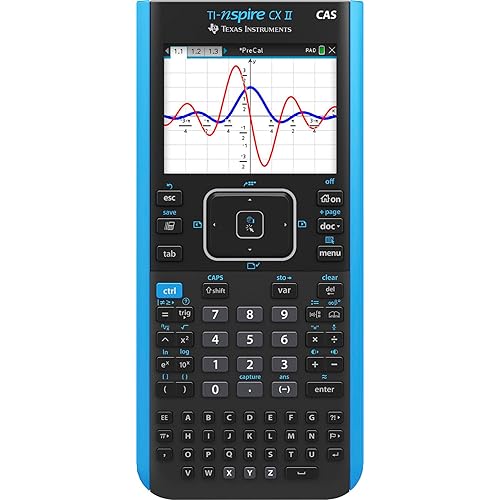
I am in college for engineering and needed a calculator for complex math and calculus. So far I only used some basic functions like the linear equation solver and the graphing function. I also tried CAS mode but found it easier to plot my function and find the intercepts on the graph. It's nice that the screen is a touch screen and the processor keeps up when you pan and pinch to zoom in and out of the graph view. This is a really powerful tool. It's like basically having a baby version of Matlab or Wolfram Mathmatica on you at all times. My professor even complimented me on my calculator. All the other students in my class have either the ancient Ti-84 or Ti-83 with the black and white screen and AAA batteries or the Ti-84 plus ce with color screen and rechargable battery in compact size and the HP Prime helps me to stand out from the crowd and gives me capabilities on par with some of my computational computer programs. I also have some experience with the Ti-Nspire which is one of the comparable models from a competing calculator company. I'd say the Prime is alot easier to use than the Nspire becasue of stuff like the touch screen, the better processor, and the nicer build quality. The build quality is also really nice. The buttons are basically hardened rubber and the faceplate is made of brushed metal. The device feels dense and sturdy. The footprint is also a nice size. It will easily stow away in a book bag or a desk drawer. I had a problem however with the right arrow button and the 1 button being unresponsive to clicks. I would feel the button actuate and hear a click but the calculator didn't register the input. I would then have to go back and push th ebutton again harder this time to get the button to register. Hopefully this is something that will resolve itself after I break in the keypad. The battery life is okay and will easily last a day or two. I do wish that the calculator had usb type C instead of micro B but it isn't that big of a deal. I heard that the calculator also takes the same batteries as an old Samsung Galaxy phone so maybe I'll look for some replacement batteries to hotswap them when they die. This might also be a good plan for test taking becasue you dson't want your calculator battery to suddenly die so it might be good to get a few backups. I bought this from a third party seller becasue they offered the fastest prime shipping. However when I recieved my the transparent plastic blister packaging was already opened. However the product and accessories looked brand new. The protective plastic film was still on the screen. This might have something to do with the unresponsive button issue I brought up earlier. ... show more
Reviewed in the United States on October 19, 2023 by Preston Stormer

  • The BEST calculator I've ever used!
Style: HP x 2025
I am attending grad school and needed a good scientific calculator. This was rated as the most powerful out there, but I thought I would need to learn HP's reverse Polish Notation, so I got comfortable with that before making this purchase. It turned out I not only didn't need to use reverse Polish, but it is somewhat discouraged because of the way this can handle equations. You simply type the equation you want, and it makes it absolutely simple to complete the equation on a large screen. Far easier than any other calculator I've tried. I also read there is a huge learning curve for this, but that's only for the advanced features, and the ones I've tried have been incredibly easy to learn. Easily the best calculator I've ever used. ... show more
Reviewed in the United States on December 18, 2025 by Falcon91Wolvrn03

Can't find a product?

Find it on Amazon first, then paste the link below.
Checking for best price...