Search  for anything...
HP

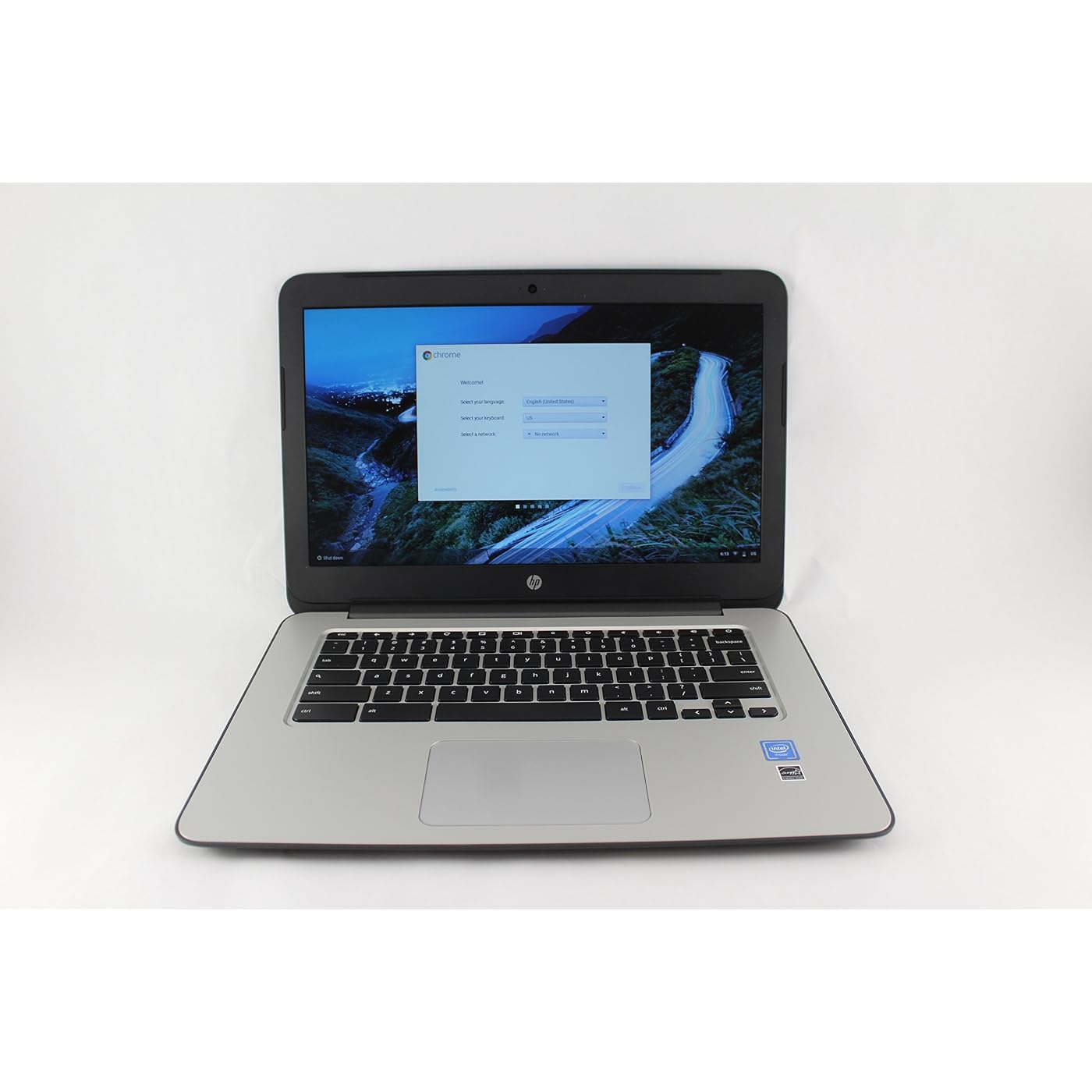
HP 14" Chromebook 14 G4, 4 GB RAM, 16 GB SSD, Intel HD Graphics, Black (T4M32UT#ABA)
  • Based on 251 reviews
Condition: New
Checking for the best price...
$179.77 Why this price?
Save $29.23 was $209.00

Buy Now, Pay Later


As low as $29.96 / mo
  • – 6-month term
  • – No impact on credit to apply
  • – Instant approval decision
  • – Secure and straightforward checkout

Ready to go? Add this product to your cart and select a plan during checkout.

Payment plans are offered through our trusted finance partners Klarna, Affirm, Afterpay, Apple Pay, and PayTomorrow. No-credit-needed leasing options through Acima may also be available at checkout.

Learn more about financing & leasing here.

Free shipping on this product

This item is eligible for return within 30 days of receipt

To qualify for a full refund, items must be returned in their original, unused condition. If an item is returned in a used, damaged, or materially different state, you may be granted a partial refund.

To initiate a return, please visit our Returns Center.

View our full returns policy here.


Availability: In Stock.
Fulfilled by Business Premium Desktops Laptops (SN Recorded)

Arrives Saturday, Jul 11
Order within 18 hours and 21 minutes
Available payment plans shown during checkout

Protection Plan Protect Your Purchase
Checking for protection plans...

Features

  • 35.56 cm (14") diagonal HD display
  • HP True Vision HD webcam
  • Intel processor for a no-hesitation experience

Description

Connect in style. Open your sleek, next-generation Chromebook to get online, fast. Quickly access your favorite websites and Chrome web apps on the 35.56 cm (14") diagonal HD display. Enjoy a more dynamic web chat experience, thanks to the HP True Vision HD webcam. Easily save and share images and videos using the multi-format digital media card reader in your HP Chromebook 14.

Brand: HP


Model Name: Chromebook


Screen Size: 14 Inches


Color: Silver


Hard Disk Size: 16 GB


CPU Model: Celeron N2840


Ram Memory Installed Size: 4 GB


Operating System: Chrome OS


Special Feature: Anti Glare Coating


Graphics Card Description: Integrated


Color: Silver


Hard-Drive Size: 16 GB


Operating System: Chrome OS


Other Special Features of the Product: Anti Glare Coating


Graphics Description: Integrated


Graphics Coprocessor: Intel HD Graphics


Hard Disk Description: SSD


Item Weight: 3.8 Pounds


Video Processor: Intel


Specific Uses For Product: personal


Webcam Capability: Yes


Graphics Card Ram: 4 GB


Automatic Backup Software Included: Webcam


Form Factor: Other


Hard Disk Interface: USB


Voltage: 3.7 Volts


Graphics Ram Type: DDR3 SDRAM


Compatible Devices: External displays, keyboards, mice, storage devices, printers, and other accessories that use USB, HDMI, or Bluetooth connectivity.


Warranty Type: Limited


Item Dimensions L x W x Thickness: 13.54"L x 9.44"W x 0.7"Th


Chipset Type: Intel Bay Trail-M


Optical Storage Device: No Optical Drive


Power Device: AC adapter


Video Output: HDMI


Virtual Reality Ready: No


Screen Size: 14 Inches


Resolution: 720p


Native Resolution: 1366 x 768 pixels


Display Type: LED


Display Resolution Maximum: 1366x768 Pixels


Display Technology: LED


Supported Monitor Maximum Quantity: 1


Touch Screen Type: No Touchscreen


Has Color Screen: Yes


Screen Finish: anti-glare


Connectivity Technology: Bluetooth


Wireless Technology: Bluetooth, Wi-Fi


Wireless Compability: 802.11bgn


Cellular Technology: 4G


Bluetooth Version: 4


Bluetooth support?: Yes


Human-Interface Input: Touch Pad


Keyboard Description: Chiclet


Notebook Pointing Device Description: touchpad


Keyboard Layout: QWERTY


Control Method: Touch


Touchpad Feature: True


Processor Series: Celeron N2840


Processor Speed: 2.16 GHz


Processor Count: 2


Processor Brand: Intel


CPU Model Number: Celeron N2840


CPU Model Generation: 4


CPU Model Speed Maximum: 2.58 GHz


CPU L1 Cache: 32 KB


CPU Codename: Bay Trail


Brand: HP


Model Name: Chromebook


Model Year: 2015


Model Number: T4M32UT#ABA


Built-In Media: 3-cell battery, AC Adapter, Chromebook


Manufacturer: Hewlett Packard Office


UPC: 889894582294


Global Trade Identification Number: 94


Unit Count: 1.0 Count


Item Type Name: HP Business T4M32UT Chromebook 14 G4 4G 16GB


Warranty Description: 1


External Testing Certification: Energy Star certified


RAM Memory Installed: 4 GB


RAM Memory Technology: DDR3L SDRAM


Memory Clock Speed: 1600 MHz


Ram Memory Maximum Size: 4 GB


Memory Speed: 1600 MHz


RAM Type: DDR3 SDRAM


Cache Memory Installed Size: 1


RAM Memory Slot Total Count: 1


Memory Slots Available: 1 or more


Battery Cell Type: Lithium Ion


Battery Life: 8.15 Hours


Number Of Cells: 3


Lithium-Battery Energy Content: 5.3 Watt Hours


Total Usb Ports: 2


Hardware Interface: HDMI, Headphone, USB


Number of Ports: 3


Total Number of HDMI Ports: 1


Available M2 Slot Count: 1


Audio Output Type: Headphones


Speaker Description: Includes headphones with integrated microphone


Microphone Form Factor: Headphone


Audio Recording: Yes


Frequently asked questions

If you place your order now, the estimated arrival date for this product is: Saturday, Jul 11

Yes, absolutely! You may return this product for a full refund within 30 days of receiving it.

To initiate a return, please visit our Returns Center.

View our full returns policy here.
  • Klarna Financing
  • Affirm Pay in 4
  • Affirm Financing
  • Afterpay Financing
  • PayTomorrow Financing
  • Financing through Apple Pay
Leasing options through Acima may also be available during checkout.

Learn more about financing & leasing here.

Top Amazon Reviews


  • Awesome Laptop!!
This Chromebook is amazing. The quality of the machine and the speed of the operating system are great. I have a company issued HP laptop that is really impressive. So, when my MacBook Pro was coming to the end of its life, I decided to pick up an HP Chromebook because I do everything in the cloud (Gmail, Google Docs, etc.) and I've had a great experience with my HP laptop for work. This Chromebook exceeded my expectations. It is beautifully designed, awesome build quality, great screen, and great sound. The 4GB of RAM and the Celeron processor allow me to run multiple tabs with no problems at all. When buying a Chromebook, you definitely want to get as much RAM as possible. I'm getting around 7 hours on the battery and it charges really fast. Packaging and delivery were spot on as usual. If you are looking for an affordable, high-quality laptop this is the one. If you do most of your computer work in a WEB browser, Chromebooks are the way to go. Great product!! ... show more
Reviewed in the United States on February 9, 2018 by Scott Horne

  • Super light, long battery life
I did a ton of research before purchasing this chromebook and this seemed to be the fastest and well built chromebook in this size and price range. I've been using it for a few weeks now and coming from a 17" MacBook Pro it is a very big adjustment. Pros: Super light, long battery life, quick charge to full battery, fast startup, auto updates, very slim, seems to be built well (doesn't feel cheap like other models I tested in stores), performs exactly as described, great price for screen size, you can adjust some of the keys on the keyboard to make it feel like either a windows or mac (swap ctrl/command & alt positions). Cons (or things I would prefer differently) Screen type is more matte as compared to the more shiny Windows or Apple laptops. It isn't bad, just not as crisp or professional looking. Keyboard is a little noisy, screen doesn't go back as far as I would like it to, speakers aren't great (positioned on the bottom) All in all what can I say, I spent just over $200 for it so I could surf the internet and do SEO/AdWords work on the side. It works great for everything I've needed so far and makes so much more sense to get this rather than spend another $800-$1500 on a MacBook that I would just use to get online 90% of the time. I would recommend this to anyone looking to save some money on their next laptop purchase if you mainly just need something to get online. The only thing I forgot to look into when purchasing a chromebook was the capabilities with the printer we have. To print from a chromebook you'll need a printer that has wifi connectivity or is a cloud ready printer. That isn't specific to this model, but I thought it was worth mentioning. ... show more
Reviewed in the United States on February 3, 2018 by Amazon Customer

  • Great company
I bought a Chromebook from this company a few weeks ago and my brother took the Chromebook for himself so I bought this one it works great! I like the feeling of it and how soft it closes so it your looking for a great Chromebook for chrome I would recommend it for that however the Chromebook does not have playstore so if your looking for that I would suggest looking at a different one! ... show more
Reviewed in the United States on September 27, 2023 by Cameran G.

  • Cheap and you can tell!
This laptop was cheap, very cheap, and unfortunately, it is obvious why. The battery life is awful, it struggles to even play a video, and it just feels so cheap. I can't imagine many applications that this computer would be good for even with the affordable price. I wish I had returned this item when I was still in the window for returns. I would not recommend this computer unless you browse strictly text-based websites. ... show more
Reviewed in the United States on February 20, 2024 by hailey

  • My previous Chromebook was better
I previously had an Acer Chromebook 15 that I loved. It ended up dying after 18 months so I bought one of these to try another manufacturer's offerings. I have only owned this for about 4 days and it's certainly getting the job done, but I'm quickly realizing I was spoiled by my previous Chromebook. My 3 biggest complaints so far are below - No support for 1920x1080 resolution. The native resolution is 1366x768, and you quickly realize that this isn't big enough for most sites. I have set my default page zoom to try to combat this, but it's just not enough. 90% just doesn't cut it and 80% just feels too small. Not a knock on the device, - The screen only opens to about 120 degrees. It's not a huge deal, but there have already been a few occasions where I wished it would tilt back further. - There seems to be a minor lag while browsing. It's not bad enough that I would want to return the device but it seems slower than my previous Acer Cgromebook. ... show more
Reviewed in the United States on May 5, 2017 by A. Schlitt

  • This Computer is a Great Deal
This computer was $38 used in good condition. I am not gaming or anything like that but for occasional paperwork and things like that it seems fine. It was only $38. My expectations were very low based on the price so anything above minimal function exceeds expectations. Here I am using this computer to leave a review so 5/5. It's a little dirty and old but guess what? It was only $38. The battery came charged and setup was as simple as logging into my Google account. This was a deal. Did I mention it was only $38? Update: It's March 2025 and this thing is still running. The only thing it won't do is Disney+ now due to the obsolete browser. But it still runs everything else better than the HP Pavillion. The battery still holds a charge as well as when I got it. This was a great investment for $38. ... show more
Reviewed in the United States on December 14, 2023 by Aaron

  • Great value!
Just arrived and its great. I had to replace my older HP 14 after 3 + years, it had had enough. I use my Chromebook as a primary computer, both at my desk and as a laptop for meetings, so it gets lots of work. It's almost disappointing how easy it is to start with a new one. Everything I need is still there, on line and in my browser. It recognizes you from your log in email and google account. I still need access to my windows desktop from time to time for some heavy lifting and graphic work, but the Chromebook fulfills 90% of what I need and use. This model , the G4 14 inch ( HP 14" Chromebook 14 G4, (4 GB RAM, 16 GB SSD,...), has a better screen and speakers than the older 14 I owned. The design is a little better looking as well. The only thing I waih I had done is buy it with a quad processor (As I do live online video's and a quad helps with that) After reading many of the reviews it seems pretty consistent that these go about 2 1/2 to 3 years before there done. I am not a huge HP fan to be honest, but for the price its very good. I have owned a Samsung with I think is great quality, and an Acer, which I wouldn't buy again. ... show more
Reviewed in the United States on February 7, 2017 by J. Bayes

  • Light & Fast Chromebook
After playing with my new Chromebook for a few days, here are my observations. The overall design of the HP Chromebook is pretty solid. Thin and light with a good array of ports and features. The track pad is not the greatest however, most users may prefer to get a wireless mouse. The keyboard is pretty good for this price range and is generally centered on the screen and the QWERTY keyboard and is acceptable for light to moderate typing duration. The display is acceptable for viewing videos, but users should adjust their expectations of video quality. YouTube videos look decent on this display. This laptop is likely not acceptable for gaming that requires powerful graphics and lots of memory. The audio is OK, but unspectacular - again, about what you would expect for low cost machine. Photos viewed on screen are unspectacular but acceptable for most purposes. Setup is very simple and it connects easily to wireless networks, but we were unable to get it to connect to our network drives using the recommended Network File Share application. This is likely an issue with our network, not the Chromebook or the file share app. Additional apps for various functions are available for easy download and install from the Chrome Web Store. File management is a little confusing at first, as most files are stored in the cloud. But once you get adjusted to this concept and working from the web browser environment vs the MS Windows desktop, you can do most anything with the Chromebook that you can do with a standard PC laptop. There is very little space provided in the built in flash drive (16GB) so most users may opt to install a separate micro SD card or thumb drive if you need to carry additional files on board. The provided 4GB of RAM seems acceptable for all built in applications and web surfing. It takes only a few seconds to start up to the desktop from either power up or waking from sleep mode. Pros: low cost, light weight & thin, decent keyboard, simple WiFi connectivity, ultra fast start up Cons: balky touch pad, quirky OS and cloud file storage takes some getting used to If your looking for a simple, easy to use, low cost laptop for web based applications for light to moderate use, you can't go too wrong with the HP Chromebook. ... show more
Reviewed in the United States on August 16, 2017 by William

Can't find a product?

Find it on Amazon first, then paste the link below.
Checking for best price...