Search  for anything...

GMKtec G3S Mini PC Computers Intel N95 Processor (Turbo 3.4GHz)

  • Based on 1,817 reviews
Condition: New
Checking for the best price...
$249.99 Why this price?
Save $130.00 was $379.99

Buy Now, Pay Later


As low as $41.67 / mo
  • – 6-month term
  • – No impact on credit to apply
  • – Instant approval decision
  • – Secure and straightforward checkout

Ready to go? Add this product to your cart and select a plan during checkout.

Payment plans are offered through our trusted finance partners Klarna, Affirm, Afterpay, Zip, Apple Pay, and Google Pay. No-credit-needed leasing options through Acima may also be available at checkout.

Learn more about financing & leasing here.

Selected Option

Free shipping on this product

FREE 30-day refund/replacement

To qualify for a full refund, items must be returned in their original, unused condition. If an item is returned in a used, damaged, or materially different state, you may be granted a partial refund.

To initiate a return, please visit our Returns Center.

View our full returns policy here.


Availability: In Stock.
Fulfilled by Amazon

Arrives Sep 2 – Sep 3
Order within 15 hours and 46 minutes
Available payment plans shown during checkout

Protection Plan Protect Your Purchase
Checking for protection plans...

Color: 8GB+256GB Grey


Features

  • 12th INTEL ALDER LAKE N95 PROCESSOR - The G3S mini pc uses the 12th Intel N95 CPU 4 Core 4 Threads 6MB cache, burst speed up to 3.4GHz. Compared with (N100/N5105/N5100/N5095), the N95 offers an overall performance improvement of 36%. Ideal for routine tasks, office work and home entertainment,which is more convenient than traditional desktop pc
  • 8GB RAM MEMORY & 256GB SSD STORAGE - GMKtec Nucbox G3S mini pc is prebuilt with 8GB DDR4 RAM, you will enjoy a speedier experience with Built-in 256GB M.2 2242 SSD Hard Drive. Our mini desktop pc boots up in seconds, work on multiple browser tabs, software applications and quickly transfers files
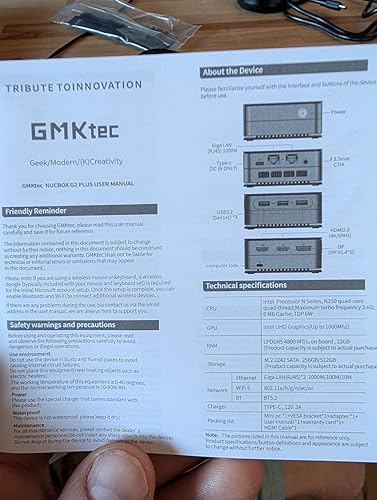
  • RICH INTERFACE - Nucbox G3 Plus mini computer is equipped with USB 3.2, up to 10Gbps/S, HDMI(4K@60Hz)2, 3.5mm Audio Jack. Supports WiFi 5, and Gigabit Ethernet RJ45 1000MbE network connectivity, Bluetooth 5.0. This Mini PC supports multiple device connection and can be used with servers, monitoring equipment, office equipment, displays, projectors, televisions, etc
  • 4K DUAL SCREEN DISPLAY - Mini desktop computer is equipped with upgraded Intel Graphics(max 1000MHz), supports 4K video playback and AV1 decoding, connect the pc with a projector as a home theatre, enjoy a variety of entertainments. Two HDMI 2.0 ports allows you to multi-task efficiently on two 4K@60Hz displays
  • WiFi5 & BT5.0 - Built-in Bluetooth 5.0 enables you to connect multiple wireless devices such as mice, keyboard, monitoring equipment, printer and monitor. High-speed wireless connection technology, reliable and efficient transmission speed, providing a faster internet experience for browsing and streaming. Small pc supports Wake On LAN, PXE Boot, RTC Wake and Auto Power On, ideal to use as a server
  • GMKtec WARRANTY - GMKtec offers a 1-year limited GMKtec's warranty for each mini PC, starting from the date of the purchase. All defects due to design and workmanship are covered. With a professional after sales team always ready to attend to your needs, you can simply relax and enjoy your mini PC

Description

Purpose: GMKtec aims to provide customers with reliable high-quality products, professional after-sales service, and become a leading brand in the Mini PC industry. About: GMKtec is a company established in 2019, focusing on the research, design, and production sales of computer hardware. We have our own R&D & manufacturing team. Our Mini PCs deliver the best powerful performance in an ultra-compact form for everyday computing tasks. Nucbox G3S Nucbox G3 PRO Nucbox G11 Nucbox G10 Nucbox M2 PROS Nucbox M2 PROS Nucbox M6 Ultra

Brand: GMKtec


Operating System: OS


CPU Model: Intel Mobile CPU


CPU Speed: 3.4 GHz


Cache Size: 8 GB


Graphics Card Description: Integrated


Graphics Coprocessor: Intel UHD Graphics 1200MHz


Memory Storage Capacity: 256 GB


Specific Uses For Product: Business, Education, Everyday Use


Personal computer design type: Mini PC


Operating System: OS


Specific Uses For Product: Business, Education, Everyday Use


Personal Computer Design Type: Mini PC


Color: 8GB+256GB Grey


Additional Features: Auto Power On, PXE Boot, RTC Wake Om, Wake On LAN


Hard Disk Description: 256GB SSD


Hardware Interface: 3.5mm Audio, Bluetooth, Ethernet, HDMI, PCI Express 3.0, PCIE x 16, USB 3.2 Gen 2×2


Power Consumption: 15 watts


Specification Met: CE, FCC, UL


Video Output Interface: HDMI


Hard Disk Interface: PCIE x 16


Cooling Method: Cooling Fan


Compatible Devices: Headphone, Keyboard, Monitor, Mouse, Television


Power Plug Type: Type A - 2 pin (North American)


Video Output: HDMI×2


Graphics Description: Integrated


Graphics Coprocessor: Intel UHD Graphics 1200MHz


Graphics Card Ram: 8 GB


Graphics Ram Type: DDR4 SDRAM


Graphics Card Interface: Integrated


Processor Series: Intel Mobile CPU


Processor Speed: 3.4 GHz


Processor Socket: Socket P


Processor Count: 4


CPU Model Speed Maximum: 3.4 GHz


Total Usb Ports: 4


Total Number of HDMI Ports: 2


Number of Component Outputs: 2


Human-Interface Input: Buttons, Keyboard


Keyboard Description: Not included


Keyboard Layout: QWERTY


Brand: GMKtec


Model Number: G3S


Model Name: G3S


Built-In Media: 1 x GMKtec Nucbox G3S Intel Alder Lake N95 Mini PC, 1 x HDMI Cable, 1 x Power Adapter, 1 x User Manual, 1 x VESA Mount with Screws


Processor Brand: Intel


Model Year: 2026


CPU Model Number: Intel N95


Video Processor: Intel


Unit Count: 1 Count


Manufacturer: Shenzhenshi Jimokekejiyouxiangongsi


Cache Memory Installed Size: 8 GB


Memory Storage Capacity: 256 GB


RAM Memory Installed: 8 GB


RAM Memory Technology: DDR4


Ram Memory Maximum Size: 8 GB


Memory Speed: 3200 mt_s


RAM Type: DDR4 SDRAM


Memory Clock Speed: 3200 MHz


Screen Size: 75 inches


Display Resolution Maximum: 3840x2160


Display Type: External


Aspect Ratio: 169


Resolution: 4500 x 3000


Native Resolution: 4096 x 2304


Connectivity Technology: Bluetooth, Ethernet, HDMI, LAN, USB


Wireless Compability: 2.4 GHz Radio Frequency, 5 GHz Radio Frequency, 5.8 GHz Radio Frequency, 802.11ax, Bluetooth


Wireless Technology: Bluetooth, Wi-Fi


Frequently asked questions

If you place your order now, the estimated arrival date for this product is: Sep 2 – Sep 3

Yes, absolutely! You may return this product for a full refund within 30 days of receiving it.

To initiate a return, please visit our Returns Center.

View our full returns policy here.

  • Klarna Financing
  • Affirm Pay in 4
  • Affirm Financing
  • Afterpay Financing
  • Zip Pay in 4
  • Financing through Apple Pay
  • Financing through Google Pay
Leasing options through Acima may also be available during checkout.

Learn more about financing & leasing here.

Top Amazon Reviews


  • Small, powerful and priced right
Color: Black Steel
Basically, I tried to do everything I could to test this unit and see if it stumbled in any way. I have not been able to make it stumble so I am very pleased with this purchase. I love the small size and because of it I may just keep components in several places and just transport the small box as my portable computer. It has plenty of power for the type of work I do, which is normal homeowner type of uses. It has all the ports I could use or anticipate needing. It has a DP Port (Display Port) which is used to string multiple monitors together. I haven’t considered this in the past, but may in the future and it will be nice to have the option with this machine. Some of the USB ports I’m using could be freed up by using Bluetooth components. I would recommend this computer for people looking for an alternative to laptops or towers and the price is right considering what you get. It also appears to me that upgrading to larger RAM and Storage may not be necessary as the cloud appears to be taking over. I upgraded my other mini to larger RAM and a 1 terabit drive. But after using this unit I’m not sure it is necessary. All in all I can’t say anything negative about the unit. I’m very pleased! Keep reading for additional detailed description. This is my second minicomputer from GMKtec. I purchased one about 1 year ago. It worked well but the SSD crashed. The company worked with me, and I was able to replace the SSD, and rebuild the software and it has been working ever since. So, they have been responsive and stand behind their products. I had a need for a second computer so spotted this and decided to give it a chance. The unit came nicely packaged and intact. All the items listed were in the package as advertised. The difference with the minicomputer is that all the peripherals are not included. I have many of the peripherals so it is not an issue for me but be aware that if you don’t you need a monitor (I’m using a small TV I had), a keyboard (I bought a $13 USB one) and a mouse (I already had one). After acquiring the components, you literally just plug the components in and turn it on. The first thing you notice is how fast the screen comes up. Remember when you would turn your computer on then go get some coffee and hope it was up and running? Not so here it is a fast boot up. It went through some introductory screens and askes you some questions. The only one that gave me hesitation was the password one. It turns out this is to log into the computer every time you turn it on. So, make that a simple one to remember. I didn’t but went in to change it later. It comes loaded with Microsoft Windows 11 After that I started downloading software and Apps, all the ones that I use. I had no difficulty or problems with any of them. I connected it wirelessly through my home router with no difficulty. It comes with the latest wifi-6. I’m connected with 2.4 GHz channel and get 55 Mbps download and 33.42 Mbps upload. I know this depends on your systems but shows that there is plenty of speed. The minicomputer unit is 1.5 inches high and 3 3/8 inches square (see picture). Plenty of USB ports and if necessary, you can put a USB expander in one port. I used the headphones jack to listen to some music and connected my Bluetooth ear buds also both worked with a hitch and there is no lag or distortion. The package also comes with an angle support so you can hang it on the back of the monitor. This cleans up the area and make the monitor appear to be an all in one. I loaded Microsoft 365, a mechanical drawing program, iTunes and quicken and used them thinking that they may put the unit to a test for speed and any potential problems. There were none and it performed flawlessly. I have some “sleep” issues with the other unit, but this unit goes to sleep and wakes up with no issues even if left for a long period and with the monitor disconnected. Another improvement I noticed was that they have changed the way they screw the cover on. On my previous unit you had to remove the rubber feet to access the screws, and this will eventually cause problems with them coming off. This newer unit has the screws accessible trough the feet. This is much better for those looking to do any upgrading. ... show more
Reviewed in the United States on October 28, 2023 by Kevin P Stewart

  • Cool little computer!
This is a great little computer. Its about as basic as it gets, but that's what I was in the market for. As I age, I've found I barely even use a computer at home for personal stuff at all any more. I have a work laptop that docks to a couple monitors for work from home stuff. I have an extensive steam game library from the old days, but i just don't really have a place in my life for gaming anymore, and i have a Nintendo switch for what little gaming i do. So, I sold my personal laptop and old gaming PC and replaced it with this... Its attached to the back of one of my work monitors, and runs 24/7 as a plex server and network storage computer. I can switch the monitor over to it if i want to, but i will probably just remote into it from my phone for most quick media and file management tasks. It serves up full 4k over wifi no problem. During setup and configuration, it seemed speedy, and responsive enough, and would probably be just fine for a daily use computer for just about everything. It came with Windows 11 pro pre-installed with no bloatware, and setup was super easy. I'm honestly amazed what you can get for so little money, and in a package not much bigger than a deck of cards. I heavily considered getting a "better" mini PC with better graphics, more RAM, etc... but i tried to be honest with myself on my use case, and this is probably better, as it is so efficient for 24/7 mini-server type use. At some point i may try running some basic 3d modeling software of it, as this is about the most demanding thing i can think of that i may still want to do in my personal life, but bottom line, this is a lot of computer for a little money and no space at all. Pretty cool. Note that i was considering using it with my USB-C laptop dock to switch in and out with my work laptop,and the user manual confirmed that the usb-c port is only for power, and its not a thunderbolt port, so that wouldnt work. If you want USB4/thunderbolt, you may need to upgrade a bit more. ... show more
Reviewed in the United States on December 16, 2025 by Yeti

  • These mini PCs are really amazing for their size.
Color: Black Steel
This is the third GMKtec mini PC I bought. I started with a very basic N150 model. I was amazed how a tiny 3.5 x 3.5 inch box could do everything my older PC could do for less than two hundred bucks. Next I bought a GMKtec Ryzen 7 Pro 6850U mini PC. It turned out that this was much more PC than I needed, so I tried the Ryzen Embedded R2514 mini PC. That’s what I am reviewing now. Firstly I just love the tiny footprint of the PC. At 5 x 5 x 2 inches it takes up almost no desk space. I also like that it has a USB-C port that can be used for video (Thunderbolt). I have a small Acer portable monitor that has USB-C ports. I really like the small size of USB-C cables as compared to HDMI cables. If you’re going minimalist, it looks good. As an FYI, the monitor I have is supposed to be able to get its power from the PC video cable, but in my experience the monitor likes the included power supply much better. I have not had any issues at all from the PC so far, not that I expected any issues, since this is my third GMKtec mini PC. I haven’t noticed the fan spooling up more than a tiny bit, and only for a few seconds. I have a short video of the PC playing two different video clips at the same time. You can see the CPU has no issues at all with that load. In the future I may find additional uses for this PC, but for now its main use is running a Theta Edge Node. This is for staking Theta Fuel tokens (crypto) to your own node. The nodes I have, run 24/7. None of the GMKtec mini PCs have had any issue with this. I really wanted to try GTA5 on here, but because I got locked out of the email I used to verify the Rockstar launcher, I can’t report on how that looks. Bottom line: If you want a PC with a tiny footprint that is also very stable, this would be a good mid level choice. ... show more
Reviewed in the United States on August 25, 2026 by Vegas, Baby

  • Shockingly Effect Mini Server, Intel N150 really is THAT GOOD
I have spent the last few days putting this device through tests working on making sure it can actually do the jobs I got it for. So far, this appears to be a really solid choice for a home server network hub / main box for anything that doesn't require mass storage. I have replaced the internal m.2 card with a Transcend 2TB drive: https://www.amazon.com/dp/B092W8G8C6?th=1 My system is running ProxMox VE as the base operating system, then I deployed Docker and Docker Compose natively on the host system and used handy ProxMox helper scripts to setup and spin up VM and containerized versions of Opnsense, Adguard, and Home Assistant. Via Docker Compose I deployed Traefik, sabnzbd, Audiobookshelf, Lidarr, Navidrome, VaultWarden, Bookstack, Baikal, DocMost, Joplin, prowlarr, and a WebDAV sync server for RetroArch. Using even "just" an SSD style m.2 to host everything, I'm finding the 12GB of RAM version to be just about perfect as a spot to put those services and then I'm using the rest of the bulk storage for a music collection, audiobook collection, and podcast storage. Audiobookshelf runs nice and responsively with this as a host. I ran my unit through like 8 hours of memtest86, no errors at all (woo!). Then I installed the OS as documented above. Then I felt like it would make sense to run some download tests. Sabnzbd++ running in a container on this system ran (I'm pretty sure) faster than it has for me before on this connection. So this system is outperforming a router while also deliverying Opnsense's enterprise class control and firewall. 69.6 GB - downloaded in 15m 37s, average 76.2 MB/s, unpacked in 28m 50s 90.9 GB - downloaded in 22m 37s, average 68.6 MB/s, unpacked in 20m 49s 91.1 GB - downloaded in 18m 39s, average 84.1 MB/s, unpacked directly 15.2 GB - downloaded in 3m 6s, average 83.5 MB/s, direct unpack Obviously, my MUCH bigger and more electrically inefficient AMD AM4 system would unpack these jobs faster, but these are basically the most difficult jobs I could think of for the sabnzbd++ chain, a couple of untouched full size ISOs where the system has to download and handle 10s of GBs at a time. No hiccups or problems encountered, this tiny guy crunched that data out like a champ. Basically, the Intel N150 really is that good! Downsides & Notes: I didn't touch the WiFi / BlueTooth unit on mine at all and can't speak to its usefulness. Also, with only one m.2 2242 slot and the stated max capacity of 2TB means, unless you slap some USB3-based storage on, this guy will be limited by its data storage in terms of workloads it can do. Overall: I was shocked at how tiny and cute this device is, and the BIOS lets you change the LED ring light at the bottom to a bunch of different colors, so it seriously overdelivered for me in terms of asthetics and build quality. It's priced competitively with a good router, but running Opnsense on real hardware with multiple GB of RAM to throw at the problem, you are going to outperform any router that costs the same price this does. Just add a wireless access point and go :) A dual NIC mini PC as gateway and main home services host is going to be my go-to solution going forward, it's great! ... show more
Reviewed in the United States on June 24, 2025 by Suburban Vampire

  • Worked partially for a month. Then failed in 1 1/2 years. See Update.
Color: 8GB+256GB Black
May 2024 I use this mini PC for my home theater use. I have the TVGuardian+ app (search TVG+, not the old set-top box) which does a very good job of taking out all the unnecessary foul language for Netflix, Prime, and several other similar apps (with more coming). The app works through Windows 11 and Chrome browser (only), hence, the need for a mini computer to run it, rather than having a laptop running for TV watching. When using this mini-PC for only this use it starts super fast not being junked up with lots of apps. My wireless USB Logitech trackball plugs into the mini-PC & can just sit on my recliner armrest to do everything after starting up the mini-PC with a Logitech keyboard on my coffee table that only needs to be on for 15 seconds to login. The min-PC easily plugs into my audio amp for 5.1 sound through HDMI, then the audio amp to the TV also through HDMI. I elected to get this model with not only the tiny, faster M.2 form factor, but an NVMe technology rather than the rapidly depreciating SATA in case for some reason TVG+ didn't work out I could use it with a big monitor in the office as a second computer. Well, after 9 months we really love TVG+ and the ability to watch many more shows now that the needlessly tedious foul language is muted and the closed captioning is replaced with nicer words. It has found its home on the TV component shelf. So far, 5 stars. UPDATE: June 2024 I started getting strange behavior: Whenever I moved my trackball to get around on Chrome or any programming app like Netflix, Prime, etc. the TV screen would go black for 1-2 seconds, then reappear. I thought it was a problem with TVG+ (TV Guardian+) and just put up with it. Update late Jan 2026 One of the two HDMI sockets on the GMKtec mini PC failed in strange ways causing Netflix to only partially connect - meaning I got only Netflix's top menu bar and an otherwise black screen. Thinking it must be something other than the GMKtec I began elimination diagnosis. Netflix worked fine on my laptop with HDMI out to my audio amp then to TV. So, I unplugged everything and switched to the other HDMI socket on the GMKtec. Everything went back to normal... with no 1-2 second black screen on every trackball movement... almost, that is. In order to get Netflix to work properly I could no longer just put the GMKtec to sleep like I had been doing since May of 2024 (with complete shutdowns about once a week). I have to now do a full Windows shutdown each time to get it to work. So, clearly something is wrong with the GMKtec and has been all along since June of 2024 when the momentary black screens began to appear. I contacted GMKtec to get their take on it and if they'd be willing to replace the unit since something was wrong with it a month after putting it into service. Nope! It's out of warranty. Never-mind it really began failing only a month into service, So, boo on GMKtecs warranty. AND, BTW, even during the warranty period you would have to ship it back to the manufacturer in guess where? Yep, China. So GMKtec is off my list of reputable, or competent manufacturers. Who would expect to have to replace a PC every year and a half? I went from 5 to 2 stars for unreliability, and then 2 to 1 star for bad repair or replacement policy for having to ship it back to China. Boooooo again. STAY AWAY. ... show more
Reviewed in the United States on January 5, 2025 by Amazon Customer

  • Even decent for lite gaming
Color: 8GB+256GB Black
I'm honestly quite shocked at the value this thing has packed into it. I originally wanted to just convert this into a Linux-only machine and set up emulation there but I quickly found that there were some issues with display and processing. What I thought was going to be a fairly light load, turned out to be more than it could handle. It was not even running a sega Genesis game well. I also found that there's something with the display/graphics that I couldn't even get dual screens to work in Ubuntu Linux. Nor could I send audio out via HDMI. GMKTec had a build of Ubuntu but when I tried to install it, the computer did not seem to like it. I never was able to get their build of Ubuntu working. I feel like their build could have solved some of the Linux issues. I don't think it was inherently that the machine couldn't handle the graphics processing. So after wiping the machine a few times through trial and error I was able to get both Linux and Windows installed and either selectable during the boot menu. Having reinstalled Windows again I needed to download the drivers from GMKTec's website and run the install script. This was necessarily to ensure that the graphics and sound worked properly. This time attempting to run emulation (on windows) I was been pleasantly surprised. This machine, currently being under $200, has been able to handle a wide variety of retro gaming from original NES to Wii U. The Wii and Wii U emulation has some stuttering during assets loading or busy environments, but when the games are running things are generally smooth and appropriately 30 or 60 fps. Switching to Steam, I was able to run Ori and the will of the wisps, but only after turning down the graphic settings to Low. Running normal day to day web browsing works fine and it has a great amount of storage 1TB. This is a perfect day to day machine for probably 70-80% of users. This is also a perfect solution for travel or hooking up to a TV where the small form factor is preferred over a big tower or laptop. I think for more serious PC gamers this is not going to be enough processing power to run any powerful modern games. For the price, this is also a perfect machine to try out configurations that might break your normal computer, like trying to install multiple OS's and accidentally wiping the machine. For me this is going to be a perfect machine for learning different technologies on where I don't want to clutter my main machine. What's crazy is that a machine like this would have been completely sufficient to do all of my college homework on, though I think a laptop is better for that job (especially taking notes). PC's have come extremely far since the late 90s and early 00s. From that perspective it is mind blowing what this thing can do. From the perspective of today, this is adequate to handle almost any task, but intensive gaming, number crunching, video editing, or 3d rendering this is probably going to fall short. That being said the price to value ratio is still extremely high. ... show more
Reviewed in the United States on February 6, 2025 by Patrick W

  • Very affordable and capable mini PC, highly recommended!
Color: Black Steel
After purchasing 4 GMKtec Nucboxes (3 of which are G2's), I figured it was time to write a review. For reference, I'm the Director of IT at a local school, so I'm pretty well versed in computers and technology. I have a mesh wifi network at home and up until recently, we'd been using HP ProBook laptops to stream content off the internet onto various large format TVs in the house. We also use the network to backup the large quantity of multimedia (movies, tv shows, anime, etc..) on 8 TB hard drives connected to the computers. We mirror the content using a backup tool. The laptops all had 2.5 GHz i5 processors and 8-16GB of RAM and 802.11g network adapters. Since the release of Windows 11 and the announced EOL (end of life) date of Windows 10, I've been looking for replacement computers. I'd read about Nucboxes in the trades and based on the reviews I saw decided to give the GMKtec G2 a shot. Boy was I surprised. I backup several gigabytes of data daily and with the old computers, this could take an hour or so. With the new computers, running WIFI 6, the backups were literally taking just minutes. To be honest, my home mesh is only WIFI 5 capable, but that is a substantial improvement over the WIFI 3 (802.11g) I had been using. To optimize network transmission speeds, I should upgrade my mesh, but to be honest, I'm so thrilled with the speeds I'm getting, I'm more than satisfied. So as media streaming devices, these are more than fine, but what about a desktop replacement? I set one up for my wife and she couldn't be happier. The N100 processor outperforms her old laptop and coupled with the DDR5 RAM and SSD, it more than fills her needs. We also love the 3 independent displays (2 HDMI and 1 DP) and we've even seen a noticeable drop in our utility bill. Our TV connected computers are typically on 24/7. Because of the fast bootup speeds of these devices, we considered shutting them down when not in use, but because of the low power consumption, we've decided to just leave them on. I've seen some reviews saying that these are okay for some entry level gaming, but that's not really my area of expertise. I will say that as a desktop replacement for office use, these are awesome. I mentioned that I manage IT at a school, right? Well I've been so impressed by these that we're in the process of upgrading our teacher workstation to GMKtec G2's. I also love that these come with Windows 11 Pro, installed. BTW, if you are looking at buying a Raspberry Pi 5 starter kit, I'd reconsider. These are cheaper and more capable. Of course, first verify that whatever you are trying to do is supported in the Windows environment. ProTip: When mounted in the VESA mounting screws behind a monitor, it's a bit of a pain to reach behind the screen to turn the device on. My solution? In the BIOS, you can configure the G2 to turn on when power is detected. If you do this, you can use something like a smart switch to power the box and turn it on with a voice command. ... show more
Reviewed in the United States on December 4, 2024 by Mkduffer

  • GMKtec Mini Monster
Color: Black Steel
This small PC packs a punch! 4K video output looks spectacular. Supports up to 3 monitors. Easy to set up and put just about anywhere. High speed USB front panel ports easy to access. Highly recommended for those who need a power pc without taking up space.
Reviewed in the United States on August 21, 2026 by Thomas J. Pascente

Can't find a product?

Find it on Amazon first, then paste the link below.
Checking for best price...