Search  for anything...

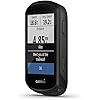
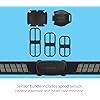
Garmin Edge 530 Sensor Bundle, Performance GPS Cycling/Bike Computer with Mapping, Dynamic Performance Monitoring and Popularity Routing, Includes Speed and Cadence Sensor and HR Monitor

  • Based on 2,823 reviews
Condition: New
Checking for the best price...
$399.99 Why this price?

Buy Now, Pay Later


As low as / mo
  • – Up to 36-month term if approved
  • – No impact on credit to apply
  • – Instant approval decision
  • – Secure and straightforward checkout

Ready to go? Add this product to your cart and select a plan during checkout.

Payment plans are offered through our trusted finance partners Klarna, Affirm, Afterpay, Apple Pay, and PayTomorrow. No-credit-needed leasing options through Acima may also be available at checkout.

Learn more about financing & leasing here.

Selected Option

Free shipping on this product

This item is eligible for return within 30 days of receipt

To qualify for a full refund, items must be returned in their original, unused condition. If an item is returned in a used, damaged, or materially different state, you may be granted a partial refund.

To initiate a return, please visit our Returns Center.

View our full returns policy here.


Availability: Only 3 left in stock, order soon!
Fulfilled by Amazon

Arrives Monday, May 4
Order within 4 hours and 47 minutes
Available payment plans shown during checkout

Protection Plan Protect Your Purchase
Checking for protection plans...

Style: Sensor Bundle


Pattern Name: GPS Bike Computer


Features

  • Performance GPS cycling computer with mapping and touchscreen
  • Dynamic performance monitoring provides insights on your VO2 max, recovery, training balance, heat and altitude acclimation, nutrition, hydration and more when paired with compatible sensors
  • Cycling safety features include new bike alarm, group messaging and tracking, assistance and compatibility with Varian rearview radar and lights so you can see and be seen (when device is paired with your compatible smartphone)
  • Includes routable Garmin Cycle Map with popularity routing which helps you ride like a local plus off-course recalculation and back to start; mountain biking model has integrated Trail forks data, including trail difficulty ratings
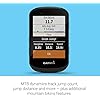
  • Customize with free apps, widgets and data fields from the Connect IQ Store.MTB dynamics track jump count, jump distance and hang time as well as Grit, a measure of the ride's difficulty, and Flow, which tracks the smoothness of your descent so you have a score to beat next time.Battery life: up to 20 hours with GPS; works with Garmin Charge power pack for up to 40 hours of additional battery life

Description

Who cares that the Edge 530 cycling computer offers dynamic performance monitoring and insights to help you improve? You do. So, whether you’re a podium finisher, Kona qualifier, gravel grinder, straight-shaven, urban pedaled, dirt ball or somewhere in between, Edge 530 is ready to roll as your new riding partner.


Product Dimensions: 3.2 x 0.8 x 1.9 inches


Item Weight: 2.72 ounces


Domestic Shipping: Item can be shipped within U.S.


Item model number: 010-02060-10


Batteries: 1 Lithium Polymer batteries required. (included)


Wireless communication technologies: Bluetooth, Wi-Fi


Connectivity technologies: Bluetooth, ANT+, Wi-Fi


Special features: Bluetooth


Display resolution: 246 x 322


Other display features: Wireless


Human Interface Input: Touchscreen


Colour: Black


Whats in the box: Edge 530; Standard mount; Flush out-front mount; Tether; Speed sensor; Cadence Sensor; Heart rate monitor; USB cable; Documentation


Department: unisex-adult


Manufacturer: Garmin


Country of Origin: Taiwan


Date First Available: April 24, 2019


Frequently asked questions

If you place your order now, the estimated arrival date for this product is: Monday, May 4

Yes, absolutely! You may return this product for a full refund within 30 days of receiving it.

To initiate a return, please visit our Returns Center.

View our full returns policy here.

  • Klarna Financing
  • Affirm Pay in 4
  • Affirm Financing
  • Afterpay Financing
  • PayTomorrow Financing
  • Financing through Apple Pay
Leasing options through Acima may also be available during checkout.

Learn more about financing & leasing here.

Top Amazon Reviews


  • Complete Review: The Good, The Bad, & The Bugs
Style: Sensor Bundle Pattern Name: GPS Bike Computer
The Good: bright display & good auto brightness good app & sensors syncing good sensors & accessories good Trailforks voice navigation incident detection & live tracking great battery management & auto pausing The Bad: small display, no protector mediocre GPS signal no location marker button hard to view track map & no map color coding 3 bugs: sensors updating, manual activity pausing, starting live tracking annoying, time consuming datafield reordering & letter selection The Garmin Edge 530 is the first biking computer I’ve ever used, which I bought with the heart, speed, and cadence sensors for $400. That’s a lot since you can get a premium phone for that price. After trying it out for 2 weeks over several courses, I decided to keep it although it deserves only 3 stars. I’ll cover the pros & cons in detail so you can make your own decision. UPDATE: It's disappointing that Garmin commented on my review with a lame excuse for the device's problems. Obviously, I checked to make sure I had the latest software version (as verified by the device & app). The display is amazingly bright and legible; the auto brightness works well adapting to your environment. The Android app and sensors sync with the Edge device seamlessly. A bonus is that if you buy the Edge with the 3 sensors, the sensors come pre-synced; that saves a lot of time! The Android app manages battery usage well and has many useful features. The 3 sensors work well; they all auto stop and start as soon as you use them. After attaching the sensors, wear the heart sensor to auto sync, turn the crank 9 times to auto sync, and roll your bike in 2 small circles to auto sync. The Edge comes with 2 stem mounts and a handlebar mount that can fit different parts’ sizes. The rubber bands for the speed and cadence sensors look thin; hopefully they’re durable or there goes $60! The band for the heart rate monitor looks thick, but it’s actually comfortable to wear and has a quick release loop on the side. I bought the Edge for the Trailforks integration, which does voice navigation well via the phone app, but NEEDS cellular signal. However, I noticed if I’m traveling fast (ie: > 20 mph), it sometimes misses a voice prompt. This can be either due to poor GPS signal and/or the computer not checking your position often enough. The incident detection is very useful; so far I haven’t had any false positives and it activated when I had a small fall. The live tracking is awesome! Your friends and family can live track you as you ride, and see your course and stats. The group tracking is similar: you can track people in your group and they can track you. I ride with only 1 friend so I don’t use that feature; you probably don’t need it unless you ride with 4+ people. Best of all, the Edge has great battery management even with always-on, auto brightness. It does auto pause well whenever you’re stopped so definitely enable it. I ride for 3 hours moving time, 6 hours total (I rest a lot), and it used only 40% of the battery! Some people complained they can’t use it for century rides (100 miles), but I think it’s possible as long as you don’t double the usage time above. THE BUGS: Now for the Edge’s negatives. The 2.6” inch display is small and no screen protector is provided! You can cram in 10 data fields or 5 graph fields, but those fields are going to be small. For $300, they really should have given a 3.2” inch screen. Else Garmin should have provided a stronger antenna and a GPS receiver augmented with WAAS or EGNOS to improve location accuracy instead of using a standard one. The Edge GPS receiver is just ok; it loses signal sometimes in urban areas or dense forests. A location marker button is sorely needed; marking a location using the menu is troublesome & convoluted. The course map is hard to view; you can’t select the track’s line color and the line is not bold so it’s hard to differentiate the track from the roads. If you bike on or near roads, you need more time than just a glance to view the track. The course map should color code the lines to correspond to elevation, speed, cadence, and heart rate. The phone app does this when you’re comparing different graphs for those stats, which is very useful. The Edge has 3 bugs: after you have your sensors connected and try to check for updates, the device just hangs even though it shows the sensors, Wifi, and Bluetooth are connected. You can quit the update check, but your sensors will never be updated. Another bug is manually pausing the activity recording by pressing the bottom right button. The activity does pause, but you will lose connections to your sensors and their data if you do not restart the activity within a minute. The 3rd bug occurs when you start live tracking without a mobile signal and you cannot share your course, but the app does not retry to send the tracking emails when you get service. Worst of all is reordering the datafields in a screen layout when doing the setup. If you want to move a datafield to a different position, you cannot simply move it - you must change that field and ALL subsequent fields! When you’re doing the setup, you will see how annoying and time consuming it is! There are probably over 100+ datafields, but Garmin has a popular category so you can get setup quickly. Garmin has only 1 layout pre-populated with the popular stats; they should have several to choose from. Equally annoying is when you’re searching for a course, you need to scroll through the alphabet to select each character, which is very time consuming! Garmin should have word matching so you can choose the words quickly as you’re selecting the letters. Also Strava Segments, which are not really needed since other apps have better trails, require a paid monthly Summit account. If you do buy a Garmin device, I recommend the Edge 530. The Edge 830 & 1030 devices will have the same pros & cons, but both cost more and have touchscreens that are problematic as reported by many users. Having to use buttons sounds archaic, but it’s actually easy and relatively fast. The Edge 530 uses a lithium battery for better longevity and it is water resistant to rain/ splashes. If Garmin fixes the 3 last negative issues and not give poor excuses, then this device deserves 4 stars. ... show more
Reviewed in the United States on September 1, 2019 by tech_enthusiast

  • Great product
Style: Mountain Bike Bundle Pattern Name: GPS Bike Computer
Bought this for a friend. I have the same computer with the build in trailforks maps. It comes with everything you need.
Reviewed in the United States on January 30, 2023 by Jrs

  • Check your version ASAP!!!
Style: Device Only Pattern Name: GPS Bike Computer
My original review, unedited is below and expresses my level of frustration at the device and finding it was the wrong region for me. I recommend upon first receiving the device, hook it up to a laptop or PC, connect to Garmin to update your maps. If you have the wrong region, send it back immediately! NOW, once you have the correct region device, this little guy is a GEM -- with a couple caveats. It's a little hard to press the button on the right without inadvertently pressing the button on the opposite side AND I haven't figured out how to make the screen mostly map, but have a couple of basic metrics on the screen at the same time. But the alerts are very helpful, and the navigation is pretty solid. Purchased through Amazon. After a month of using it and finding some frustration with having NO MAPS on the device I contacted Garmin support. They checked my serial number and informed me it was the EU version of the device so there was nothing they could do. Of course I’m leaving negative seller review as well, but I still have the box and there is nothing on the packaging to indicate that this is any kind of variant. Also, it seems to me the only difference should be software, so there ought to be a way to update that software. ... show more
Reviewed in the United States on August 22, 2022 by Darren Lathen

  • Great Bike Computer
Style: Device Only Pattern Name: GPS Bike Computer
Great bike computer that has some awesome capabilities and features. I mainly mountain bike so those are the features I use often. The jump tracking is surprisingly very good and neat to see your stats and attempt to beat them. This is the same with the flow and grit statistics that offer a cool analysis to compete with. It shows nearby routes for mountain biking trails which is awesome especially if going to a new trail you can try a route to stay on course and not get lost. GPS is superb for tracking even in the woods. With that, battery was not affected too much, ~45 min ride in the woods in 26 degree weather with GPS + GLONASS enabled (most battery consumption) lost 4% battery. The Garmin connect app is very good, I've had zero issues and really like what it has to offer and the user interface along with viewing my activities. It is on par with strava and almost makes me want to buy a garmin smartwatch honestly. Having no touchscreen may be a plus for me actually, I use gloves often so a touchscreen would be painful. Also, the buttons work well and are easy to get use to after playing around with the device here and there. I have more features to try out but so far this is a awesome bike computer and I have no things that bother me about it at all so far. I've seen reviews saying it's too complicated and took long to setup. The app walks you through setup that takes 5 minutes and if you want to customize all your screens/profiles that display while riding that will take a bit longer but that is not setup. This is a electronic device that offers some great features and yes using some of these features requires technical prowess. But what electronic device doesn't, phones, tablets, laptops, computers etc do. There will be a learning curve as there is with many things in life. For me I am highly technologically skilled in consumer and some business electronics(IT professional) this device is relatively easy to use for me. For others it may be similar to buying a phone from another manufacturer or a new model with a new operating system. The point is it will take a bit of time to get use to like most things. If it's too complicated I suggest another bike computer that has much less features such as it only tracks speed/distance/time/clock. But if you want to up your cycling skills this will help with its advanced data and analysis along with some features to smile about. ... show more
Reviewed in the United States on November 27, 2021 by Jared Mancha

Can't find a product?

Find it on Amazon first, then paste the link below.
Checking for best price...