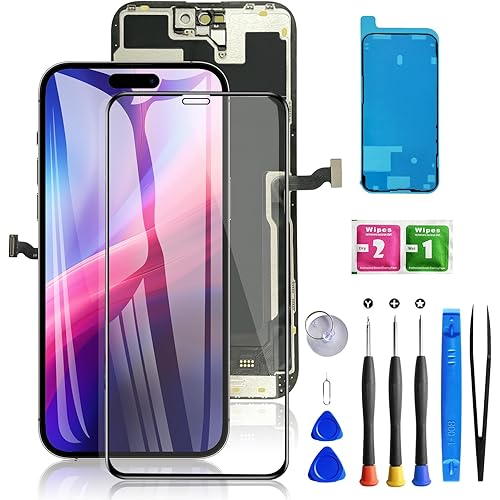
for iPhone X Screen Replacement Kit, 5.8" LCD Display 625 nits (typ) 3D Touch Digitizer Assembly with Frame Adhesive and Repair Tools (Model A1865/A1901/A1902/A1903)





Buy Now, Pay Later
- – 4-month term
- – No impact on credit to apply
- – Instant approval decision
- – Secure and straightforward checkout
Ready to go? Add this product to your cart and select a plan during checkout.
Payment plans are offered through our trusted finance partners Klarna, Affirm, Afterpay, Zip, Apple Pay, and Google Pay. No-credit-needed leasing options through Acima may also be available at checkout.
Learn more about financing & leasing here.
Selected Option
FREE 30-day refund/replacement
To qualify for a full refund, items must be returned in their original, unused condition. If an item is returned in a used, damaged, or materially different state, you may be granted a partial refund.
To initiate a return, please visit our Returns Center.
View our full returns policy here.


Size: 5.8" for iPhone X
Features
- [Compatibility] Only fits 5.8" iPhone X ( A1865/A1901/A1902/A1903) NOT for XR/XS or others. Verify your model in Settings > General > About before purchase.
- [Original-Level Display & Full Functionality] High resolution, high brightness and responsive touch. Supports Face ID just like the original factory screen. Fixes cracked glass, dead pixels, color distortion and laggy touch.
- [Beginner-Friendly Install] Search iphone x screen replacement on YouTube and follow step-by-step videos. Transfer the original ear speaker/sensor assembly to the new screen to ensure proper functionality.
- [All Essential Tools Included] LCD assembly, waterproof adhesive, tweezers, pry tools, suction cup, SIM ejector, opening sheets, aluminum handle & precision screwdriver bits. Tip: Gently heat the screen edges with a hair dryer for easier removal. Do not overheat to avoid damage.
- [Reliable Quality & 24/7 Support] Each screen is double tested with no dead pixels or dust. Fast-response support is available anytime during installation.
Description
1. Basic Step Follow iFixit tutorials for screen replacement (steps + safety tips). 2. Pre-Installation Must-Do Test the new screen by connecting it to the motherboard first to ensure it works. 3. Safety Warnings 1. Disconnect battery/power before removing the old screen (prevents motherboard short circuit). 2. Use correct screw sizes (wrong screws damage the screen). 3. Carefully transfer earpiece, ambient light sensor and proximity sensor from the old screen. 4. Troubleshooting If issues occur (no power, touch failure, flickering, lines): 1. Disconnect and reconnect the screen and battery. 2. Force restart: Volume Up → Volume Down → Hold Side button (10–15 sec) until Apple logo appears. 3. If problems persist, apply for free replacement. FAQ Q: Is it difficult to install? Can I replace it as a beginner? A: The package includes all professional installation tools. You can download the guide on the product page. Beginners can finish installation in 30–60 minutes by following the steps. Q: Is this screen fully compatible with my iPhone? A: It only supports the listed models. Please check your model in Settings > General > About before ordering. Q: Is it original quality? How about the display and touch? A: The screen has resolution, color and brightness close to the original. It supports True Tone and responds to touch smoothly without delay. Q: Will there be gaps, poor fit or Face ID failure after installation? A: Every screen is strictly tested for perfect fit. Install correctly, connect cables well and tighten screws, then Face ID works normally with no fitting issues. Q: What if installation fails or the screen is defective? A: If the screen is faulty or parts are missing, you can apply for a free replacement in your order. Give your phone a fresh new look!
Product Dimensions: 5.35 x 2.27 x 0.21 inches
Item Weight: 5.6 ounces
Item model number: LCDTA
Other display features: Wireless
Color: black
Whats in the box: New LCD Screen, Repair Tools Kit, Waterproof Frame Adhesive
Manufacturer: HK
Date First Available: January 6, 2025
Frequently asked questions
To initiate a return, please visit our Returns Center.
View our full returns policy here.
- Klarna Financing
- Affirm Pay in 4
- Affirm Financing
- Afterpay Financing
- Zip Pay in 4
- Financing through Apple Pay
- Financing through Google Pay
Learn more about financing & leasing here.