Search  for anything...

Falcon2 Pro S 40W Enclosed Laser Engraver with Air Assist, Built-in Camera, Class 1 Laser Cutter and Engraver Machine for Wood, Metal, Batch Prodcuction, Engraving Area 355 * 390mm

  • Based on 5 reviews
Condition: New
Checking for the best price...
$1,349.00 Why this price?
Save $3,150.00 was $4,499.00

Buy Now, Pay Later


As low as / mo
  • – Up to 36-month term if approved
  • – No impact on credit to apply
  • – Instant approval decision
  • – Secure and straightforward checkout

Ready to go? Add this product to your cart and select a plan during checkout.

Payment plans are offered through our trusted finance partners Klarna, Affirm, Afterpay, Zip, Apple Pay, and Google Pay. No-credit-needed leasing options through Acima may also be available at checkout.

Learn more about financing & leasing here.

Selected Option

Free shipping on this product

30-day refund / replacement

To qualify for a full refund, items must be returned in their original, unused condition. If an item is returned in a used, damaged, or materially different state, you may be granted a partial refund.

To initiate a return, please visit our Returns Center.

View our full returns policy here.


Availability: Only 3 left in stock, order soon!
Fulfilled by Amazon

Arrives Saturday, Jul 25
Order within 8 hours and 26 minutes
Available payment plans shown during checkout

Protection Plan Protect Your Purchase
Checking for protection plans...

Color: Falcon2 Pro S 40W


Features

  • Precise Smart CuttingFalcon 2 Pro Ss smart system automatically adjusts cutting paths for clean, accurate edges with minimal material waste, ensuring every project is efficient and professional.
  • Smart Auto FocusSmart Auto Focus: One-click auto-focus instantly adjusts to the optimal height for any material, ensuring sharp, precise results without manual effortideal for smooth, efficient engraving every time.
  • Exceptional Cutting PowerThe Falcon2 Pro S 40W laser engraver boasts a powerful 40W laser module capable of cutting through 20mm basswood, 30mm black acrylic, and even thin metal sheets up to 0.15mm stainless steel sheet, ensuring high efficiency and precision for various materials.
  • Falcon Design SpaceFalcon Design Space is easy to use, free, and powerful, and the Falcon2 Pro S also can be used with popular engraving software such as LaserGRBL and LightBurn. It supports Windows and Mac OS systems.
  • FDA SafetyWith a 360 visual enclosed design, the Falcon2 Pro S laser engraving machine not only giving you a clean and quiet working environment, but also allowing you observe the processing from any angle and protact your eyes from laser radiation. The Laser Class 1, Laser Output Level: 40000mW

Description

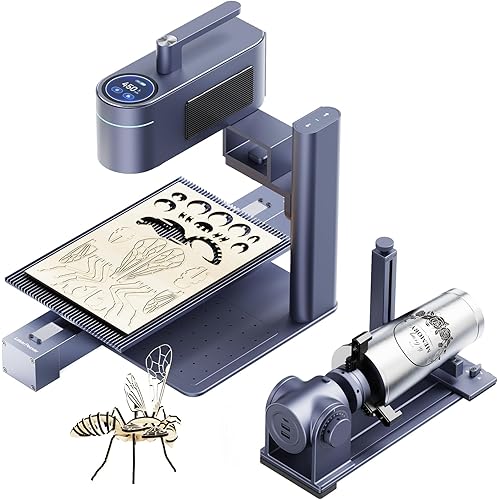
Visit the Store Visit the Store Visit the Store Visit the Store Creality Falcon A1 10W Falcon 5W with Honeycomb CR-Laser Falcon 10W A1 10W Laser Engraver Creality Falcon A1 10W Laser Engraver, 80W Enclosed Cutter with Air Assist. Ideal for Beginner-5W Creality Falcon 5W Laser Engraver Machine with Honeycomb Laser Bed 500x500 10W-Air Assist&Rotary Roller Creality Falcon 10w Laser Engraver with Air Assist Ready to Use, Craft Easier Falcon A1 10W pre-sets settings, Falcon Design Space streamlines creation. Ready to Use Out of the Box No assembly required, ready to use out of the box 4 in-1 Laser Rotary Roller The Rotary Kit Pro-Adjustable jaws fit various shapes. Experience the power of our laser engraver, capable of creating vivid, colorful engravings on metal surfaces. Effortlessly enhance engraving precision with the built-in camera, which enables accurate positioning, real-time monitoring, and seamless adjustments, ensuring optimal results for every project. Enhance engraving precision and cut quality with the air assist feature, which clears smoke and debris from the laser path, reduces burn marks, and allows for cleaner, more accurate engravings on various materials. The laser engraver delivers precise and clean cuts on wood, showcasing its ability to handle intricate designs with smooth, crisp edges. This capability makes it ideal for both detailed craftsmanship and large-scale projects. Stainless steel is cut with high precision, producing smooth, clean edges with no burrs. The advanced laser technology ensures accuracy and efficiency, making it suitable for complex metalworking tasks and intricate designs. Achieves smooth, polished edges and high clarity when cutting acrylic sheets, minimizing burn marks and delivering excellent results for both decorative and functional purposes.

Product Dimensions: 25.39 x 11.22 x 30.31 inches


Item model number: Creality Falcon2 Pro 40W


Item Weight: 60.9 pounds


Manufacturer: CREALITY FALCON


Date First Available: June 5, 2025


Frequently asked questions

If you place your order now, the estimated arrival date for this product is: Saturday, Jul 25

Yes, absolutely! You may return this product for a full refund within 30 days of receiving it.

To initiate a return, please visit our Returns Center.

View our full returns policy here.

  • Klarna Financing
  • Affirm Pay in 4
  • Affirm Financing
  • Afterpay Financing
  • Zip Pay in 4
  • Financing through Apple Pay
  • Financing through Google Pay
Leasing options through Acima may also be available during checkout.

Learn more about financing & leasing here.

Top Amazon Reviews


  • It is well worth the money especially if you’re just starting out.
Color: Creality Falcon A1 10W
Being new to laser engraving, this machine is amazing. It’s all self-contained. It does have an exhaust and it’s really easy to set up. I’ve been using the software that comes with it and it works really well, let your imagination run wild. Do not hesitate to purchase this item
Reviewed in the United States on June 13, 2026 by Justin

  • Solid, Pre-Assembled Engraver That’s Great for Beginners
Color: Creality Falcon A1 10W
Solid Build and Easy to Use — Love That It Comes Fully Assembled The Creality Falcon A1 came completely assembled right out of the box, which was a big plus. Setup was quick and easy — we were able to start engraving within minutes. The build quality feels sturdy and well-made, with a solid metal frame and smooth operation that gives it a professional feel. It’s also fairly easy to use once you get the hang of the software, and it’s much more beginner-friendly than some other engravers. You can tell some thought went into the design and layout. Overall, a great machine in terms of build and ease of use. Having it arrive pre-assembled really makes a difference, and it feels like a high-quality product that’s built to last. ... show more
Reviewed in the United States on November 10, 2025 by Brandon Emery-Martin

  • Perfect! Perfect!
Color: Creality Falcon A1 10W
Great engraver! I originally bought it to make acrylic flight sim panels but have found myself engraving cups, metal zyn tins and much more! Ready to use right out of the box with no setup. Plug and play. Works great and the Falcon software is very easy to learn. Fits perfectly on my desk and not too big. Laser works fast and is plenty powerful enough for my needs. Great value! ... show more
Reviewed in the United States on January 18, 2026 Reviewed in the United States on January 18, 2026 by Seth Lee

  • Good start, very little helpful information
Color: Creality Falcon A1 10W
New to laser engraving, and had been watching and reading a lot of posts about engraving. This went on sale, so I grabbed it. The good: - Easy to setup if you've watched some video's beforehand and have an idea of what you're doing. - Software is easy to use and get engraving quickly, well for basic engravings. - There appears to be loads of free templates/projects you can download and use. The Creality website has many, once you figure out how to register, and you can download right from the burning software. Some notes: - This only comes with one sheet of wood and that's used during setup. Have supplies on hand , or just keep burning over what you've already done and learn how things work. I did go out to a local shop and grab some wood shapes, a small packet of painting canvas boards and even a square of felt to play with. All did very well! - If you're going to work on metal, it's going to take awhile to learn the settings and many burn repeats (like 10 for each item). REMEMBER TO START WITH LOW POWER AND FASTER BURN AND ADJUST AS NEEDED! (you'll learn that 😉) - If you're going to burn photo's (B&W) on wood, it's going to take 'hours' for a 5"x6" (ish) photo. If you started low power and fast, you'll probably reburn once or twice over your project. - DO NOT MOVE YOUR ITEM UNTIL IT'S THE WAY YOU WANT. You can keep burning over to make lines darker/deeper, but once you've moved your item, good luck getting it back to exactly where it was. The bad (or 'needs improvement'): - The thick instruction manual is multiple languages, there's only like 25ish pages in English and they aren't really helpful. - The manual also points out several areas which need 'regular maintenance' but doesn't say anything about how to do it. I haven't found what really needs to be done for some items such as the laser unit. - Nowhere does it tell you how to get the software to run on your computer to allow burning. Hint, go to the Creality Wiki page, select 'Falcon A1', 'Software Operation Tutorial', and 'Craftseek - Free Laser CNC Files, Graphic Designs, Craft Maker Hub'. From there you can download the Falcon Design Space, install it and get fully setup. - This item doesn't include a 'honeycomb', to protect your base. You'll engrave random lines on the base without it, trust me 😒. If you don't have a honeycomb, use the board they included as a base for your projects. - I wasn't really able to find how high project items can be, but it's somewhere around 1/4" tall or less max by default. You can remove the bottom plate with 4 VERY SMALL screws (another gripe, couldn't they be bigger so you can grab them?) and raise the whole device. They sell legs for this, or use something that holds the device higher. - They are proud of the camera, however it's 'still image' only (at least as far as I've been able to find). You have to click a button and it takes a photo. Not very practical to use for project alignment, move, snap, move, snap... Overall, it's cheap enough to allow you to get into laser engraving and play around. If you're going to get serious into engraving, you'll probably want to upgrade at some point. ... show more
Reviewed in the United States on July 14, 2025 by Mike

  • Falcon A1 20w
Color: Creality Falcon A1 20W&Assist
I bought this laser about a week ago after a disastrous experience with a much cheaper named brand laser. This laser came fully assembled except for a few small things(which was a blessing).It took about 20 min to get it fully set up and ready to go. I ran the pre set up things to adjust the focus, a quick sample engraving and it was smooth as butter. I had one or two questions and customer service got back to me within 12 hours and helped me quickly. So far, everything is working perfectly. I'll update this after I've engraved and cut several more projects. ... show more
Reviewed in the United States on February 27, 2026 by Rob

  • NO CUSTOMER SERVICE AFTER 3 WEEKS THAT RESULTED INTO REPAIRING OR REPLACING THE MACHINE
Color: Creality Falcon A1 10W
I purchased this machine in January of 2026 and 4 months later it stopped working. I contacted customer service and all they wanted me to do is check this and check that. Please send video. please send video proving that the cables weren't bumped when closing the lid. this has gone on over 3 weeks and all i have is a machine that doesn't work. Please beware of this company. ... show more
Reviewed in the United States on June 8, 2026 by DAVE HEINTZELMAN

  • Very good laser engraver
Color: Creality Falcon A1 10W-White
Very well constructed, easy to setup and use, it came completely assembled, so far it is working great.
Reviewed in the United States on March 2, 2026 by Amazon Customer

  • Problems with machine
Color: Creality Falcon A1 10W
It’s an ok starter machine if it didn’t have issues. I do have problems. Wire on top is in a position that leads me to believe it will eventually break. I have to dismantle the laser often because this wire keeps getting into a bind. I also have to calibrate the machine everytime I use it. Time consuming to get started every time use it. I would have returned but thought problems were from me being new to the machine and thought it was just learning process. So wrong! ... show more
Reviewed in the United States on March 8, 2026 by Sherry Sexton

Can't find a product?

Find it on Amazon first, then paste the link below.
Checking for best price...