





$109.95
Buy Now, Pay Later
As low as
$18.33
/ mo
Learn more
- – 6-month term
- – No impact on credit to apply
- – Instant approval decision
- – Secure and straightforward checkout
Ready to go? Add this product to your cart and select a plan during checkout.
Payment plans are offered through our trusted finance partners Klarna, Affirm, Afterpay, Zip, Apple Pay, and Google Pay. No-credit-needed leasing options through Acima may also be available at checkout.
Learn more about financing & leasing here.
Free shipping on this product
30-day returns
Learn more
30-day refund/replacement
To qualify for a full refund, items must be returned in their original, unused condition. If an item is returned in a used, damaged, or materially different state, you may be granted a partial refund.
To initiate a return, please visit our Returns Center.
View our full returns policy here.
Availability:
In Stock.
Arrives
Wednesday, Nov 11
At a glance
- Condition
- New
- Dimensions
- 2.5 x 6.75 x 7.25 in
- Weight
- 11.84 oz
- Color
- Black
- Controller Type
- Gamepad
- Additional Features
- Wireless
- Hardware Platform
- PlayStation 4
- Works with
- Playstation 4
Features 4
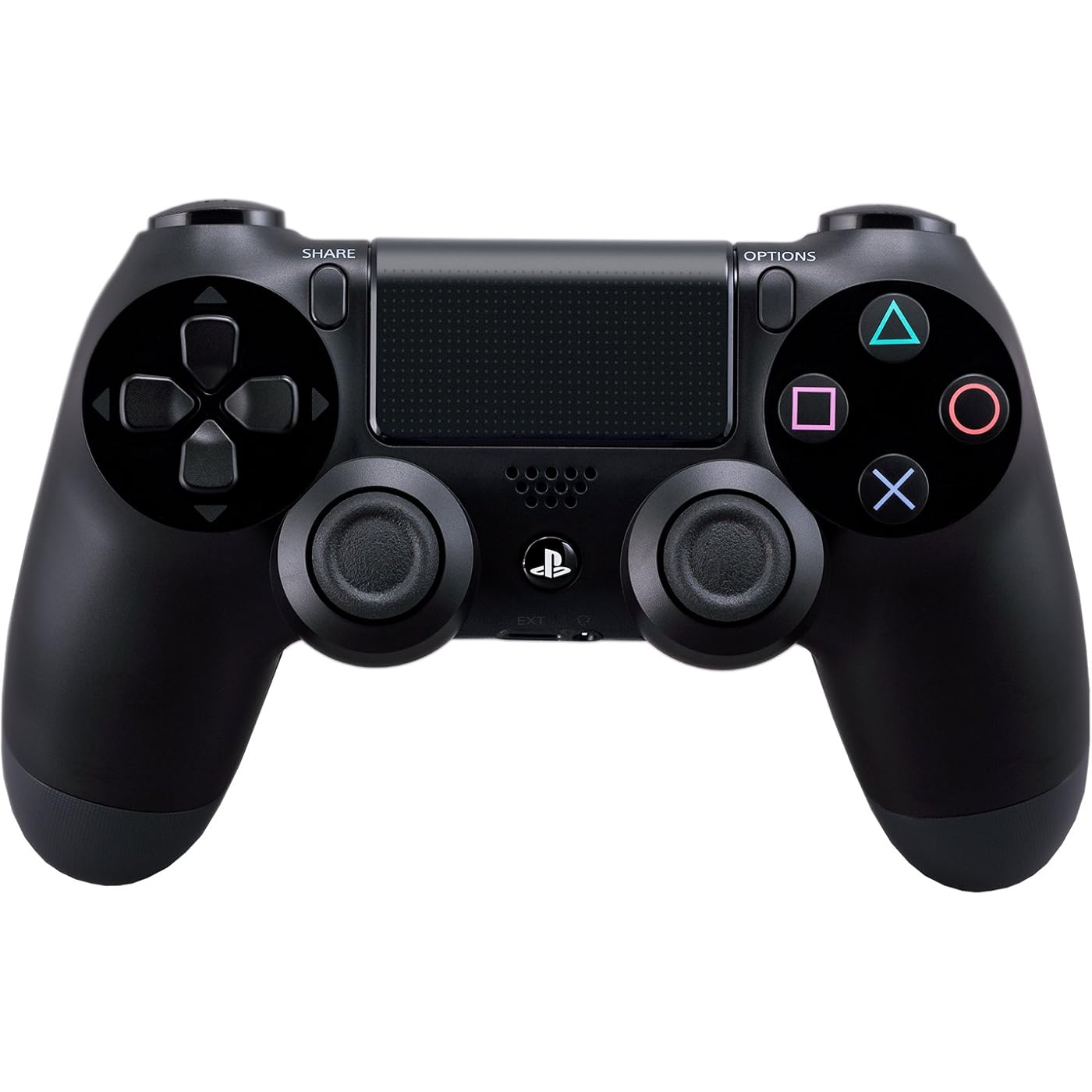
- Precision Controller for PlayStation 4: The feel, shape, and sensitivity of the DualShock 4s analog sticks and trigger buttons have been enhanced to offer players absolute control for all games
- Sharing at your Fingertips: The addition of the Share button makes sharing your greatest gaming moments as easy as a push of a button. Upload gameplay videos and screenshots directly from your system or live-stream your gameplay, all without disturbing the game in progress.
- New ways to Play: Revolutionary features like the touch pad, integrated light bar, and built-in speaker offer exciting new ways to experience and interact with your games and its 3.5mm audio jack offers a practical personal audio solution for gamers who want to listen to their games in private.
- Charge Efficiently: The DualShock 4 Wireless Controller can easily be recharged by plugging it into your PlayStation 4 system, even when on standby, or with any standard charger with a micro-USB port.
Specs 19
| Controller Type | Gamepad |
|---|---|
| Connectivity Technology | wireless |
| Additional Features | Wireless |
| Button Quantity | 13 |
| Hardware Platform | PlayStation 4 |
| Power Source | Battery Powered |
| Compatible Video Game Console Models | Sony PlayStation 4 |
| Item Weight | 11.84 ounces |
| Package Quantity | 1 |
| Item Dimensions | 2.5 x 6.75 x 7.25 inches |
| Item Dimensions D x W x H | 2.5"D x 6.75"W x 2.5"H |
| Brand Name | PlayStation |
| Model Name | DualShock 4 Wireless Controller |
| Manufacturer | Sony PlayStation |
| Global Trade Identification Number | 79, 42 |
| UPC | 714520304271 012301019216 711719100379 798762692358 |
| Model Number | 10037 |
| Manufacturer Part Number | CUH-ZCT2 |
| Color | Black |
No specs match.
Frequently asked questions
If you place your order now, the estimated arrival date for this product is:
Wednesday, Nov 11
Yes, absolutely! You may return this product for a full refund within 30 days of receiving it.
To initiate a return, please visit our Returns Center.
View our full returns policy here.
To initiate a return, please visit our Returns Center.
View our full returns policy here.
- Klarna Financing
- Affirm Pay in 4
- Affirm Financing
- Afterpay Financing
- Zip Pay in 4
- Financing through Apple Pay
- Financing through Google Pay
Learn more about financing & leasing here.
Similar Products




Top Amazon Reviews
For those of us who prefer the Xbox 360 controller vs. the DS3, the DS4 is a huge (r)evolutionary step...
As always, gamers are passionate in their opinions but make no mistake: objectively speaking the DS4 controller is a huge step up from the DS3. Sony has, at the very least, closed the gap in the controller discussion. Whereas the DS3 was almost universally considered inferior to the Xbox 360 controller, the DS4 is so good it makes any controller debates going forward one of subjectivity and individual preference. I've seen and heard some rather interesting opposing viewpoints on the DS3/DS4. Too often, the controller debate gets caught up in the symmetrical vs. asymmetrical stick placement, which is largely a red herring argument. In the end, the problem with the DS3 was ergonomics which has largely been fixed on the DS4. Symmetrical stick placement has nothing to do with the DS3's problems. Rather, for most American gamers' hands the DS3 is simply not ergonomic & is considered too small by most of the male gamers out there (that said, my girlfriend prefers the DS3 to the 360 controller simply because of her small hand size). The DS3's sticks feel too tall, too "loose", and too close together with a slick convex surface & a "squishy" down click. The triggers are also squishy & curved downward which doesn't give a satisfying, natural "trigger feel". The DS3's overall build quality is often described as cheap, with the DS3 offering far more structural flex than the 360 controller. In short, the DS4 fixes all of these issues and then some. The sticks are placed further apart, a shorter/stiffer throw with at least 50% more tension, a nice convex/"sticky" surface. The triggers are shaped like triggers. The size of the hand grips is just enough bigger that it fits comfortably in both my girlfriend's small hands and my much larger hands. The overall build quality is a huge step up and feels solid with absolutely zero flex even under hard/wrenching use. To be sure, there are always going to be naysayers. But, the general consensus among the gaming press - as well as about 75% of the gamers I've personally talked to who have experience with both controllers - is that the DS4 is a huge step up from the DS3 and overall a much improved, highly comfortable controller. In particular, using the DS4 with FPS (first person shooters) is a joy and a welcome surprise given how much of a chore it was to play this genre with the DS3. I almost always purchase multiplat FPS games on the 360 simply because the DS3 is really that bad in this genre. This is no longer a problem, and in fact I'm looking forward to playing all multiplats on the PS4 now, especially FPS games (in no small part due to the PS4's significantly better shader power/memory bandwidth which will make multiplats look and perform better on PS4). With all that said, I still slightly prefer the Xbox 360 controller and believe that overall it's the closest thing to perfection we have seen in a controller *for my hands* (bad d-pad notwithstanding). However, there is no question the DS4 is a huge improvement on the DS3 and it's a *very* close 2nd for me. I would place the Xbox One controller as a distant 3rd place because they changed up the bumpers and stick tension (it's actually looser than the DS4 and 360 controller now...bad move MS)... plus a slightly smaller size than the 360 controller are actually downgrades (for my hands). It's amazing MS spent $150 million redesigning the almost perfect 360 controller only to make it not quite as good for most gamers. Sony needs to get it in gear and release a PS3 firmware patch to allow the DS4 to work wirelessly as an official DS3 replacement. As it stands right now, it will work via USB cable b/c the PS4 detects it as a standard HID device. But this thing is so good the PS3 really deserves to be fully usable with it. One thing is for sure: I have a huge backlog of PS3 games I will definitely spend a lot more time with simply because of the DS4. I can't think of any higher praise than that. If Sony does enable full PS3/DS4 compatibility they'd move these things to PS3 owners like hotcakes...even for people who don't intend to upgrade to the PS4 right away.
...
show more
Reviewed in the United States on November 1, 2013 by mj
Controls the Future? The Future of Controls
I've owned a Playstation Four for a while now, but I've used the provided controller to the point where I've worn down the analog stick covers, degraded the vibration rotors, and rendered the R2 button unresponsive. However, let the status of the controller stand as testament to my dedication to the PS4 dualshock controller. The thing is extraordinarily comfortable. Before I actually got the PS4, I seriously wondered if the changes to the Playstation system altogether would be worth investment. I was afraid I would be paying more money for more of the same. Fortunately, I made a great investment in the new-gen system, and the controller is a definite improvement over the former controller. The analog sticks aren't as close together as they were for the PS3 controller, and the addition of the touchpad certainly was, at first, the subject of amusement and speculation given its early limited uses. However, it has been a useful feature for games and other non-game related features. The addition of the headphone input was, at first, not very useful to me given I didn't have any games where I needed headphones, but that has changed over time. The alteration of the select/start button setup to the share/options configuration isn't anything I consider worth mentioning since the option button is sort of designated as an all-in-one feature of the PS3's start/select, but the change may be confusing to anyone who is not familiar with the new controller layout. I play Battlefield Four, and at first I was confused how to "spot" an enemy without the select button, but a different button is designated with this task, and it's really easy to learn the controls for games even with the start/select change. The new controller also has a large blue light strip along the front. It doesn't really have many functions other than to look cool, but it does serve some various offhand functions for the Playroom "game". This is usable only for people who own the Playstation Eye, though. The light does change color based on different functions/uses of the controller. Everything else is, for the most part, similar if not the same as the PS3 controller. You'll have the classic Playstation direction keys and shape buttons associated with all the previous Playstation controllers. Despite the early odd experience with the controller, I really noticed the difference between the PS4 and PS3 controllers. I have used the PS3 more sparingly given the handles are a little larger yet "roomy" (spaced apart) than the PS3's controller. The controller is very comfortable and is also somehow lighter feeling than the PS3 controller, for all of its added mass. The controller is altogether vastly better than its predecessor and certainly merits more praise than I thought was possible, but I'll try to be concise. The share button deserves its own discussion, though, so I apologize for this rather lengthy review. The share option is nothing short of awesome. I had always wanted to record gameplay from the PS3, but the money necessary to buy a decent game capturing device simply drove me away from making the investment. Now, however, I can simply plug in a USB drive into the PS4 and export my gameplay files to the USB and then transfer and edit the files to my liking. Admittedly, the quality of the videos I make aren't as great when compared to a person who uses a good game capturing device, but the tradeoff is simply the fact that I'm not looking to be a frontman for a particular game title or company. The system works well enough without spending a crapload of money on really expensive gaming equipment. The PS4 and its controller really help amateur gamers like me feel comfortable and happy playing games without much further investment in other equipment. This may not be the same for every person looking to have a good time playing on the PS4, but the new features to the system and, for that matter, to the controller make gaming so much better than it ever has been.
...
show more
Reviewed in the United States on February 15, 2015 by Aven
Possibly the best controller I've ever used.
I touched on the DS4 in my PS4 review, but I think it's fair that I reiterate my favorite features here, since I purchased a 2nd controller, and my favorite feature really shows itself when you have more than one. it is a remarkable improvement to the PlayStation controller line. My fiance is incredibly impressed by how comfortable it is, and the fact that we both agree - even me with my large mitts - shows how much effort was put into the ergonomics of the controller. The weight and size feels perfect, and really does the system as a whole justice. One really neat feature, that gets glanced over in some reviews, is the ability to plug any standard headphones into the controller and pump all of the system audio through the controller, wirelessly. No delay, either. I've been using my iPhone earpods (later version), and the quality is great. Microphone works well too. When not using the headphones, the speaker on the controller adds a layer of depth to games like Knack and Resogun that is a real treat. One really awesome feature that we didn't realize from all of the pre-release reviews is that each controller can be assigned to a user, and that user can be connected to a PSN account. Whenever you turn on a controller, it asks "who's using this controller?". Which ever account you pick, that person will log in. In a game like Knack, both me and my roommate have our own PSN accounts and are both logged in. Depending on which controller is used to launch the game, that user is the primary player and is playing to earn trophies on their profile. Each user, though, has their own "home screen", meaning at any time I can press the PS button on the controller and go to MY home screen, see my friends, change my settings, etc. During this time my roommate can't interact with the screen - it's my home screen after all. We can hop back into the game quickly, or he can press the PS button on his controller and go into his homescreen, where he gets to interact with his friends, change his settings, etc. Because we're both logged in, the status of both of our accounts is "Playing Knack". It's a fantastic way to utilize the account system and tie it directly with a controller. If we're playing with his game save, and he is earning trophies for his account, as soon as he wants to stop, he can end the game and put his controller down and I can go to my homescreen with the PS button and launch a new game. I am instantly using my account and earning trophies for me, now, without having to log out of the system first or changing which controller is "Controller 1". It is one of the stand out features of the system for us. Having used several controllers over the past 20+ years, the DS4 is my favorite. It's obvious why as soon as you hold it in your hands. And having an extra one for your console really shows of Sony's attention to detail with the PS4.
...
show more
Reviewed in the United States on November 19, 2013 by Timothy
New favorite controller, works great for PC gaming after initial driver setup
I've always liked the way xbox 360 controllers fit comfortably in your palms, unlike the way the Dualshock 3 controllers have to be held further away in the fingers, but I like most everything about Dualshock controllers better, not least the symmetrical sticks and the separate d-pad buttons. This Dualshock 4 controller is the best of both worlds for me. It fits in the palms in the way that I like, and it fixes the few problems I had with the Dualshock 3. The rim on the sticks and the lip on the triggers prevents my thumbs and fingers respectively from sliding off when they get sweaty, the buttons feel just the right balance of clicky and squishy and easy to press, and the triggers and bumpers have just the right amount of resistance. I am mainly a PC gamer, and to use this controller with my PC all I had to do was install the DS4Windows driver to make it look like a xbox360 controller to games (for those not familiar with controllers and PC gaming, most games that support controllers assume xbox360 as the standard and don't support others very well without a workaround like this). Since the initial setup, I almost never have to mess with it, games just see it as an xbox360 controller (even the default button configuration is usually fine). It does mean that I get the xbox360 button prompts, but once you've memorized the layout you don't even look at the buttons and it's not a problem at all. Rumble works perfectly, as well. Also, with DS4Windows you can change the color, brightness, and behavior of the light on the controller. You can turn it off entirely, have it on just when charging (I just use mine wired, but I'm pretty sure you can use wireless if you have a compatible bluetooth dongle), have it flash when low on battery, have it change colors depending on battery, or whatever else you prefer. The touchpad mouse also works on PC (with the DS4Windows driver, and possibly without (can't quite remember)), and although I've had a little trouble setting up the sensitivity in a way that I like (right now I have it set up to touchy, but I'm confident I just need to get around to fiddling with the setting) it is really nice to have, both for regular situations and for emulators and oddball games that support controllers during actual gameplay but not, for whatever reason, in the menus.
...
show more
Reviewed in the United States on March 28, 2015 by Zephyr
Feels nice in hand, have to see it in action for review to be complete
Immediately upon removing this controller from its packaging, I was surprised to find that that the textured backing is not a grippy, rubber material as it appears in pictures and videos. Instead, it is a plastic, micro-textured material. It doesn't offer the level of grip in my hand that I thought it would, but it does seem to improve on the smooth back surface of the Dualshock 3 controller. The second thing I noticed about the controller is its size. It is significantly bigger than the Dualshock 3, and feels more substantial in your hand. All in all, it offers a much more natural and relaxed hand positioning when holding it. Because the controller is wider, it allows for the thumbsticks to be spaced farther apart- great for those people with large/long thumbs that would suffer that wierd feeling of banging their thumbs together while in the heat of a game. Speaking of the thumbsticks, they have a great, responsive feel to them. There seems to be a very little dead zone in their movement and they have an improved design that should allow for better gripping through long play sessions. They have a rubbery surface much like the Dualshock 3, but have improved on the dome-like structure of the Dualshock 3 to add a "rippled" (think ripples on a pondafter throwing a rock in) top that seems to hold your thumb better. Probably the most noticable difference in this generation of the Dualshock controller is the touch pad sitting front and center. It looks and feels nice, but there isn't much I can say about it until I'm able to actually play some games on the PS4 that are designed for the use of this controller. If the developer integration is done right, I could see the touch pad adding value to RPG's (opening and moving/zooming through a world map), sports games (calling hot routes in Madden?) and possibly even shooters (quick tossing grenades, much like the touchscreen is used for in shooters on the Vita). If integrated poorly, however, it could pose a problem. If the developer forces us to use the touchpad for the touchpad's sake, and the move doesn't feel natural, it will prove to be a huge pain point. Finally, the Dualshock 4 heralds the introduction of true trigger buttons on a Playstation controller. I've always preferred playing shooters on the Xbox 360 solely because the 360 controller had dedicated trigger buttons that felt much more natural in shooters than trying to keep your finger curled around the top shoulder buttons (L1 and R1) on the Dualshock 3. There is no need to worry about that any longer, though, because Sony has finally jumped on board and added high quality trigger buttons to the Dualshock 4. They offer just the right amount of tension and it is even throughout the pull. Overall, they feel very good and seem to be big enough to not have to worry about your finger slipping off in the heat of the battle. Overall, this controller looks like a HUGE upgrade over the Dualshock 3, but it's hard to say with certainty that this is true until I actually have a chance to play with it. At this time, I'm giving the controller a 4-Star review for this reason alone. If it holds up as well as I'm hoping during actual gameplay, I will have no problem bumping this review up to 5-Stars.
...
show more
Reviewed in the United States on October 30, 2013 by Helmsman
Sony's got this thing pretty much dialed in !!!
Can't even use mine yet but i can tell you this much already ... I love it ! Sure it's not compatible with my PS3's but from fondeling and toying with it , i'm impressed . IT's clearly larger than the previous DS's and fits my large adult man paws far better . However my wife and her dainty lil' hands wasn't put off by the new size either so that's a bonus .The joysticks are redesigned with inverted shrooms on top which cushion and cup the thumbs helping to prevent slippage during aggressive use , I LOVE THAT ! The silicone covers on them are new as well and provide a better feel than the previous textured caps . The tactile response of the triggers is notabley smoother and crisper and they are some what reshaped as well which i'm not 100% on as they are awfully close to one another and this may lead to inadvertant usage of the L2/R2 triggers when meaning to hit the L1/R1 triggers . The iconic triangle , square , circle and X buttons remain and feel pretty much just like all my other DS controllers so i'm guessing no change there . The D pad is the same lay out as previous as well but it too feels different , not so much softer or smoother but definately different . THen there is the mouse pad and like i said , at this point i've not been able to actually use it , just fondle it so i can't say as to how it works but it has a weird mouse pad like feel to it the same as late model Sony VAIO's and it's seperate from the actualy DS4 , meaning that it feels as if it s floating and has some minimal movement to it , it's not just a small touch pad . Also of note is the X Box like speaker/mic connections option it features and i'm not sure why they went that route exactly but there is none the less a unique port/plug for just such usage . Also of note , a small built in speaker in the center just above the PS button , not sure how that will come into use either . Lastly i want to mention the 2 most notable features , the charging jack/plug port is now Micro USB ( same as Android ) and my Android chargers charge my DS4 and the rear face of the DS4 is some kind of textured silicone or something finish completely different than any previous controllers and far better . No sweaty greasy slippery fingers falling off at that crucial moment here any more !!! It feels fantastic and provides good grip and comfort and i'm certain many are going to love and appreciate that even though many would likely not even notice !
...
show more
Reviewed in the United States on November 3, 2013 by Skipster
Improves on every aspect of the Dualshock 3, and has many new & unique features.
The Dualshock 4 is the follow-up to Sony's previous controller, the "Dualshock 3". However, while the Dualshock 3 simply lifted the design of the Dualshock 2, with only a few minor alterations... the Dualshock 4 has been re-designed from the ground up. First, let me mention that I've only used this controller on a Windows PC, so I have no experience using it with a PS4. keep that in mind as you read my review. Now, let me talk about the ergonomics. The new body is slightly wider than it's predecessor, and it's got a cleaner, smoother feel to it. It feels about as light as the Dualshock 3, but has a sturdier feeling build quality to it. The weight also seems to have been re-distributed down to the left & right handles of the controller, while in the Dualshock 3 most of the weight was located within the upper body. This causes the Dualshock 4 to feel slightly heftier, without actually having any additional strain during long play sessions. The Directional-pad's buttons are now closer to each other, making hitting diagonals a much smoother process which also feels a lot better. The left and right sticks have a very minimal texture to them (less than the Dualshock 3), but each stick has an indentation around the edge, making it easier to keep the sticks from slipping out of your thumbs. The left and right triggers now have an outward curve instead of the Dualshock 3's inward design, making them easier to hold without your fingers slipping off. This mirrors the Xbox 360 controller's triggers in some way, but these triggers also seem to have a slightly shorter throw than that, meaning you can use them as buttons pretty easily, too. The left & right shoulder buttons, as well as the four face buttons all have a good feel to them when pressed, and seem well suited to rapid-speed input. Start & Select are now gone and have been replaced by a touchpad, which is used in some games for touchscreen-like drag input. The touchpad also has a button underneath, which can do different things depending on if you press it on the left or right side. There's also "share" & "options" buttons next to the touchpad. The controller is natively supported on PC as a directinput device, and there are third-party tools that allow it to become an xinput device. I've been using the controller for about half a year at this point, and the controller automatically works with nearly every game I've tried and for the ones it doesn't, it's very easy to get it working with them. The touchpad is also supported by some games, for example I used it to control the mini-map in Metal Gear Solid 5. You can also map both sides of the touchpad buttons to specific actions using the third-party tools. Overall, I'm incredibly satisfied with the controller, and I feel as though it's the best controller to use for PC gaming today... taking the reigns from the Xbox 360 pad, and improving on that controller as well. It works great for 3D games, works great for 2D games... I've bought two already, and I might even buy more in the future. Highly recommended!
...
show more
Reviewed in the United States on March 4, 2016 by ZombifiedDuder
This Will WORK WIRELESS on DESKTOP PCs Running WINDOWS 8.1 (64-Bit)
This is the best playing and best feeling gaming controller on the market, and yes, you can use it wirelessly (via Bluetooth) on a desktop PC running Windows 8.1. There are many tutorials on the internet that explain how to do this, but 4/5 methods I found and used completely failed. Most were intended for Windows 7 users. My rating for this controller is 5 stars because it is an outstanding contoller. The remainder of my review will be a quick tutorial on how to get it working quickly and easily any time you want to use it, without messing with your computer's settings or opening up the command prompt- so read on only if you want to know how to get it working on Windows 8.1 64-bit. If you have a somewhat newer laptop, you almost certainly have Bluetooth. If you have a desktop, there's a good chance you don't. Either way, open the control panel. Everything should be alphabetical, if you don't see a Bluetooth setting, you need a dongle to use the controller wirelessly. They're pretty cheap, but many aren't compatible with Windows 8+. This one worked for me and arrived in 2 days to Southern California, (with the "standard shipping" option), shipped in the same box as the controller I had purchased simultaneously: http://www.amazon.com/gp/product/B00EW3WS9M/ref=oh_aui_detailpage_o00_s00?ie=UTF8&psc=1 Install the Bluetooth software with the USB dongle plugged in. (I disabled most of the startup entries associated with the aftermarket Bluetooth and had no issues with it working properly afterwards). Bluetooth: Check. Next you need to download the latest XBox 360 device drivers for Windows. Microsoft will tell you that no further software is needed for Windows 8.1. Disregard and download the XBox 360 drivers for Windows 7 64-Bit and install. (You're free to disable the Xboxstat.exe startup entry). If you've researched this at all, you've probably heard that you need DS4Windows, (now know as "Inputmapper"), to get this to work. You don't. So don't download that program and don't donate money to make their ads go away. It's unnecessary and doesn't work, (in my experience), when the remote is wireless on 8.1. However, you DO need to download special software. Download the files needed here: [...] Open the zip folder and extract the entire "ScpServer" subfolder to C:\Program Files (x86). Plug in the Dualshock 4 controller via USB to Micro USB cable. (The same one you charge Android, and some Blackberry, phones with). Order one of those as well if you don't have one. Watch this video and follow all the steps up to 4:55 (STOP there as he makes the process overly complicated): [...] If you followed the aforementioned steps carefully, then all you should have to do to connect the Dualshock 4 to your Windows Bluetooth is hold down the Playstation button for a few seconds. It will blink a once or twice before Windows recognizes it. When the main light on the Dualshock 4 lights up red, your device is connected and should be recognized by your games. The downside to following this method is that your Bluetooth device will ONLY work for the Dualshock 4 controller, (it will no longer work for Bluetooth headphones, etc.). Also, games will think that you are using an X-Box controller, so when controller buttons are shown on screen, they will appear as X/Y/B/A instead of ⬛/🔺/X/🌑, and the main LED light will not change colors based on the game as they do when connected to a PS4.
...
show more
Reviewed in the United States on March 30, 2015 by Mr. Archer