Search  for anything...

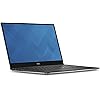
Dell XPS9350-8008SLV 13.3" 3200x1800 Laptop (Intel Core i7-6560U 2.2GHz Processor, 16 GB RAM, 512 GB SDD, Windows 10 Microsoft Signature Image) Silver

  • Based on 518 reviews
Condition: Used - Very Good
Checking for the best price...
$599.99 Why this price?
Save $200.00 was $799.99

Buy Now, Pay Later


As low as / mo
  • – Up to 36-month term if approved
  • – No impact on credit to apply
  • – Instant approval decision
  • – Secure and straightforward checkout

Ready to go? Add this product to your cart and select a plan during checkout.

Payment plans are offered through our trusted finance partners Klarna, Affirm, Afterpay, Apple Pay, and PayTomorrow. No-credit-needed leasing options through Acima may also be available at checkout.

Learn more about financing & leasing here.

Selected Option

Free shipping on this product

This item is eligible for return within 30 days of receipt

To qualify for a full refund, items must be returned in their original, unused condition. If an item is returned in a used, damaged, or materially different state, you may be granted a partial refund.

To initiate a return, please visit our Returns Center.

View our full returns policy here.


Availability: Only 2 left in stock, order soon!
Fulfilled by R3NEW

Arrives Sunday, May 3
Order within 23 hours and 37 minutes
Available payment plans shown during checkout

Protection Plan Protect Your Purchase
Checking for protection plans...

CPU: Intel Core i7


Capacity: 16 GB RAM / 512 GB SSD


Style: Laptop Only


Features

  • Intel Core i7-6560U, up to 2.2 GHz Processor with Intel Iris Graphics 540 (GT3e)
  • 16 GB LPDDR3 Included; 16 GB Maximum
  • 512 GB SSD Storage; No Optical Drive
  • 13.3 Inch QHD+ (3200x1800 pixels) LED-Lit Touchscreen Display
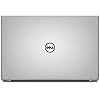
  • Windows 10 MSSI Operating System; Machined Aluminum Display Back and Base in Silver
  • Max Memory: 16 GB

Description

Designed to be the best performing laptop of its size. Smallest 13-inch laptop in an 11" frame. World's first/only laptop with Infinity Edge display. Easy inputs with a backlit keyboard and precision touchpad. Ultimate experience for mobile professionals to protect, power, and connect on the go, office, or at home. XPS laptops are artfully constructed with premium materials for maximum durability. Sleek and beautiful overall design is a side effect of careful performance driven construction. Most environmentally responsible laptop offered by Dell.

Brand: Dell


Model Name: XPS 13


Screen Size: 13.3 Inches


Color: Machined Aluminum Display Back and Base in Silver


Hard Disk Size: 512 GB


CPU Model: Core i7


Ram Memory Installed Size: 16 GB


Operating System: Windows 10 Microsoft Signature Image


Special Feature: Backlit Keyboard


Graphics Card Description: Integrated


Standing screen display size: ‎13.3 Inches


Screen Resolution: ‎3840 x 2160 pixels


Max Screen Resolution: ‎3200x1800 Pixels


Processor: ‎2.2 GHz core_i7


RAM: ‎16 GB DDR3


Memory Speed: ‎2.2 GHz


Hard Drive: ‎512 GB Solid State Drive


Graphics Coprocessor: ‎Intel Iris Graphics 540


Chipset Brand: ‎Intel Integrated Graphics


Card Description: ‎Integrated


Graphics Card Ram Size: ‎1740.8 MB


Wireless Type: ‎802.11ac


Number of USB 3.0 Ports: ‎2


Average Battery Life (in hours): ‎11 Hours


Brand: ‎Dell


Series: ‎XPS 13


Item model number: ‎XPS9350-8008SLV


Hardware Platform: ‎PC


Operating System: ‎Windows 10 Microsoft Signature Image


Item Weight: ‎2.8 pounds


Product Dimensions: ‎11.98 x 7.88 x 0.6 inches


Item Dimensions LxWxH: ‎11.98 x 7.88 x 0.6 inches


Color: ‎Machined Aluminum Display Back and Base in Silver


Processor Brand: ‎Intel


Number of Processors: ‎2


Computer Memory Type: ‎DDR3 SDRAM


Flash Memory Size: ‎512


Hard Drive Interface: ‎ESDI


Voltage: ‎240 Volts


Batteries: ‎1 Lithium Ion batteries required. (included)


Date First Available: March 19, 2016


Frequently asked questions

If you place your order now, the estimated arrival date for this product is: Sunday, May 3

Yes, absolutely! You may return this product for a full refund within 30 days of receiving it.

To initiate a return, please visit our Returns Center.

View our full returns policy here.

  • Klarna Financing
  • Affirm Pay in 4
  • Affirm Financing
  • Afterpay Financing
  • PayTomorrow Financing
  • Financing through Apple Pay
Leasing options through Acima may also be available during checkout.

Learn more about financing & leasing here.

Top Amazon Reviews


  • Great laptop, getting even better with software updates
CPU: Intel Core i7 Capacity: 8 GB RAM / 256 GB SSD Style: Laptop Only
Pros: * Portability. It's not quite as small or light as 11.6-inch laptops, but it's amazingly close for having a 13.3-inch display. * Great build quality. It feels sturdy and has a comfortable palm rest. The touch models in particular have a smooth, stable screen casing. * Great battery life. The QHD+ and 256GB SSD options do come with a battery life penalty, but even with both, this laptop should be able to last you a day of classes or travel between charges on low-brightness non-gaming use. * Intel graphics are good enough now that almost all games should be playable (at low settings). I personally prefer Intel graphics for their low power draw and great driver support in both Windows and Linux. * Amazon's the best place to buy this laptop. I bought the i7/8GB/QHD model in December 2015 for $1300. You can't find prices that good from Dell or Microsoft. I have my doubts whether the i5->i7 upgrade is especially significant, but when I bought it, both models had roughly the same price. * This is the Microsoft Signature Edition, which means you can use it out-of-the-box without worrying about bloatware. Most Windows 10 users probably won't need to reinstall the OS. * The QHD+ display looks great. The text is very crisp (for most programs), colors look great, I've had no brightness problems, and touch works fine. * USB-C is a great port for the future. Unlike the 2015 Macbook, you're not stuck with just USB-C. It also has standard USB-A ports, an SD slot, and a separate charging port. Cons: * Wireless card. All current models include the Broadcom 4350 (DW 1820A), which doesn't seem as great in performance or driver support as the Intel Wireless cards. Even with the latest updates (as of December 2015), its Windows 10 driver still has some issues. Thankfully, it's not too difficult to change wireless cards as long as you have the correct precision screwdriver and a prying tool. I replaced mine with a Intel 7265 IEEE 802.11ac Bluetooth 4.0 - Wi-Fi/Bluetooth Combo Adapter for Desktop Computer/Notebook 7265.NGWG.W. The upcoming Iris Pro model might use a different wireless card. * While Skylake video and chipset drivers work fine, they're still new, so make sure you install the latest updates for best results. * The BIOS/firmware at launch had some problems that were fixed with updates. Make sure you install BIOS updates as soon as you set up the laptop. * This is not a gaming laptop. If your primary intention is to play games at high quality and framerates, either use a desktop or buy a different laptop that focuses more on those features. The Iris Pro model will be a much better with games, but still not that great. * For the QHD model: although display scaling has improved a lot in recent times, you'll still probably find quite a few programs not designed for HiDPI yet. Windows 10 defaults to a 2.5x scaling (effectively 1280x720), which you can change to the much more sane 2.0x scale (effectively 1600x900). Steam is especially problematic with HiDPI: overlays are often tiny and unscaled. Using non-HiDPI external monitors might be awkward too. * This laptop has no HDMI/DisplayPort/miniDP/VGA ports built-in. Other than wireless displays (Miracast), the only video output is through the USB-C port. * Watch out for the hinge corners when you open the laptop. Opening it on your finger hurts, but probably won't injure you. USB-C and Thunderbolt 3: * Dell is an early adopter for these standards, but you'll be seeing many more devices with them in 2016, and you'll be able to share accessories between this laptop and many other upcoming PCs and phones. You can use this one port with one cable to replace multiple older connectors at the same time. * Not many monitors support USB-C yet, so you'll probably need a video adapter. Any USB-C video adapters from Dell, Google, Monoprice, and most Amazon sellers should work. * The USB-C port can fast-charge USB-C phones. My Nexus 5X charges at 15W/3A, the same as the phone's own AC adapter. * Like Chromebook Pixel, but unlike Nexus 5X and Nexus 6P, this USB-C port supports full USB 3.1 speeds and video output either via DP/HDMI/VGA adapters or to USB-C monitors. With the right accessories, you can even connect to multiple monitors from this one port. * You can charge with the USB-C port, but only with high-voltage laptop chargers like the Pixel/XPS 12 chargers or Thunderbolt Dock. The included charger uses Dell's normal DC charging port instead. * There's only one USB-C port, which might be a minor inconvenience in the future when more devices use it. Some of Dell's other new devices use two USB-C ports and completely ditch the old-style DC charger port. * Thunderbolt 3 supports external GPUs, which is an interesting way to give a laptop gaming performance when docked. However, there's no confirmation whether this laptop will ever get a BIOS update for that GPU-switching functionality. * February 2016 update: I recently got Dell's new Thunderbolt 3 dock. There's enough to say about it to need a separate review, but in short, there's still a lot of software issues. This might be great with time after more OS and firmware updates, but for now I'd say regular non-Thunderbolt USB-C accessories are much more reliable and software-agnostic. I would not recommend using the Thunderbolt dock as a desktop replacement. Dell also offers a non-Thunderbolt USB-C dock. Linux: * The BIOS setting for "SATA Operation" is set to "RAID On" by default. For Windows-only users, this is fine, but for dual-boot or Linux users, you'll want to change this to "AHCI" to get the installer (as of Ubuntu 15.10) to actually recognize your SSD. Changing this setting will break the current Windows install, so you'll need to reinstall it if you want to dual-boot. * The Broadcom wireless card requires the Linux 4.4 kernel. For Ubuntu, this means you should run Ubuntu 16.04+ or install a backported kernel. Either way, I still recommend installing Intel WIreless if you can. * HiDPI scaling on GNOME seems fine to me. Users of other desktop environments are less fortunate. Unlike Windows, X11 won't upsize any programs that aren't designed for HiDPI. Steam is the only program I use with that issue, so the library menus appear super tiny. * Thunderbolt 3 isn't supported by Linux. If you connect a TB3 dock while running Linux, at best absolutely nothing will happen (no video, no USB, no charging) and there's a fair chance your system will hang. I haven't heard any reports about the kernel getting support any time soon, but even when it does, I don't think you can interact with the BIOS settings or bootloader from a keyboard connected to a Thunderbolt dock. * Non-Thunderbolt USB-C accessories work fine on Linux, as the hardware sees them as normal USB or DisplayPort outputs. Misc: * I also have the Dell Premier Sleeve (S), which is quite nice and fits this laptop perfectly, but it's somewhat overpriced. This laptop can fit in any 13.3-inch laptop sleeve, but it might be a bit loose. Most 11.6-inch laptop sleeves won't fit. * The outer metal shell is sturdy and premium-feeling, but it's not quite to my taste. It's cold to the touch. * When you look up any info about this laptop, make sure you're looking for the right model. This was the second version of XPS 13 that released in 2015 and they both look almost identical at a glance and both feature Dell's tiny-bezel "infinity display". This 9350 model has a 6th-generation Intel processor (Skylake), Thunderbolt 3, and other more subtle updates over the early-2015 9343 model which has 5th-generation Intel processors (Broadwell). * I upgraded to this from a Chromebook (C720). It's hard to beat ChromeOS in battery life, but this is of course much more capable with the much-higher display resolution, RAM, CPU power, and SSD capacity. I almost considered a Chromebook Pixel instead, but I like the tiny bezels, bigger SSD, and the option to sometimes run Windows. Summary: This laptop is small, premium, and overall great and pleasant to use. Make sure to install updates and buy the accessories you need. While budget laptops keep getting better, pricier ultrabooks and premium laptops need to be really special to be worth the extra price. I believe this laptop succeeds at standing out in a good way. Update 02/03/2016: Added some information about Dell's new docks and Iris Pro model ... show more
Reviewed in the United States on January 2, 2016 by Jennifer

  • The benchmark ultrabook that offers awesome performance
CPU: Intel Core i5 Capacity: 8 GB RAM / 256 GB SSD Style: Laptop Only
I am an engineering student and needed an upgrade. After doing some research, I came across the Dell XPS 13 and I am loving it so far. This thing is FAST. The model I have has the Skylake i5, 256 GB SSD, and 8 GB ram. This comes with a quad HD glossy touchscreen. Design: The brushed metal on the outside of the laptop feels scratch resistant and durable. When the laptop is opened, one can't help but stare in awe at the Infinity Edge display. The small bezel around the screen is barely noticeable, and adds quality to the user experience. Display: The quad HD display is amazing whenever viewing media. The brightness and viewing angles are great and more improved than the past models by Dell. There is a little glare because the screen is glossy, but colors are more vibrant on this screen. Battery: The battery life is not as great as Dell presents it to be. I am getting around 7 to 8 hours of use out of the battery, which is sufficient for me. Performance: As an engineering student, I need to run programs and software like Matlab. I have Matlab downloaded on my XPS 13, and I am able to run all sorts of code that I can think of. I am able to multitask and have many windows of different programs open at once, and this computer still runs fast. As for gaming, I have only tried playing Mass Effect 2 on this so far. I can play the game in 1080p which bloom, dynamic shadows, and everything except for film grain on and still get up to 40 fps. When I bring this down to 720p and keep all of the other graphic effects on, I am getting 60 fps. When I bring the resolution up to 1440p, I get a mere 15 fps, which is not playable. Audio: Ultrabooks nowadays don't have the greatest speakers built into them. Although these speakers sound trebly, Dell does a great job of putting decent laptop speakers in the XPS 13. I hate listening to music through the laptop speakers, but when I have no choice, the XPS 13 speakers get loud enough for me when on the go. Keyboard & Trackpad: The keyboard is very easy to type on. The backlight has adjustable brightness so that battery can be saved if needed. The keystrokes are soft, but I am used to a Dell keyboard like this. The trackpad has many gestures that can be performed easily and has a satisfying click. This was a recent buy, so I will update my review in a few months to see if I come across any problems using the XPS. ... show more
Reviewed in the United States on July 21, 2016 by Francois Ross

Can't find a product?

Find it on Amazon first, then paste the link below.
Checking for best price...