




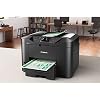
Canon MAXIFY MB2720 Wireless Color Photo Printer with Scanner, Copier and Fax (0958C002) Bundle with Printer Cable and Deco Essentials Printer eBook



Buy Now, Pay Later
- – 6-month term
- – No impact on credit to apply
- – Instant approval decision
- – Secure and straightforward checkout
Ready to go? Add this product to your cart and select a plan during checkout.
Payment plans are offered through our trusted finance partners Klarna, Affirm, Afterpay, Zip, Apple Pay, and Google Pay. No-credit-needed leasing options through Acima may also be available at checkout.
Learn more about financing & leasing here.
30-day refund/replacement
To qualify for a full refund, items must be returned in their original, unused condition. If an item is returned in a used, damaged, or materially different state, you may be granted a partial refund.
To initiate a return, please visit our Returns Center.
View our full returns policy here.
Recently Viewed





At a glance
- Condition
- New
- Model
- E4CNMB2720
- Dimensions
- 18.1"D x 18.3"W x 12.6"H
- Weight
- 26.5 lb
- Color
- Black
- Printing Technology
- Inkjet
- Printer Output
- Color
- Warranty
- 1 Year
- Works with
- PC, Smartphones
Features 9
- Two paper cassettes provide a combined capacity of 500 sheets - or a full ream of paper, so you're ready for any job
- The Canon PRINT app has great features so you can scan, copy and print right from your favorite mobile devices
- Print laser-sharp text that is highlighter and smudge resistant with the Dual Resistant High Density (DRHD) Inks
- With a 20,000 page Duty Cycle, the MAXIFY MB2720 is built to last for all your home business needs
- All MAXIFY printers feature 100% US-based Service & Support.Copy Speed (up to) : FCOT (Color): Approx. 12 Seconds
- Computer Operating Systems:Windows 10, Windows 8, Windows 8.1, Windows 7, Windows 7 SP1, Windows Vista SP1, Vista SP2, Windows Server 2012, 2012 R218, Windows Server2008, 2008 R218 Mac:19 Mac OS X v10.8.5 - 10.11
- Paper size: 4 x 6, 8.50 x 14, 8.50 x 11, 5 x 7, 8 x 10
- In The BOX INCLUDES: Canon MAXIFY MB2720 Wireless Home Office All-In-One Printer | Setup CD-ROM | Full Set of Ink Tanks | Power Cord | Telephone Line Cable | Canon USA Protection
- BUNDLE INCLUDES: Deco Gear Print Like a Pro - Deco Essentials Guide | High-Speed 6FT USB 2.0 Printer Cable, USB Type-A Male to Type-B Male
Description
Successful businesses are efficient. The MAXIFY MB2720 Wireless Home Office All-In-One Printer was designed to help you work and meet your business needs. With features like Quick First Print and Schedule On/Off your business will be able to print quickly and save money. Specifically designed to meet the needs of home-based businesses with 1-4 users, the MB2720 printer produces bold, colorful prints of your business documents. The MAXIFY MB2720 printer is the workhorse your business needs with a quick first printout time as fast as 6 seconds and fast print speeds up to 24 ipm (B&W)/15.5 ipm (Color). Built for the big jobs, it has a large 500 sheet paper capacity and a 20,000 page duty cycle. The efficient MAXIFY ink tanks deliver a high page yield from one set of XL ink tanks and the Dual Resistant High Density (DRHD) inks produce laser sharp text that is smudge and highlighter resistant. The entire MAXIFY lineup features built-in Wi-Fi and is fully compatible with the Canon PRINT app. This makes it easy to share and print information directly from your tablet and smartphone via select popular Cloud services. You can also easily scan directly to your mobile device. Best of all, the eco-friendly MB2720 printer is backed by 100% U.S.-based customer service and support. Welcome to the new standard in Home Office Printing!
Specs 52
| Brand | Canon |
|---|---|
| Connectivity Technology | USB |
| Printing Technology | Inkjet |
| Special Feature | Auto Power On, Schedule On/Off, Automatic Duplex Printing, Four-Color Pigmented Ink System |
| Color | Black |
| Model Name | E4CNMB2720 |
| Printer Output | Color |
| Maximum Print Speed (Color) | 15.5 ppm |
| Max Printspeed Monochrome | 24 ppm |
| Item Weight | 26.5 pounds |
| Printer Type | Inkjet |
| Other Special Features of the Product | Auto Power On, Schedule On/Off, Automatic Duplex Printing, Four-Color Pigmented Ink System |
| Printer Output Type | Color |
| Item Dimensions D x W x H | 18.1"D x 18.3"W x 12.6"H |
| Controller Type | Android |
| Print media | Envelopes, Paper (plain) |
| Scanner Type | Flatbed |
| Maximum Copy Speed Black and White | 1 ppm |
| Warranty Type | Full Warranty |
| Maximum Copies Per Run | 99 |
| Ink Color | color |
| Additional Printer Functions | Copy, Fax, Scan |
| Control Method | Touch |
| Compatible Cartridge | PGI-1200BK XL/PGI-1200C XL/PGI-1200Y XL/PGI-1200M XL, PGI-1200BK/PGI-1200C/PGI-1200Y/PGI-1200M |
| Number of Trays | 2 |
| Processor Count | 1 |
| Maximum Media Size | 8.5 x 14 inch |
| Maximum Sheet Capacity | 500 |
| Paper Size | 4 x 6, 5 x 7, 8 x 10, 8.5 x 14 inches |
| Maximum print Resolution Color | 1200 x 600 dpi |
| Maximum Print Resolution Black and White | 1200 x 600 pixels |
| Power Consumption | 27 watts |
| Wattage | 27 watts |
| Maximum Copy Resolution Color | 4800x1200 dpi |
| Maximum Copy Resolution Black and White | 1200 dpi |
| Model Number | E4CNMB2720 |
| Built-In Media | Full Set of Ink Tanks, MAXIFY MB2720 Wireless Home Office All-In-One Printer, Power Cord, Setup CD-ROM, Telephone Line Cable |
| Series Number | 2700 |
| Model Series | MB2700 |
| Specific Uses For Product | Office |
| UPC | 196641221536 |
| Unit Count | 1 Count |
| Manufacturer | Canon USA Inc. |
| Color Pages per Minute | 15.5 ppm |
| B&W Pages per Minute | 24 ppm |
| Initial Page Print Time | 6 seconds |
| Color Depth | 48-bit input / 24-bit output bits |
| Printer Connectivity Type | USB |
| Hardware Interface | USB |
| Total USB 2.0 Ports | 1 |
| Total Usb Ports | 1 |
| Duplex | Automatic |
No specs match.
Frequently asked questions
To initiate a return, please visit our Returns Center.
View our full returns policy here.
- Klarna Financing
- Affirm Pay in 4
- Affirm Financing
- Afterpay Financing
- Zip Pay in 4
- Financing through Apple Pay
- Financing through Google Pay
Learn more about financing & leasing here.


