


Search  for anything...

Brother SDX85 ScanNCut Electronic Cutting Machine Scanner

  • Based on 1,660 reviews
Condition: New
Checking for the best price...
$461.22 Why this price?

Buy Now, Pay Later


As low as / mo
  • – Up to 36-month term if approved
  • – No impact on credit to apply
  • – Instant approval decision
  • – Secure and straightforward checkout

Ready to go? Add this product to your cart and select a plan during checkout.

Payment plans are offered through our trusted finance partners Klarna, Affirm, Afterpay, Zip, Apple Pay, and Google Pay. No-credit-needed leasing options through Acima may also be available at checkout.

Learn more about financing & leasing here.

Selected Option

Free shipping on this product

This item is eligible for return within 30 days of receipt

To qualify for a full refund, items must be returned in their original, unused condition. If an item is returned in a used, damaged, or materially different state, you may be granted a partial refund.

To initiate a return, please visit our Returns Center.

View our full returns policy here.


Availability: Only 3 left in stock, order soon!
Fulfilled by Triplenet Pricing INC

Arrives Sep 28 – Sep 30
Order within 6 hours and 2 minutes
Available payment plans shown during checkout

Protection Plan Protect Your Purchase
Checking for protection plans...

Color: White/Green


Pattern Name: Cutting Machine


Features

  • SCAN DRAWINGS AND MATERIALS: Brother ScanNCut DX is the only cutting machine series with a built-in scanner. Scan your drawing to convert it to a cut file, directly cut printed stickers, and precisely place designs without counting blocks
  • STUNNING DIY PROJECTS: Craft right out of the box with 251 built-in designs. Add custom designs and additional free patterns with the USB port and wireless capability, and customize and combine your projects with the easy-to-use 3.47" touchscreen LCD display
  • NO MATERIAL SELECTION REQUIRED: The included ScanNCut DX auto blade and auto blade holder uses true automatic material sensor technology to detect the thickness of the material with no blade adjustment or material selection required. Always perform a trial/test cut to confirm a successful cut
  • CUTS UP TO 3 MM (0.1 in) THICKNESS: The Brother ScanNCut DX SDX85 effortlessly cuts materials up to 3mm thick such as paper, vinyl, fabric, balsa wood, chipboard, foam and felt
  • MAKES THE PERFECT PAIR WITH BROTHER SEWING MACHINES: Use ScanNCut DX in tandem with a Brother sewing machine to craft unique applique designs, fun home decor and family keepsakes.
  • CONNECT TO SCANNCUT FROM YOUR PHONE: Use your phone, tablet or PC to connect to your SDX85 machine
  • Warning: this product should only be used by children 13 years and older and under adult supervision.
  • MADE IN BROTHER FACTORIES BY BROTHER EMPLOYEES: Brother machines are made in Brother owned and operated facilities by our employees with emphasis on meeting customer demands with a quality product
  • This product is intended fonly in the US at 120 volts, and any other use voids the warranty.

Description

The only series of home and hobby cutting machines with a built-in scanner is now more accessible than ever. Introducing the latest addition to the ScanNCut family, the affordable and compact ScanNCut DX (SDX85). Combining premium features such as 251 built-in designs and a 3.47” LCD touchscreen display, the SDX85 is designed for the beginner craft hobbyist or student and allows you to start crafting right out of the box. The SDX85 also incorporates Brother’s Auto Blade sensor technology which automatically detects the thickness of your materials such as felt and foam, and cuts without frays or damage, for precise custom-made patterns. The SDX85 is perfect for adding flair to projects.This electronic cutting machine makes the perfect pair with Brother sewing machines allowing you to cut & create appliques. Use the built-in scanner to scan your drawings, cut them out on the material of your choice with the Auto-Blade. With a simple internet connection, you’ll be able to wirelessly access and work with Brother CanvasWorkspace to create virtually anywhere and anytime. Work remotely with your tablet, mobile device, or PC. The SDX85 is wireless network ready. While connected to the same internet network, wirelessly send your cut files directly to your Brother ScanNCut DX. The Brother SDX85 is also whisper-quiet, allowing you to create, craft, and cut materials without disturbing others. A generous 1-year limited warranty backs this Brother machine along with free phone and online technical support for the life of the product. Make moments at a moment’s notice.

Brand: Brother


Material: Vinyl


Color: White/Green


Product Dimensions: 8.5"D x 21"W x 6.8"H


Operation Mode: Semi-Automatic


Brand Name: Brother


Manufacturer: Brother


Unit Count: 1 Count


Warranty Description: 1 year limited


UPC: 012502660361


Number of Items: 1


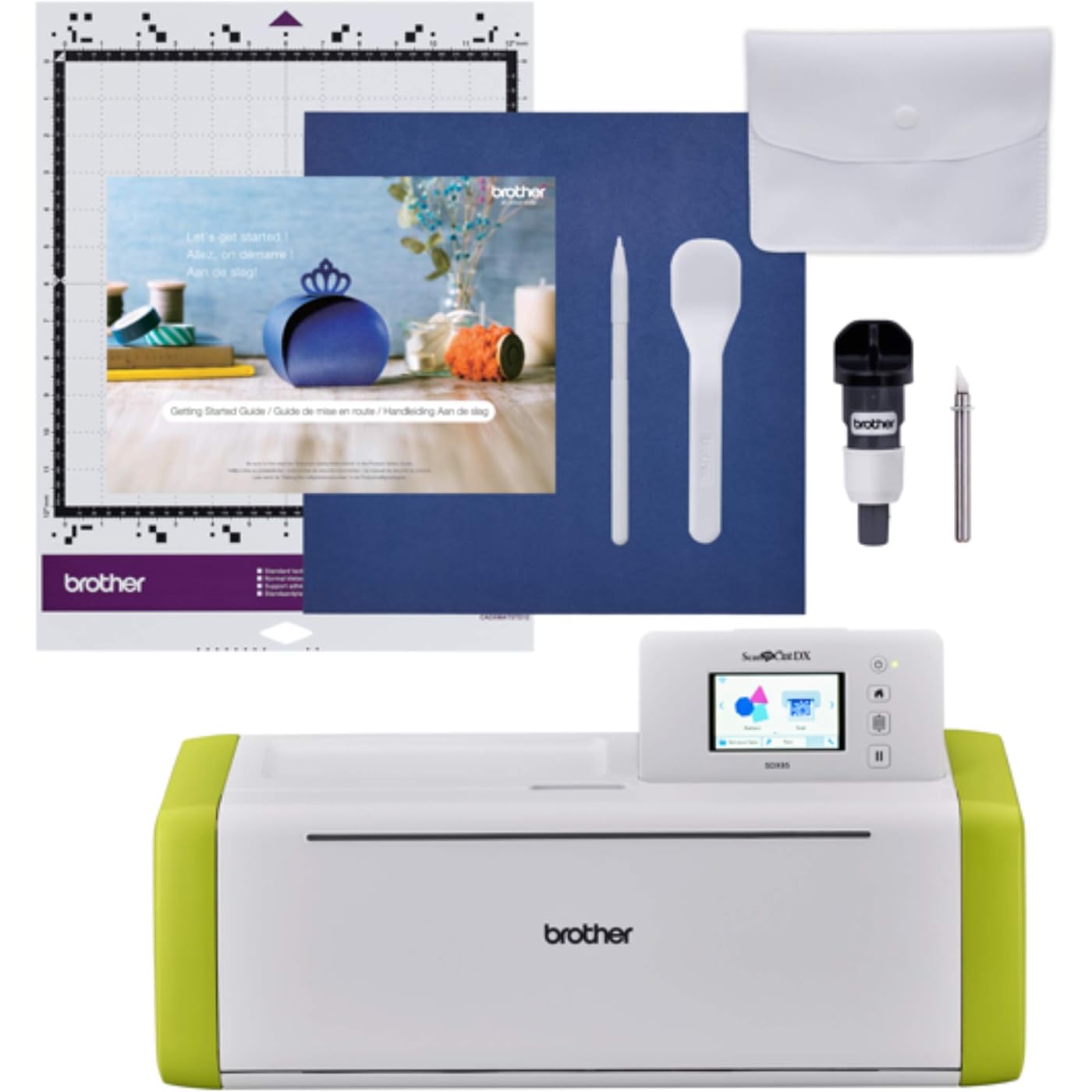
Included Components: 12x12” Std Tack Mat; Auto Blade&Holder; Spatula; Stylus; Accessory Bag; Guide


Item Type Name: Brother ScanNCut SDX85 Electronic DIY Cutting Machine with Scanner, Make Vinyl Wall Art, Appliques, Homemade Cards and More with 251 Included Patterns


Model: SDX85


Part Number: SDX85


Material Type: Vinyl


Color: White/Green


Operation Mode: Semi-Automatic


Print media: Banner paper, Card stock, Fabric, Labels, Paper (plain)


Input Voltage: 120 volts


Compatible Devices: Smartphone, Tablet, PC


Item Dimensions D x W x H: 8.5"D x 21"W x 6.8"H


Item Weight: 5.8 kg


Frequently asked questions

If you place your order now, the estimated arrival date for this product is: Sep 28 – Sep 30

Yes, absolutely! You may return this product for a full refund within 30 days of receiving it.

To initiate a return, please visit our Returns Center.

View our full returns policy here.

  • Klarna Financing
  • Affirm Pay in 4
  • Affirm Financing
  • Afterpay Financing
  • Zip Pay in 4
  • Financing through Apple Pay
  • Financing through Google Pay
Leasing options through Acima may also be available during checkout.

Learn more about financing & leasing here.

Top Amazon Reviews


  • This unsung crafting hero is beyond amazing!
I have been looking at these for ages. I read blogs and reviews on Cricut vs Brother Scan and Cut and got Cricut Maker 3 for my first machine. It was AFTER that mistake that I realized that most of those are comparing OLD Scan and Cuts to the new Maker 3, which is beyond preposterous. It would be like comparing one of those old Expressions models to the newest Scan and Cut! In fact, the DX line came out in 2020 and Maker 3 came out in 2021, so there really isn't a legitimate reason for such a biased oversight, misleading people in a horrendous way. Anyway, I finally got one and it is amazing! I went ahead and got the Illustrator link so I can send my designs directly (seriously, directly) to the machine. Not only that, it cuts up to 3mm. Part of what you'll hear is that it's not as user friendly, people can't figure it out, but that's because it doesn't have the marketing some of the competitors do. There are plenty of very affordable and also plenty of FREE classes to teach you the machine. I haven't really taken mine yet as I use Illustrator mostly, with a little bit of Canvas Workspace. You CAN use this without a desktop, laptop, ipad or whatever but I would buy the cards with designs in them if you want to do that. All in all, this is a truly outstanding machine, don't let clever marketing fool you. Also, bad reviews are sometimes people truly not liking the machine and sometimes people expecting the crafting version of a dishwasher that magically finds, loads, and washes your dishes, then dries them and puts them away in the cabinet without you ever having to do much at all. Take a bit of effort, it's completely worth it!!! ... show more
Reviewed in the United States on May 6, 2022 by Me, Myself, and I

  • Brother SDX85C feels like the right choice
Color: Charcoal Pattern Name: Cutting Machine
I have not owned a Brother machine of any kind in decades! My last was a typewriter that I really liked. Lol. I spent a vast amount of time searching for my first cutting machine. I didn't want anything that required a paid subscription, which eliminated the more well-known brand and I was fine with that. So when I first saw a YouTuber demonstrating this Brother ScanNCut SDX85C, I felt like this was the way to go. The scanning ability was the first thing to grab me because I like having versatility. So even though most of my projects will be uploaded to my cutter by way of a USB flash drive, I know that scanning will offer a great alternative for templated projects and patterned materials to be stored onto my flash drive, then uploaded to my Mac for use. I have not used my SDX85C heavily yet, as I am still selecting proper materials for my projects, but I did create the enclosed gift/treat box and it came out perfectly. The instructions were easy to follow, placing and removing the cardstock from the included mat went well too. Each cut was clean and precise. However, I did experiment a little bit by making a tree that I found in the Brother library. I only had a lighter-weight cardstock on-hand and the mat ended up being too sticky for it. So it was a chore removing every bit of the design and excess paper from it, but that was the chance I took. Now I know for that particular cardstock, I'll need to use a light tack mat or find another solution. But I don't blame the machine or the provided mat. My inexperience caused that inconvenience. Plus, the cardstock wasn't coated or textured like the enclosed sample, so surely, that had a lot to do with it. Using the display panel has been easy to understand. There are many shapes and project guides accessible through the touch screen and the Brother CanvasWorkspace. One YouTuber who does how-to videos for Brother cutting machines demonstrated that there are more design options when working through the offline version of the CanvasWorkspace as opposed to the online version. My intention from the very start was to only use the offline version, so I was happy to hear that. I have plans to use my machine for creating projects out of many different types of materials so having the auto-blade included is such a convenience. With a cutting depth of 3 mm, that will be sufficient for every type of material that I can think of, that I would want to cut with this machine. Anything else that is thicker that I care to work with, is generally much harder, so I'd use a laser cutter for such projects. I love that there are two compartments inside of the door where I can store the tools that I will use most often. I can even fit my 8" bookbinding bone folders in the left compartment, along with my rotary cutter and other smaller tools. The cutting surface is an ample and appropriate size for everything that I currently have in mind to cut. Be aware that at times, the cutting mat will shoot part way out the back of the machine to readjust the alignment for certain sections of your material. So be sure to have space to fully extend the rear tray about 3" and another 4-6" for the protrusion of the cutting mat beyond that. Overall the unit does have a large footprint so plan for that. As far as noise, I find it to be at a level that is not bothersome at all. I actually enjoy the sounds of my various machines working hard on my behalf so I may be partial. But the sound definitely isn't overbearing or likely to drown out conversations, TVs, etc. To date, the only complaint that I have is that the mats are quite pricey, especially when compared to other brands selling as multi-packs for the same price or less. I wish that Brother would have also included a light, heavy-duty, and fabric mat. Perhaps the higher priced models do or you'd have to catch a bundling deal, which I didn't. Other than that, I'm not a fan of hard-tipped styluses. I prefer the soft, rubbery tips. So I bought a set to replace the included stylus and purchased some additional hand tools as well. I know that once I really dive in, I'm going to be using my cutter on a daily basis. I'm already planning to get the adapters for foiling and freehand drawing/writing, and who knows what else is out there to expand its already great level of functionality! I'm looking forward to all that I will learn about my machine's capabilities after all this time of dreaming up ways that I'd like to use it, and the multitude of beautiful items that will be created. So far, I am very happy with choosing the Brother SDX85C, and knowing the expansive lengths that my designing mind will go, I'm really hoping that this machine can take me there every step of the way. ... show more
Reviewed in the United States on June 26, 2025 by Tay

  • best craft shop upgrade
i was on the fence about which machine to purchase when it came to the cricut maker and the brother sdx. after so much research, going through pro’s and cons of both machines i really leaned towards the brother machine. both being costly i really wanted to make sure i was making a good investment for my business. I love that the brother scans your image and sends it right to your computer where you can see what you’re working with on your mat. I print messages in specific fonts for card fronts, place the printed image onto the card mat, scan it in to my computer, and that’s where i place cut files over top of the printed image to create the perfect greeting embellishments. this machine can do way more than just that as well. this machine works amazing for what i purchased it for and i do not regret it one bit. ... show more
Reviewed in the United States on May 5, 2025 by Jozlyn Ostipow

  • Is “life changing” too cheesy?
Color: Charcoal Pattern Name: Cutting Machine
In May of last year I started a sticker business to pass the time during the stay at home order and it unexpectedly took off. I would spend hours cutting stickers by hand, and after much research between the Cricket and Silhouette Cameo 4 decided to get the Cameo on Black Friday (let me note that despite multiple searches for a scanner/cutter like this, this never showed up). Well, after a week of it failing to register & multiple phone calls to it support, it still wouldn’t work so I exchanged it for another one thinking that would help. Cut to three months later and hundreds of frustrated hours later and it still hadn’t cut a single sticker, even after buying a pixscan mat. This just happened to pop on my tik tok page of all places, and after some quick research the next day I took the Cameo back and ordered this. Within five minutes of getting it I had already cut the test pattern it came with, and was cutting stickers. My stickers are image based, and this reads it perfectly, and the .08 border seems to look best. There’s a few that have white spots towards the edge, so if upping the color reader to the max 20 doesn’t work (it rarely doesn’t) I just had to throw a quick 1 pixel border around them in photoshop, then set it cut -.05 inside said border and that also works great for keeping the white border look. Ive had this six days and basically cut my work time down by 80% and have cut thousands of stickers already. I did see some complaints about the standard adhesive mat it comes with being too sticky, but mine actually lost stickiness after a day, so now I use a tiny roll of masking tape on each corner then roll it down flat and its worked perfectly. The scanner glass is also very easy to clean if a stray piece of vinyl ends ip sticking to it after a complicated cut. There no wifi or software setup needed, which is also a great bonus as theres having to deal with registration marks. I can’t talk this up enough, and I wish I’d known about it months ago. ... show more
Reviewed in the United States on February 13, 2021 by Jeszy Arnold

  • GREAT MACHINE (hard to learn) In Depth Review
I've had my machine for about 2 weeks now. I did a lot of research and watched a ton of YT videos BEFORE purchasing. I thought I'd be ready by the time I got it. Have read many many reviews and blogs too. Just so you know, until your hands on with the machine it's really hard to get it into your brain how it works and what it really can do. (At least my brain). I'm pretty tech savvy but even for me this is a very steep learning curve. There's things you need to understand 1. the machine interface - the options are willy nilly all over the place and so just memorize where things are because it's not intuitive at all and you'll poke endless times trying to find the option you need and go crazy. 2. You need to understand the mechanics, ie blade depth, cut pressure, speed and how to scan correctly, this takes trial and error and getting very familiar with the idiosyncracies of your particular machine. Because it's mechanical as well as electronic the settings for these things are going to be particular to your machine, the guidelines are your starting point and helpful but not the whole story. 4. You need to understand what exactly each option does and what it does not do. The manual isn't particularly helpful until you learn the lingo and exactly what you are looking for when you reference the manual, and it misses some details so you'll be searching for answers for sure. The error messages are opaque, just like on your computer but the manual addresses these. The machine does a fantastic job guiding you through some steps if it relates to actual cutting, say if you are foiling or embossing. Otherwise, your on your own. It won't let you cut it draw until you insert the right tool so that's nice for when you forget. (Brother has graciously unlocked those 2 features but you'll still need to purchase the supplies to use them, kind of spendy and embossing is a huge process to get through, I haven't even bothered to try this feature) 5. Sign up for, download and learn about Canvas Workspace. It also isn't very intuitive. The best YT videos on this are from Alanda Craft, Julie Fei Fan Balzer is good but she misses some essential details on the technical side of things related to this machine and it's software. Julie is great at demonstrating a project and you'll learn a lot from her. She goes fast though but her videos are short and so a rewind isn't a pain. There are lots of other scan and cut creators and all are helpful. 6. The Canvas Workspace has a ton of free projects and very nice ones too, also the brother USA site has lots and lots of free projects and even a very nice editing feature for many of them, these are all drawing files but you can import them to CWS as images and transform them into cutting files from there so if your looking for a nice card to tweak and personalize this is a great place. 7. Learn the difference between a draw file and a cut file. Your machine WILL NOT CUT a draw file and vice versa. So remember to save your file as either draw or cut if you don't want to be totally mystified as to why your final project isn't showing up on the cut/draw screen after you've imported it from CWS. 8. Use the Canvas Workspace as much as possible to create your file, the machine interface is really too small and limited for creating, it's great for on the fly though. It's REALLY EASY to send your file from CWS to your machine, I love this feature. 9. The mats are giving me no problem, I do a test cut first on new material and this saves the mat and my sanity. If a section loses it's stickiness totally I use the Zig glue to restick it and it works fantastic, see YT, I think Papered chef and Jen Blausey have really good videos. If I need more stick I just tape down the material, no big deal, just don't interfere with the rollers, you don't want to get your tape tangled up in the machine and mat registration marks have to be clear on order for the machine to read correctly. It's okay to tape over the rulers. I clean my mat with an alcohol free baby wipe. I really like my machine, I think it's very versatile and does a great job of cutting and drawing and I'm very excited about all of the possibilities a cutting machine offers and think I made the right choice to buy a Brother. I'm not a stamper and don't want to mess with dies or the expense of them. I called customer service yesterday with a question, got through in a reasonable amount of time and found CS to be friendly and responsive and very helpful. The scanning feature is wonderful so learn how to use it correctly, again a ton of videos on how to get the best results. I docked 1 star overall because this is a very intensive learning curve and I think Brother could do a better job with more detail in the manual. I printed out the manual and you need a printed manual for quick reference but this manual needs to be updated with the new updated features they've added since. Also I think a printed manual should be included because it's essential to have one, I didn't like at all having to print my own. I have 3 stars for ease of use but that's because of needing to learn so very much, 4 stars for the mat adhesion and 5 stars for versatility. As for my purchase experience, it was pretty rocky. The 1st machine I received had been used and the packaging was all messed up in the box and things were missing and the mat very used. So check your packaging very carefully and expect nothing less than brand new pristine. People return these things and the boxes are not always checked for damage or use. I was pretty mad because the delay put me way behind schedule and I was mortified at the condition of what I received, I'm not used to receiving things this way from Amazon, I use Amazon A LOT. The 2nd one I received is absolutely perfect and I'm very happy with Amazon's quick response in fixing it. I hope this review helps others, this is a great machine and they've even dropped the price 20.00 since I purchased it. The only drawback I can see is that we may not get all the updates going forward as they have newer (more expensive) models now and updates on older models are always eventually phased out so that's not a surprise. But it does all I need it to do but updates should factor into your decision on whether or not to purchase this model (CM350). If you go with a newer model my points still apply, I don't see any really difference in the newer models except higher scanning resolution, auto blade and increase of cut depth from 2mm to 3mm and quieter. All great new features but not a deal breaker for me. The new machines got the paper piercing and offset lines features added recently too, sad I didn't get those but I oh well. As for quietness, I don't find this machine to be noisy at all. Happy cutting! (You'll be walking around with tape on your feet a lot) 🤪 ... show more
Reviewed in the United States on December 7, 2019 by Wendy

  • Be patient it works
Take some time to figure out but the scan and cut feature is priceless. A little trouble removing adhesive vinyl with backing from the sticky mats as well as the residual. But there is an included spatula for the former and washing the mat can get the residue off.
Reviewed in the United States on July 11, 2026 by Anselm Hii

  • Super disappointed in it.
Color: Charcoal Pattern Name: Cutting Machine
I've used numerous cutting machines, plotters, cnc lasers etc so I do have experience with machines that makes my job easier and ramp up production. This machine isn't it. I watched tons of videos on these before placing an order. Figured it'll be something easy enough for my kids to draw/print fun things and have the machine simply scan and cut. Turn out this doesn't nearly fit the bill. 1. Horrible software. The web app is very limited if you wanted to make your own custom cuts. If you wanted to use their selection of cut templates to make things then they do have lots to choose from. Their standalone app doesn't keep you logged in for longer than 14 days. Makes no sense why they'd make you constantly sign in when it's installed on your own PC. 2. It doesn't cut well. Half cuts for stickers were very inconsistent. It varies by brand of sticker paper, but with it supposedly auto measuring the source paper's thickness it should be fairly accurate across the board. I know it's not my machine because the test cuts when setting the machine up, it cut the supplies materials perfectly. Its advertised as being able to cleanly cut 100s of material and I guess it does, just know that every new type of material you buy, you're gonna have to do test cuts... Which brings us to the next thing. 3. It is extremely slow to operate. The cutting speed itself is decent. But scanning, editing cut lines, user interface etc is extremely slow. Just to zoom in on a design it's 1-3 seconds per tap. So if working on a small design and you need to zoom in 4 times that's 15 seconds just to do that not including panning in the direction you need to go to see the entire design. 4. The built in screen is horrible, and small. 5. The scanning feature is either way too sensitive or not sensitive enough. There's not nearly enough threshold adjustments. For instance on the same scan it would pick up light grey lines but will pick up specks of dust. 6. The cutting mat is way too sticky even after I wiped it down several times with alcohol. A few times where it finally made a good cut, material cut ripped trying to remove it. I will be keeping it because price-wise it's not a big hit for something that I will be using to continue to experiment with and push to its limits until it dies. But if you're into crafts and wanting a machine that is quick and easy to use I highly recommend sticking with a Cricut or Cameo etc. It sucks for what it's supposed to do, scan and cut. ... show more
Reviewed in the United States on June 17, 2026 by Late664

  • The BEST
Best machine you can buy, especially if you’re a stamper. You’ll no longer need to purchase separate matching dies for your stamps, PLUS it can cut anything those “other machines” can. By not purchasing matching die sets for my stamps, this paid for itself! HIGHLY recommend ANY Brother SNC!
Reviewed in the United States on September 1, 2025 by RinasAMaker

Can't find a product?

Find it on Amazon first, then paste the link below.
Checking for best price...