


Search  for anything...

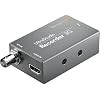
Blackmagic Design UltraStudio Recorder 3G (BM-BDLKULSDMAREC3G)

Based on 439 reviews
Condition: New
Checking for the best price...
$225.00

Buy Now, Pay Later


As low as $37.50 / mo
  • – 6-month term
  • – No impact on credit to apply
  • – Instant approval decision
  • – Secure and straightforward checkout

Ready to go? Add this product to your cart and select a plan during checkout.

Payment plans are offered through our trusted finance partners Klarna, Affirm, Afterpay, Zip, Apple Pay, and Google Pay. No-credit-needed leasing options through Acima may also be available at checkout.

Learn more about financing & leasing here.

Free shipping on this product

This item is eligible for return within 30 days of receipt

To qualify for a full refund, items must be returned in their original, unused condition. If an item is returned in a used, damaged, or materially different state, you may be granted a partial refund.

To initiate a return, please visit our Returns Center.

View our full returns policy here.


Availability: Only 1 left in stock, order soon!
Fulfilled by Amazon

Arrives Nov 18 – Dec 9
Order within 9 hours and 44 minutes

Available payment plans shown during checkout

Protect Your Purchase

Easy claims online, fast replacements, no fees

Checking for protection plans...

At a glance

Condition
New
Model
OB02426
Weight
68 g
Video Input
HDMI
Mfr Part Number
BDLKULSDMAREC3G
Works with
PC, Personal Computer, Personal Computers, Portable

Features 4

  • 10-Bit
  • 4:4:4 | 2:2:2
  • 2K DCI
  • SDI/HDMI Out

Description

Blackmagic ultrastudio recorder 3g bm-bdlkulsdmarec3gget the world's smallest pocket sized sdi and HDMI video capture for your thunderbolt 3 laptop or desktop computer! ultrastudio recorder.3g features the highest quality 10.bit uncompressed and compressed video capture that's compatible with all popular video software including davinci resolve, avid media composer, adobe premiere pro.cc and hundreds.more!delivery content ultrastudio recorder 3g

Specs 15

Connectivity Technology Flush
Brand Blackmagic Design
Number of Channels 16
Item Weight 68 g
Media Format Digital Video SD Card
Total Usb Ports 1
Video Input HDMI
Model Number OB02426

Frequently asked questions

If you place your order now, the estimated arrival date for this product is: Nov 18 – Dec 9

Yes, absolutely! You may return this product for a full refund within 30 days of receiving it.

To initiate a return, please visit our Returns Center.

View our full returns policy here.

  • Klarna Financing
  • Affirm Pay in 4
  • Affirm Financing
  • Afterpay Financing
  • Zip Pay in 4
  • Financing through Apple Pay
  • Financing through Google Pay
Leasing options through Acima may also be available during checkout.

Learn more about financing & leasing here.

Top Amazon Reviews


Thank you Blackmagic
Worked perfectly for its intended use. Blackmagic always coming through with the quality products.
Reviewed in the United States on April 3, 2024 by Nina

Works on my M1
Got this for OBS input, and it works great! You can get it to run on older macs with a Powered Thunderbolt 3 device in the loop. I had my 2013 Macbook Pro connected to a CalDigit TS3 Plus Thunderbolt 3 Dock with the Apple Thunderbolt 3 <==> 2 Adapter, and it works!!! Without the dock, It doesn't work. So the Thunderbolt Adapter seems to not give enough power for the UltraStudio Recorder 3G. ... show more
Reviewed in the United States on July 24, 2021 by CJ M.

Great
It works perfectly with BM media express software, although I can’t get it work with Premiere Pro 24 on M1 SonomaOS. It works along with BM Analog to SDI device used and my old HDV prosumer camcorder.
Reviewed in the United States on February 7, 2024 by L Watts

Works wonderful with MacBook Pro M1 2020
Works great! Just remember this is not a quick plug in and then it works, there are a few steps. You must do the following: Log into the black magic official website (not the most intuitive so be patience) > download the Desktop Video 12.0 Mac OS X (the one that supports Apple M1 if that’s what your using) > fill in the details and register your product > enable Extensions in Security settings so the software, once downloaded won’t continue to be blocked > once done you will need to “Enable system extensions”, you need to modify your security settings in the Recovery environment- to do this, shut down your system. Then press and HOLD the Touch ID or power button to launch Startup Security Utility. In Startup Security Utility, enable kernel extensions from the Security Policy button > to enable kernel extensions click “Reduced Security” also click Allow user management of kernel extensions from identified developers > click OK > top left where the Apple logo is click Restart > click the desktop video you previously downloaded > plug in the Black Magic’s Capture Card and YOUR good to go. If there are any hiccups at the last step, just unplug capture card and plug back in. Once I’ve been set up, no issues. Most of these steps you can just follow once your actually going through the process, Apple explains what to do once you start the initial step. Hope this helps someone as it’s not for your everyday joe! ... show more
Reviewed in the United States on March 14, 2021 by Ironman

It does work, but Blackmagic really cheaps out here.
Edit 5/23/21: I’ve realized that my initial review of this unit may have been a tad harsh. I was upset over the fact that BM does NOT include relevant cables to make their equipment work out of the box. However, after spending $20+ for a 3ft usb-c thunderbolt 3 cable, I am here to report that this unit does appear to work as expected and so I am upping my review from the previous 1-star to 4-stars. Still subtracting a star for the aforementioned cable situation. This device DOES NOT come with a Thunderbolt cable, leaving you to have to make another purchase if you don't have one ready and available. So far, I have had this out of the box for less than 30 minutes and neither of my Windows 10 Thunderbolt 3 machines will recognize this device. Not even Blackmagic's "Desktop Video Setup" program will recognize it. Looks like this will have to go back. Blackmagic: your cheapness here has caused this issue. Throw in a cable with this! Even a short 12in/1ft cable. Something.. anything! ... show more
Reviewed in the United States on September 2, 2020 by JBPS

Does not work with Zoom 5.9.3 on Mac
I bought this unit based on many reviews that it will work with Zoom. I am looking for a lower latency recorder than USB UVC solutions (which are around 130 ms). Well, it didn't initially, then it did... and now, it no longer works with 5.9.3. Search for the thread "Ultrastudio recorder Zoom Meeting Green Lines?" on BlackMagic Design's forums -- I am not the only one suffering. Even if it gets fixed, this is too much hassle as this will be the 2nd time in the product's history that Zoom compatibility broke. Not confidence inspiring. ... show more
Reviewed in the United States on February 28, 2022 by RKL

Solid unit in brand new packaging.
Great unit, got the Apple Branded Thunderbolt Cable to go with it, and after installing the software it worked first time out of the box in my OBS setup for streaming for work. Needed a quality product for long-term use and everyday use throughout the workday. This seams to be the answer.
Reviewed in the United States on March 31, 2023 by Ian B

If you are running a new mac with an M1 chip don’t get it
Picture quality is decent highly overpriced for a ancient huge piece though .. they have outdated firmware and drivers to be compatible with thunderbolt 4 hubs so I can run one fine but the three I got along with having to run my audio interface are just collecting dust . I have spent thousands trying to get a hq multi camera setup past couple months for online dj streaming . This was the straw that broke camels back . I’m pissed and completly disappointed . ... show more
Reviewed in the United States on September 25, 2021 by Boh
Checking for best price...