Search  for anything...

ASUS ROG Rapture GT-BE98 PRO First Quad-Band WiFi 7 Gaming Router supports 320MHz, Dual 10G Port, Triple-level Game Acceleration, Mobile Game Mode, Subscription-Free Security, AiMesh, and VPN features

  • Based on 1,071 reviews
Condition: New
Checking for the best price...
$599.99 Why this price?
Save $100.00 was $699.99

Buy Now, Pay Later


As low as / mo
  • – Up to 36-month term if approved
  • – No impact on credit
  • – Instant approval decision
  • – Secure and straightforward checkout

Ready to go? Add this product to your cart and select a plan during checkout.

Payment plans are offered through our trusted finance partners Klarna, Affirm, Afterpay, Apple Pay, and PayTomorrow. No-credit-needed leasing options through Acima may also be available at checkout.

Learn more about financing & leasing here.

Selected Option

Free shipping on this product

FREE 30-day refund/replacement

To qualify for a full refund, items must be returned in their original, unused condition. If an item is returned in a used, damaged, or materially different state, you may be granted a partial refund.

To initiate a return, please visit our Returns Center.

View our full returns policy here.


Availability: Only 10 left in stock, order soon!
Fulfilled by Amazon

Arrives Friday, Mar 20
Order within 1 hour and 35 minutes
Available payment plans shown during checkout

Protection Plan Protect Your Purchase
Checking for protection plans...

Style: Quad-Band


Features

  • Beyond-fast WiFi 7 (802.11be) with new 320MHz channels in the 6 GHz band and 4096-QAM significantly increases network capacity and throughput, with speeds of up to 30 Gbps
  • Multi-link Operation links to multiple bands at the same time to ensure stable internet connections and efficient data transfers
  • Cutting-edge external dual-feeding antennas boost coverage by providing high efficiency and significantly enhanced signal strength
  • Maximized wired connectivity and flexibility with dual 10G ports and quad 2.5G ports
  • Triple-Level Game Acceleration - The GT-BE98 Pro boosts your PC gaming traffic every step of the way, from your PC gaming port all the way to the game server.

Description

The ASUS ROG Rapture GT-BE98 Pro quad-band WiFi 7 Gaming router is beyond fast. With dual 6 GHz bands, dual 10Gbps ports, and new WiFi7 technlogies such as Multi-link Operation, achieve speeds of up-to 30Gbps and push the boundaries of whats possible in networking. Disclaimer: Actual data throughput and WiFi coverage will vary from network conditions and environmental factors, including the volume of network traffic, building material and construction, and network overhead, result in lower actual data throughput and wireless coverage.

Brand: ASUS


Model Name: GT-BE98 PRO


Special Feature: Access Point Mode, Guest Mode, Internet Security, Parental Control, QoS


Frequency Band Class: Quad-Band


Wireless Communication Standard: 802.11.be


Compatible Devices: Gaming Console, Personal Computer, Smart Television, Smartphone, Tablet


Recommended Uses For Product: Business, Gaming, Home


Included Components: GT-BE98 Pro quad-band gaming router, Power adapter, Quick start guide, RJ-45 cable, Warranty card


Connectivity Technology: Ethernet, USB, Wi-Fi


Color: BLACK


Product Dimensions: 13.7 x 8.6 x 13.7 inches


Item Weight: 4.4 pounds


Item model number: GT-BE98


Date First Available: December 11, 2023


Manufacturer: ASUS


Frequently asked questions

If you place your order now, the estimated arrival date for this product is: Friday, Mar 20

Yes, absolutely! You may return this product for a full refund within 30 days of receiving it.

To initiate a return, please visit our Returns Center.

View our full returns policy here.

  • Klarna Financing
  • Affirm Pay in 4
  • Affirm Financing
  • Afterpay Financing
  • PayTomorrow Financing
  • Financing through Apple Pay
Leasing options through Acima may also be available during checkout.

Learn more about financing & leasing here.

Top Amazon Reviews


  • Excellent Performance, Frustrating VPN Experience, and Overly Complex Setup
Style: Quad-Band
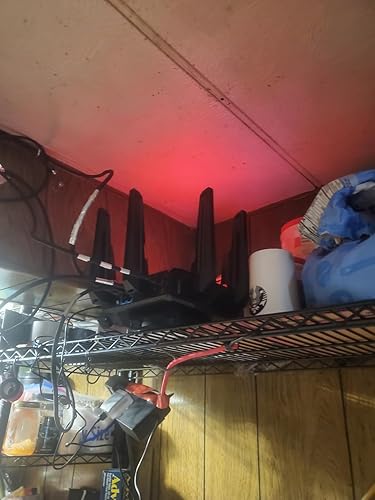
The media could not be loaded. Product Review — ASUS ROG Rapture GT-BE98 Pro Flagship-level hardware, strong Wi-Fi 7 speeds, excellent coverage, and powerful gaming/QoS features. Performance potential is top-tier once configured correctly. Biggest weakness: VPN setup usability. Manual config uploads and fragile routing behavior can break full-network connectivity if misconfigured. Advanced users will manage fine; average households may find VPN Fusion frustrating without careful setup. Unified Wi-Fi + VPN Fusion Setup Step = Meaning | Straight to the point PART 1 — Combine All Wi-Fi Bands First Step 1 = Enable Smart Connect / Unified SSID Meaning: Merge 2.4G + 5G + 6G into one network. Step 2 = One name + one password Meaning: Devices auto-select best band. Step 3 = Let Wi-Fi 7 Multi-Link manage traffic Meaning: Router balances load across bands automatically. Step 4 = Avoid band separation Meaning: Prevent congestion and device signal lock-in. Result: Stable, optimized, multi-band throughput instead of single-channel overload. PART 2 — Airtime & Traffic Fairness Step 5 = Airtime Fairness ON Meaning: No device hogs bandwidth. Step 6 = WMM ON Meaning: Full Wi-Fi speed protocols active. Step 7 = WMM No-Ack OFF Meaning: Prevent packet loss + false connectivity. PART 3 — VPN Fusion Safe Setup Step 8 = Create VPN profile Meaning: Add OpenVPN inside VPN Fusion. Step 9 = Upload server file + certificate Meaning: Authenticate tunnel correctly. Step 10 = Enter VPN login credentials Meaning: Account authorization. Step 11 = Disable “Apply to all devices” Meaning: Prevent full-network tunnel routing. Step 12 = Click Apply Settings Meaning: Save profile safely. Step 13 = Connect VPN Meaning: Tunnel activates. Correct status: VPN = Connected Internet = Connected Meaning: Split routing stable. If Internet Breaks Step 14 = Disconnect VPN Meaning: Restore ISP path. Step 15 = Verify global apply OFF Meaning: Remove forced routing. Step 16 = Unassign all devices Meaning: Clear tunnel mapping. Reconnect safely. Cooling & Hardware Stability Add-On (Review Update) Step 17 = Use external router cooling fan Meaning: Prevent thermal throttling. Step 18 = Don’t rely only on built-in cooling Meaning: Dust + heat reduce router performance over time. Overheating can cause: Connection instability. Throughput drops. Random disconnects. Final Configuration Logic Unified Wi-Fi = Multi-band load balancing. Airtime Fairness = Equal device distribution. VPN = Router-level tunnel only. Global apply = Disabled. Outcome: Stable connection, fast loading, no household outages, no factory reset rebuilds. ... show more
Reviewed in the United States on February 4, 2026 by Xeng Pao Vang Xeng Pao Vang

  • Beast mode
Style: Quad-Band
I thought I wrote a review of the BE98U but it's now gone. I've been in networking for over 30 years working for some of the largest networking companies. By far this is and has been the best home router I've ever owned. I have at one time or another used all the major players TP-Link, Orbi, Linksys, Pfsense etc. They were all good but had their quirks as does the ASUS. I started to use the 98u in December of 2023, an early convert to Wifi 7, for my office Network. The first one I received was faulty, I still use it’s replacement. By far the ASUS has been the most stable, configurable, has great range and the icing on the top is it's compatibility with the other ASUS networking products. Also they don’t charge for services that should be free like parenting tools and lousy security software (a pet peeve of mine ORBI) Since implementing the 98U I have become "kind of retired". I decided to save some money and get rid of my office network. I installed MoCA on my home network (ASUS BQ16 pro) and use the backhaul from the BQ16 over MoCA into the 98U and if works flawlessly with full 2.5 GB speeds. Pros: • Configuration – Now you don’t have to, it’s usable but you can configure almost everything. • Software others are charging for • Great range and speeds • Lots of ports • Stable • Works with other ASUS network products Cons: • It’s LARGE • It might not be pleasant to look at for some • Software could be released more often • Customer support of awful The most praise I can give any hardware or software is it runs like a clock and I don’t have to think about it. This is what I have with the ASUS BE98U. Update 1-10-26 I started to have problems with my office BE98U, wireless stopped working. I had to do a full factory reset of the device to get it working again. I decided to buy another 98U just in case and change my configuration. My configuration now is a 98U as the primary router, two more placed strategically in the main house and my office with back haul over MoCA. I have 3 BQ16 Pros, one connected to MoCA and the other wireless. The new 98U I couldn't get to work with the mesh in my office. It worked in the house but not my office so I took everything back to the factory settings and now it works flawlessly. I tried this configuration a year ago and it wouldn't works mostly due to mesh compatibility between the 98Us and the BQ16 Pros, It works now fast and reliable. All the problems I've read about online and my own experiences stem from the last software update and it's repeatable. BTW ASUS is clueless when it comes to ANY problems. When in doubt, do a factory reset is not a strategy it's a problem. While I'm at it, ASUS updates are counted in months not weeks and they have the laziest development staff. Bottom line, I love the hardware platform, range, configurability but the software and support suck. ... show more
Reviewed in the United States on March 1, 2025 by GrumpyandDopey

Can't find a product?

Find it on Amazon first, then paste the link below.
Checking for best price...