Search  for anything...

ASUS Prime Z690-A LGA 1700(Intel 12th) ATX Motherboard (16+1 DrMOS,PCIe 5.0,DDR5,4X M.2, Intel 2.5 Gb LAN,USB 3.2 Gen 2 Front Panel Type-C,Thunderbolt™ 4,Aura Sync RGB Lighting)

  • Based on 478 reviews
Condition: Used - Like New
Checking for the best price...
$139.99 Why this price?

Buy Now, Pay Later


As low as $23.33 / mo
  • – 6-month term
  • – No impact on credit to apply
  • – Instant approval decision
  • – Secure and straightforward checkout

Ready to go? Add this product to your cart and select a plan during checkout.

Payment plans are offered through our trusted finance partners Klarna, Affirm, Afterpay, Apple Pay, and PayTomorrow. No-credit-needed leasing options through Acima may also be available at checkout.

Learn more about financing & leasing here.

Selected Option

Free shipping on this product

This item is eligible for return within 30 days of receipt

To qualify for a full refund, items must be returned in their original, unused condition. If an item is returned in a used, damaged, or materially different state, you may be granted a partial refund.

To initiate a return, please visit our Returns Center.

View our full returns policy here.


Availability: Only 6 left in stock, order soon!
Fulfilled by UltraParts Renewed

Arrives Jul 20 – Jul 26
Order within 13 hours and 23 minutes
Available payment plans shown during checkout

Protection Plan Protect Your Purchase
Checking for protection plans...

Style: Prime Z690-A LGA 1700


Features

  • Intel LGA 1700 socket: Ready for 12th Gen Intel Core processors and Windows 11, support PCIe 5.0 and DDR5.Operating System: Windows 11, Windows 10 64-bit.Audio : High quality 120 dB SNR stereo playback output and 113 dB SNR recording input (Line-in).
  • AI Motherboard : AI overclocking, AI cooling and Two-way AI noise cancellation
  • Enhanced Power Solution: 16+1 DrMOS, ProCool sockets, alloy chokes and durable capacitors for stable power delivery
  • Comprehensive Cooling: Large VRM heatsink, M.2 heatsink, M.2 backplate with Q-Latch, hybrid fan headers and Fan Xpert 4
  • Next-gen connectivity: DDR5 memory, PCIe 5.0, Intel 2.5 Gb Ethernet, USB 3.2 Gen2x2 Type-C, front panel USB 3.2 Gen 2 Type-C, Thunderbolt 4 header support

Description

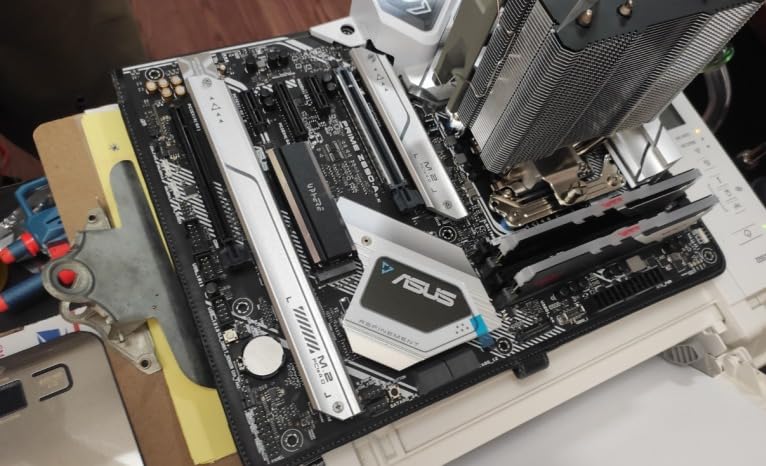
The ASUS Prime Z690-A is expertly engineered to unleash the full potential of 12th Gen Intel Core processors. Boasting a robust power design, comprehensive cooling solutions and intelligent tuning options, the ASUS Prime Z690-A provides daily users and DIY PC builders a range of performance tuning options via intuitive software and firmware features.ASUS Prime Z690-A is perfect for those seeking to create a sleek, futuristic-looking build, thanks to its black and white finish and iridescent metallic nameplate and PCB cover.

Brand: ASUS


CPU Socket: LGA 1700


Compatible Devices: Personal Computer


RAM Memory Technology: DDR5


Compatible Processors: Intel Core i9-12900K, i7-12700K, i5-12600K


Chipset Type: Intel Z690


Memory Clock Speed: 6000 MHz


Platform: Windows 11


Model Name: PRIME Z690-A


CPU Model: Unknown


Processor Socket: LGA 1700


Compatible Devices: Personal Computer


RAM Memory Technology: DDR5


Compatible Processors: Intel Core i9-12900K, i7-12700K, i5-12600K


Chipset Type: Intel Z690


Memory Clock Speed: 6000 MHz


Platform: Windows 11


CPU Model: Unknown


Memory Storage Capacity: 128 GB


Ram Memory Maximum Size: 128 GB


Main Power Connector Type: 24-Pin


Graphics Card Interface: PCI Express


Memory Slots Available: 4


Number of Ports: 38


S/PDIF Connector Type: Optical


System Bus Standard Supported: Serial ATA/600


Total SATA Ports: 4


USB 2.0: 11


Total Usb Ports: 8


Number of Ethernet Ports: 1


Total PCIe Ports: 5


Brand: ASUS


Model Name: PRIME Z690-A


Model Number: PRIME Z690-A


Manufacturer: ASUS


UPC: 195553447324


Mfr Part Number: PRIME Z690-A


Item Type Name: motherboard


Item Weight: 3.55 Pounds


Warranty Description: 3 Years


Frequently asked questions

If you place your order now, the estimated arrival date for this product is: Jul 20 – Jul 26

Yes, absolutely! You may return this product for a full refund within 30 days of receiving it.

To initiate a return, please visit our Returns Center.

View our full returns policy here.

  • Klarna Financing
  • Affirm Pay in 4
  • Affirm Financing
  • Afterpay Financing
  • PayTomorrow Financing
  • Financing through Apple Pay
Leasing options through Acima may also be available during checkout.

Learn more about financing & leasing here.

Top Amazon Reviews


  • Good motherboard
Style: Prime Z690-A LGA 1700
Pros: supports windows 11, works with i9 13900K. Installed Noctua NH-D15 easy. I recommend attaching the back plate of the cooler first, installing the motherboard in the case second, connecting CPU power cables third, and only then installing the cooler. I recommend using PSU that support PCU power x2. For example, EVGA Supernova 750 P6 or similar. BIOS was updated automatically - intiated by Windows 11 as optional update. Cons: Limited availability of officially supported memory. I was able to get 6000 MHz stable max out of G.Skill Trident Z5 DDR5 6400 - I do not recommend this memory kit for this motherboard. At higher memory frequency Corona renderer would crash. Things I learn after trying to make things work for several days: - use less expensive 5600 DDR5. I installed Kingston 64GB 5600MT/s DDR5 KF556C40BBK2-64 and it did not affect the speed of rendering. This memory kit is officially compatible with this MB. - with air cooling you have to setup this motherboard properly to avoid overheating. I use massive Noctua NH-D15 for air cooling. I get about 89-91 degrees C under continuous heavy load with 23C room temp. I think. So, I think that this cooler is very efficient. i9 13900K is producing so much heat, that there is no room for overclocking without overheating. Overall, overclocking does not produce any serious productivity boost, but increases energy consumption and heat production. I spent two days just to figure out how to prevent overheating during rendering in 3DS MAX. The best way to do that is to go to AI Tweaker in BIOS and disable Asus Multicore Enhancement. Also, I used Asus AI Suite 3 to calibrate fans. Some reports show slightly better rentering time in Corona Benchmark with MSI MEG Z690 ACE MB with MSI MEG CORELIQUID S360 cooling. Render Benchmark with MSI was 37 sec with 4800 RAM vs 37-38 sec on my system with 5600 RAM. However, the cost of MSI with watercooling will be about $380 more. ... show more
Reviewed in the United States on January 31, 2023 by Snowstorm

  • As good as a 790, but much cheaper
Style: Prime Z690-A LGA 1700
I got the i9-13900 and the fast DDR5. I seriously considered getting the Z790, assuming it was much better. But, I read up on the performance, they are identical. The real difference is the Z690 needed a BIOS update to work with this new i9, otherwise the Z790 has one more USB port, maybe? So, if you get this and the i9-13900 it might not power up, mine didn't. It just sat there, the power leds never showing it boot. I had a new motherboard, new CPU, new RAM. I didn't know what was broken, but I happened to have a compatible older i7 CPU. I dropped it in and it booted just fine. I ran the BIOS update to support the i9-13900 and then put it back in and it booted. So, if you want DDR5 and all the performance from the new i9's this is an amazing motherboard at a great price, but you might need a BIOS update. If you don't have a compatible CPU that will boot, this might not be the motherboard you want. It has PCIe5, but I can't use it. My RTX4090 is PCIe4. My M.2's are PCIe4. But, if a new PCIe5 video card or m.2 drive comes out I know I can support it. I got 5,400mhz DDR5. Dropped it in, set the speed in BIOS (it knew the settings), and it just worked. This is seriously fast RAM, as fast as the CPU. This gives a massive performance improvement over the DDR4. You get 3 M.2 slots, and you can add more to PCIe riser cards if you need them. I love this motherboard, and the CPU is amazing. I was devoted to AMD, but their CPU just can't compete with this one anymore. ... show more
Reviewed in the United States on February 22, 2023 by Adam White

  • Worked right out of the box with i7-12700K! Great Looks and Performance Worked right out of the box with i7-12700K! Great Looks and Performance
Style: Prime Z690-A LGA 1700
This was my first new PC build in a long while. I had researched and decided on this one for a friend of mine's creator video editing PC build. It has a decent amount of USB-A/USB-C and at least one thunderbolt port as well as header support for an add in card. I paired this with an i7-12700K and an air cooler for a really cool running and fast rig. This board has great looks with the contrasting silver and white against the black PCB of the board. This board has 4 M.2 Sata SSD slots on it for your storage needs as well as 4 Sata ports for HDD or SATA 2.5 SSD drives as well. This is also an overclocking motherboard but I did not play with any of the settings as it was not for me and needed to run at stock/stable speeds. I would not hesitate to buy this board again or the Strix line of boards for a build in the future. On first boot you will need to be patient, these newer boards and memory have to kinda learn each other first and then it will post and you can start tinkering/installing windows. I would say give it up to a minute or so for it to show some video, it may even reboot once or twice before you see the Asus Logo as its booting. I was using the onboard video during initial power up and I at first thought something was wrong. I am talking about the very first time you power it on, it will take a lil bit to show video. Once I could see the BIOS and configure it to boot from a USB Win10 install I was off and running. Everything runs so much faster than what I am used to, my friend is amazed by the performance and difference from what he had been using. I got this during the Black Friday Promotions and got a decent price on it but never needed Tech support so they get 2 stars. Did not use it for gaming but it crushes content creation/video editing, etc. Ran benchmarking and it was getting some really good scores, even beating a 16core 32 Thread threadripper 1950X. Solid board, good features, worth the purchase in my eyes. ... show more
Reviewed in the United States on February 4, 2024 Reviewed in the United States on February 4, 2024 by Gary Cantrell

  • This Looks Awesome! This Looks Awesome!
Style: Prime Z690-A LGA 1700
ASUS outdid themselves with this sci-fi all aluminum design of the Prime Z690-A motherboard. This is actually my very first build as before I only used laptops and I wanted a Professional Workstation. This product is only made for DDR5 so please keep that in mind before buying. When you have a clear path to obtaining some DDR5 at MSRP (don't feed the scalpers/retailers that are scalping) don't pass up on this majestic board. Overall the features are more toned down compared to the gamer boards as this generation those have a Q-Release button from ASUS, but this wins in looks, build quality, and pricing as it only costs $299.99 or less. I highly recommend this for creators or people who just want something other than the traditional gamer designs, but again be mindful of having a clear path to obtaining DDR5 Memory. Full System Specs: ・ASUS Prime Z690-A ・Noctua NH-D15 Chromax Black ・Intel Core i9-12900K 5.2GHz ・NVIDIA RTX A5000 24GB ECC ・G.Skill Trident Z5 RGB 32GB 5600MHz ・Samsung 980 PRO 2TB M.2 NVMe ・Samsung 970 EVO Plus 2TB M.2 NVMe ・Samsung 970 EVO Plus 2TB M.2 NVMe ・Samsung 970 EVO Plus 2TB M.2 NVMe ・EVGA Super Nova G5 850W 80 Plus Gold ・Fractal Torrent Gray E-ATX Mid Tower Case ... show more
Reviewed in the United States on December 21, 2021 Reviewed in the United States on December 21, 2021 by Metragoon

  • Wont post - even with a 12th Gen CPU (Updated 1/4/2024)
Style: Prime Z690-A LGA 1700
I *SPECIFICALLY* bought a 12th Gen I9 for this motherboard after seeing all the people saying that the 13th Gen doesn't work without a BIOS update. Well guess what? It doesn't work with a 12th gen either. The First boot took a whopping 2 minutes just to even see the ASUS logo screen after about 5 or 6 attempts. After about 2 hours, I was able to load up my Windows 10 flash drive and install windows. From there, I had absolutely no drivers. The CD Rom the drivers came with was useless as I don't have a CD drive on my PC. I then decided to plug in my phone and use the USB Hotspot Tethering. Went to their support site and tried to download all the drivers for the board. Not a *SINGLE* one worked from their official site for Windows 10. Their setups just launch and exit immediately. Since the driver seemed to be for an Intel I225/I226 LAN, I went and got the driver from Intel. Still no dice - told me the device wasn't found. I suspect the USB ISO for Windows 10 is just a tad bit old, but without internet drivers, I cannot update windows since the Tethering would drop as soon as I restarted the machine. I then remembered I had an old SATA CD Rom drive in one of my older machines. I shut down the machine, attached it to the first SATA port, rebooted aaaaannnnnnddddd.... Now the motherboard refuses to POST at all and I cannot get even get the BIOS to come up. Another 2 hours pass with me reseating the RAM, CPU, removing the CMOS battery, trying different DIMM slots, etc. After that, I said enough is enough and am opting for a refund. In the meantime I found MANY online discussions about this board taking ages to POST even with a working setup, and having now just seen this products store page with a big yellow warning saying "Frequently Returned Item" I can see why. UPDATE: SO! I did want to address some new info that has come to light. I still *do not* recommend this board given the issues I had with it even getting to the BIOS, *however* I will admit that I bought a replacement MSI PRO Z790-A MAX WiFi ProSeries Motherboard and it had eerily similar results in regards to windows and drivers. I was correct in that the USB installer I have is a *retail* windows installer USB drive, meaning it is from 2015 / 2016. The problem with Windows 10 and the drivers is that the build actually predates the creation of this chipset / firmware, and led to the driver installation failures. The defacto-reason why I could not get Windows 10 to boot is that it actually lacked the drivers for the NVMe drives I had installed (Samsung 990 PRO Series - 2TB). I popped in a traditional SATA hard drive and lo-and-behold it booted up windows fine - albeit still without drivers. I created a brand new Windows 10 22H2 build USB installer and this time I had finally gotten it to boot off of the NVMe drive. I *STILL* lacked drivers, but this time the installation CD actually worked. Final working specs: MSI PRO Z790-A MAX WiFi ProSeries Motherboard MEG Ai1300P PCIE 5 & ATX 3.0 Gaming Power Supply (2) Samsung 990 PRO Series - 2TB PCIe Gen4. X4 NVMe 2.0c CORSAIR VENGEANCE RGB DDR5 RAM 128GB (4x32GB) 6000MHz CL40 Intel Core i9-12900K PNY GeForce RTX® 4090 24GB XLR8 Gaming VERTO DeepCool AK500 WH White CPU Air Cooler 240w TDP All-White Giant Single-Tower 6mm x 5 Copper Heatpipes CPU Cooler ... show more
Reviewed in the United States on December 25, 2023 by Patrick

  • Good motherboard and ASUS Software is the Worst Good motherboard and ASUS Software is the Worst
Style: Prime Z690-A LGA 1700
Board feels quality , I got a wharehouse deal for $109 and I see why they returned it , The HDMI plug in back is so loose and created artifacts on screen when moved the slightest, also coil whine , when I first built it I was bench testing it and immediately heard very high pitch whine , it was annoying at first but now that its in the case I don't really notice. Im using a dedicated card so I dont need the HDMI port in back but still a letdown a little. Specs i5-12600k Patriot Viper 5600 cl36 - XMP working perfect , set it and forget it GOOD: Feels quality , Good VRM , Great onboard sound imo , tons of m.2 , looks cool BAD: Takes forever to boot and cycle through checklist , like literally around 6 seconds to finish checks and post . in comparison my laptop is already booted completely by the time this boards posts and white light comes on?? Armory Crate software . Wow worst bundled software ever, oh you just want a simple app to change the RGB color on your motherboard? No , take these 15 apps you dont need instead , and they will run 24/7 and bloat up your whole system , All we want to do is control the RGB not create a account and all this crap. Prob never buying ASUS again ever because of this , I know you think im overreacting but no , wait till you deal with all that crap software. ... show more
Reviewed in the United States on August 23, 2023 Reviewed in the United States on August 23, 2023 by Jeremy M

  • Great motherboard
Style: Prime Z690-A LGA 1700
Works great was able to fit all of my PC parts and plug everything in painlessly. I didn't realize that it came with lights so that was a nice surprise.
Reviewed in the United States on September 16, 2025 by E. Jeanette Sexton

  • Super pleased and ready to game
Style: Prime Z690-A LGA 1700
After 10 years of having the same computer build, it was time for an upgrade. I was hesitant to get this board because of a few reviews where people said that you should update the BIOS right away before you do anything else. I didn't do that. I just built my new gaming computer, pressed the power button, and hoped for the best. This board didn't disappoint. It took a moment longer than I expected to boot to the BIOS but when it finally did, I was so happy. I installed Windows 10 Home and then updated that. I updated my GPU driver to the most recent driver. Some minor tweaks and now everything is running better than I expected. As someone who is over 60 and still loves to game. this motherboard is exactly what I needed. My career was not in technology or computer building so to have this build start right up the first time was very satisfying. It was very easy to install all my parts. It was also very easy to figure out where all the case cables went along with all the other cables. I will likely have to have update the BIOS to get the full speed from my memory but right now everything is running perfectly. Hopefully it will last me for many years to come. ... show more
Reviewed in the United States on July 27, 2022 by E. Ray

Can't find a product?

Find it on Amazon first, then paste the link below.
Checking for best price...