Search  for anything...

ASUS Prime X470-Pro AMD Ryzen 2 AM4 DDR4 DP HDMI M.2 USB 3.1 ATX Motherboard

  • Based on 3,200 reviews
Condition: Used - Good
Checking for the best price...
$179.99 Why this price?

Buy Now, Pay Later


As low as $30.00 / mo
  • – 6-month term
  • – No impact on credit
  • – Instant approval decision
  • – Secure and straightforward checkout

Ready to go? Add this product to your cart and select a plan during checkout.

Payment plans are offered through our trusted finance partners Klarna, Affirm, Afterpay, Apple Pay, and PayTomorrow. No-credit-needed leasing options through Acima may also be available at checkout.

Learn more about financing & leasing here.

Selected Option

Free shipping on this product

This item is eligible for return within 30 days of receipt

To qualify for a full refund, items must be returned in their original, unused condition. If an item is returned in a used, damaged, or materially different state, you may be granted a partial refund.

To initiate a return, please visit our Returns Center.

View our full returns policy here.


Availability: Only 2 left in stock, order soon!
Fulfilled by Amazon

Arrives Sunday, Feb 22
Order within 12 hours and 28 minutes
Available payment plans shown during checkout

Protection Plan Protect Your Purchase
Checking for protection plans...

Style: X470-PRO


Features

  • Powered by AMD Ryzen 2 AM4 and 7th generation Athlon processors to maximize connectivity and speed with NVMe M.2, front panel USB 3.1 Gen2 and Gigabit LAN
  • 5 Way Optimization with auto tuning and Fan Xpert 4 delivers advanced fan controls with an integrated AIO pump header for dynamic cooling. Operating System Windows 10 64 bit, Windows 7 64 bit
  • Patent pending Safe Slot features an injection molding process that integrates metal framing for a stronger, firmly anchored PCIe slot built for heavyweight GPUs
  • Aura Sync RGB lighting features a nearly endless spectrum of colors with the ability to synchronize effects across an ever expanding ecosystem of AURA Sync enabled products
  • Industry leading 8 channel HD audio with Realtek S1220 A codec delivers a warm, full sound
  • Turbo App, providing better CPU performance, efficient power saving, precise digital power control, whole system cooling and even tailor your own app usages.

Description

Powered by AMD Ryzen 2 AM4 processors, the ASUS Prime X470 Pro delivers customizable performance. 5 Way Optimization provides intelligent auto tuning and dynamic fan calibration, while on board dual NVMe M.2 and USB 3.1 Gen2 deliver maximum transfer speeds. Outshine the competition and personalize your build with Aura Sync RGB. Manageability WOL by PME, PXE

Brand: ASUS


CPU Socket: Socket AM4


Compatible Devices: Personal Computer


RAM Memory Technology: DDR4


Compatible Processors: AMD AM4 Socket AMD Ryzen 2nd Generation/Ryzen with Radeon Vega Graphics/Ryzen 1st Generation/7th Generation A-series/Athlon X4 Processors See more


Chipset Type: AMD X470


Memory Clock Speed: 2133 MHz


Platform: Windows 7, Windows 10


CPU Model: Athlon


Memory Storage Capacity: 64 GB


Processor: ‎athlon


RAM: ‎DDR4


Memory Speed: ‎2133 MHz


Wireless Type: ‎802.11a/b/g/n/ac


Number of USB 2.0 Ports: ‎1


Number of USB 3.0 Ports: ‎4


Brand: ‎ASUS


Item model number: ‎Prime X470-Pro


Item Weight: ‎2.29 pounds


Product Dimensions: ‎12 x 2.8 x 9.6 inches


Item Dimensions LxWxH: ‎12 x 2.8 x 9.6 inches


Computer Memory Type: ‎DDR4 SDRAM


Batteries: ‎1 Lithium Metal batteries required. (included)


Manufacturer: ‎ASUS Computer International Direct


Is Discontinued By Manufacturer: ‎No


Date First Available: ‎April 12, 2018


Frequently asked questions

If you place your order now, the estimated arrival date for this product is: Sunday, Feb 22

Yes, absolutely! You may return this product for a full refund within 30 days of receiving it.

To initiate a return, please visit our Returns Center.

View our full returns policy here.

  • Klarna Financing
  • Affirm Pay in 4
  • Affirm Financing
  • Afterpay Financing
  • PayTomorrow Financing
  • Financing through Apple Pay
Leasing options through Acima may also be available during checkout.

Learn more about financing & leasing here.

Top Amazon Reviews
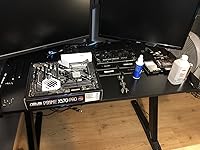

  • Amazing board with excellent memory overclocking!
Style: X570-PRO
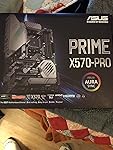
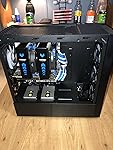
I have owned this motherboard for around 12-18 months now. I have built many PCs, used a lot of motherboards, and did a lot of research before picking this board. After almost 18 months of use I can say I’ve never had one single issue with this motherboard. It looks premium, has great features, USB C, some of the best memory overclocking across all X570 boards, and much much more. It comes with 12+2 power stages, duel NVMe 4.0 support, DDR4 support up to 4400mhz, multiple RGB and ARGB headers, 6 PWM fan headers plus a water pump header, USB 3.2 Gen 2 ports, and basically as good as it gets everything outside on board WiFi. That’s the only thing it’s missing. It’s ready out of the box for both Ryzen 3000 and 5000 chips with no changes needed to the bios. Speaking of the bios it’s amazing. Very easy to navigate and feature rich. I’m running a Ryzen 5800X, duel Gen 4 NVMe drives, an RTX 3080, 6 fans, an AIO, 4 sata based SSDs, and an internal wireless card. I’m using an EVGA G3 Supernova 80+ Gold 850 Watt PSU to power it all. The board takes two EPU(CPU) cables to power it but will work fine with just one as well if your PSU doesn’t have two. I overclock all my components. I enjoy tinkering and have always overclocked. This board overclocks extremely well on the CPU and even better on the memory. It even has one step overclocking where the board does it for you for some extra performance if you don’t want to. Asus fan control is fantastic too. It automatically detects rather you are using DC or PWM fans and syncs them all up. Auto adjusting their speed based on temps of your system. Very easy to flash to a new bios, and do whatever you like on this boards Bios. When you power it on there are CPU, GPU, Ram, and Boot LEDs that blink to let you know if there are any issues and at which stage in startup it occurs. The board has massive heatsink around the CPU socket and the chipset fan does an amazing job at keeping the chipset cool while being silent. I run my 5800X at 5.1ghz all cores, with all my storage drives, both NVMe slots populated with Gen 4 drives, tons of case fans, and a heavily overclocked RTX 3080 and I’ve no had any issues at all. Prior to the 3080/5800X I had a 2070 Super and Ryzen 3600X in it. Worked just the same and perfect with that hardware as well. My memory config is also 32GB of 3600mhz G.Skill. I use 4x8GB sticks so all 4 dimm slots are populated and it still runs 3600mhz CL16 without issue perfectly. I can even get them to run higher if I want but I can’t get my infinity fabric to match the speed so I leave them at 3600mhz. The board has RGB on both the chipset fan and on the top left near the your ports. You can change the colors of this to whatever you like to match the rest of your setup. It’s subtle but looks nice. Or you can have them off if you want no lighting. All in all this is an amazing board for overclocking with tons of ports and features, an easy to use bios, duel Gen 4/PCIE 4.0 support, and it looks fantastic. It’s been featured and used in many of LTTs PC builds and videos as a great motherboard for a high end machine without over paying for extra features you will never use. As I said the only thing it doesn’t have that you may want is on board WiFi. Just throw a wireless card in and you’re good to go. There are more than enough slots for one plus any size GPU or GPUs you like. I love this motherboard and it’s one of the best and easiest to use I have ever owned. My temperatures on all my components even while overclocked stay well below average using this board and my case which is designed for high air flow. The VRM cooling is excellent here. You can overclock and push any Zen 2 or 3 Ryzen based chip you like. It has a ton of USB ports both type A and C so plenty to hook up whatever you need. Support for RGB and ARGB, 6 says ports, two NVMe slots, and 7 fan headers in total counting the pump one. You can make a monster rig with this board. An amazing and fantastic looking X570 board. Another thing I forgot to mention I really like about it is one NVMe slot comes with it’s own heatsink cover built in but one does not. Many boards now both come with covers. Which you might think is good but most of the nice high end Gen 4 NVMe drives come pre installed with a nice thick heatsink already on them. So you can put it in the slot with no internal heatsink cover and rock on without removing it at the expense of damaging it. If you have an NVMe with no built in heatsink you have a slot for that too. It’s just a great all around board for any system rather it’s be for gaming or content creator/professional use. I included some pics of the box, the board, and my PC with it running on the board. If you are gonna use any Zen 2/3 based chip then have no worries and be at ease that it will 100% work just fine on this board straight out of the box. If you have any concerns as long as you don’t NEED on board WiFi and plan to use an internal wireless card or Ethernet cable then put them to rest. Order with confidence that you are getting an excellent board that will do whatever you need. I hope this review helped. Thanks for reading, check out the pics, and please leave a like if it did. If anyone has any questions just submit them and I will answer them the best I can. Thanks! ... show more
Reviewed in the United States on December 30, 2021 by Darkoasis Darkoasis

  • Sparse on mounting hardware/cables/stickers. Excellent AMD Ryzen9 3900X Platform
Style: X570-PRO
One of the cheaper ASUS motherboards for the new Ryzen 9 AMD X-570 chipset. Wasn't my first choice, was looking at the TUF-Gaming boards, but they were out of stock. I wasn't disappointed. It worked great out of the box. I was a little concerned as the motherboard box did not have any kind of seal on it, nor did the static-package. I carefully looked over the board, took pictures, and found no apparent damage or signs of previous use. I've build a couple of dozen systems in the past 20 years. This board is great. I am guessing most of the negative reviews are user error and/or an occasional fluke. I've yet to have a problem with an ASUS motherboard. My M4A89GTD PRO/USB3 from 2010 is still rocking away just fine...although barely starting to slow down. With regard to the Memory DDR4 mounting brackets being "cheap", only having one moving locking end, as one reviewer commented on--I honestly can't imagine that being a problem. Pushing straight down on the DDR4 DIMM as the manual shows works great, and the locking pin is secure. Honestly one of the easier DIMM insertions I've done. I don't treat my cases with kid gloves, and move systems around a fair amount, and I can't imagine the DIMMs coming out. My verdict on that complaint is that it is unfounded/exaggerated. The box is sparse on mounting hardware. Not sure if ASUS is cost cutting, or if this is because it is a lower end ASUS board (and no ASUS board is junk, they just have cheaper options), but the only fasteners included were the spacers and screws for the M.2 port. Fortunately for me the Rosewill case I bought came with mounting hardware, and I had leftover screws and such from previous builds. That said be aware if your PC case doesn't come with the motherboard mounting screws, you may be delayed in your build. They do include the ASUS "Q-Connector" in the box, which makes connecting all your PC Case's front I/O cables (Power switch, Power LED, Reset Switch, Drive Access light, Front Audio etc...) much easier. Only 2 SATA Cables come in the box. No ASUS Sticker : ( Seems cheesy, but my biggest gripe is no stickers. Guess you have to buy ROG or Tuf-Gaming to get an ASUS sticker included in the cost. Seems like their marketing folks should spring for a few cents to support brand loyalty and brand pride (I'll be ASUS until I get burned--and not by something dumb I do, but by shoddy products, which I've yet to experience--as long as they stay quality they've got a customer for life, with or without the sticker). THE UEFI BIOS worked great. I was able to update the BIOS Firmware directly from within the BIOS over the internet before I installed Windows 10. Worked like a champ. Updated to version 1005 dated 8/12/2019 without ever leaving the BIOS or having an OS installed. The only install hiccup I had was more likely due to my older defective LG BH12LS35 SATA Blu-Ray burner. It has been acting odd, not wanting to read/burn DVD's sporadically. The UEFI BIOS recognized it fine, but it seems as if there were mechanical problems. Ended up using the Windows 10 Media Creation Tools to make Thumb Drive installation media, which worked great. I was a little concerned that my new Sabrent Rocket PCIe 4.0 M.2. SSD (one of the fastest drives currently available for consumers, one of the few devices early adopters can play with PCIe 4.0 with) may not cooperate well with the motherboard, and Windows 10 install. Here ASUS could have made the motherboard manual more clear. I am not sure if I understood the instructions correctly, or it just worked. Pages 1-13, 1-21, 3-14, and 3-15 of the motherboard manual are the sections that pertain to setting up PCIe 4.0 drives (you can download the motherboard manual off of the ASUS website to pre-view this--or any other ASUS board you are considering). 1-13 briefly mentions selecting either AHCI or RAID mode for the SATA connectors. Here I was a little confused as the M.2 sockets can run in either PCIe 4.0x4 or SATA mode, and I wasn't sure if changes made in the BIOS section for the SATA changed anything on the PCIe drive, as there didn't seem to be a settings page for PCIe drives. In the end I reverted back to AHCI mode, as I needed the Blu-Ray Burner to work. My previous boards allowed some ports to run RAID and others AHCI, this did not seem to be an option. Perhaps the RAID controller software is sophisticated enough to allow some ports to run as AHCI. I don't know for sure. I briefly considered using both M.2 sockets with 2 Sabrent Rocket PCIe 4.0 drives in a RAID configuration...but that just seems silly. In the forums some users have talked about the fact that there is nothing you can really copy from this drive to, that would take advantage of its insane speed. It does boot fast LOL. Page 3-14 references NVMe RAID mode. Here I am not sure if running the PCIe 4.0 Sabrent Rocket in RAID would be selected here, I think so. It is just an enabled/disabled option. I believe I enabled it, despite only having one drive. Finally on page 3-15 the manual mentions the PCIEX16_2 Bandwidth ( the physical PCIEX16_1 slot is the one closes to the CPU socket, and the one they recommend using for a single GPU and putting a 2nd SLI GPU in PCIEX16_2, see pg 1-7). The two options for PCIEX16_2 Bandwidth are [X8 Mode] or [PCIe RAID Mode]. The explanatory note for [PCIe RAID Mode] states "The Hyper M.2 x16 card and other add-on M.2 devices all run at x4 mode, which allows you to create a PCIe RAID array." A further note below that states "Use PCIe RAID Mode when installing the Hyper M.2 X 16 card or other M.2 adapter cards. Installing other devices when using PCIe RAID mode may cause your PC to fail to boot up." I am using an other M.2 adapter card, so that is why I selected PCIe RAID mode for this setting and elsewhere. It is still not very clear to me what I was supposed to do, but she is up and running. I've yet to tweak my Memory to get the full speed out of it, currently in the default setting not using the XMP profile for the JDEC values. Benchmarking everything on defaults with Passmark puts the CPU and Sabrent Rocket in the 99th percentile both. So good job AMD with the Ryzen 9 3900X and this board seems to "play well" with that CPU right out of the box, as well as the new Sabrent Rocket (not listed on the QVL). I wasn't going to wait around for Samsungs PCIe 4.0 solution. So far very pleased with this configuration. ... show more
Reviewed in the United States on August 20, 2019 by Chris Quimby

Can't find a product?

Find it on Amazon first, then paste the link below.
Checking for best price...