Search  for anything...

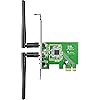
ASUS(PCE-N15) maximum performance Wireless-N Network Adapter ( 300Mbps Transmit / 300Mbps Receive) with PCI-E interface, Include Full Height and Low Profile bracket, WPS button Support

  • Based on 1,559 reviews
Condition: New
Checking for the best price...
$23.06 Why this price?
New Year Deal · 25% off was $30.60

Buy Now, Pay Later


As low as $5 / mo
  • – 4-month term
  • – No impact on credit
  • – Instant approval decision
  • – Secure and straightforward checkout

Ready to go? Add this product to your cart and select a plan during checkout.

Payment plans are offered through our trusted finance partners Klarna, Affirm, Afterpay, Apple Pay, and PayTomorrow. No-credit-needed leasing options through Acima may also be available at checkout.

Learn more about financing & leasing here.

Free shipping on this product

This item is eligible for return within 30 days of receipt

To qualify for a full refund, items must be returned in their original, unused condition. If an item is returned in a used, damaged, or materially different state, you may be granted a partial refund.

To initiate a return, please visit our Returns Center.

View our full returns policy here.


Availability: Only 1 left in stock, order soon!
Fulfilled by MemoryC

Arrives Feb 10 – Feb 15
Order within 10 hours and 14 minutes
Available payment plans shown during checkout

Protection Plan Protect Your Purchase
Checking for protection plans...

Features

  • Software AP - 2-in-2 device for wireless connection sharing
  • WPS(Wi-Fi Protected Setup) button - Quickly set up a secure wireless connection
  • Support Multiple OS - Windows and Linux
  • Software AP - Connect your notebook and game consoles to the Internet; Supports WEP, WPA-PSK, and WPA2-PSK methods for enhanced security
  • Interface: PCI-Express; Standard: IEEE 802.11 b/g/n; Antenna: 2x R SMA Antenna; Operating Frequency: 2.4GHz;
  • Operation Channel: 11 for N. America, 14 Japan, 13 Europe (ETSI); Data Rate: 802.11 b/g/n- downlink up to 300Mbps, uplink up to 150Mbps(20/40MHz)
  • Certificates: CE, FCC, C-Tick, IC; OS
  • Modulation: CCK, DQPSK, DBPSK, OFDM, Management: Software AP
  • Utilities: Wireless setting, Site survey, WPS Wizard; Security: 64-bit WEP, 128-bit WEP, WPA2-PSK, WPA-PSK, WPS support
  • Software AP mode allows the WLAN card to act as a virtual access point, and connects your notebook, or other game consoles to the Internet.
  • Designed to provide complete end-to-end wireless performance from the server or server backbone to the switch infrastructure and down through to the desktop with the PCI Express connector
  • Antenna: 2 x R SMA Antenna
  • OS Support: Windows 8 32bit/64bit, Windows 7 32bit/64bit, Windows Vista 32bit/64bit, Windows XP 32bit/64bit, Linux Kernel 2.6 (Support Ubuntu only)

Description

Asus PCE-N15 300Mbps 802.11b/g/n Wireless PCI-Express Adapter


Product Dimensions: 4.74 x 0.87 x 0.87 inches


Item Weight: 2.19 ounces


Item model number: PCE-N15


Batteries: 1 Product Specific batteries required.


Is Discontinued By Manufacturer: No


Date First Available: June 6, 2011


Manufacturer: Asus


Frequently asked questions

If you place your order now, the estimated arrival date for this product is: Feb 10 – Feb 15

Yes, absolutely! You may return this product for a full refund within 30 days of receiving it.

To initiate a return, please visit our Returns Center.

View our full returns policy here.

  • Klarna Financing
  • Affirm Pay in 4
  • Affirm Financing
  • Afterpay Financing
  • PayTomorrow Financing
  • Financing through Apple Pay
Leasing options through Acima may also be available during checkout.

Learn more about financing & leasing here.

Top Amazon Reviews


  • Constant Disconnects / High Latency
I bought two of these adapters because I moved into an apartment with "free internet" - which happened to be a wireless network through out the house. Having two desktops, that wasn't very fun. Installing the unit was a breeze - power down your PC, pop it into your mini PCI-e, install the drivers - and off to the races you go. Although, if you're running Crossfire/SLi you may not be able to use this card. I only have one GPU per PC, and I had to drop the cards down to the next available slot to access the proper port. After installing and getting up and going, the fun began. At first, I was disappointed because the card was only reporting 2-3 bars - after connecting though it maxed out and stayed at 4-5 the entire time. Then the disconnects started happening. The card would simply lose the network after a couple of minutes, and only when it decided it was the proper time would it come back. The entire time, any surrounding networks would still be visible - but the router for the apartment just didn't exist anymore. I verified that the router was still going through my cell phone. Eventually, it would return and remain working for about 5 minutes before disappearing again. A little research showed that the chip inside the card is actually a Realtek RTL8192CE - so I uninstalled the drivers I downloaded from Asus and installed the drivers from Realtek. Same issue persisted. I played around with various settings trying to find anything that the card would like that would keep it from dropping out so bad - but in the long run it just doesn't want to work at all for more than 5 minutes (on a lucky attempt). Then, I decided to be bold and try to play a video game (RIFT, to be exact). Upon entering the world, my latency would jump sporadically from 47ms to a whopping ~4,000ms - making any actions useless. I ran a number of Pingtests, and even kicked on a recurring command prompt ping for about 15 minutes. Both tests reported a consistent ~40ms, with the exception of the CMD test spitting out a random ~100ms here and there. I took breaks in my time with this card to test out another, was supposed to be temporary, USB dongle that I picked up (the Netgear WNA3100). Signal strength isn't as great, but latency and stability are superb comparative. In the long run, I've attempted everything that other users have reported works fine. The card itself would have been fantastic for standard browsing (should the connection have remained) - but as I'm a gamer and a web designer - I rely on my packets getting where they need to be without any delay (especially 4,000ms worth of it). I still don't know what exactly is wrong with it, but I'm already done playing with it and am shipping it back for a refund tomorrow. ... show more
Reviewed in the United States 🇺🇸 on August 4, 2012 by Kyle J. Gagliardo

  • Better than ethernet
If you are looking to make your desktop wireless, look no farther. The PCE-N15 works great. This is the updated/ faster model of the PCE line. I did a lot of research on this- on many other sites than amazon. I installed it in just a few minutes, and in a couple more minutes, was connected to my network. I had to install the included software. The PCE-N15 can be installed with just a little common sense and mecanical know-how. It does take a little pressure to snap it into place on the plate- the only tool required is a screwriver. Since then, no looking back. When I wake up my computer from sleep mode, it connects to the network in about 15 seconds (if that long). No dropped signal issues, no problems at all! Always stays connected. I do not have to refer to the software to make any changes, or reset anything. One VERY IMPORTANT thing to know before purchase: can my computer accomodate this device? Make sure your motherboard has an open slot for installation. Just open your case and look. I bought the bigger slot version (dual band) from ASUS and did not realize it was already being used by my video card until after it arrived. There are only two slot size versions- easy to tell the diffrence. The return process was easy-I did not open the box. I cannot comment on reception because my router is about three feet away through an interior wall. Better than ethernet: I have a good cable connection. Previously I had my internet conversion box connected to my PC by the ethernet cable. After installation, it seemed to me that pages and video were loading up faster than before. I do not have numbers to back it up, just from what my experience was. Its a great product made by a great company. And its worth the money. ... show more
Reviewed in the United States 🇺🇸 on December 13, 2011 by B. Jennings

  • It works fine
This adaptor is in my Win 7 machine. After I installed the card, I had the PC hooked to the Internet with an Ethernet cable and it downloaded the driver. I did not use the included disk because I wanted to get the latest driver. (I wanted to go wireless to get rid of the Ethernet cable running on the floor over to where an Ethernet switch is located.) Once that installed, I unplugged the Ethernet cable and rebooted, and got the wireless icon in the notification area in the lower right hand of the computer screen and connected to my Apple wireless network with no problem. Speed is pretty good, but I am in the same room as the wireless access point. I am getting as much as 30 mebabits down and 10 up with my Comcast service. On my iMac I get better than 50 down and 10 up, and it is in a different room. But I don't think the speed difference between 50 and 30 matters all that much in real world usage of the Internet. Very easy to install and get working. Amazon dropped the ball on a timely delivery this time. Ordered over the weekend, delivered on Thursday (I am a Prime Customer). I do not think this was a Lazership problem because it was not shipped until Tuesday. They probably had a huge number of orders over the weekend and just could not get to them all on Monday. Not that big a deal for me. Amazon is usually really great in meeting their delivery commitments. ... show more
Reviewed in the United States 🇺🇸 on August 1, 2013 by Rick

Can't find a product?

Find it on Amazon first, then paste the link below.
Checking for best price...