Search  for anything...

Apple Pencil 2nd Generation - 2X Fast Charging Stylus Pen for iPad Air M2/M3, Pro M4/11/13, A16/11th/10th Generation - Magnetic,High Precision,Palm Rejection iPad Pencil White

  • Based on 42 reviews
Condition: New
Checking for the best price...

Buy Now, Pay Later


As low as $7 / mo
  • – 4-month term
  • – No impact on credit to apply
  • – Instant approval decision
  • – Secure and straightforward checkout

Ready to go? Add this product to your cart and select a plan during checkout.

Payment plans are offered through our trusted finance partners Klarna, Affirm, Afterpay, Apple Pay, and PayTomorrow. No-credit-needed leasing options through Acima may also be available at checkout.

Learn more about financing & leasing here.

Selected Option

Free shipping on this product

FREE 30-day refund/replacement

To qualify for a full refund, items must be returned in their original, unused condition. If an item is returned in a used, damaged, or materially different state, you may be granted a partial refund.

To initiate a return, please visit our Returns Center.

View our full returns policy here.


Availability: Only 5 left in stock, order soon!
Fulfilled by Amazon

Arrives Apr 27 – Apr 28
Order within 18 hours and 57 minutes
Available payment plans shown during checkout

Protection Plan Protect Your Purchase
Checking for protection plans...

Color: Black


Features

  • EDIVIA Apple Pencil Compatibility: Made for iPad 2018-2025 Series, it works with iPad Air M2/M3, iPad Pro M4/11/13, iPad Mini 7th/6th Generation, iPad 11th/10th/9th/8th/7th/6th generation,it allows you to using it as a tool for daily work and study, design work and on line teaching
  • High Precision: The latest apple pencil is equipped with a 1.5mm super fine pom tip, which is more precise and sensitive than other pens, Allowing you to write small letters and draw thin lines. Truely smooth writing feeling without lagging/skipping/disappearing
  • No Big Finger with apple pencil: This apple pencil for ipad 10th generation has a better touch point than the tip of your finger,which provides better accuracy to little touch focuses like keys on the screen console. Forget your big finger after using this pencil for iPad
  • Palm Rejection Technology: you can rest your hand freely on ipad screen without uncomfortable glove, just like using a real pen on the paper, your imagination is the limitation.
  • High Precision apple pencil 2nd generation:With upgrade same original for apple pencil tip,it offers smooth writing feeling, better durability and no scratches, this new convenient drawing/writing tool is your great daily working/living partner.

Description

EDIVIA Apple Pencil 2nd Generation - 2X Fast Charging Stylus Pen for iPad Air M2/M3, Pro M4/11/13, A16/11th/10th Generation - Magnetic,High Precision,Palm Rejection iPad Pencil White 1.5mm Super Fine Plastic Tip apple pencil for iPad lets you draw,write and navigate with pinpoint accuracy and offers comfortable pen-like control stylus pen for iPad Anodized aluminum body apple pen Provide durability and offers a stylish appearance Palm Rejection apple pencil enables you to rest your hand on the screen while drawing/writing/sketching Soft Tip ipad air pencil 2024 allows you to interact with your device's touch screen easily Touch-Control Cap Pencil for iPad Air M2 offers easy operation Easy Steps to Start: 1. One Touch on the Touch Cap to power on/off. 2. Open recommended drawing/writing applications in your device and change the input method to handwriting. 3. There you go. Enjoy design with the Stylus for iPad Air stylus pencil as you want. Now you can start using it. 4. Tip: there isn't bluetooth connection or cable connection with your device. 5. Settings: If the stylus cannot write, please go setting your iPad or iPad Pro as below steps :Settings>Apple Pencil>Turn off the Apple pencil / or Settings>Notes>Turn off "Only draw with Apple Pencil" If you have any question or concern, just let us know, we will help on troubleshooting

Color: Black


Brand: EDIVIA


Material: Aluminum


Number of Batteries: 1 Lithium Polymer batteries required. (included)


Item Weight: 40 Grams


Battery Average Life Standby: 30 days


Compatible Devices: iPad 2018-2025 Series


Item dimensions L x W x H: 6.5 x 0.47 x 0.47 inches


Are Batteries Included: Yes


Batteries Required?: Yes


Product Dimensions: 6.5 x 0.47 x 0.47 inches


Item Weight: 1.41 ounces


Item model number: ID715


Batteries: 1 Lithium Polymer batteries required. (included)


Date First Available: September 15, 2021


Manufacturer: EDIVIA


Frequently asked questions

If you place your order now, the estimated arrival date for this product is: Apr 27 – Apr 28

Yes, absolutely! You may return this product for a full refund within 30 days of receiving it.

To initiate a return, please visit our Returns Center.

View our full returns policy here.

  • Klarna Financing
  • Affirm Pay in 4
  • Affirm Financing
  • Afterpay Financing
  • PayTomorrow Financing
  • Financing through Apple Pay
Leasing options through Acima may also be available during checkout.

Learn more about financing & leasing here.

Top Amazon Reviews


  • Excelente
Color: White
Excelente
Reviewed in the United States on April 12, 2025 by Juraha

  • This pen works as well as Apple product
Color: White
I have been using this pen with my Ipad for about two months. I am very pleased with the functionality of the pen and would order it again.
Reviewed in the United States on February 14, 2024 by K Cantwell

  • A true game changer
Color: White
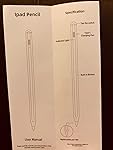
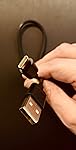
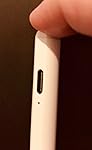
I've used iPads since their inception and upgraded to the latest one this year. I didn't want to spend a ton of money on the Apple-branded pencil, because I wasn't convinced a stylus would actually bring anything to the table. After all, I'm not an artist, and my handwriting is absolutely horrible (and slow). When I saw this item available for review on the Vine program, I had to at least check it out. I am SO happy I did! I had no idea how much using a stylus could change your entire experience of using a tablet! In fact, it caused me to learn about many features of my tablet that I had no idea existed (such as the Accessibility feature that allows a persistently present "menu" button to access common functions that normally aren't available when using a "pencil"). The tip of the stylus is very fine, which is wonderful because it dramatically increases the accuracy of your "tapping". In fact, it's far more accurate and less frustrating than using your fingers. I still haven't gotten the hang of using my handwriting to enter text into text boxes yet, but the fineness of the stylus tip has actually improved my overall handwriting. I just find it faster, at this time, to pop up the stylus keyboard and tap out my message. The magnet is very strong, and it snaps right in place on the side of the newer iPads. It's not clear to me, however, whether this stylus gets any benefit out of the induction charging of the iPad (it's my understanding that when you click an Apple Pencil into place, it begins recharging). But, it certainly hasn't been an issue, and the charge lasts an amazingly long time. I use my tablet for a non-stop period of about 3-4 hours per day and made the decision to recharge the stylus after a week only because I didn't know how much charge was left and didn't want it to run out on me while using it. When I say this is a game changer, I'm not sure I can adequately describe what I mean other than to say it completely changes (improves) your experience of using a tablet. To the point where in those brief moments where I decide to just do something quickly by using a finger swipe/tap, it actually feels strange to me and somehow less efficient. And this is after only one week of usage. If you're looking to give a stylus a try and don't want to drop a ton of change on an expensive Apple stylus, this is the *perfect* solution. It comes elegantly packaged with 2 replacement tips, a small instruction booklet, and a small USB-C to (whatever you call the larger form factor USB) cable. Even had I not had access to this stylus through the Vine Voice program, it's priced well within the "let's give this a try" range for me. I don't hesitate to recommend this highly. ... show more
Reviewed in the United States on November 6, 2022 by Nat Russo

  • Good item
Color: Grey
Ease of use
Reviewed in the United States on December 4, 2022 by Jack L. Whitley

  • This is better than the apple pen.
Color: Grey
The media could not be loaded. When I first got my ipad in 2020 I opted to buy the apple pen because the best buy salesperson suggested that I invest in a pen especially if I was doing graphic design and offered me a price match. He was able to find a price match for the apple pen for $90. Worst decision ever. That pin was trash and I never used it. It didn't have strong magnets that stuck to it so I had to get thick case that came with a pen holder. And I didn't like how you could not turn pen on or off you literally had to connect the pen by plugging it into the lightning cable slot. This pen is far greater in comparison. The on and off button is touch which works one hundred percent of the time. The tops screw on and off making it easier to change the tips. And it could be me but it seems like this blue tooth works very well it connects and find the pin automatically which is amazing. I mainly use it for a graphic design and to help my daughter with hand writing on different applications. I have had no issues using the pen at all. And for this price it's an old brainer! ... show more
Reviewed in the United States on November 26, 2022 by Ahmad

  • Doesn’t work good at all
Color: Grey
DO NOT WASTE YOUR MONEY. This pencil doesn’t work good at all. It works when it wants to. It do not work all the time like it is supposed to.
Reviewed in the United States on December 8, 2022 by Sartise Garcia

  • USB Charged Stylus
Color: Black
The media could not be loaded. iPad Air 2022 pencil is magnetic and palm rejection. I love the palm rejection feature being a left hander I always drag the side of my hand on everything. The tips are hardy and soft and the actual pen is easy to turn on and off as you can see in the video with a click on the bottom of the pen. This is a very smooth writing and coloring stylus. I’ve tried others but I really like this one the best. This stylus is for any age really from small kids to adults. I’m an adult and I have had so much fun using this tool. This stylus is also precise and you can do thin lines or fat lines depending on how you hold your pen. This stylus pen is USB charged with the charger included. This is my third one btw. One my 7 y/o granddaughter uses, then I got a different brand ( I wasn’t happy with it) and now I got this one again for myself. This easy easy to use stylus is a good value and is very giftable and ready to go!! ... show more
Reviewed in the United States on November 16, 2022 by KariH. KariH.

  • So Far So Good
Color: Black
I am not an artist 👩🎨. I would like to improve my artistic ability, however. I think that this stylus will allow me to do just that. It couldn’t have been easier to start using. Just tap the top of the stylus/pen to turn it on and open the app on which you will use the stylus. I’ve been using it on Pages on my iPad. I will use it in other apps in the future. It has worked exactly as I would have hoped. Some other reviewers have done a nice job of giving details about the Stylus Pen. I may well add some details of my own when I’ve had more time to use it. Up to this point, I have really enjoyed It. It’s a lot of fun. I wanted something that was easy to use and worked as (I thought) it should. I think that I’ve gotten exactly that with this item. ... show more
Reviewed in the United States on November 22, 2022 by Eudaimonia

Can't find a product?

Find it on Amazon first, then paste the link below.
Checking for best price...