Search  for anything...

AOOSTAR AG03 eGPU Dock with 800W PSU, OCuLink & Dual Thunderbolt 5, External GPU Dock for Windows 11 Laptops, Mini PCs & Gaming Handhelds, GPU Not Included

  • Based on 23 reviews
Condition: New
Checking for inventory...

Notify me when this product is back in stock

$279.00 Why this price?
Save $10.99 was $289.99

Buy Now, Pay Later


As low as $46.50 / mo
  • – 6-month term
  • – No impact on credit to apply
  • – Instant approval decision
  • – Secure and straightforward checkout

Payment plans are offered through our trusted finance partners Klarna, Affirm, Afterpay, Zip, Apple Pay, and Google Pay. No-credit-needed leasing options through Acima may also be available at checkout.

Learn more about financing & leasing here.

Free shipping on this product

FREE 30-day refund/replacement

To qualify for a full refund, items must be returned in their original, unused condition. If an item is returned in a used, damaged, or materially different state, you may be granted a partial refund.

To initiate a return, please visit our Returns Center.

View our full returns policy here.


Availability: Unavailable
Fulfilled by Amazon
Available payment plans shown during checkout

Features

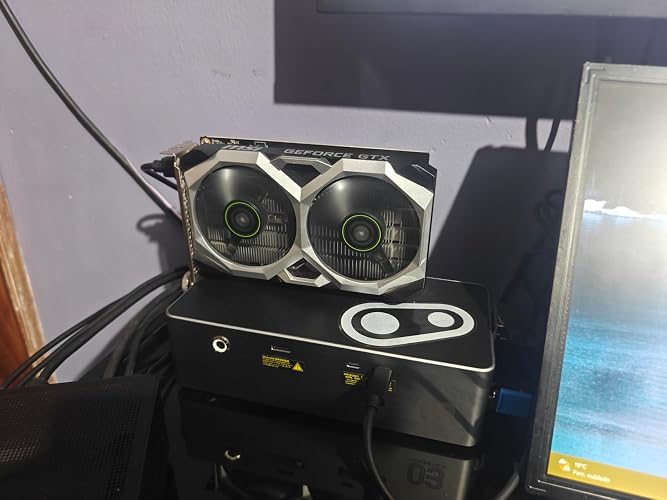
  • External GPU Dock with Built-in 800W PSUAOOSTAR AG03 is a powerful eGPU dock and external GPU docking station designed to add desktop-class graphics performance to compatible Windows laptops, mini PCs, desktops, and gaming handhelds. This GPU docking station features a built-in 800W server-grade power supply and supports up to 500W GPU power output, helping create a cleaner external GPU setup without bulky extra power bricks. Graphics card is NOT included.
  • OCuLink eGPU Dock + Dual Thunderbolt 5 PortsAG03 combines 1 x OCuLink port and 2 x Thunderbolt 5 ports with the Intel JHL9480 controller, making it a flexible OCuLink eGPU dock and Thunderbolt 5 eGPU dock for high-performance expansion. For Thunderbolt/USB4 eGPU connection, please use the right-side TB5 port marked with the computer icon. The left-side TB5 port supports DisplayPort protocol and 27W output, and is not intended as the main eGPU host connection.
  • Compatibility Notice Before PurchaseDesigned as an external GPU dock for select Windows 11 devices equipped with OCuLink, Thunderbolt 4/5, USB4, or USB4 v2 ports. Windows 11 22H2 or later is recommended. Not compatible or not recommended for AOOSTAR GT37, AOOSTAR WTR MAX, ROG Xbox Ally / Z2 Extreme devices, RX 9070 XT GPU setups, and certain MINISFORUM models. Compatibility may vary by host device, BIOS, firmware, GPU model, cable, and driver. Please check compatibility before purchase.
  • External GPU Enclosure with PSU & GPU Cable NoticeAG03 works as an external GPU enclosure with PSU, providing 3 x 8-pin GPU power connectors and supporting up to 500W graphics card power output. Some high-end graphics cards using 12VHPWR or 12V-2x6 power connectors may require an additional compatible cable or adapter, which is not included. GPUs requiring more than 500W are not recommended.
  • Active Cooling eGPU Dock for Performance SetupsBuilt for gaming, AI computing, 3D rendering, video editing, and professional workloads, AG03 is an eGPU docking station with active cooling and a server-grade PSU to maintain stable power delivery. Fan noise may be audible in quiet rooms or under heavy GPU load. For setup or compatibility questions, please contact AOOSTAR support before returning the product.
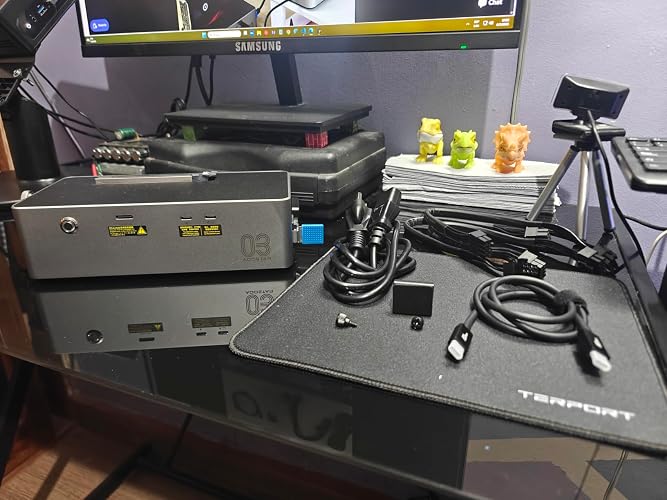
  • What In Box: 1 x AOOSTAR AG03 Oculink port EGPU Dock 1 x TB5 cable 1 x Power supply 2 x Switch Cable * The GPU is not included.Porduct size 22.5 x 11 x 6cm, weight 1.5KG, and unlimited graphics card length.AOOSTAR provide 12 months after-sales service from the date of order, For compatibility, driver, GPU cable, or setup questions, please contact AOOSTAR support first. Our team can help you check your device, GPU model, cable connection, and driver setup.

Brand: AOOSTAR


Hardware Interface: 3.0 V TTL


Compatible Devices: Windows 11 laptops, gaming handhelds, mini PCs


Product Dimensions: 8.86"L x 4.33"W x 2.36"H


Number of Ports: 3


Item Weight: 1.6 Kilograms


Wattage: 240


Input Voltage: 240 Volts


Number of Items: 1


Unit Count: 1.0 Count


Hardware Interface: 3.0 V TTL


Compatible Devices: Windows 11 laptops, gaming handhelds, mini PCs


Number of Ports: 3


Wattage: 240


Input Voltage: 240 Volts


Minimum Required Operating System Version: Windows 11


Smart Home Compatibility: Not Smart Home Compatible


Item Dimensions L x W x H: 8.86"L x 4.33"W x 2.36"H


Item Weight: 1.6 Kilograms


Brand: AOOSTAR


Manufacturer: AOOSTAR


Unit Count: 1.0 Count


Warranty Description: 1 YEAR


Frequently asked questions

This product is currently out of stock. Please check back later for shipping info.

Yes, absolutely! You may return this product for a full refund within 30 days of receiving it.

To initiate a return, please visit our Returns Center.

View our full returns policy here.

  • Klarna Financing
  • Affirm Pay in 4
  • Affirm Financing
  • Afterpay Financing
  • Zip Pay in 4
  • Financing through Apple Pay
  • Financing through Google Pay
Leasing options through Acima may also be available during checkout.

Learn more about financing & leasing here.

Top Amazon Reviews


  • Clean and futureproof!
Coming from the EG01, the AG03 is an upgrade. It looks much cleaner on my desk and takes up less space. It works well with my MACO 8845HS and 9070 XT over Oculink, and I'm confident that it'll be ready for when I eventually acquire some TB5 hardware. One important limitation with this Oculink setup is that the Thunderbolt/USB4 chip is completely bypassed, meaning the host PC can't communicate with either port. Interestingly, they aren't strictly charging-only; they actually function as an isolated, peer-to-peer hub between themselves. For example, an Android device plugged into the right side port can browse the photos of an iPhone plugged into the left side port. Beyond that unique data bridge, they are still highly useful for power, as the right side supports 140W output and the left side supports 27W output. This is a nice advantage over the EG01 that allowed me to get rid of my bulky laptop charger from my power bar, though the lack of a DC power port means I'm not gaining any outlets in the end since I now need to use the power adapter that came with my mini PC. The PSU fan noise doesn't bother me at all. To my untrained ears, it doesn't sound any louder than a full-size ATX PSU. Overall, I'm satisfied. My only gripes are that the USB-C ports can't data-tether back to the host PC in an Oculink configuration, and that no Oculink cable is included. ... show more
Reviewed in the United States on July 5, 2026 by Peter C

  • Real thoughts about Aoostar AG03: a reliable and beautiful mini PC setup.
To be honest, I’ve spent years trying every major mini‑PC brand on the market, always ending up with awkward instant failures black screens in under 30 days and devices that never came back to life. Then I found you guys. I had been wanting one of these pretty and functional little bad boys for a long time, even with the investment it required (mainly for the graphics). Maybe it started as a bit of a vanity goal, but now that it finally came true, I absolutely love it. From any angle, this is a genuinely useful and solid addition to any functional setup. ... show more
Reviewed in the United States on July 16, 2026 by Victor M.

  • Defective out of the box.
Included power supply failed immediately out of the box. If you get a red led on your unit start the return process.
Reviewed in the United States on July 1, 2026 by Samuel Vargas

  • A better AG02
I already own the Aoostar AG02, so that’s my baseline for comparison. I use the AG02 over Oculink on my NAS, and picked up the AG03 to pair with an Aoostar MACO 6850H mini PC. One caveat up front: when I first connected the AG03 over USB4, the GPU wouldn’t be recognized at all. Aoostar support was excellent and even sent a second AG03, but the replacement behaved the same. The issue turned out to be with the MACO mini PC, not the dock. Re‑flashing the BIOS (even though the number BIOS build date was identical) immediately fixed the problem. Since then, USB4 has been completely stable. With that out of the way, the AG03 has been great. It supports both Oculink and Thunderbolt 5, and even though my setup is limited to USB4, the AG03 is noticeably more robust than the AG02. Hot‑plug works perfectly on the MACO, whereas the AG02 required the USB cable to be connected before booting. The dock includes two TB5 ports, and the host port can deliver up to 140W (PD 3.1), which means many mini PCs can be powered directly from the dock. The included 800W platinum 1U server PSU is solid and reliable. The fans are audible, but not excessive. In my setup the fan noise from the MACO mini PC itself was more noticeable than the AG03's fans. Performance is excellent. Oculink is still faster due to native PCIe 4.0 x4 bandwidth, but USB4/TB5 offers flexibility and hot‑swap support. Both connection methods work well, and the AG03 handles them reliably. Overall, I prefer the AG03 over the AG02. Once the MACO's BIOS issue was resolved, the AG03 has been rock‑solid and offers a more capable, more stable USB4 experience. ... show more
Reviewed in the United States on July 8, 2026 by hatchna

  • Runs well with compatible hardware, but may not work with old PCs when using NVIDIA 5th gen GPUs
It's a solidly built device that's good for upgrading an older PC, but there are limits as to how old your PC can be before this fails to function properly. This worked okay with a Ryzen 7 1700 PC and an I7 8th Gen PC with an RTX A2000, but it does not function properly with the I7 8th Gen PC when using an RTX 5060ti. The Ryzen 7 1700 seems to have no problems running with either of those GPUs. I have not tried the Thunderbolt adapter since I only have an Oculink PCIe 4x card on a desktop PC. I give 4 stars because they need better documentation in English on all of the limitations and what other hardware you'll need to make it work. The chatbot I asked said there were changes to the 5th Gen NVIDIA GPUs that make them less compatible than the older NVIDIA RTX GPUs were and indicated using Thunderbolt does not fix any of that. ... show more
Reviewed in the United States on May 23, 2026 by Sean

  • Possibly the best eGPU dock on the market right now.
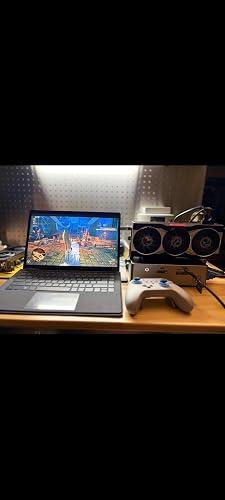
Setup: AG03 AMD 6900XT Minisforum V3 Tablet PC (8840u APU) Connected through USB. eGPU helped make MH: Wilds playable on the tablet. PD charging on the same cable is a really big plus. Build quality is great, nice finish on the body. Possibly the best eGPU dock on the market right now.
Reviewed in the United States on July 1, 2026 by Edward

  • The AG02 is excellent, so is there a good reason to choose the AG03 instead?
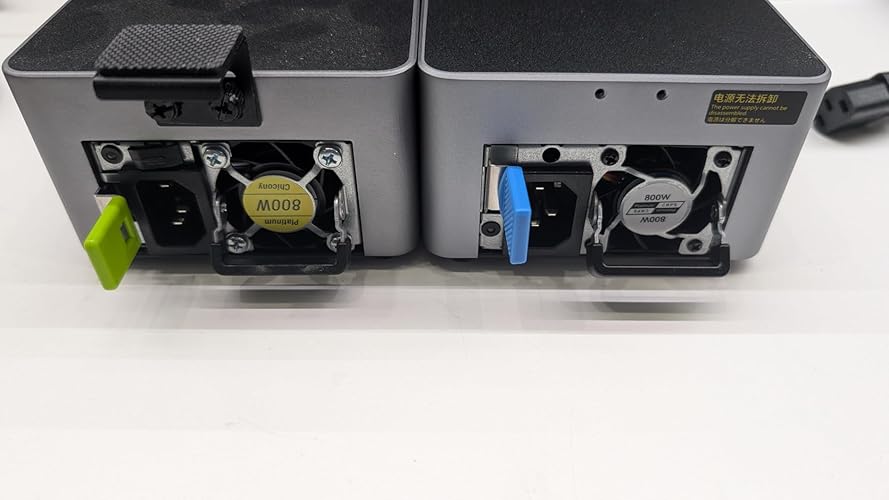
Mechanically and functionally, it's pretty similar, but this dock is based on the Intel JHL9480 chip instead of an asmedia 246x. I'll focus on the differences in this review, most of which stem from the different controller. + TB5 vs. TB4: This dock is capable of 80Gbps instead of being capped at 40Gbps. This only matters if you've got a TB5 device - but it does double your actual data rate if you do. While on paper, faster than oculink- the Thunderbolt overhead means you're still better off with oculink if it's an option. + 140W vs 100W usb-pd power: If you're using this as an EGPU, and your laptop actually draws that much power, there might be an advantage + 2nd Thunderbolt port: You can daisy-chain another thunderbolt device to the AG03 - you can't do that on the AG02. That might be handy if you had an SSD or second dock, or even just a display you wanted to attach to. = Internally, as much as possible of the circuit board was re-used from the AG02. The same PI3DBS16412 pcie switches and PI3EQX16904GL redrivers are in the same locations. The thunderbolt chip is on a discrete module that appears to support 2 separate x4 pcie links, but only one link is used. - The AG02 had a removable Chicony PSU. The AG03 has a similarly spec'd Delta PSU - but there are two hard-to-find screws keeping it from sliding out. I imagine this is because people had issues where the psu was not completely seated, but I would have preferred that the removal screws be user accessible... without having to punch holes in the cover (see photo) - The AG03 still does not come with the appropriate power cables for high end GPUs. You'll need an "evga type" 12VHPWR harness to connect your high end GPU properly. In summary: Do you have TB5 and need the speed? Do you need >100W charging? Do you need an extra daisy chained thunderbolt? If yes to any of those, then the AG03 is probably worth the added cost over the AG02. If not, then you'll probably be completely satisfied with the AG02 and save a few bucks. While i would have docked half a star for the screwed-in swappable PSU, It's not bad enough to dock a whole star, so it holds the 5-star review for me. ... show more
Reviewed in the United States on May 19, 2026 by joefitz

  • Like the AG02 but a bit better.
I bought the AG02 a couple of weeks and it is connected to my main pc (Aoostar WTR Max via oculink to RX9070XT). I snagged this week as I have a couple of older GPUs lying around eg RX660XT and RX6750XT. The latter is in my old Razer Core X but that's a behemoth that occupies so much deskspace that it generally just never gets used. The AG03 is pretty much the same as the AG02 externally except for the extra USBC port and the blue plastic around the PSU instead of orange plastic. It works fine with oculink or TB with the WTR Max, and as a bonus it works with my MSI Claw A8 (which has the Z2 Extreme chip). The MSI did not like the AG02 - screen would go black when connected via TB cable. However the AG03 seems to work fine with the MSI, no black screens, I even got World War Z to benchmark and then play a game. The TB chip has been upgraded from the AG02 to the AG03 and that might be part of the explanation. TB performance seems a bit better (ie less of a downgrade from oculink) with the AG03 but we're talking 5% difference max (when comparing TimeSpy scores). The AG03 (and AG02) design is nice and compact, particularly when compared to the Minisforum DEG1 and DEG2 (and didn't like my RX9070XT). ... show more
Reviewed in the United States on May 14, 2026 by DR T.

Can't find a product?

Find it on Amazon first, then paste the link below.
Checking for inventory...