Search  for anything...

AODELAN Camera Wireless Shutter Release Remote Control for Nikon COOLPIX P1000 P950 B600 A1000 Z50 Z30 Z fc, Replaces Nikon ML-L7

  • Based on 1,265 reviews
Condition: New
Checking for the best price...
$23.99 Why this price?
Holiday Deal · 20% off was $29.99

Buy Now, Pay Later


As low as $5 / mo
  • – 4-month term
  • – No impact on credit
  • – Instant approval decision
  • – Secure and straightforward checkout

Ready to go? Add this product to your cart and select a plan during checkout.

Payment plans are offered through our trusted finance partners Klarna, Affirm, Afterpay, Apple Pay, and PayTomorrow. No-credit-needed leasing options through Acima may also be available at checkout.

Learn more about financing & leasing here.

Selected Option

Free shipping on this product
This item's return window has been extended for the holiday season: Returnable until Jan 31, 2026

To qualify for a full refund, items must be returned in their original, unused condition. If an item is returned in a used, damaged, or materially different state, you may be granted a partial refund.

To initiate a return, please visit our Returns Center.

View our full returns policy here.


Availability: In Stock.
Fulfilled by Amazon

Arrives Tuesday, Dec 23
Order within 15 hours and 12 minutes
Available payment plans shown during checkout

Protection Plan Protect Your Purchase
Checking for protection plans...

Style: Black for nikon


Features

  • [Easy To Use] AODELAN for Nikon camera remote control ML-L7A operating range up to 30m/98.5ft, you can shutter release in any direction,do not need to looking at every direction.
  • [Shooting Still Photos and videos two function] Camera remote control ML-L7A besides shooting still photo (support immediate release and 3-sec and 10-sec delay release.) also can shooting videos.
  • [Zooming Control] - This shutter release for Nikon can control the zoom to Wide-angel coner and telephoto shooting.When you want to see the distant scenery clearly,you can hold the + button.
  • [Adjust Exposure compensation and speedlite] - You can adjust the brightness at any time.If you want adjust speedlite, first you need to raise the flash.
  • [Compatible Models] PLS NOTICE that this Nikon wireless remote control JUST COMPATIBLE WITH Nikon COOLPIX P1000 B600 A1000 Z50 P950 Z30 Z fc. If your camera firmware upgrade to V1.4, so our ml-l7a shutter remote can compatible with Nikon Z6II and Z7II.

Brand: AODELAN


Special Feature: Lightweight


Color: For Nikon ML-L7A Remote Control


Max Number of Supported Devices: 1


Compatible Devices: compatible with Nikon Z50, Z30, Z fc, COOLPIX B600, A1000, P1000, P950.


Product Dimensions: 4.53 x 0.98 x 1.97 inches


Item Weight: 0.847 ounces


Item model number: For Nikon


Batteries: 1 Lithium Metal batteries required. (included)


Date First Available: April 28, 2019


Manufacturer: AODELAN


Frequently asked questions

If you place your order now, the estimated arrival date for this product is: Tuesday, Dec 23

Yes, absolutely! You may return this product for a full refund within 30 days of receiving it.

To initiate a return, please visit our Returns Center.

View our full returns policy here.

  • Klarna Financing
  • Affirm Pay in 4
  • Affirm Financing
  • Afterpay Financing
  • PayTomorrow Financing
  • Financing through Apple Pay
Leasing options through Acima may also be available during checkout.

Learn more about financing & leasing here.

Top Amazon Reviews


  • Excellent product, and excellent seller support!!!
Style: Upgrade White for Sony
The media could not be loaded. Update: 5 stars product, I had a problem linking my camera, I had one option disabled on my camera and the seller replied to my question and helped me solving it within 6 hours. If anyone has the same issue below, please make sure the “Rmt Control Bluetooth” option on the page 2 of network settings is one. After doing it, it worked like a charm. It was my fault, the product was working excellent, cancelling my return and keeping it for sure. To the seller, I apologize. Old Review, disregard: Sony ZV-E10, the remote pairs with the camera, it says ok on the remote screen, but none of the buttons do anything to the camera, also it doesn’t auto connect, it just stays on scanning, and I have to re-pair it, but either way, it didn’t worked. I am returning it this week, if the seller see this and can assure is a problem with my specific unit and not that is not compatible (or if I am doing something wrong), I am open to solutions and get a replacement and change the rating. I will open up a question awaiting support if possible, thanks. ... show more
Reviewed in the United States on June 17, 2025 by Jonathan Fernandez Jonathan Fernandez

  • Just buy it!
Style: Upgrade Black for Sony
Just buy it! It works perfectly for setting up on a tripod and standing far away from the camera. Great value for the money.
Reviewed in the United States on August 27, 2025 by Bowser Creatives LLC

  • Returned, as I could not get it working with my Canon 77D & 90D cameras.
Style: Upgrade Black for Canon
Packaged well and quick delivery, but this was returned, as I couldn't get it to pair up with my Canon 77D. It would pair up with my Canon 90D, but once paired up, I couldn't get the buttons to operate the camera. I liked the design and position of the controls, but couldn't use it on my favorite cameras. I do not own a mirrorless camera, yet, but this is supposed to work with the cameras that I do have, and I have other older remotes that do operate these cameras. ... show more
Reviewed in the United States on October 11, 2025 by Charley

  • Real button makes this better than OEM
Style: White for Nikon
The original Nikon remote has those metal dome buttons. I just have not had the best luck with that button type. This has a rubber keypad with a contact pad on the bottom. It is easy to feel and find buttons without looking. As for compatibility, it worked great with my Z5ii. The toughest part was find that "pairing" is actually called "Save Wireless Controller". I actually had to look that up the manual! GASP! Anyhow, works great. BT recommended ... show more
Reviewed in the United States on May 4, 2025 by B. T.

  • I love this thing!
Style: Black for Canon
I've used cable releases in the past, and I've also used the Camera Connect app on my phone as a remote release. I much prefer this to any of the others. The phone app has its place - it can do things this can't, like provide a remote view of whatever the sensor is seeing, allowing you to make adjustments as if you were doing them right in the camera, etc., but for just focusing and taking the shot without introducing camera movement, this is the best. I can slip it in my pocket, or attach the loop to my tripod or camera. It doesn't throw any light, so it doesn't interfere with astrophotography. It's so simple, I can find the button without looking. I've had no problems with the bluetooth connection, and I've used it with both my R7 and my R6II. If I lose mine, I'll be replacing it immediately. ... show more
Reviewed in the United States on October 27, 2024 by Stephen Hamlin

  • Shows ‘connected’ but does not flash or function
Style: Black for Canon
Canon 6D Markii It shows connected on 2 different screens but will not flash on the trigger itself when the button is pushed. No photos are taken. It’s like it’s not recognizing anything is there. Waste of money. I will be returning immediately.
Reviewed in the United States on November 23, 2025 by Niki Mendez Niki Mendez

  • I got this for the Canon RP. Here is what you need to know for it to work
Style: Black for Canon
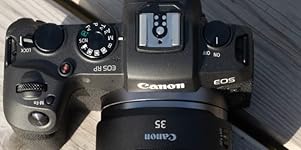
I got this for a Canon RP. Pairing was easy. Just hold "W" and "T" together and it will go into pairing mode. if it flashes like 10 times, then it errored out. Do it again. On the camera is the most important part. Go into bluetooth and get it to where it will ask you to check bluetooth connection. Mine is paired with my phone but this won't get in the way of that. But you can only have one bluetooth connection at a time, so can't use your phone as a screen and take a photo at the same time using the remote. Once you have it searching for a remote, put the remote in pairing mode like listed above. Once it connects, the camera will confirm it. Now it will work. Easy Peasy. ****Now for the important part**** For my Canon, you have the put the camera in 2 second delay mode for the remote to work. If you read the manual or call Canon, you will eventually learn this but it's not obvious. I returned another brand remote because it worked once and then never again because I had it in burst mode. Can't do that with the remote. The remote will take one photo at a time and if you switch the mode, 2 second delay. Anyway, this w ... show more
Reviewed in the United States on December 12, 2022 by Princess Mamata Princess Mamata

  • Fire away
Style: Black for Canon
Works well with the Canon 90D. I love it. Remotely trigger the camera over long distances. I tried it at 40 feet and it worked just fine.
Reviewed in the United States on November 17, 2025 by Joe325

Can't find a product?

Find it on Amazon first, then paste the link below.
Checking for best price...