




Amazon Kindle Scribe 32GB (newest model) — 11” paper-like display with front light — One notebook to replace them all — Write in notebooks, documents, and books. Includes Premium Pen - Graphite
Condition: New





Buy Now, Pay Later
As low as
/ mo
Learn more
- – Up to 36-month term if approved
- – No impact on credit to apply
- – Instant approval decision
- – Secure and straightforward checkout
Ready to go? Add this product to your cart and select a plan during checkout.
Payment plans are offered through our trusted finance partners Klarna, Affirm, Afterpay, Zip, Apple Pay, and Google Pay. No-credit-needed leasing options through Acima may also be available at checkout.
Learn more about financing & leasing here.
Selected Option
Free shipping on this product
30-day returns
Learn more
FREE 30-day refund/replacement
To qualify for a full refund, items must be returned in their original, unused condition. If an item is returned in a used, damaged, or materially different state, you may be granted a partial refund.
To initiate a return, please visit our Returns Center.
View our full returns policy here.
Availability:
Only 5 left in stock, order soon!
Arrives
Sunday, Sep 20
Recently Viewed





Digital Storage Capacity: 32 GB
Color: Graphite
Offer Type: Without Kindle Unlimited
Features
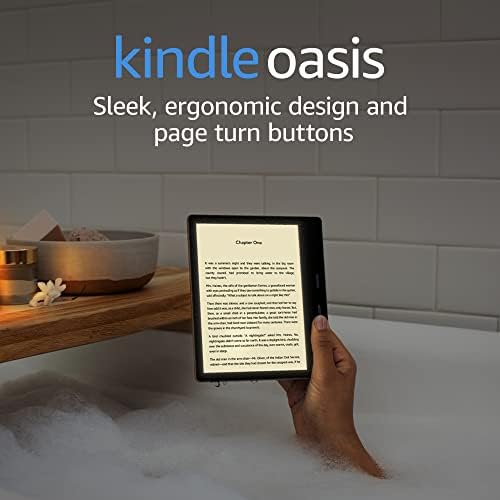
- All-new Kindle Scribe Features an 11 glare-free display with front light, built-in notebook, AI tools, and support for popular cloud services.
- Get a pen-on-paper feel The textured surface and responsive display create a smooth, paper-like writing experience. Plus, the included pen never needs charging and has a built-in eraser and shortcut button for tools like the highlighter.
- More room to read, write, and think At just 5.4mm thin and 400g light, its redesigned for comfort, with a larger 11" display and 40% faster writing and page turns.
- Work comfortably in any light The display automatically adapts brightness to your lighting conditions. Adjust the warmth for greater comfort at night.
- Get more out of your notes Take notes in the built-in notebook, then use AI to find information, ask questions about what youve written, and generate summaries. You can also clean up handwriting or convert it to text.
- Review documents without printing Import files from Google Drive or Microsoft OneDrive, add handwritten notes and markups, and export them as PDFs. You can also send notebooks to Microsoft OneNote to edit anywhere.
- Capture thoughts as you read Choose from millions of title in the Kindle Store, then jot notes right on the page. Write between the lines as text shifts to make room, or expand and collapse margins as needed.
- Leave the charger behind Long battery life gives you weeks of reading and writing on a single charge.
- Stay focused on what matters Unlike a tablet, Kindle Scribe is purpose-built for reading and writing. Its glare-free, paper-like display is easy on the eyes, even in bright sunlight, without distracting apps and notifications pulling you away.
Frequently asked questions
If you place your order now, the estimated arrival date for this product is:
Sunday, Sep 20
Yes, absolutely! You may return this product for a full refund within 30 days of receiving it.
To initiate a return, please visit our Returns Center.
View our full returns policy here.
To initiate a return, please visit our Returns Center.
View our full returns policy here.
- Klarna Financing
- Affirm Pay in 4
- Affirm Financing
- Afterpay Financing
- Zip Pay in 4
- Financing through Apple Pay
- Financing through Google Pay
Learn more about financing & leasing here.


Top Amazon Reviews
Digital Storage Capacity: 32 GB
Color: Graphite
Offer Type: Without Kindle Unlimited
I love tech, but the new Kindle Scribe is actually the first item I ever bought on the release day (okay, I ordered it on release day; took a few days to arrive). This is an exceptional E-Reader, and I've been a Kindle aficionado from the early days. I had the last model Scribe just for the larger reading screen; at first I didn't care about the notetaking capabilities, but soon found it indespesible. So why is the new model worth the upgrade? For starters, a larger screen. And if size isn't everything, the new display is phenomenal. The front lighting is even, adjusts (if you set it to) to the ambient light in your room, making it perfect for bright or night. The e-ink experience is better than ever; crisper, clearer, more like reading off an actual page than ever before! It's also faster, whether turning pages, or skipping around the home, library, or workspace screens (and kudos to the new layout of the homescreen, which organizes everything beautifully and includes a quick notes to instantly jot down a thought.) The writing experience is even better than before, with virtually no noticeable lag in pen strokes and a more paper-like feel to writing. The AI has 100% perfectly transcribes my normally illegible penmanship with no mistakes so far (pause for a moment of silence for the Apple Newton). The premium pen it comes with attaches to the side very strongly (I can pick the whole device up just holding the attached pen), and writes smoothly. I find myself writing more just because it's an enjoyable experience! Haven't figured out the cure for writer's cramp, yet. The device gives you more screen space while being lighter overall, so it's very comfortable to hold and transport. Plus, it's a small thing, but I LOVE the thinner, uniform, light colored frame. The previous Scribe had the one side that was thicker; maybe for holding, but it just always seemed askew. It's funny but sometimes the aesthetics of a piece of tech adds as much to the joy of using it as the tech itself. In planning for my upgrade, I asked Alexa+ if I should go with this monochrome version or the Colorsoft. She suggested since I read on it more than write, this is the one that would give the best reading experience, explaining that it gave crisper text and a more paper-like visual experience than the Colorsoft. I haven't tried the Colorsoft, but I can say, the joyful reading experience with this model leaves me no regrets. If you're in the market for a terrific E-Reader that also gives a great notetaking experience (and not worried as much about coloring, sketching or doodling), this is the best you can get. If you already have the prior Kindle Scribe, you won't regret the upgrade!
...
show more
Reviewed in the United States on January 22, 2026 by Michael W. Jacobson
Digital Storage Capacity: 32 GB
Color: Graphite
Offer Type: Without Kindle Unlimited
I've purchased this black and white Scribe and the Kindle Scribe Colorsoft, and after writing hundreds of pages on them, I love both. I've reviewed the Colorsoft on the Colorsoft page. This is a general review of the B&W, but I'll try to write this review particularly for people who are trying to decide between the two. TLDR: The B&W is a better device for what it does. I still prefer the Colorsoft. I rated the Colorsoft 4 stars, and I would rate this one 5. The black and white model is pretty close to perfect for what I want, which is to be able to read and write on a device with simplicity. I don't have complex use cases - the document/folder structure is intuitively easy to use. There's no learning curve - writing on the new kindle scribe is as easy as reading on it. The writing feel is EXCELLENT, and the screen is crisp. The brightness and amber-ness are very similar to my Kindle Oasis and much easier on the eyes than the lighting on a Kindle basic. Key point: writing is noticeably more paper-like on the B&W than on the Colorsoft. There's no tablet-feel on this, and there is a little bit of a tablet feel on the Colorsoft - this is really hard to articulate, but it just feels a little better to write on the B&W. Having said that, I've written literally hundreds of pages on the Colorsoft and really, really enjoy that, too. If I'd never tried the B&W, I wouldn't notice any issue at all. This isn't a device for the complex "workflows" you see on YouTube or Reddit, but documents are searchable, and the organizing structures make sense. I've compared handwriting recognition on the Kindle to that of couple of major LLMs, and the Kindle handwriting recognition is better - it's REALLY good. It's wild when you're searching your kindle for something and references in your own handwritten documents show up, too. Whispersync means your documents are regularly backed up - not as quickly as Google Docs, but much more quickly than I expected. And it's easy to email or upload PDFs for extra backup or use on a laptop. Pen choices are great. Template choices are terrible, but I already ranted about that on my Colorsoft review. There's a LOT of room for growth on the templates, but they are generally less annoying on the B&W than on the Colorsoft. Flashing is minimal - if flashing doesn't bother you on your existing Kindle, it won't bother you on the B&W scribe. By contrast, when I tested the Remarkable Pro products, the flashing was really distracting to me - as a result, I found them difficult to use. The Colorsoft flashes when you use the shader, so I just avoid that. Ghosting is also really minimal on both devices - occasionally there's a little ghosting but it's rare and not distracting. I read a lot and I write a lot - for work, for personal use, and just for general to do lists, notes, and reminders. Both the B&W and the Colorsoft are fantastic for both. When I got my first kindle, I was amazed at how great it was to be able to read at 3 am without waking anyone up - and have an entire library of books at hand. I'm equally amazed at how great it is to be able to write at 3 am without waking my spouse up - and have a library of my own notebooks at hand. Similarly, I have traveled three times with this device, and I love having the books I am currently reading and the notebooks I am currently writing in with me. And I wouldn't have said "distraction free" matters to me ... except that it turns out that it does. I've written two academic papers and part of a book chapter on this, and if I were on my laptop, I would have been looking up references, checking email, maybe running some of the text through an LLM. I'm so SO much better at just getting complex ideas down on "paper" with this than I am on my laptop. There's stuff to fill in later - I have to look up refs, gather up images, etc - and certainly do editing that is easier to do on a laptop than on the scribe - but it's astonishing to me how much I can get done when nothing else is competing for my attention. And while there are software updates that would be helpful (better templates, ways to put links within docs, a way to keep a book open on one side of the device with a notebook open on the other side, and I could go on!), there are workarounds that are good enough. You can take notes in the side margin of a book and copy/paste those notes to a notebook - it's clunky but doable. The B&W has a crisper screen, better writing feel, and better lighting. Black and white drawings on the B&W are also really excellent. But I'm choosing the Colorsoft. As someone who has been using a Kindle since they had keyboards, I did not think I cared one bit about color. But I really love seeing my library in color - I've accumulated thousands of books over the years, and "shopping the closet" of my kindle is more fun when the covers are in color. And I also find color really useful as an organizing tool inside my own notebooks - there's no flashing with the highlighting tool, so I use that a lot. I like having color covers on my own notebooks. Book highlights can be sorted by color. Color ends up being really useful and just ... fun. So I'm keeping the colorsoft. Before the new scribes were announced, I spent months trying to choose an e-ink writer that would match the experience of reading on a Kindle, but for writing. I watched endless YouTube videos, read tons of Reddit opinions, tried as many devices as I could get my hands on, and had at least five different devices in various carts. At the end of the day, I just wanted a backlit e-ink device for reading and writing - one that was easy to use, reasonably secure, and easy enough to write on that I would quickly lose awareness that I was writing on a device, and just be able to sink into my writing. Both the Colorsoft and the B&W check those boxes with room to spare, and the B&W knocks them out of the park. If you don't care about color, get the B&W. If you want to prioritize writing feel, get the B&W. If you think color will add value, get the Colorsoft. But both are really excellent devices for reading and writing. For that purpose, both new Scribes are just
...
show more
Reviewed in the United States on January 21, 2026 by Sally
Digital Storage Capacity: 32 GB
Color: Graphite
Offer Type: Without Kindle Unlimited
I had the first edition Scribe and while I liked it, I found myself using it less and less due to the cumbersome nature. it felt too heavy, was a it sluggish, and I did not like how the writing and pdf reading experience was. I mainly used it for taking notes and reading academic manuscripts. I was on the fence for a LONG time about upgrading to the 3rd version. the reviews seemed to be across the board, was it "worth" it? was it not a big upgrade? after watching many YouTube videos, I decided to just do it. After taking it out of the box, I was immediately happy I did. While the weight difference may not be huge, it is lighter and certainly more balanced to hold. The new pen is amazing (love the eraser). The reading and writing experience is much improved over the first generation. I am able to smoothly zoom in on pages, write in the margins, and share documents easily with my Google Drive. the other huge benefit, for me, is the workspace. I can better organize my files in folders and sync between scribe and my drive. Overall, it was well worth the upgrade for me. Yes, it is pricey, but if you are integrating this in your daily or regular workflow, it is worth it. If you are just using this for reading books, then the first gen is fine (if the weight doesnt bother you), but for more involved work/reading/notes, this is truly a valuable device. love it!
...
show more
Reviewed in the United States on August 6, 2026 by Sam Jenkins
Digital Storage Capacity: 64 GB
Color: Graphite
Offer Type: Without Kindle Unlimited
The form factor is perfect, very light and thin, easy to hold. Battery life is great as with all ereaders usually. The screen is crisp and sharp, no problems there. There are two cons though: the light, and white border. I first bought a scribe colorsoft and it is really awesome. Even though the screen isn't quite as crisp due to the color layer, the lighting on the colorsoft really makes up for it. But I wasn't happy with the slight grain on the colorsoft and decided to buy a B&W version instead. The first B&W unit had very uneven light, so much so that it was distracting and I was unable to enjoy reading. So I bought another one and it had the exact same light problems. I guess that's how it's manufactured in 2025 even though my 2022 scribe had uniform lighting. I put both B&W scribes and my scribe colorsoft all next to each other and used them for a few minutes each and also on their own for a few days each. Well, to my surprise the scribe colorsoft had the most uniform light and was actually more pleasing or easy on the eyes than the B&W versions. I really liked reading on the scribe colorsoft much more because the light was so even and non distracting. I wasn't expecting this outcome because the grain on the colorsoft is there and I'd rather not have the color layer. In a turn of events, I decided to return both B&W scribes and keep the scribe colorsoft instead. I can see myself getting used to the screen grain quite easily. Also, the white bezels don't look as clean as black, but it does match the pen. This is a personal preference. I love the B&W scribe, I think it has the best and most crisp screen on the market with a frontlight, but the lighting is just too uneven for me to accept. I hope future revisions fix this light problem, because otherwise it is a nearly perfect device.
...
show more
Reviewed in the United States on December 30, 2025 by Customer
Digital Storage Capacity: 64 GB
Color: Graphite
Offer Type: Without Kindle Unlimited


I have purchased the Kindle Scribe B&W, Kindle Scribe Colorsoft, and Boox Note Air5c. My review is on the device first, then their comparisons. I also posted a similar review on the Kindle Colorsoft. After a month of heavy daily use (1-3hrs), the Kindle Scribe B&W has become my favorite reading and writing device. One of its biggest strength is the clarity of the screen; crisp, bright, and easy on the eyes for long sessions. There’s no writing lag, and the pen feels smooth and natural, with adjustable settings plus built‑in eraser and highlighter functions. Writing on this device genuinely feels like pen and paper. See screenshot with and without front light. Performance is consistently fast: no reading lag, no loading delays, and no ghosting even after intensive use. The notebook system is intentionally simple, with clean folder organization and easy export/import to email, Google Drive, OneNote, and OneDrive. I especially appreciate the Canvas feature, which lets me write directly in DRM‑protected books without breaking my reading flow. Annotations and highlights can be exported. The Scribe’s AI tools work primarily inside the AI Notebook. You can summarize handwritten notes, convert handwriting to text, and ask questions about the topics you’ve written. The AI pulls information from across all your notebooks to give insights or explanations based on your own content. (See screenshot) AI summarization doesn’t work inside books or PDFs, likely due to content restrictions. My workaround is exporting highlights to OneDrive and using an external AI tool when I need further analysis and organization. I have also found sending my notes to Alexa device useful. I created a calendar for the entire month of April, with important events, sent that note to Alexa and it created calendar events and reminders to my google calendar. Other strengths: excellent battery life, Bluetooth support, and the ability to send content (I.e. scanned documents) from my phone straight into the Kindle for direct writing. Cons: The Scribe doesn’t offer complex organizational tools like tagging or hyperlinking. However, Kindle’s global search works across notebooks, books, PDFs, and the store, and AI search inside notebooks is thorough. There’s also no color, but I use the Kindle app on my phone or PC when I need it. The device also lacks native speakers or a mic, though Bluetooth is available. The device is locked into Amazon's ecosystem, however I am still able to import EPub books from Libby, which works for me. I found that the majority of the ebooks I wanted to own were DRM protected anyway, no matter what device I use, so being in Amazon's ecosystem doesn't make a difference for me. I suggest looking up specific ebooks formatting availability across websites and determine if an open ecosystem is wanted or Kindle will suffice. Compared to the Color Scribe: Screen clarity is comparable; my husband believes the Color Scribe is clearer than the B&W, though I think the B&W is clearer. The Color version has a minimal grain from the color layer and has a cooler hue, whereas the B&W has a warmer hue. The B&W’s no-front-light mode is far superior in clarity. The Color Scribe’s no‑front‑light mode is noticeably darker. (Screenshots: Color scribe on left, B&W on right. Front light and without front light comparisons.) The B&W model also includes 2~3GB more storage. All other capabilities are the same. Compared to the Boox Note Air 5C: The Scribe is simpler, smoother, and easier to learn. Writing in DRM books is seamless due to Canvas, whereas Boox relies on standard Kindle limitations. The Scribe’s screen is brighter and clearer, and writing has zero lag. Boox offers an open ecosystem, but its color layer is much grainier and the writing delay is noticeable. I would just buy a tablet if an open ecosystem is needed. The Kindle Scribe B&W is an outstanding device for focused reading, and writing, with top tier clarity and performance. If color isn’t a major part of your reading or note‑taking life, the Kindle Scribe B&W is the better choice.
...
show more
Reviewed in the United States on April 8, 2026 by Sapphira1
Digital Storage Capacity: 32 GB
Color: Graphite
Offer Type: Without Kindle Unlimited


The kindle scribe is a cool e-reader and e-writing device but has shown some issues. I will start with why I've returned two of them. The biggest issue I've had with the device is the consistency with writing. i've noticed that when writing, there are sections (close to the right side for me) that do not recognize your input well or even, at all. That's extremely frustrating if you are writing and suddenly you are either appearing off line or it becomes illegible. It seems to react as dead zones, where the pen is no longer registering input in the right place. I have tried correcting the issue with multiple Kindle pens but have had no relief. This happened on my first scribe and I though it was just bad luck. Then the issue appeared again on my second scribe and I couldn't justify the issue with the price. I didn't think it would be a huge issue but because it occurs are several parts of the screen, it makes any meaningful writing frustrating, requiring me to remember where the issue exist so that i can start a new line or avoid that area all together. Again, I think the device is neat and I can't say everyone will have this issue. I am only speaking from my experience. If you want a device to jot down notes, do a little journaling, and also be able to read your kindle collection, give it a try. The fee is hefty for what it offers but that's the expense when buying into ecosystems like this! Hope this review helped
...
show more
Reviewed in the United States on July 7, 2026 by Amazon Customer
Digital Storage Capacity: 64 GB
Color: Graphite
Offer Type: Without Kindle Unlimited
The Display: A Literal Game Changer As an avid reader of fantasy, thriller, and horror, I really appreciate the screen upgrade. Moving from the 2022 version to this 2025 model, the first thing I noticed was the increase in screen size (now a crisp 11-inch display). The sharpness and clarity are incredible - it makes the atmospheric descriptions in my horror novels feel even more immersive. The text is "inky" and clear, which is a huge plus for long reading sessions. Speed and Performance: The performance difference is night and day. Page Turning: It is significantly faster than the previous model. I no longer feel that slight "lag" when flipping through a fast-paced thriller. System Snappiness: Navigating through my library or opening large notebooks is much more fluid. It feels like a modern tablet without losing the E-ink comfort. Weight: It is also much lighter in your hands compared to the 2022 version. Note-Taking & Productivity: While I mostly use this for reading, I’ve started diving deeper into the note-taking features. The new Workspace is exactly what the Scribe needed. Cloud Integration: Being able to utilize Google Drive, OneDrive, and OneNote directly on the device is a massive productivity boost. Organization: Managing notebooks is much more intuitive now. I'm looking forward to spending more time mastering the workflow, but even as a "casual" note-taker, it feels much more professional than the 2022 version. Final Thoughts: If you are coming from the older Scribe, the trade-in is absolutely worth it for the speed and the workspace features alone. It’s an awesome device that bridges the gap between a world-class e-reader and a functional digital notebook.
...
show more
Reviewed in the United States on December 29, 2025 by Chris95
Digital Storage Capacity: 64 GB
Color: Graphite
Offer Type: Without Kindle Unlimited
Came very securely packaged with better box than the old scribes and kindles. Device is lovely and I would absolutely recommend getting it on sale or for trade in. It is actually very comfortable to hold, not at all cumbersome the only thing of note is that the pen came wrapped in a paper that was very difficult to remove. The pen itself is a nice upgrade from the old one, it has a great texture and is easier to hold. My screen was flawless and has very nice even fronlight. The only thing of note is that in dark mode you do get a slight glow around the edges that may be distracting at first when reading in the dark. .
...
show more
Reviewed in the United States on June 21, 2026 by Snoowl