Search  for anything...

2 Set Back Rear Camera Lens Glass Replacement for Google Pixel 7 with pre-Installed Adhesive and Reparing Toolkit

  • Based on 136 reviews
Condition: New
Checking for the best price...
$8.90 Why this price?
Save $16.09 was $24.99

Buy Now, Pay Later


As low as $2 / mo
  • – 4-month term
  • – No impact on credit
  • – Instant approval decision
  • – Secure and straightforward checkout

Ready to go? Add this product to your cart and select a plan during checkout.

Payment plans are offered through our trusted finance partners Klarna, Affirm, Afterpay, Apple Pay, and PayTomorrow. No-credit-needed leasing options through Acima may also be available at checkout.

Learn more about financing & leasing here.

Selected Option

Free shipping on this product

FREE 30-day refund/replacement

To qualify for a full refund, items must be returned in their original, unused condition. If an item is returned in a used, damaged, or materially different state, you may be granted a partial refund.

To initiate a return, please visit our Returns Center.

View our full returns policy here.


Availability: In Stock.
Fulfilled by Amazon

Arrives Monday, Feb 23
Order within 8 hours and 13 minutes
Available payment plans shown during checkout

Protection Plan Protect Your Purchase
Checking for protection plans...

Color: Pixel 7


Features

  • OEM Camera Glass Lens and perfectly FitBrand new original OEM Sapphire camera glass lens replacement compatible with Google Pixel 7 (Not for Pixel 7 Pro).
  • Included Step By Step Installation ManualOur camera lens replacement repair set come with a detailed step by step installation manual to help you complete the repair process faster,reduce your time-consuming and greatly increases your odds of a successful installation. We also have 24 hours online after-sales staff to help you at any time.
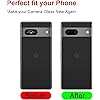
  • 2 Set Lens to Fix Your Phone Camera Brand New AgainThis is the rear-facing camera glass lens replacement if you have a scratched or broken external camera lens,they will fix your phone camera same as new one!Include 2 set means 2 times chance in case you fail at first time or back up for future using.
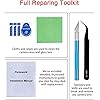
  • Include Toolkit You NeedIncluded a professional repair toolkit which make your repair much more easier,no need to open your phone.Strong pre-installed adhesive will firmly hold.
  • 100% Satisfaction And Product GuaranteedWe provide one year warranty for our product. We can send a new glass camera lens if you are not 100% satisfied with this product. Our brand's customer service team is online 24 hours a day, you are welcome to contact us directly by email at any time if there are any questions.

Description

Feature:1.Replacement part for broken/damaged camera, made of sapphire glass, not cheap glass!2.Great camera with strong adhesive preinstalled. Coming with the repair tools set.3.Compatible with Google Pixel 7 (all carriers) only.Package includes:2x set camera lens Replacement for Google Pixel 71x pcs Repair Tweezers1x pcs Repair Knife1x pcs Premium Cloth1x pcs Dust Stickers1x pcs Detailed Installation Manual

Brand: Perzework


Focal Length Description: 21 millimeters


Lens Type: Standard


Camera Lens Description: Prime, 21mm f/1.85 standard lens made of sapphire glass, no image stabilization, manual focus


Lens Design: Prime


Package Dimensions: 6.02 x 2.32 x 0.47 inches


Item Weight: 1.13 ounces


Other display features: Photography


Color: Pixel 7


Manufacturer: Perzework


Date First Available: June 2, 2023


Frequently asked questions

If you place your order now, the estimated arrival date for this product is: Monday, Feb 23

Yes, absolutely! You may return this product for a full refund within 30 days of receiving it.

To initiate a return, please visit our Returns Center.

View our full returns policy here.

  • Klarna Financing
  • Affirm Pay in 4
  • Affirm Financing
  • Afterpay Financing
  • PayTomorrow Financing
  • Financing through Apple Pay
Leasing options through Acima may also be available during checkout.

Learn more about financing & leasing here.

Top Amazon Reviews


  • Pixel 8 Pro replacement camera glass easier than it looks
Color: Pixel 8 Pro
I was actually preferring a similar listing, but this one was delivered a day earlier so I went with this replacement. If you are careful this is a pretty easy replacement. I used the tweezers for most of the removal as the glass had a spider web fracture coming from the center. Q-tips with alcohol helped with taking off the double sided tape. No heat was necessary. For safety and preparation I suggest nitrile gloves, safety glasses, a plate or surface, and then paper towels or plastic underneath. A few fractures of glass did go flying so I vacuumed the whole area with a dust buster and floor vacuum. The black double sided tape that is underneath the glass helps some of the pieces stay together and I worked my way to one edge then around in an oval. Shaking the glass pieces onto my plate that were falling onto the lenses. I used the tweezers to pull away from the lenses and use the sides as leverage and then scraped with the scalpel when needed. I continually applied more alcohol with a Q-tip around the edges to clean and also remove the black tape. If I got a little space with the glass I dabbed some more alcohol to loosen it for removal. Unfortunately I did not have another camera to film this but everything came off cleanly. Remember to remove some stuck tape from the center of the microphone but I do not think it is necessary to remove all the tape around the microphone. Once it was mostly clean of glass I used a Q-tip with alcohol, the dust cloth provided in the kit, as well as the tweezers to clean the edges and remove any additional glass pieces around the lenses. I also stuck the dust buster over the lenses to see if I could pull up any debris as tiny bits might have fallen behind the sides of the lenses. Lastly I used a provided wipe for the lenses and the glass area, the provided dust tape, and the provided dust cloth. Satisfied with the cleanliness of the phone I then applied the first replacement glass using the tweezers to pull the blue side tape off. I must have manhandled the replacement as the glass fit perfectly but i tried to press or slide it in and cracked the first replacement on the side. I had not tamped down the replacement and the tape had not set all the way so I had to repeat the process of removing the glass. The second replacement went in perfectly so I left the top tape on and used the cloth to gently press it into place. Overall probably the best replacement part I have ever done for a phone so far and would definitely do this again. On a side note, this may have been covered under my warranty but dealing with google as well as their authorized repair shop was a much bigger hassle than ordering one of these for next day delivery and repairing it. The repair itself was less time for me than even a round trip to the shop. ... show more
Reviewed in the United States on August 2, 2024 by G. Richardson G. Richardson

  • Easy to change
Color: Pixel 7
Easy to change. Works well.
Reviewed in the United States on February 10, 2026 by Evangelita Brown

  • Perhaps better than factory lens
Color: Pixel 7
There's a lot of options for Pixel 7 replacement lens but this one seemed to check all the boxes. If you have a Pixel 7 it's probably a matter of time before your lens shatters. Mine popped EXACTLY the same as all the others I've seen online. I wanted a real glass replacement that would fit perfectly. This one does both. The listings show the lens from both sides so some purchasers think there's 2 lenses included, but unless it shows 4 views (2 lenses, both sides) you only ordered one. My recommendation is get 2. The included instructions were generic but very clear. It helps to heat the old lens with a hair dryer to loosen the adhesive. I also set up a vacuum cleaner hose so that it sucked up the glass bits as I picked off the old lens, It came off rather easily and I made sure everything was removed and clean before placing the new lens into the indent. There's a clear protector on each side of the new lens--remove ONLY the front one and use the provided tweezers to lift it off and put it in place. I took the rear one off and somehow put a fingerprint on the inside of the lens, which I didn't realize until I had it in place. It didn't really affect the picture quality, but I'm a perfectionist so I had to change it. That's why i recommend getting a kit with 2 replacement lenses. Interestingly enough, the replacement lens was harder to remove than the factory one. In either case, there's plenty of surface area for the adhesive to bond to so I doubt very much this would cause the phone to lose its waterproof rating, As recommended, I heated up the new lens with the hair dryer to activate the adhesive (both times) and I think that's what makes it bond really well. It took probably 15 minutes from start to finish. Overall I couldn't be more pleased with this product. It's so high quality and so easy to replace that I no longer worry about the Pixel lens breakage problem. ... show more
Reviewed in the United States on December 31, 2023 by R. Fossella

  • Ok replacement but not perfect
Color: Pixel 7 Pro
The glass fit, but one of the small clear sensor holes did not perfectly line up. Camera works. Handle for razor knife is plastic not metal as shown. Overall a good kit and I was able to replace.
Reviewed in the United States on August 18, 2025 by GinaSu

  • Perfect fit
Color: Pixel 7
It took me five minutes to change. Be careful of the tiny pieces of glass. Prepare an area to on a table to do this so you can keep track of the VERY sharp pieces.
Reviewed in the United States on January 31, 2026 by Ph8_likes_me

  • Replaced Pixel 9 Camera Glass Easily
Color: Pixel 9
The instructions are for many phone models but it's easy enough to apply to your model. Heated the phone camera area with a hair dryer for about 30 seconds. Used the included tweezers to peal off the broken. This was the most difficult part because my glass was shattered. The black glue was gooey but pulled away with a little effort. After all the glass was out I used the included knife to scrape away the remaining glue. There was not much. I then used a compressed air can (not included) to blow away debris and finally used the included dust sticker to pat around the camera area. It's unclear which side of the glass is the top. For the Pixel 9 you just have to pay attention to where the holes line up and it's easy to figure out. Pealed off the back plastic layer and placed it into the camera well and it fit perfectly. Pealed off the front plastic and then heated it with the hair dryer again about 30 seconds while applying very light pressure. Let it cool a minute, booted up, and the camera works like new. ... show more
Reviewed in the United States on May 27, 2025 by Xanthene

Can't find a product?

Find it on Amazon first, then paste the link below.
Checking for best price...