Buy Now, Pay Later
- – 4-month term
- – No impact on credit to apply
- – Instant approval decision
- – Secure and straightforward checkout
Ready to go? Add this product to your cart and select a plan during checkout.
Payment plans are offered through our trusted finance partners Klarna, Affirm, Afterpay, Zip, Apple Pay, and Google Pay. No-credit-needed leasing options through Acima may also be available at checkout.
Learn more about financing & leasing here.
FREE 30-day refund/replacement
To qualify for a full refund, items must be returned in their original, unused condition. If an item is returned in a used, damaged, or materially different state, you may be granted a partial refund.
To initiate a return, please visit our Returns Center.
View our full returns policy here.
Recently Viewed


At a glance
- Condition
- New
- Model
- Optical to Female 3.5mm AUX Adapter
- Maximum Supply Voltage
- 5 volts
- Interface Type
- Optical, AUX
- Audio Output Mode
- Stereo
- In the box
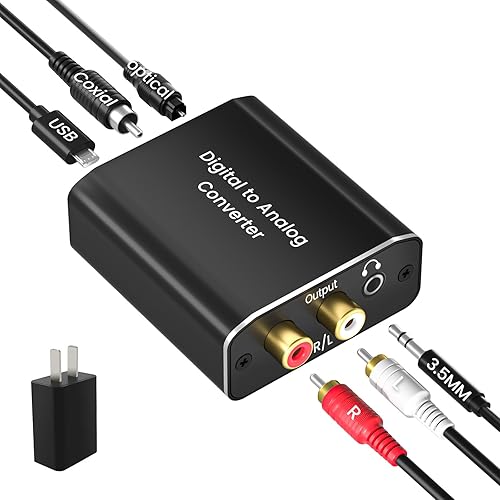
- Optical to 3.5mm AUX Converter
- Works with
- TVs, Speakers, Headphones
Features 5
- 192KHz Optical to Female 3.5mm Converter Cable - Tackston OPTICAL to AUX cable adapter converts audio signal from OPTICAL/TOSLINK into 3.5mm AUX. ( Can not be used for transfering signal from 3.5mm AUX to optical).
- Attention- TV remote control will be unable to control the playback volume during use, please adjust volume through playback devices like speaker or headphone.
- Sample Rate Upto 192KHz/24-bit - Tackston optical to audio cable signal converter achieves a high-quality sound sample rate of 192KHz and supports optical inputs at 32, 44.1, 48, 96, and 192KHz as well as data streams at 24-bit for superior audio performance.
- Attention - <1> Must connect its USB cable to 5V power supply for operation. <2> Requires TV audio output format set to PCM/Stereo, not support any surround sound format like Dolby & DTS bitstream.
- Tackston digital audio optical cable to aux converter enable you to connect to headphones via the 3.5mm aux interface, allowing you to enjoy watching TV quietly while wearing headphones without disturbing your family members. At the same time, it also brings convenience to hearing-impaired individuals.
Description
Reference for Samsung TV 1. Press the settings or menu button on the remote control. 2. Choose “Sound Output” and select “Audio Out/Optical”. 3. Move down and select the “Sound” menu. Choose “Digital Output Audio Format” and select “PCM”. Optional: Choose “HDMI Input Audio Format” and select “PCM”.
Specs 14
| Brand | Tackston |
|---|---|
| Maximum Supply Voltage | 5 volts |
| Minimum Supply Voltage | 5 volts |
| Number of Pins | 4 |
| Interface Type | Optical, AUX |
| Interface | Optical, AUX |
| Number of Channels | 1 |
| Audio Output Mode | Stereo |
| Brand Name | Tackston |
| Item Highlight | Signal from TV Optical to AUX Speaker Only, Must Be Powered by Its USB Cable, TV Audio Output Format Must Set to PCM Stereo |
| Unit Count | 1 Count |
| Manufacturer | Tackston Products |
| Number of Items | 1 |
| Part Number | Optical to Female 3.5mm AUX Adapter |
No specs match.
Frequently asked questions
To initiate a return, please visit our Returns Center.
View our full returns policy here.
- Klarna Financing
- Affirm Pay in 4
- Affirm Financing
- Afterpay Financing
- Zip Pay in 4
- Financing through Apple Pay
- Financing through Google Pay
Learn more about financing & leasing here.
Similar Products


iFi xDSD Gryphon Black Edition Portable Balanced DAC/Amp