Search  for anything...

14" Itel Laptop Computer with Intel Celeron N3350 (Dual-Core) | 4GB RAM | 256GB SSD | Ultra Slim Design | HDMI & USB 3.2 | 2.4G/5G WiFi | Webcam | for Home, Office & School

  • Based on 9 reviews
Condition: New
Checking for the best price...
$134.00 Why this price?
Save $7.99 was $141.99

Buy Now, Pay Later


As low as $22.33 / mo
  • – 6-month term
  • – No impact on credit
  • – Instant approval decision
  • – Secure and straightforward checkout

Ready to go? Add this product to your cart and select a plan during checkout.

Payment plans are offered through our trusted finance partners Klarna, Affirm, Afterpay, Apple Pay, and PayTomorrow. No-credit-needed leasing options through Acima may also be available at checkout.

Learn more about financing & leasing here.

Free shipping on this product

30-day refund/replacement

To qualify for a full refund, items must be returned in their original, unused condition. If an item is returned in a used, damaged, or materially different state, you may be granted a partial refund.

To initiate a return, please visit our Returns Center.

View our full returns policy here.


Availability: In Stock.
Fulfilled by Amazon

Arrives Wednesday, Mar 11
Order within 18 hours and 13 seconds
Available payment plans shown during checkout

Protection Plan Protect Your Purchase
Checking for protection plans...

Features

  • 3-Year of Service Coverage: Your Lesung Able1 Laptops comes with a comprehensive 3-year limited warranty (1-year full replacement + 2-year repair service), backed by our US-based support team with under 1-hour average response time, covering all defects in materials and workmanship
  • Intel Celeron N3350 Processor: LETSUNG 14'' laptop is powered by an Intel Celeron N3350 processor (2C/2T, 2MB, 2.4GHz), With an efficient cooling system, create a smooth experience for your web browsing, spreadsheet editing, and light gaming.
  • 4GB RAM & 256 SSD: This laptop computer has Dual Channels 4GB LPDDR4X RAM(2400 MT/s), comes with 256 M.2 SATA SSD, and supports up to 1TB. It extra has 1 x 2.5"" SATA HDD (7mm) slots, expandable up to 1TB, and micro card reader, support SD/SDHC/SDXC2.0.
  • 14'' HD Display: Our laptop features a 14-inch display, 1920 x 1080 resolution for clear visuals, equipped with Intel UHD Graphics 600 that supports 4K video @60Hz for more vibrant colors and clearer video.
  • Various Interfaces: This laptop with Bluetooth 4.2 and Dual-band Wi-Fi 5(2.4G+5G), supports 802.11 a/b/g/n/ac, equipped with USB 3.0 ports x2, HDMI x1, RJ45 Gigabit Ethernet port x1, DC-in Jack port x1, Phone jack x1, Micro SD card reader port x1, Reset button and speaker.
  • Ultra Slim Design: This laptop is designed with an ultra-thin case, ensuring a stylish and innovative look, as well as excellent portability. With its slim 0.8-inch body and lightweight 3.08 lbs, it is suitable for daily work and play, making it the first choice for businesses, offices, and students.

Brand: LETSUNG


Model Name: ABLE 1


Screen Size: 14 Inches


Color: Black


Hard Disk Size: 256 GB


CPU Model: Celeron N3350


Ram Memory Installed Size: 4 GB


Operating System: Windows


Graphics Card Description: Integrated


Graphics Coprocessor: Intel Celeron N3350


Standing screen display size: ‎14 Inches


Max Screen Resolution: ‎1920x1080 Pixels


Processor: ‎2.4 GHz celeron_n3350


RAM: ‎LPDDR4


Memory Speed: ‎2.4 GHz


Hard Drive: ‎256 GB SSD


Graphics Coprocessor: ‎Intel Celeron N3350


Chipset Brand: ‎Intel


Card Description: ‎Integrated


Graphics Card Ram Size: ‎4 GB


Wireless Type: ‎802.11a/b/g/n/ac


Number of USB 3.0 Ports: ‎2


Brand: ‎LETSUNG


Series: ‎ABLE 1


Item model number: ‎Able 1


Operating System: ‎Windows


Item Weight: ‎4.75 pounds


Product Dimensions: ‎8.8 x 13.3 x 0.79 inches


Item Dimensions LxWxH: ‎8.8 x 13.3 x 0.79 inches


Color: ‎Black


Processor Brand: ‎Intel


Number of Processors: ‎1


Computer Memory Type: ‎DDR4 SDRAM


Flash Memory Size: ‎2 MB


Hard Drive Interface: ‎eSATA


Hard Drive Rotational Speed: ‎5400 RPM


Voltage: ‎7.4 Volts


Date First Available: April 1, 2025


Frequently asked questions

If you place your order now, the estimated arrival date for this product is: Wednesday, Mar 11

Yes, absolutely! You may return this product for a full refund within 30 days of receiving it.

To initiate a return, please visit our Returns Center.

View our full returns policy here.

  • Klarna Financing
  • Affirm Pay in 4
  • Affirm Financing
  • Afterpay Financing
  • PayTomorrow Financing
  • Financing through Apple Pay
Leasing options through Acima may also be available during checkout.

Learn more about financing & leasing here.

Top Amazon Reviews


  • Great little mini PC
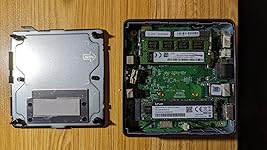
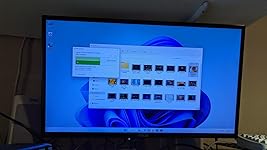
The Geekom MiniAir 11 is a great little mini PC. It is exactly as described in the product listing and shown in the included photos. It is a sleek professional looking box that even comes with a handy mounting bracket that lets you easily mount it to the back of a monitor, provided the monitor has open VESA mounting holes that are not used by any built-in stand. In other words, you cannot use the bracket with a monitor that is already using any other type of VESA bracket. Since it is based around the Intel N5105 processor, which is in the Celeron family of processors, I wasn’t sure what to expect performance wise. Plug in a mouse, keyboard and display and it will power right up and boot into the pre-installed Windows 11 OS and begin the initial configuration for Windows settings. It seemed to perform pretty well during this process, so I tried out a few things to get a feel for the performance. Copying some very large video files from an external USB-C drive to the internal SSD was a pretty respectable speed and hit just shy of 360MB/s doing a plain Windows file copy. Watching the full HD videos on the built in Windows Media Player, the machine was easily able to handle playback while still performing a number of other tasks simultaneously. This makes it look ideal for a great portable media playback device. In terms of performance, the internal SSD that ships with this is a SATA style drive and I’m curious to replace it with a better NVMe type drive to see how much better it may perform. As the PC has three USB-A style ports, I wanted to connect all the input devices (mouse, keyboard, webcam, etc) to a hub and use only a single USB port on the PC. This worked perfectly at first. But on a couple of occasions, when the PC was rebooted, the mouse/keyboard did not seem to be recognized unless I unplugged the hub and plugged it back in. Again, only seemed to happen a couple time, and only on a reboot, so I am not yet clear on where the responsibility for the glitch lays yet. I suspect it may be the hub itself as it is an early USB 3.0 hub. The PC itself appears to be well made and I like the layout and having usable USB ports on the front in addition to the expected ports on the back. My only complaints about this so far don’t have anything to do with the machine itself. My only issues are the support from Geekom on their website. I wanted to be able to see if there are any electronic versions of any manuals or anything. While these was a PDF version of the quick setup paper that comes with the PC, there was no other documentation or anything available on the website. These is download links for all the drivers needed if you had to do a complete reinstallation of the OS, but all of them go through another 3rd party website with annoying ads, including pop-up windows! I thought pop-up ads were banished many years ago, but apparently not, and this does not inspire a lot of confidence in the safety of these drivers. Scanning them with my desktop PCs installed anti-virus software did not show any problems, but hopefully the vendor will fix this sloppy mess on their website. ... show more
Reviewed in the United States on July 27, 2023 by GB1960 GB1960

  • Works for the Basic Needs
I've been using the GEEKOM Mini Air 11 Mini PC and I'm really impressed with it. It's small, lightweight, and quiet, and it's more than powerful enough for my needs. I use it for basic tasks like browsing the web, checking email, and working on documents, and it's been great. I've also used it to stream movies and TV shows, and it's been perfect for that too. The only downside to the Mini Air 11 is that it doesn't have a lot of storage space. It comes with a 256GB SSD, which is enough for me, but if you need more storage, you'll need to add an external hard drive or SSD. Overall, I'm really happy with the GEEKOM Mini Air 11 Mini PC. It's a great value for the price, and it's perfect for anyone who needs a small, powerful, and quiet computer. Here are some pros and cons of the GEEKOM Mini Air 11 Mini PC: Pros: Small and lightweight Quiet Powerful enough for basic tasks Great for streaming movies and TV shows Affordable Cons: Limited storage space No optical drive Overall, the GEEKOM Mini Air 11 Mini PC is a great value for the price. It's small, lightweight, quiet, and powerful enough for basic tasks. It's also great for streaming movies and TV shows. If you're looking for a small, powerful, and affordable computer, the GEEKOM Mini Air 11 Mini PC is a great option. ... show more
Reviewed in the United States on May 26, 2023 by Shawna Coronado

  • Utterly Fabulous - 6 Stars
I have built my own desktop PC's since about 1986. Just for business type activity: database, programming, graphics and CAD - no gaming. I always try and find the smallest neatest tower case I can find but they are always enormous and have acres of empty space inside. There is a super small tower standard but the motherboards are more expensive and parts are harder to source. So this little MiniAir 11t from GEEKOM was intriguing when I saw it. I could fit about ten of them in my current Linux box. The fact the name includes the word "Air" sort of implies that they are grasping for Apple like design aspirations. When I opened up the very smart packing I almost agree with them. The box itself is much smaller than I was expecting, 4 1/2 inches square and less than 1 1/2 inch high. And it looks gorgeous. It looks like a sub-component of an orbital satellite. The casing is a very attractive metallic gray. The side panels are jam packed with connectors like USB and HDMI. I have plans for it be the heart of my music recording system with Ableton Live on Windows as well as Audacity on Arch Linux. In that application compactness and lack of fan noise make a big difference. I connected the MiniAir to my 27" ViewSonic at 1920 x 1040 and an HP keyboard. It comes with Windows 11 which I have avoided for years since I became a Linux guy and more recently a devoted Arch Linux nut. Arch rules! Logging onto Windows for the first time is like being an immigrant at Ellis Island where they keep you in a dark cell, measuring your body, and checking for diseases and all your family history, before allowing you into the bright sunlight. None of that invasion on Linux. The result is a PC performance at current standards or above. The graphics driver is bright and crisp. I was most impressed with the sound card which sounds substantially better than the sound from my current ASUS motherboard. I listened to Extreme's "Rebel" on YouTube and it was killer through headphones. I am going to dual boot Arch Linux on it using GRUB as the boot loader. I love GRUB to death, it makes you look like a real programmer. In summary this is a beautifully engineered PC that defies all expectations of jamming so much quality and capability into such a tiny space. I am seriously considering never building another tower box. ... show more
Reviewed in the United States on June 4, 2023 by Peter Butler

Can't find a product?

Find it on Amazon first, then paste the link below.
Checking for best price...