Search  for anything...

10.1" Digital Calendar Chore Chart – 1080P Full HD Interactive Touchscreen, Smart Family Planner, Hearth Display Digital Wall & Desk Mountable for Seamless Scheduling
  • Based on 10 reviews
Condition: New
Checking for the best price...
$89.99 Why this price?
New Year Deal · 10% off was $99.99

Buy Now, Pay Later


As low as $15.00 / mo
  • – 6-month term
  • – No impact on credit
  • – Instant approval decision
  • – Secure and straightforward checkout

Ready to go? Add this product to your cart and select a plan during checkout.

Payment plans are offered through our trusted finance partners Klarna, Affirm, Afterpay, Apple Pay, and PayTomorrow. No-credit-needed leasing options through Acima may also be available at checkout.

Learn more about financing & leasing here.

Selected Option

Free shipping on this product

FREE 30-day refund/replacement

To qualify for a full refund, items must be returned in their original, unused condition. If an item is returned in a used, damaged, or materially different state, you may be granted a partial refund.

To initiate a return, please visit our Returns Center.

View our full returns policy here.


Availability: In Stock.
Fulfilled by Amazon

Arrives Saturday, Feb 14
Order within 20 hours and 5 minutes
Available payment plans shown during checkout

Protection Plan Protect Your Purchase
Checking for protection plans...

Color: White


Size: 10.1 inch


Features

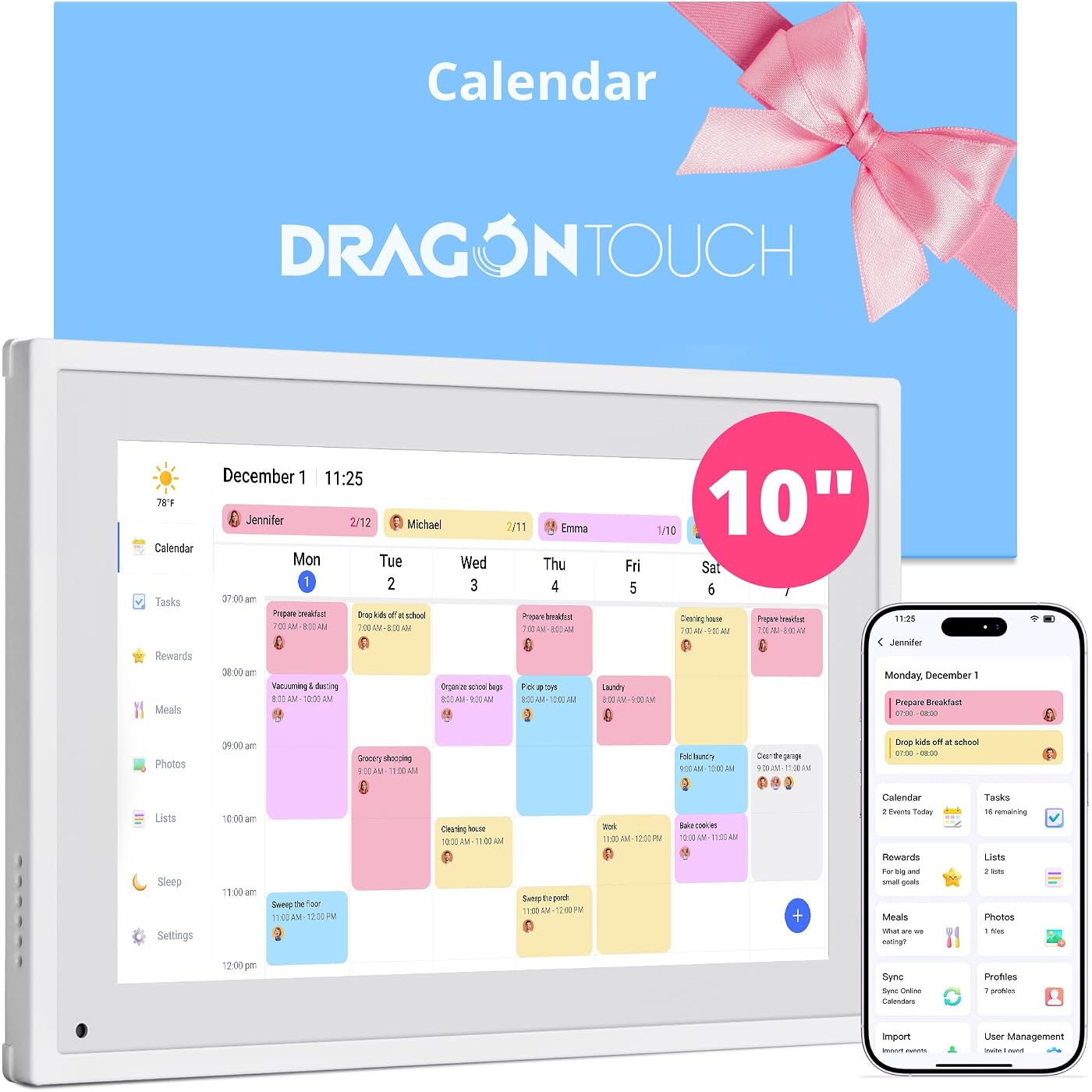
  • All-In-One Smart Family Calendar: Dragon Touch digital frame effortlessly organizes and tracks every family schedule with the crystal-clear 10.1" FHD touchscreen. Assign different colors and tasks to each family member, making family scheduling simpler and more intuitive.
  • Easy Setup and Auto-Sync: Enjoy a user-friendly design that our smart picture frame allows for quick setupjust plug in, connect to Wi-Fi, and link your calendar to the Mobile App. Once synced, it seamlessly integrates multiple personal calendars (iOS, Google, etc.) into one unified interface. Authorize additional devices for even greater convenience.
  • Interactive Chores Chart & Dinner Planner: Our digital calendar keeps housework organized and motivates family members, especially children, to develop healthy habits with an interactive chore chart. Display your family dinner plans to keep everyone informed and eliminate the daily "What's for dinner?" question.
  • Manage from Anywhere: Stay connected with the powerful eCalendar App. Access and manage your calendar on the go, with free features like a photo frame, chore chart, dinner plan, grocery list, and more. Paid functions like Magic Import offer advanced tools tailored for users with special needs.
  • Charming Digital Picture Frame: When not in use, your smart calendar transforms into a beautiful digital picture frame. Showcase treasured family photos on the crystal-clear 10.1" large touchscreen, adding a touch of elegance to any room as modern home decor.

Description

10.1" Digital Calendar Chore Chart – 1080P Full HD Interactive Touchscreen, Smart Family Planner, Hearth Display Digital Wall & Desk Mountable for Seamless Scheduling

Size: 10.1 inch


Brand: Dragon Touch


Manufacturer: Dragon Touch


UPC:


Manufacturer: ‎Dragon Touch


Brand: ‎Dragon Touch


Item Weight: ‎2.38 pounds


Package Dimensions: ‎13.3 x 7.76 x 1.42 inches


Item model number: ‎TM10


Color: ‎White


Number of Items: ‎1


Size: ‎10.1 inch


Manufacturer Part Number: ‎TM10


Date First Available: April 30, 2025


Frequently asked questions

If you place your order now, the estimated arrival date for this product is: Saturday, Feb 14

Yes, absolutely! You may return this product for a full refund within 30 days of receiving it.

To initiate a return, please visit our Returns Center.

View our full returns policy here.

  • Klarna Financing
  • Affirm Pay in 4
  • Affirm Financing
  • Afterpay Financing
  • PayTomorrow Financing
  • Financing through Apple Pay
Leasing options through Acima may also be available during checkout.

Learn more about financing & leasing here.

Top Amazon Reviews


  • The perfect calendar to keep our family connected
Color: White Size: 11.5"W x 20.1"H
The media could not be loaded. This digital desktop calendar has been a great solution for our family's scheduling needs. It's user-friendly and offers several convenient features. I was looking for a digital desktop calendar we could share as a family given everyone is on a different schedule each day. I found this one and thought it would be a good fit. What I like about it… - The size, it’s the perfect size to either stand on a desk or hang on a wall. Not too small or too big. - The screen - it’s clear and easy to read - Set Up: - Display Options: You have two options, hang on a wall or stand on a desk/table. I really appreciated that there were arrows on the back that showed me exactly where to install the screws (there are screws and a screwdriver in the box) depending on how I wanted to display it. I loved that they included a guide for wall hanging to ensure it’s positioned properly. I started by using it with the stand. - Quick Start: With the quick start guide I was up and running within minutes. (connected to wifi and plugged in) Once you download the app, it will assign an email to you. From there you can add your events to the device in one of two ways. Either by going to your existing calendar and adding the email address it gives you to your events, or you can add it directly on the device. - Adding Your Calendar Events: I initially added my plans for the week manually and the one thing I’d say is you are required to add a category for each event (e.g., 'Work,' 'School,' 'Appointments,' 'Family Events'). At first that took some adjustment, but once I got used to it, I appreciated it because you can separate your calendar items into all different categories. Overall, I’m really enjoying using this desktop digital calendar and it’s so easy to see what we have scheduled for the day and who is going where. I think I’ll eventually hang it on the wall in our living room but for now it’s great in our kitchen where we can quickly see what is going on for the day, week or month. Once the app was installed I really didn’t need instructions and I could easily add our plans for the week. I'm enjoying having all our family's events in one central location that's easily visible to everyone. ... show more
Reviewed in the United States on April 12, 2025 by Julie Julie

  • Excellent addition to the living room
Color: White Size: 11.5"W x 20.1"H
I have had this digital calendar and picture frame for a month and I am very happy with my purchase. The set up was extremely easy. I was able to sync two separate Google calendars to it with just a few clicks in the app. Its very straight forward. When an update is made to a calendar either on the computer or in the Google calendar app it shows on the Dragon Touch in a few minutes. The digital picture frame function is excellent too. Switching between the two is very simple. Uploading and arranging the pictures in the app takes just a few minutes and is very intuitive. The resolution of the screen is excellent. The calendar is sharp and easy to read from far away. The pictures are vivid and the structure and quality of the frame itself is sturdy. Its a heavier device than it looks which I appreciate. This isn't a cheap piece of plastic. The app is great during set up. Since the initial setup I have not had to open the app again but there are features in the app that I haven't fully explored yet. The Dragon Touch itself has all the interface you really need on a daily bases without opening the app. Switching between calendar and pictures is done in a few taps of the screen. There are functions right on the screen for all the settings and formats you would want. For instance, if you want to change how long each picture stays up on the screen, or crop a picture or change the order of the pictures, it's all done with a few taps of the screen. Everything in the setting screen is logically displayed. I have not had to refer to the instructions for guidance since setting up the device. I started with the frame in my home office. That was fine but not everyone in the house goes into the office all the time so the shared calendar wasn't being used to its potential. I then tried it in the kitchen and that was a good place but it really found its home in our living room near the TV. We walk by this area often and having the calendar function up during the day and the picture function up at night has been a good mix of utility and enjoyment. It has the option to wall mount it as well. I have a great spot for it and I may try to mount it in a few weeks. I wanted to make sure I liked it enough to put holes in my wall. After a month, I can say that I am happy enough to make those holes. Pictures are attached. I highly recommend the Dragon Touch Calendar and Picture ... show more
Reviewed in the United States on April 26, 2025 by JP JP

  • ⭐️⭐️⭐️⭐️⭐️ Great Organizer with Helpful Features!
Color: White Size: 11.5"W x 20.1"H
I bought this digital calendar so I could actually see my schedule and daily tasks on a screen before heading out for the day — and it’s been a game changer! It helps me stay organized and reminds me of my to-dos, all while looking stylish and fitting beautifully into my apartment décor. Setup was very easy — each step was clearly described in the manual, and I had it running within minutes. The calendar design is clean, easy to read, and connects seamlessly with multiple platforms like Apple Calendar and Google Calendar, which is super convenient. The task feature is great for quickly writing down things to buy or remember throughout the day. One of my favorite parts is the photo mode: sometimes, when my day looks overwhelming (we’ve all been there!), I switch to display photos instead. The device organizes pictures into categories, so I can choose different themes or events. Recently, I created a folder of photos from a gathering with friends — when they came over again, the calendar displayed those memories, and it was such a nice touch! The screen size is perfect — about the size of a laptop display — and easy on the eyes (especially for those of us who find small text a little challenging these days!). Pro tip: make sure there’s an outlet nearby to plug it in, and adjust the settings so it automatically turns off at night! Overall, I’m very happy with this purchase and highly recommend it to anyone looking to replace their paper calendar and upgrade to a smart digital one! ... show more
Reviewed in the United States on November 10, 2025 by Haley Hill Haley Hill

Can't find a product?

Find it on Amazon first, then paste the link below.
Checking for best price...